
1. Introduction
Thank you for choosing the WOBANE Rechargeable LED Strip Light. This product is designed to provide convenient and efficient lighting with its motion-sensing capabilities and flexible installation options. Please read this manual carefully before installation and use to ensure proper operation and longevity of your device.
2. Safety Information
- Keep the device away from water and high humidity environments.
- Do not attempt to disassemble or modify the product. This may void the warranty and pose safety risks.
- Use only the provided or recommended charging cable.
- Ensure the installation surface is clean, dry, and smooth for optimal adhesive performance.
- Avoid direct exposure of the LED strip to extreme temperatures.
3. Package Contents
Please check the package for the following items:
- WOBANE LED Strip Light (5 meters)
- USB Rechargeable Control Box with Dual Motion Sensors
- Adhesive Tape for installation
- User Manual
- Connectors (for DIY cutting and rejoining)
4. Product Features
- Two Operating Modes: Manual mode (ON/OFF button) and Automatic mode (motion-activated in darkness).
- Dual Motion Sensor Control: Equipped with two sensors, one at each end of the control box, allowing detection from multiple directions. Ideal for stairs or bedsides.
- USB Rechargeable Control Box: Features two built-in 2000mAh rechargeable batteries. Magnetic adsorption allows for easy installation and removal for charging.
- DIY LED Strip (Cuttable and Connectable): The 5-meter LED strip can be cut into shorter segments and reconnected using provided connectors to suit various installation needs.
- Integrated Light Sensor: The light sensor affects automatic mode operation. In bright environments, the motion sensor will not activate the light.
5. Product Overview and Components
Familiarize yourself with the main components of your WOBANE LED Strip Light system:

Image: Exploded view of the control box, highlighting key parts.
- ON/OFF Button: For manual operation.
- PIR Sensor: Passive Infrared motion sensor.
- Light Sensor: Detects ambient light levels.
- Rechargeable Assembled Battery Packs: Internal power source.
- Magnets: For easy mounting and removal of the control box.
- Type-C Charging Port: For recharging the control box.
6. Setup and Installation
Follow these steps to install your LED strip light:

Image: Installation steps for the LED strip and control box.
- Clean the Surface: Ensure the desired installation surface is clean, dry, and free of dust or grease.
- Prepare the LED Strip: Unroll the LED strip. If necessary, cut the strip at the designated cutting marks (usually indicated by copper pads) to achieve the desired length.
- Apply LED Strip: Peel off the protective backing from the adhesive tape on the back of the LED strip. Carefully press the strip onto the cleaned surface, ensuring firm contact along its entire length.
- Mount the Control Box: The control box can be mounted using its magnetic adsorption feature. You can either:
- Stick-Adsorbed: Attach the included adhesive metal plates to your desired surface, then magnetically attach the control box to the plates.
- Direct Absorbed: If your surface is metallic, you can directly attach the control box using its built-in magnets.
- Connect the Strip: Plug the LED strip connector into the control box.
- Test: Turn on the light to ensure it is working correctly.
7. Operating Instructions
7.1 Operating Modes
The WOBANE LED Strip Light offers two operating modes:

Image: Visual explanation of the automatic mode's behavior.
- Manual Mode: Press the ON/OFF button on the control box to manually turn the lights on or off. The light will remain on until manually switched off.
- Automatic Mode: In this mode, the light will automatically turn on if it detects human motion within a 3-meter range in a dark environment. It will automatically turn off after approximately 20-25 seconds of no detected motion or if the environment becomes bright.
7.2 Dual Motion Sensor Control
The control box features two motion sensors, one at each end. This design ensures that motion can be detected from either side, making it ideal for applications like under-bed lighting or stair lighting where movement might approach from different directions.

Image: Dual motion sensors detecting movement from either side of a bed.
7.3 Light Sensor Functionality
The integrated light sensor prevents the motion sensor from activating the lights in well-lit conditions, conserving battery life. If you require the motion sensor to activate the lights regardless of ambient light (e.g., in a dimly lit but not completely dark area), you can cover the light sensor with the provided mini black tape.
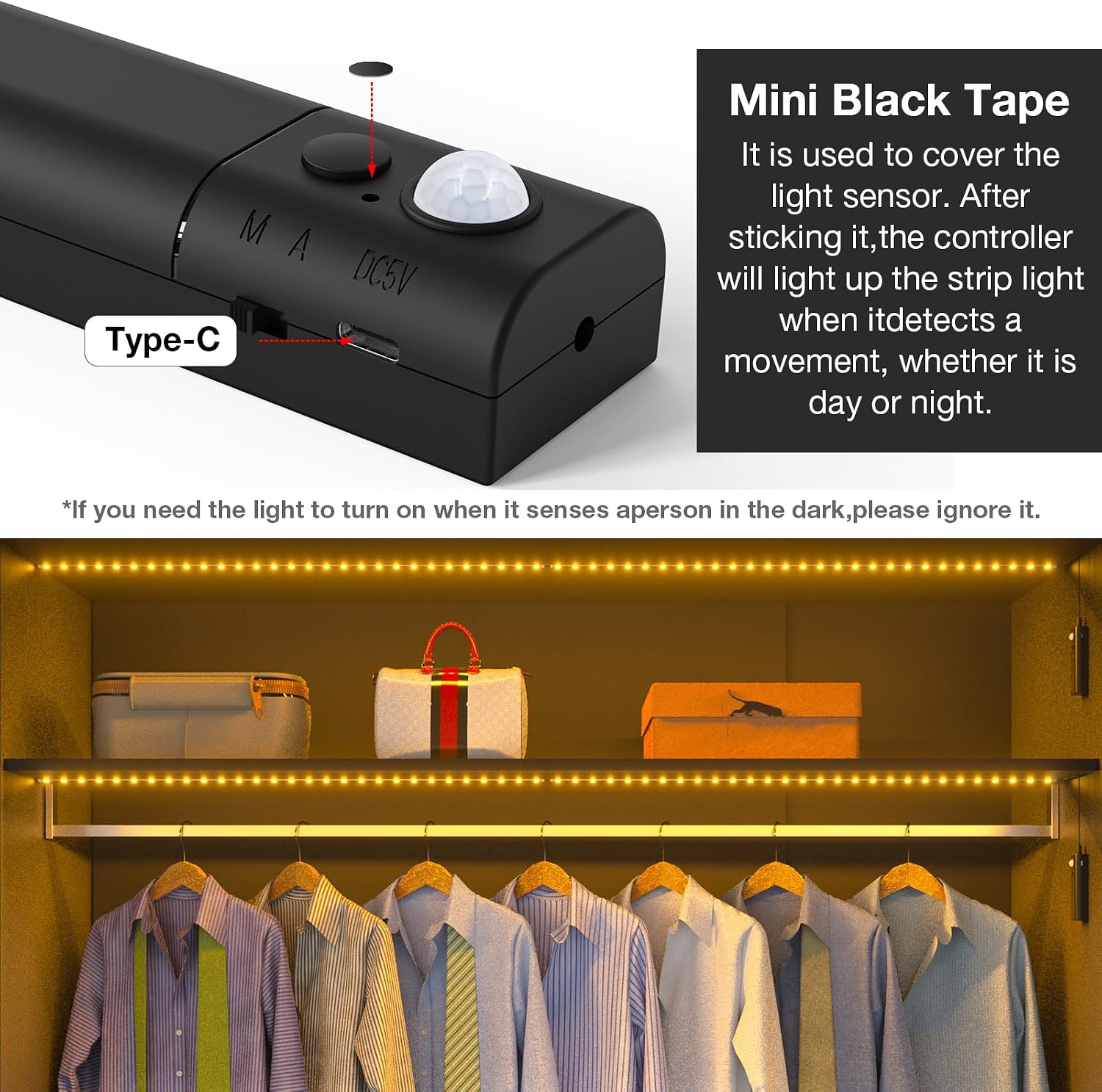
Image: Covering the light sensor with mini black tape for activation in brighter conditions.
8. Charging
The control box contains rechargeable batteries. When the battery is low, the light output may diminish or stop functioning. To charge:
- Detach the control box from its magnetic mounting.
- Connect a USB Type-C cable to the charging port on the control box.
- Plug the other end of the USB cable into a standard USB power adapter (not included).
- A red indicator light will illuminate during charging.
- The indicator light will turn green when the battery is fully charged.
9. DIY Customization (Cutting and Connecting)
The WOBANE LED strip is designed for flexibility and can be customized to your specific length requirements.
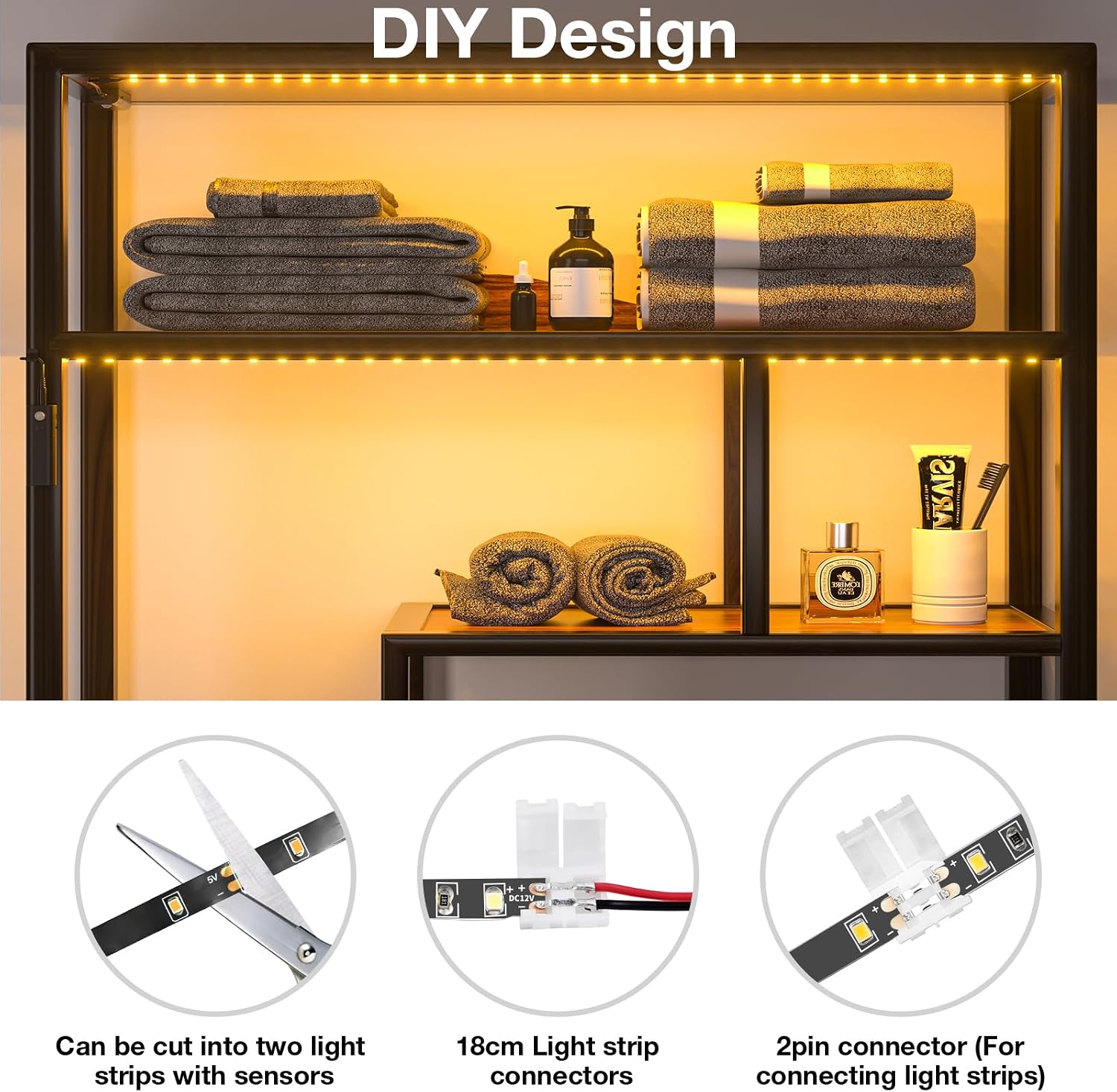
Image: Instructions for cutting and connecting the LED strip.
- Cutting: The LED strip can be cut at designated marks, typically indicated by a scissor icon or copper pads. Ensure you cut only at these marks to avoid damaging the circuit.
- Connecting: Use the provided 2-pin connectors to rejoin cut sections of the LED strip or to extend the strip. Ensure correct polarity when connecting.
10. Maintenance
- Clean the LED strip and control box regularly with a soft, dry cloth.
- Do not use abrasive cleaners or solvents.
- Ensure the motion sensors are free from dust or obstructions for optimal performance.
11. Troubleshooting
- Light not turning on in Auto Mode:
- Check if the ambient environment is too bright. The light sensor prevents activation in bright conditions. Try covering the light sensor with the mini black tape if you need it to activate in dim light.
- Ensure there is actual motion within the 3-meter detection range.
- Check battery level and recharge if necessary.
- Light turns off too quickly:
- Ensure continuous motion is present if you expect the light to stay on longer than 20-25 seconds in Auto Mode.
- Obstructions might be blocking the sensor's view.
- Light not charging:
- Verify the USB Type-C cable is securely connected to both the control box and the power source.
- Try a different USB cable or power adapter.
- Adhesive not sticking:
- Ensure the installation surface was thoroughly cleaned and dried before application.
- Avoid repositioning the strip multiple times, as this can reduce adhesive effectiveness.
12. Specifications
| Feature | Specification |
|---|---|
| Model Number | WBE033B-2700 |
| Brand | WOBANE |
| Light Source Type | LED |
| Light Color | Warm White |
| Color Temperature | 2700 Kelvin |
| Length | 5 Meters |
| Power Source | Battery Powered (Rechargeable) |
| Voltage | 1.5 Volts |
| Special Feature | Automatic On, Motion Sensor, Light Sensor |
| Indoor/Outdoor Use | Indoor |
| Control Method | Button Control |
| Connectivity Technology | USB |
| Package Dimensions | 14.2 x 13.9 x 4.3 cm; 310 grams |
13. Warranty and Support
WOBANE products are manufactured to high-quality standards. For warranty information or technical support, please refer to the contact details provided with your purchase or visit the official WOBANE website. Keep your purchase receipt as proof of purchase.
For more product information, you may visit the product page: WOBANE LED Strip Light on Amazon