
1. Product Overview
This kit includes the RC03RFB 2.4GHz Wireless Remote and the C05RF Tuya Controller, designed for controlling RGBCCT LED strip lights. It supports 4-zone group control, brightness and color temperature adjustment, and can be integrated with Tuya Smart Life app for voice control via Alexa and Google Home (Tuya Gateway required, not included).
Key Features:
- Compatibility: Supports PWM 5050SMD, 3528SMD, 5630SMD, RGBCCT, FCOB, COB RGBCCT 6-wire (+ R G B C W) LED strips. Not compatible with SPI LED strips (e.g., WS2811, WS2812B).
- 2.4GHz RF Wireless Transmission: Offers a control range of up to 98 feet (30 meters).
- 4-Zone Group Control: Control multiple controllers in up to 4 independent zones. Each remote can pair with one or more controllers.
- Auto-Transmitting & Synchronization: Controllers can relay signals to other controllers within 30 meters, extending the effective control distance.
- Brightness & Color Temperature Adjustment: Fine-tune light output and color temperature to suit various needs.
- Voltage Support: Compatible with DC5V, DC12V, and DC24V LED strips. Ensure power supply voltage matches the LED strip.
- Tuya Smart Integration: Works with GW01W Wi-Fi+Bluetooth Dual Mode Tuya gateway (sold separately) for Smart Life/Tuya Smart APP control and third-party voice control (Alexa, Google Home).
2. Package Contents
Verify that all items are present in your package:
- 1x RC03RFB Remote Control
- 1x C05RF Tuya Controller
- 1x RF Remote Bracket
- 2x Screws
- 1x Double-sided Adhesive
- 1x RC03RF Remote Control Manual
- 1x C05RF Controller Manual
Note: Tuya Gateway and 3A batteries are not included and must be purchased separately.
3. Setup Instructions
3.1 Wiring the C05RF Controller
The C05RF controller supports DC5V, DC12V, and DC24V input. Ensure your power supply voltage matches the voltage of your LED strip. The controller has two power interfaces with maximum allowable currents of 5A and 12A respectively.
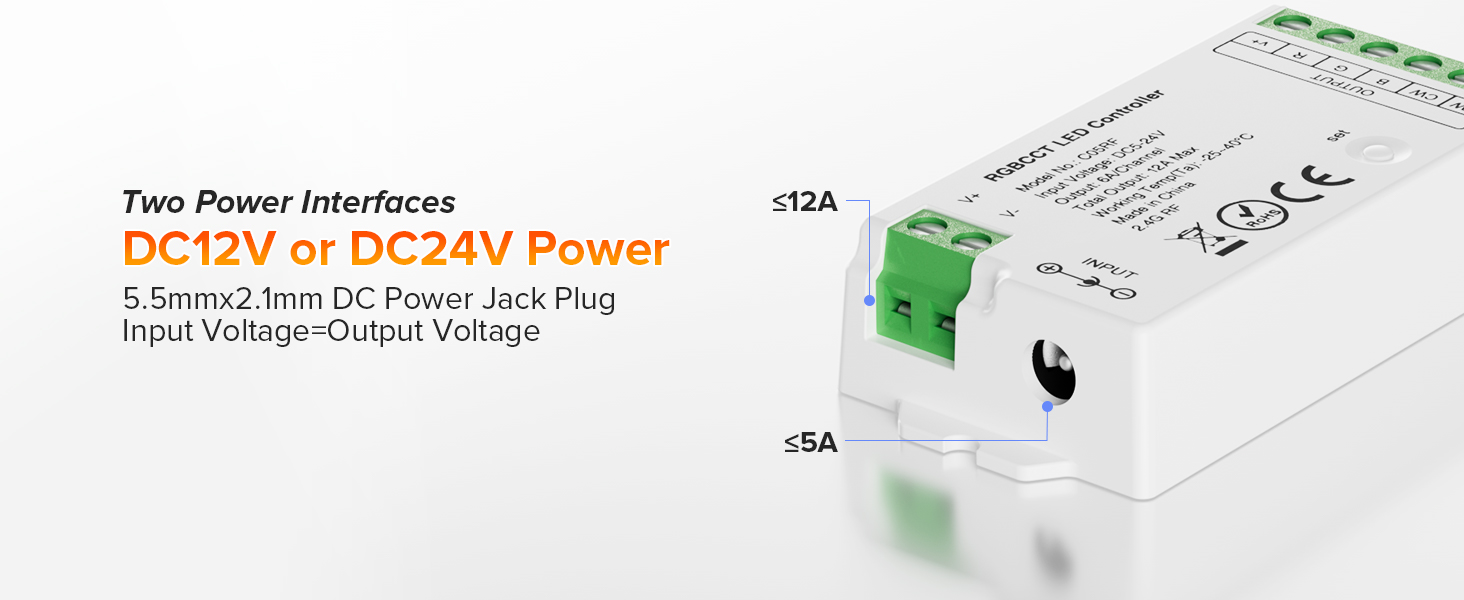
Image: C05RF Controller with two power interfaces and their current ratings.

Image: Wiring diagram for connecting power supply, C05RF controller, and RGBCCT LED strip.
- Connect your DC power supply (e.g., 12V or 24V) to the input terminals of the C05RF controller. Observe polarity: V+ to V+, V- to V-.
- Connect the RGBCCT LED strip to the output terminals of the C05RF controller. Ensure correct wire connections: V+ to V+, R to R, G to G, B to B, C to C, W to W.
- Power on the LED strip system.
3.2 Pairing the RC03RFB Remote with the C05RF Controller
Each RC03RFB remote can control one or more C05RF controllers. Follow these steps to pair:
- Ensure the C05RF controller is powered on.
- On the RC03RFB remote, select the desired zone (1, 2, 3, or 4) you wish to pair the controller to.
- Press and hold the selected zone button on the remote within 3 seconds of powering on the controller.
- The LED strip connected to the controller will flash three times to indicate successful pairing.
3.3 Tuya Smart App Integration (Optional, requires GW01W Tuya Gateway)
To enable smartphone app control and voice control, a GW01W Tuya Gateway is required.

Image: Steps for controlling LED strips via the Tuya Smart App.
- Step 1: Power Your Light Sources: Connect the LED strip to the power supply and the C05RF controller as described in section 3.1.
- Step 2: Power the GW01W Tuya Gateway: Install the gateway within 30 meters of the lights and near your WiFi router.
- Step 3: Download the Smart Life or Tuya Smart App & Connect to the GW01W Gateway: Create an account, add the device, then select the device working WiFi and enter the password. Ensure to select 2.4G WiFi. The gateway indicator will show blue light when linking. Connection is successful when the light shows green.
- Step 4: Link the Lights or Controller to GW01W Gateway: Switch off the lights you want to link, then switch them on again. Press the "SET" button on the 2.4G gateway within 5 seconds. The lights will blink 3 times slowly, indicating successful linking.
4. Operating Instructions
4.1 RC03RFB Remote Control Functions

Image: RC03RFB Remote Control Layout and C05RF Controller Dimensions.
- ON/OFF: Master power control.
- Color Ring: Touch to select desired RGB color.
- Pilot Lamp: Indicates remote activity.
- Dynamic Modes: Cycle through various lighting effects.
- Brightness +/-: Adjust the overall brightness.
- 7 Colors Switching: Quickly switch between preset colors.
- Color Temp/Saturation: Adjust color temperature for white light or saturation for RGB colors.
- White Light (W): Activate pure white light.
- Speed +/-: Adjust the speed of dynamic modes.
- Zone ON/OFF (1-4): Turn individual zones on or off.
- Zone Link/Unlink Button: Press and hold to link/unlink controllers to a specific zone.
- Night Light Mode: Activates a low-brightness setting.
4.2 Group Control
The RC03RFB remote allows for flexible 4-zone group control. You can assign multiple controllers to a single zone or distribute them across different zones.

Image: One remote controlling multiple light zones.

Image: Grouping examples for flexible lighting control.
Each controller can be bound to up to 5 remotes, allowing multiple users or control points for the same lighting setup.

Image: Multiple remotes controlling a single lighting setup.
4.3 Auto-Transmitting Function
The C05RF controllers feature an auto-transmitting function. One controller can transmit signals from the remote to another controller within 30 meters. This allows for an extended control distance, as long as there is a controller within range to relay the signal.
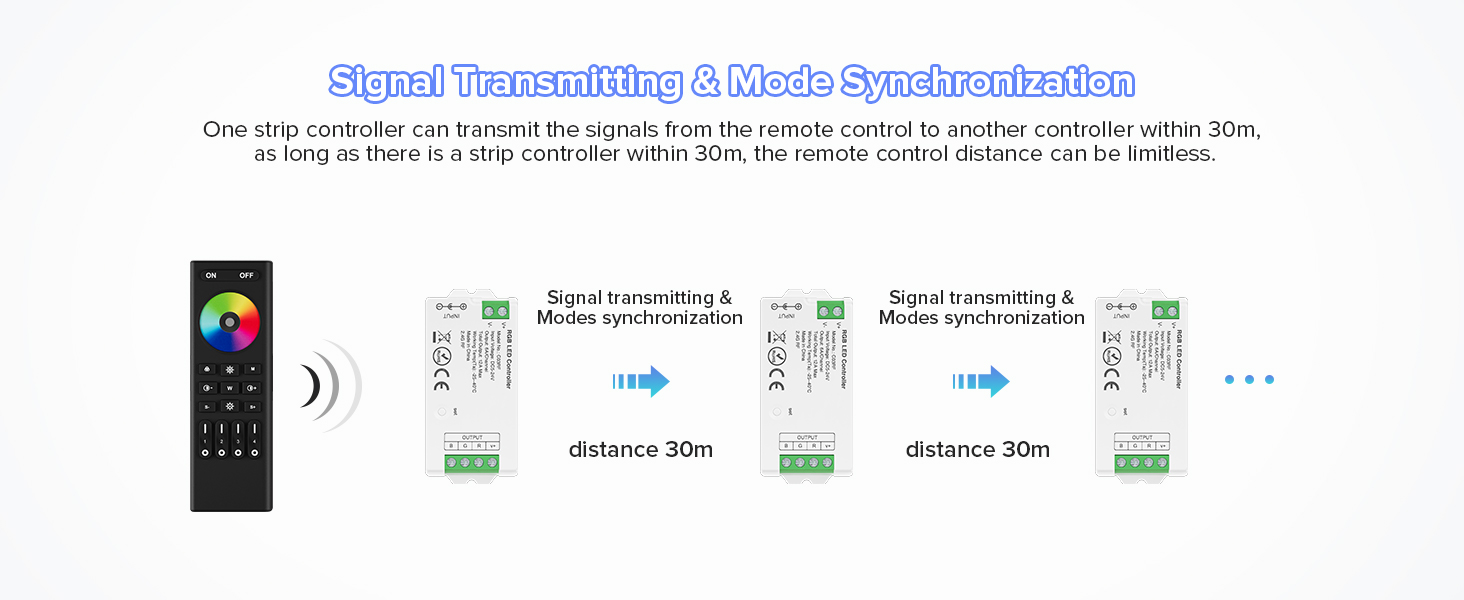
Image: Auto-transmitting function for extended control range.
4.4 Smart App Control Features (with Tuya Gateway)
When connected via a Tuya Gateway, the Smart Life or Tuya Smart app unlocks additional features:
- Voice Control: Compatible with Amazon Alexa and Google Home.
- Timer Setting: Schedule lights to turn on/off at specific times.
- Device Sharing: Share control of devices with family members.
- Tap-to-Run & Automation: Create custom scenes and automated routines.
- Do Not Disturb Mode: Prevents lights from turning on immediately after a power outage (requires two power cycles to activate).
- Falling Asleep/Waking Up Plans: Set lights to fade in/out for a natural sleep/wake cycle.

Image: Smartphone app control and third-party voice control compatibility.

Image: Tuya Gateway enabling smart home features.

Image: Do Not Disturb mode and Automation features.

Image: Group control and Device sharing features.

Image: Timing and sleep/wake plan settings.
5. Maintenance
The BTF-LIGHTING RGBCCT RF Wireless Remote and Tuya Controller Kit requires minimal maintenance. Keep the devices clean and dry. Avoid exposing them to extreme temperatures or humidity. Do not attempt to disassemble or repair the devices yourself, as this will void the warranty.
Battery Replacement (RC03RFB Remote)
The RC03RFB remote requires 3A batteries (not included). Replace batteries when the remote's response becomes sluggish or the pilot lamp does not illuminate.
- Locate the battery compartment on the back of the remote.
- Open the compartment and insert new 3A batteries, observing correct polarity.
- Close the battery compartment securely.
6. Troubleshooting
- Lights not responding to remote:
- Ensure the remote has fresh batteries.
- Verify the controller is powered on and the LED strip is correctly wired.
- Re-pair the remote with the controller (see Section 3.2).
- Check for obstructions between the remote and the controller, although RF is less sensitive to line-of-sight.
- Lights not responding to app control:
- Ensure the GW01W Tuya Gateway is powered on and connected to your WiFi network.
- Verify the controller is successfully linked to the Tuya Gateway (see Section 3.3).
- Check your smartphone's internet connection.
- Restart the Tuya Gateway and the C05RF controller.
- Incorrect colors or light output:
- Confirm that your LED strip is an RGBCCT type and is correctly wired to the C05RF controller (V+, R, G, B, C, W).
- Ensure the power supply voltage matches the LED strip voltage.
- If using an RGBW strip with an RGBCCT controller, some channels might not function as expected. Use the correct controller type for your strip.
- Interference with other devices:
- If you have multiple BTF-LIGHTING RF controllers, ensure they are paired to different zones or are sufficiently separated to avoid unintended control.
7. Specifications
| Feature | Detail |
|---|---|
| Model Number | RC03RFB (Remote) & C05RF (Controller) |
| Compatible LED Strips | PWM 5050SMD, 3528SMD, 5630SMD, RGBCCT, FCOB, COB RGBCCT (6-wire) |
| Input Voltage | DC5V, DC12V, DC24V |
| Max Output Current | 5A and 12A (two power interfaces) |
| Control Method | 2.4GHz RF Wireless, Tuya Smart App (with Gateway) |
| Control Range | Up to 98 feet (30 meters) |
| Group Control | 4 Zones |
| Auto-Transmitting Function | Yes |
| Material | Plastic |
| Item Weight | 4.6 ounces (approx.) |
| Dimensions (Controller) | 74.5 x 35.6 x 16.5 mm (approx.) |
| Dimensions (Remote) | 140 x 45.8 x 17 mm (approx.) |
| Batteries Required (Remote) | Yes (3A, not included) |
8. Official Product Video
Video: Overview of the BTF-LIGHTING 2.4GHz RF LED Controller Series, demonstrating compatibility with various LED strip types and smart home integration.
9. Warranty and Support
BTF-LIGHTING products are designed for reliability and performance. For warranty information or technical support, please refer to the contact details provided in your product packaging or visit the official BTF-LIGHTING website. Keep your purchase receipt for warranty claims.


