
Introduction
This manual provides detailed instructions for the safe and efficient use of your podoru Foldable 10000mAh Wireless Portable Charger. Please read this manual thoroughly before operating the device and retain it for future reference.

The podoru Magsafe Battery Pack in light blue, featuring its foldable stand and digital LED display.
Product Features
- 10000mAh High Capacity: Provides extended power for your devices.
- Magnetic Wireless Charging: Designed for iPhone 12/13/14/15/16 series with strong magnetic adsorption.
- Foldable Stand: Integrated stand supports both horizontal and vertical viewing angles for convenience.
- Multi-Device Charging: Supports simultaneous charging of up to three devices via wireless, USB-A, and USB-C outputs.
- Fast Charging: Features 15W Max wireless charging, 22.5W Max USB-A PD output, and 20W Max USB-C output.
- Digital LED Display: Clearly shows the exact remaining power percentage.
- Superior Safety Protections: Built-in safeguards against overcharge, overcurrent, overvoltage, short circuit, and high temperature.
- Compact and Portable: Lightweight design for easy carrying in pockets or backpacks.
Setup
Initial Charging of the Power Bank
Before first use, fully charge your podoru Magsafe Battery Pack. Connect a USB-C cable to the power bank's USB-C input port and the other end to a compatible power adapter (not included). The digital LED display will show the charging progress, indicating 100% when fully charged.
Understanding the LED Display
The integrated LED display provides real-time information about the battery pack's charge level. The percentage shown indicates the remaining power. Charging icons may also appear to indicate active charging.
Compatibility and Case Usage
This power bank is designed for magnetic attachment to iPhone 12, 13, 14, 15, and 16 series. For optimal magnetic suction and charging efficiency, it is recommended to use the power bank with a MagSafe-compatible phone case or without a case. Non-magnetic phone cases may prevent proper adsorption and charging.

For best performance, use with MagSafe-compatible cases or no case.
Operating Instructions
Wireless Charging (MagSafe)
- Ensure your iPhone is a compatible model (iPhone 12/13/14/15/16 series).
- Align the magnetic power bank with the back of your iPhone. The strong magnets will snap it into place.
- Wireless charging will begin automatically. The LED display on the power bank will show its remaining charge.

Magnetic attachment for wireless charging.
Wired Charging
The power bank supports wired charging via its USB-A and USB-C ports.
- USB-A Output: Connect your device's USB-A charging cable to the USB-A port on the power bank.
- USB-C Output: Connect your device's USB-C charging cable to the USB-C port on the power bank.
Using the Foldable Stand
The integrated foldable stand allows you to prop up your iPhone while it's magnetically attached to the power bank. This is useful for hands-free viewing or video calls.
- Gently pull out the foldable stand from the back of the power bank.
- Adjust the stand to your desired viewing angle. It supports both horizontal and vertical orientations.
- Place your iPhone (with the power bank attached) onto the stand.
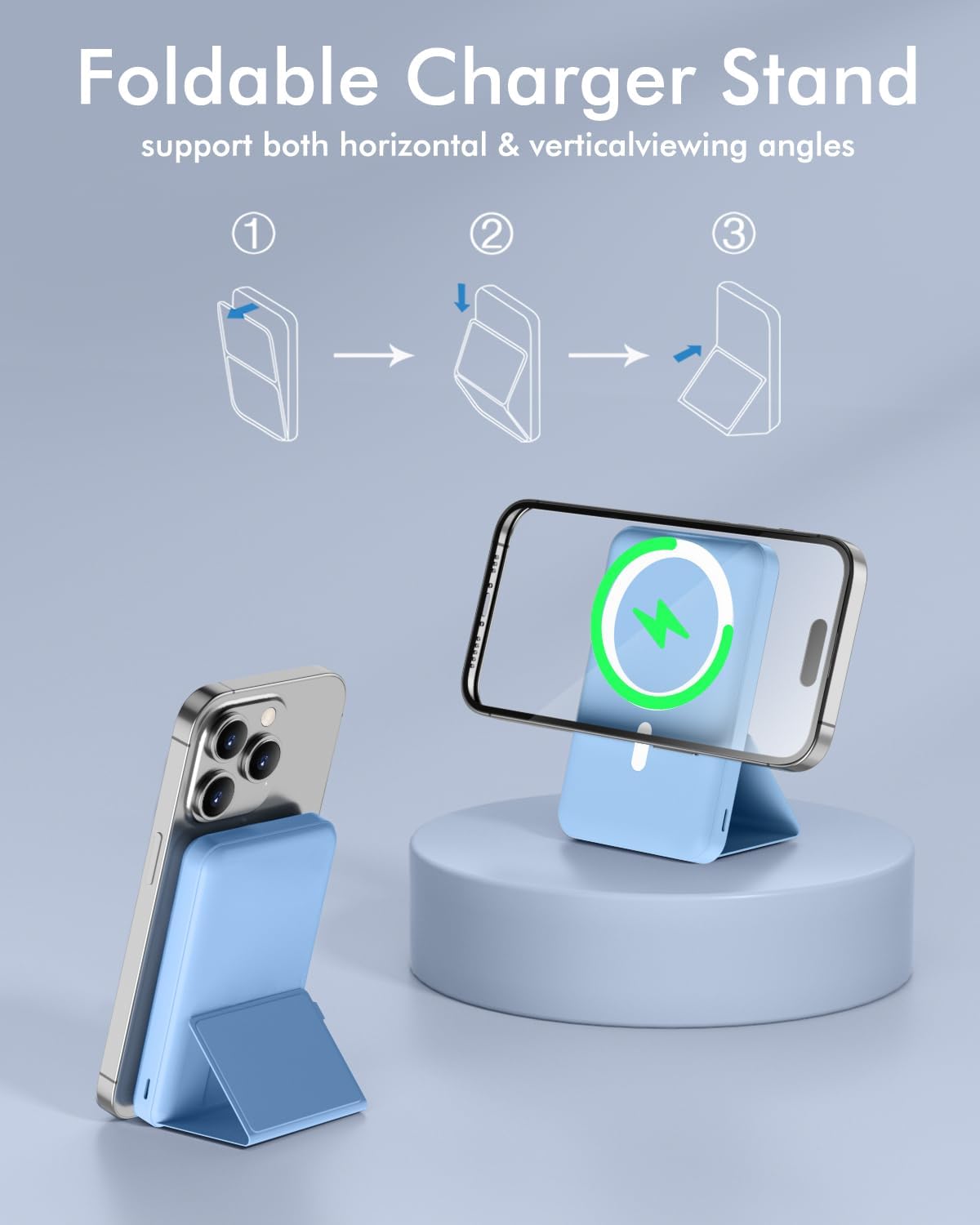
The foldable stand provides versatile viewing angles.
Simultaneous Charging of Multiple Devices
The podoru Magsafe Battery Pack can charge up to three devices concurrently:
- One device via wireless (MagSafe).
- One device via USB-A output.
- One device via USB-C output.

Charge up to three devices simultaneously.
Maintenance
General Care and Cleaning
- Keep the power bank dry. Avoid exposure to moisture or liquids.
- Clean the surface with a soft, dry cloth. Do not use harsh chemicals or abrasive cleaners.
- Store the device in a cool, dry place away from direct sunlight and extreme temperatures.
Battery Longevity
- Avoid fully discharging the battery pack frequently.
- If storing for an extended period, charge the power bank to approximately 50-70% capacity.
- Recharge the power bank every 3-6 months if not in use to prevent deep discharge.
Troubleshooting
Common Issues and Solutions
| Problem | Possible Cause | Solution |
|---|---|---|
| Power bank not charging | Faulty cable or adapter; loose connection. | Try a different USB-C cable and power adapter. Ensure connections are secure. |
| Device not charging wirelessly | Non-magnetic phone case; misaligned device; device not compatible. | Remove non-magnetic case or use a MagSafe-compatible one. Realign device. Confirm iPhone 12/13/14/15/16 series compatibility. |
| Slow charging | Using a non-fast charging adapter/cable; multiple devices charging simultaneously. | Use a PD-compatible power adapter and cable. Disconnect other devices to prioritize charging speed for one. |
| LED display not working | Battery fully discharged; internal fault. | Charge the power bank for at least 30 minutes. If issue persists, contact customer support. |
Safety Features
The podoru Magsafe Battery Pack incorporates multiple safety protection systems to prevent damage to the device and connected electronics. These include:
- Overcharge Protection
- Overcurrent Protection
- Overvoltage Protection
- Short Circuit Protection
- High Temperature Protection

Internal safety mechanisms protect against various electrical issues.
Specifications
| Feature | Detail |
|---|---|
| Model Number | KT-D013 |
| Battery Capacity | 10000 mAh (Lithium Polymer) |
| Wireless Charging Output | 5W, 7.5W, 10W, 15W Max |
| USB-A Output | 22.5W Max PD |
| USB-C Output | 20W Max |
| USB-C Input | 18W Max |
| Lightning Input | 18W Max |
| Product Dimensions | 4.09 x 2.68 x 0.86 inches (104 x 68 x 21 mm) |
| Item Weight | 6.7 ounces (0.41 lb) |
| Color | B-Sierra Blue (as per product listing) |
Warranty & Support
For warranty information and customer support, please refer to the documentation included with your purchase or contact the manufacturer directly. The product is verified by Transparency, ensuring authenticity.
Manufacturer: Shenzhen Zhilianxintong Electronics Co., Ltd