
1. Introduction and Safety Information
Thank you for choosing the CO-Z Automatic Sliding Gate Opener. This manual provides essential information for the safe installation, operation, and maintenance of your gate opener. Please read it thoroughly before installation and keep it for future reference.
1.1 General Safety Warnings
- Read all instructions: Improper installation or use can lead to serious injury or property damage.
- Qualified personnel: Installation and wiring must be performed by qualified personnel in accordance with all local electrical codes and regulations.
- Keep clear: Ensure the gate area is clear of people, pets, and objects before and during operation.
- Emergency release: Familiarize yourself with the manual release procedure in case of power failure or malfunction.
- Infrared sensors: The included infrared sensors are crucial safety devices. Ensure they are correctly installed and functioning to prevent the gate from closing on obstacles.
- Children: Do not allow children to play with the gate opener or its remote controls.
- Maintenance: Regularly inspect the gate opener for signs of wear, damage, or misalignment.
2. Product Overview and Features
The CO-Z 400W Automatic Sliding Gate Opener is designed for gates up to 1000 kg (2200 lbs) and 12.2 meters (40 feet) in length. It features a powerful 400W motor for smooth and quiet operation, with a maximum speed of 13 meters per minute. The system includes advanced safety features such as infrared obstacle detection, soft start/stop, and overheating protection.
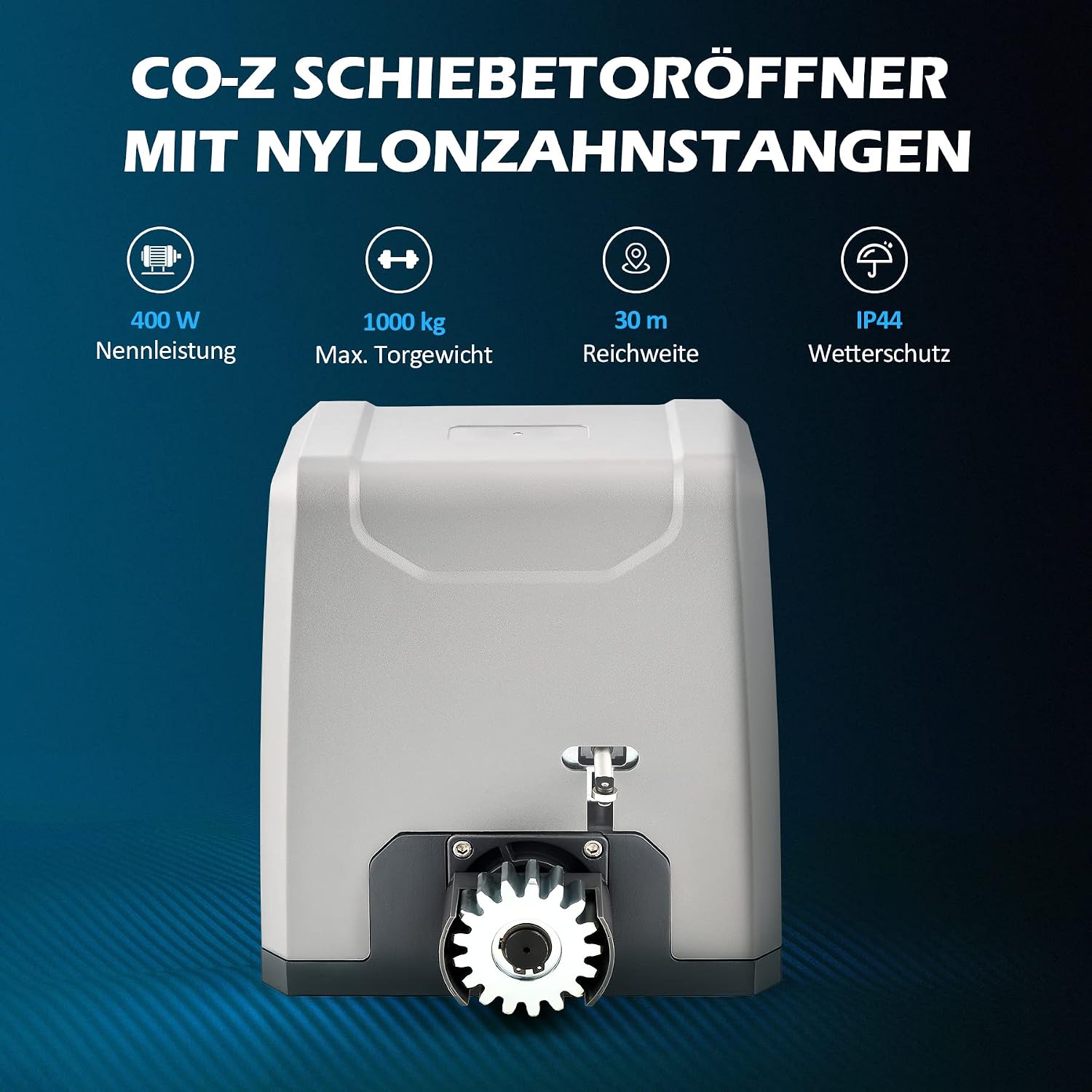
Image 2.1: CO-Z Sliding Gate Opener highlighting its main specifications: 400W power, 1000kg maximum gate weight, 30m remote control range, and IP44 weather resistance.
2.1 Key Features
- Powerful Motor: 400W motor capable of moving gates up to 1000 kg.
- Adjustable Auto-Close: Customizable delay settings (12, 24, or 36 seconds).
- Infrared Safety Sensors: Prevents gate closure if an obstacle is detected.
- Pedestrian Mode: Allows partial opening for foot traffic.
- Remote Control: Two remote controls included, effective up to 30 meters, supporting up to 40 remotes total.
- Manual Release: Keys provided for manual operation during power outages.
- Durable Construction: Robust steel frame and IP44 weather-resistant casing.
- Soft Start/Stop: Ensures smooth and quiet gate movement.

Image 2.2: Functional diagram illustrating automatic closing, pedestrian mode, remote control operation, obstacle detection, adjustable opening direction, and weather resistance.
3. Package Contents
Please check the package carefully to ensure all items are present and undamaged.
- 1x Motor and Control Board
- 2x Manual Release Keys
- 2x Remote Controls
- 1x Mounting Plate
- 12x Module 4 Nylon Racks (4m total)
- 2x Limit Switches with Accessories
- 4x M10 Foundation Bolts
- 4x M6x10 Mounting Bolts
- 4x M10x50 Hex Bolts
- 24x Self-tapping Screws
- 24x Mounting Lugs
- 8x M10 Flat Washers
- 8x M10 Spring Washers
- 8x M10 Nuts
- 2x Infrared Sensors
- 1x User Manual

Image 3.1: Visual representation of all components included in the package for the CO-Z Sliding Gate Opener.
4. Specifications
| Parameter | Value |
|---|---|
| Model | SL1000AC / SGO-RA |
| Rated Power | 400W |
| Torque | 22 N-m |
| Max. Gate Weight | 1000 kg (2200 lbs) |
| Max. Gate Speed | 13 m/min (42.6 ft/min) |
| Max. Gate Width | 12.2 m (40 ft) |
| Max. Noise Level | 56 dB |
| Operating Temperature | -20°C to 70°C (-4°F to 158°F) |
| Weather Resistance | IP44 |
| Max. Remote Controls Supported | 40 |
| Remote Control Range | 30 m (100 ft) |
| Remote Control Frequency | 433.92 MHz |
| Dimensions (L x W x H) | 27.1 x 22.8 x 28 cm (10.7 x 9 x 11 inches) |
| Weight | 18 kg (39.7 lbs) |
| Certification | CE |

Image 4.1: Detailed dimensions of the gate opener motor, mounting plate, and a rack segment.
5. Setup and Installation
This section provides a general guide for installation. Refer to the detailed user manual included in your package for specific diagrams and step-by-step instructions.
5.1 Site Preparation
- Ensure the gate slides freely and smoothly without obstruction.
- Verify the gate structure is sound and capable of supporting the opener's operation.
- Choose a suitable location for the motor unit, typically at one end of the gate, ensuring it is level and secure.
5.2 Mounting the Motor Unit
- Dig holes for the M10 foundation bolts according to the mounting plate dimensions.
- Secure the mounting plate to the ground using the foundation bolts, ensuring it is perfectly level.
- Attach the motor unit to the mounting plate using the M6x10 mounting bolts.
5.3 Installing the Racks
- Attach the nylon racks to the bottom rail of the gate using the self-tapping screws and mounting lugs.
- Ensure the racks are aligned with the motor's gear and maintain a small gap (approx. 1-2mm) between the gear and the rack to allow for gate movement.
- Install the limit switches at the desired open and close positions of the gate.
5.4 Wiring and Electrical Connection
- Connect the power supply to the control board according to the wiring diagram in the full manual.
- Wire the infrared sensors to the control board. Ensure they are aligned and unobstructed.
- Connect the limit switches to the control board.
- Important: All electrical connections must be made by a qualified electrician and comply with local electrical codes.
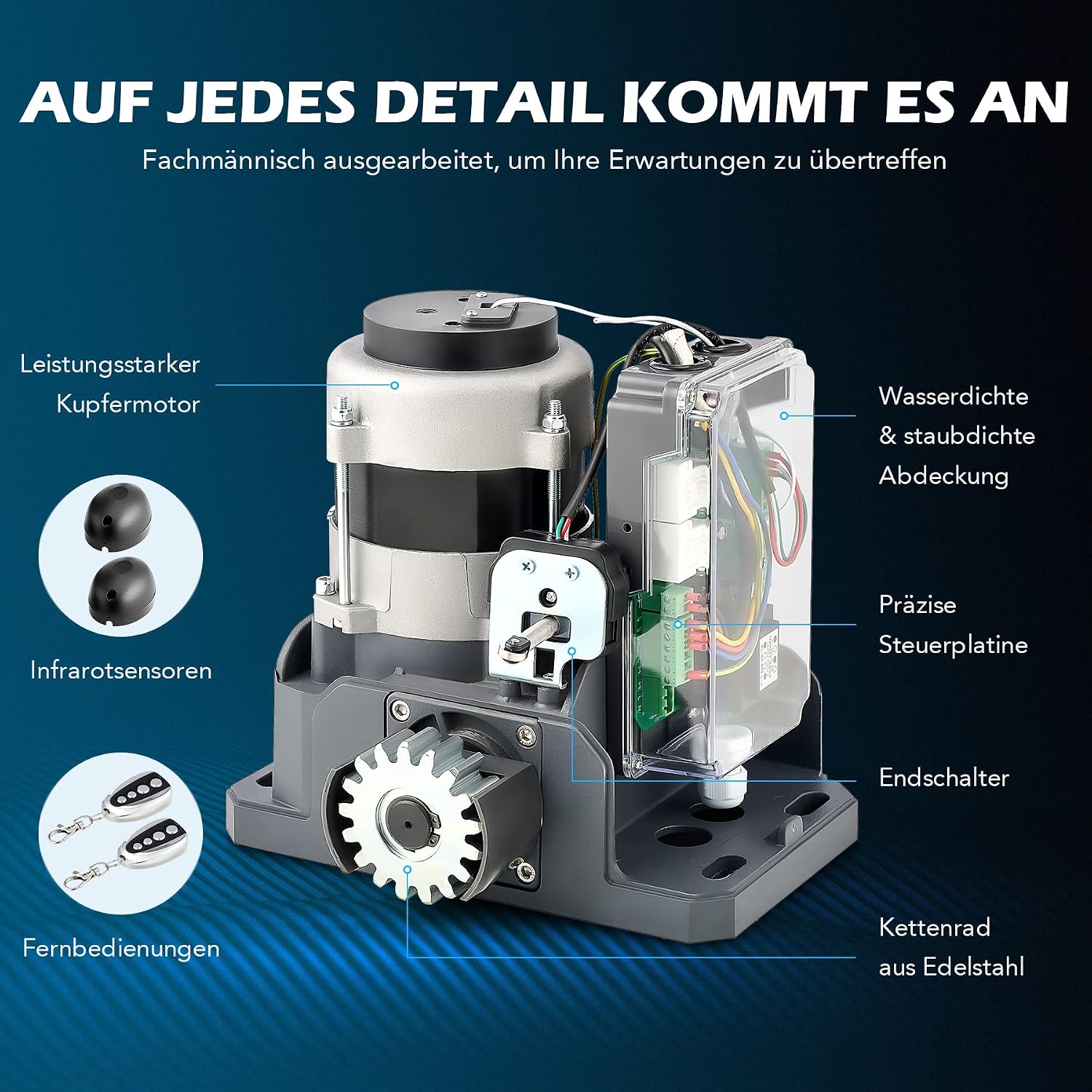
Image 5.1: Internal components of the gate opener, including the motor, control board, and limit switches, which are crucial for wiring during installation.
6. Operating Instructions
6.1 Remote Control Operation
- Press the designated button on the remote control to open or close the gate.
- A second press during operation will stop the gate. A third press will reverse its direction.
- The remote controls have a range of up to 30 meters.
6.2 Manual Release
In case of power failure or malfunction, the gate can be operated manually:
- Insert the manual release key into the lock on the motor unit.
- Turn the key to disengage the motor.
- Manually push the gate open or closed.
- To re-engage, turn the key back and remove it.
6.3 Auto-Close Function
The gate opener can be set to automatically close after a specified delay:
- Refer to the control board settings in your detailed manual to configure the auto-close delay (12, 24, or 36 seconds).
- Ensure infrared sensors are active when using auto-close for safety.
6.4 Pedestrian Mode
This mode allows the gate to open partially for pedestrian access:
- Activate pedestrian mode via the remote control or control board settings (refer to your full manual).
- The gate will open to a preset width, then automatically close after the set delay.

Image 6.1: Customizable settings for the gate opener, including adjustable speed, runtime, opening direction, and auto-close timer.
7. Maintenance
Regular maintenance ensures optimal performance and longevity of your gate opener.
- Monthly: Inspect the gate for smooth operation, ensuring no binding or excessive friction. Clean the racks and gear of any debris.
- Quarterly: Check all mounting bolts and screws for tightness. Inspect electrical wiring for any signs of wear or damage. Clean the infrared sensor lenses.
- Annually: Lubricate moving parts as recommended in the full manual. Have a qualified technician inspect the system.
- Safety Sensors: Regularly test the infrared sensors by placing an object in the gate's path during closure to ensure it reverses.
8. Troubleshooting
This section addresses common issues. For more complex problems, consult a qualified technician.
| Problem | Possible Cause | Solution |
|---|---|---|
| Gate does not move | No power; Remote battery dead; Manual release engaged; Overheat protection activated. | Check power supply; Replace remote battery; Disengage manual release; Allow motor to cool down. |
| Gate stops or reverses unexpectedly | Obstruction detected by infrared sensors; Gate friction/binding; Limit switch issue. | Clear obstruction; Check gate for smooth movement; Inspect and adjust limit switches. |
| Remote control not working | Out of range; Battery dead; Remote not programmed. | Move closer to the gate; Replace battery; Refer to manual for remote programming instructions. |
| Gate opens but does not close automatically | Auto-close function disabled; Infrared sensors blocked. | Enable auto-close in settings; Clear infrared sensor path. |

Image 8.1: Safety features such as pedestrian mode, soft start/stop, infrared sensors, and obstacle detection are critical for troubleshooting unexpected gate behavior.
9. Support
For further assistance, technical support, or inquiries regarding replacement parts, please contact CO-Z customer service through the retailer where you purchased the product or visit the official CO-Z website for contact information.
Please have your model number (SL1000AC / SGO-RA) and purchase date ready when contacting support.


