
Introduction
This manual provides comprehensive instructions for the ECONTROLLY RM-YD034 replacement remote control. This remote is designed to function as a direct replacement for original Sony Bravia TV remote controls, offering seamless compatibility without the need for complex programming.
Compatible Sony Bravia TV Models include: KDL-46EX500, KDL-40EX500, KDL-55EX501, KDL-46EX501, KDL-32EX600, KDL-32EX501, KDL-40EX501, KDL-32EX500, KDL-46EX600, KDL-60EX500, KDL-55EX500, KDL-40EX600, and similar models.

Image: The ECONTROLLY RM-YD034 replacement remote control, showing its full button layout and design.
Setup
Battery Installation
The RM-YD034 remote control requires two (2) AAA ALKALINE batteries for operation. Rechargeable batteries are not recommended. Batteries are not included with the remote control.
- Locate the battery compartment cover on the back of the remote control.
- Slide the cover downwards or press the latch to open it.
- Insert two AAA ALKALINE batteries, ensuring the positive (+) and negative (-) terminals align correctly with the markings inside the compartment.
- Replace the battery compartment cover until it clicks securely into place.
Initial Use
This remote control is pre-programmed and does not require any additional setup or programming steps. Once batteries are installed, it is ready for immediate use with compatible Sony Bravia TV models.
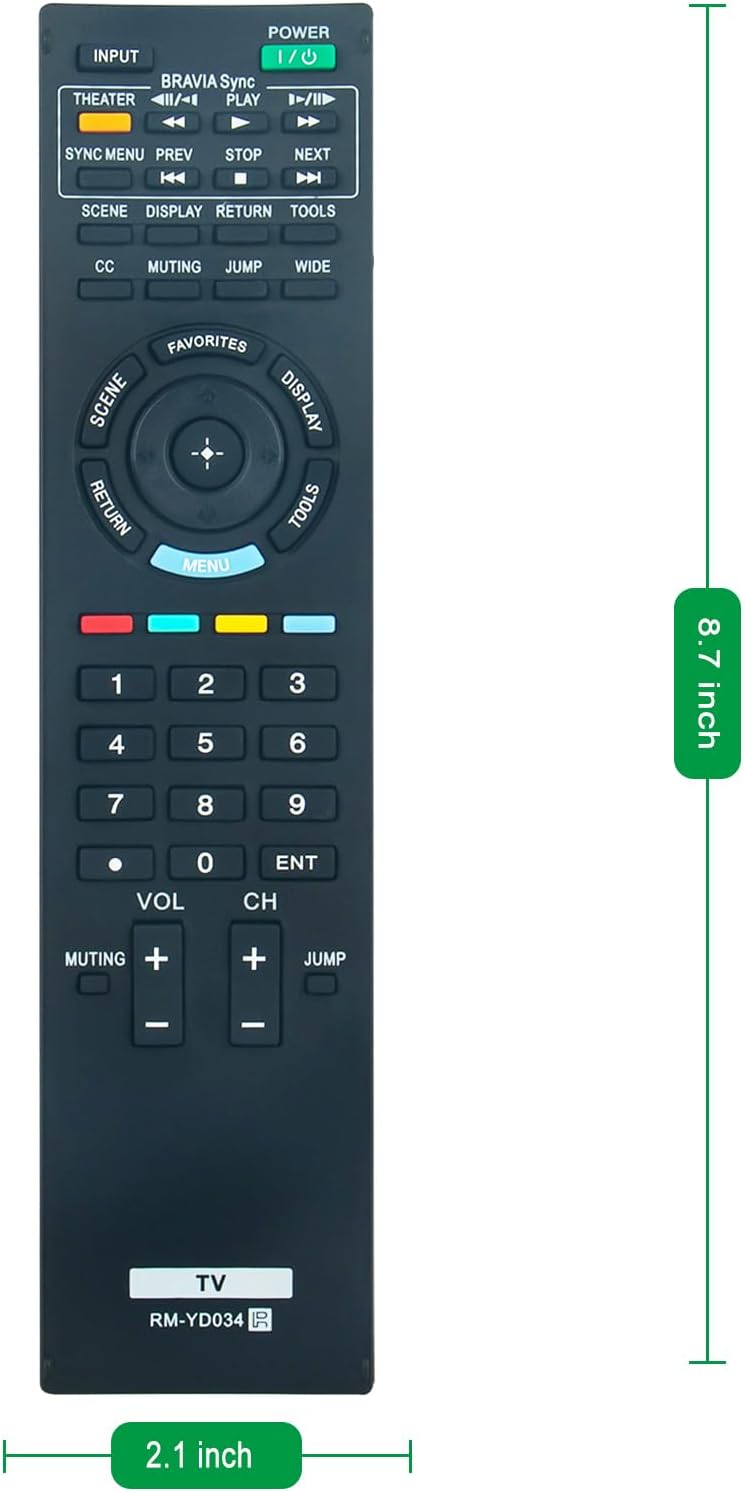
Image: The RM-YD034 remote control displaying its approximate dimensions (8.7 inches in length, 2.1 inches in width), which can assist in locating the battery compartment.
Operating Instructions
The ECONTROLLY RM-YD034 remote control operates via infrared (IR) technology. Ensure there is a clear line of sight between the remote control and your television's IR receiver for optimal performance.
Button Functions
The remote features 20 buttons, each designed for specific functions on your Sony Bravia TV. Refer to the image below for a visual guide to the button layout.

Image: A detailed view of the ECONTROLLY RM-YD034 remote control, highlighting the various buttons and their labels for easy identification.
- POWER (I/O): Turns the television on or off.
- INPUT: Cycles through available input sources (HDMI, AV, etc.).
- THEATER: Activates Theater mode (if supported by your TV).
- BRAVIA Sync: Accesses BRAVIA Sync functions for connected devices.
- PLAY/PAUSE, PREV, NEXT, STOP: Controls media playback.
- SYNC MENU: Opens the Sync Menu.
- SCENE: Selects scene modes.
- DISPLAY: Shows on-screen information.
- RETURN: Navigates back to the previous screen or menu.
- TOOLS: Accesses quick tools or settings.
- CC: Activates or deactivates Closed Captions.
- MUTING: Mutes or unmutes the television audio.
- JUMP: Jumps between two previously viewed channels.
- WIDE: Changes the screen aspect ratio.
- FAVORITES: Accesses favorite channels or content.
- MENU: Opens the main menu.
- Directional Pad (Up/Down/Left/Right) & Enter: Navigates through menus and confirms selections.
- Number Pad (0-9): Directly enters channel numbers.
- VOL (+/-): Adjusts the volume level.
- CH (+/-): Changes the television channel.
Maintenance
Battery Replacement
Replace batteries when the remote control's response becomes sluggish or stops working. Always replace both AAA ALKALINE batteries at the same time. Do not mix old and new batteries, or different types of batteries.
Cleaning
To clean the remote control, gently wipe its surface with a soft, dry cloth. For stubborn dirt, slightly dampen the cloth with water. Avoid using harsh chemicals, abrasive cleaners, or excessive moisture, as these can damage the remote's electronics or finish.
Troubleshooting
If you experience issues with your ECONTROLLY RM-YD034 remote control, please refer to the following common solutions:
- Remote Not Responding:
- Ensure fresh AAA ALKALINE batteries are correctly installed with proper polarity.
- Check for any obstructions between the remote control and the TV's IR receiver.
- Verify that the remote is pointed directly at the TV.
- Confirm that the TV is powered on.
- Specific Buttons Not Working:
- This remote is pre-programmed for Sony Bravia TVs. If a specific button does not function, it may indicate that your particular TV model does not support that feature, or the button's function differs slightly from the original remote.
- Clean the remote control as described in the Maintenance section to ensure no debris is interfering with button contacts.
If problems persist after attempting these steps, please contact customer support.
Specifications
| Brand | ECONTROLLY |
| Model Name | RM-YD034 |
| Special Feature | Pre Programmed |
| Color | Black |
| Compatible Devices | Television (Sony Bravia) |
| Connectivity Technology | Infrared |
| Button Quantity | 20 |
| Controller Type | Button Control |
| Maximum Range | 33 Feet |
| Number of Batteries Required | 2 AAA batteries |
| Item Weight | 60 Grams |
| Item Dimensions (L x W x H) | 8.73" x 2.18" x 0.56" |
Warranty Information
This ECONTROLLY RM-YD034 replacement remote control comes with a 12-month warranty from the date of purchase. This warranty covers manufacturing defects under normal use. Please retain your proof of purchase for warranty claims.
Customer Support
For any questions, concerns, or assistance regarding your ECONTROLLY RM-YD034 replacement remote control, please do not hesitate to contact our customer support team. Refer to your purchase platform or product packaging for specific contact details.
