
STORCUBE S2500
STORCUBE S2500 Portable Power Station User Manual
Model: S2500 | Brand: STORCUBE
1. Introduction
The STORCUBE S2500 Portable Power Station is a versatile and powerful energy solution designed for home backup, emergency situations, outdoor RV camping, and commercial use. With its robust 2560Wh LiFePO4 battery and 2000W AC output, it can power a wide range of appliances, offering reliable and efficient energy wherever you need it.
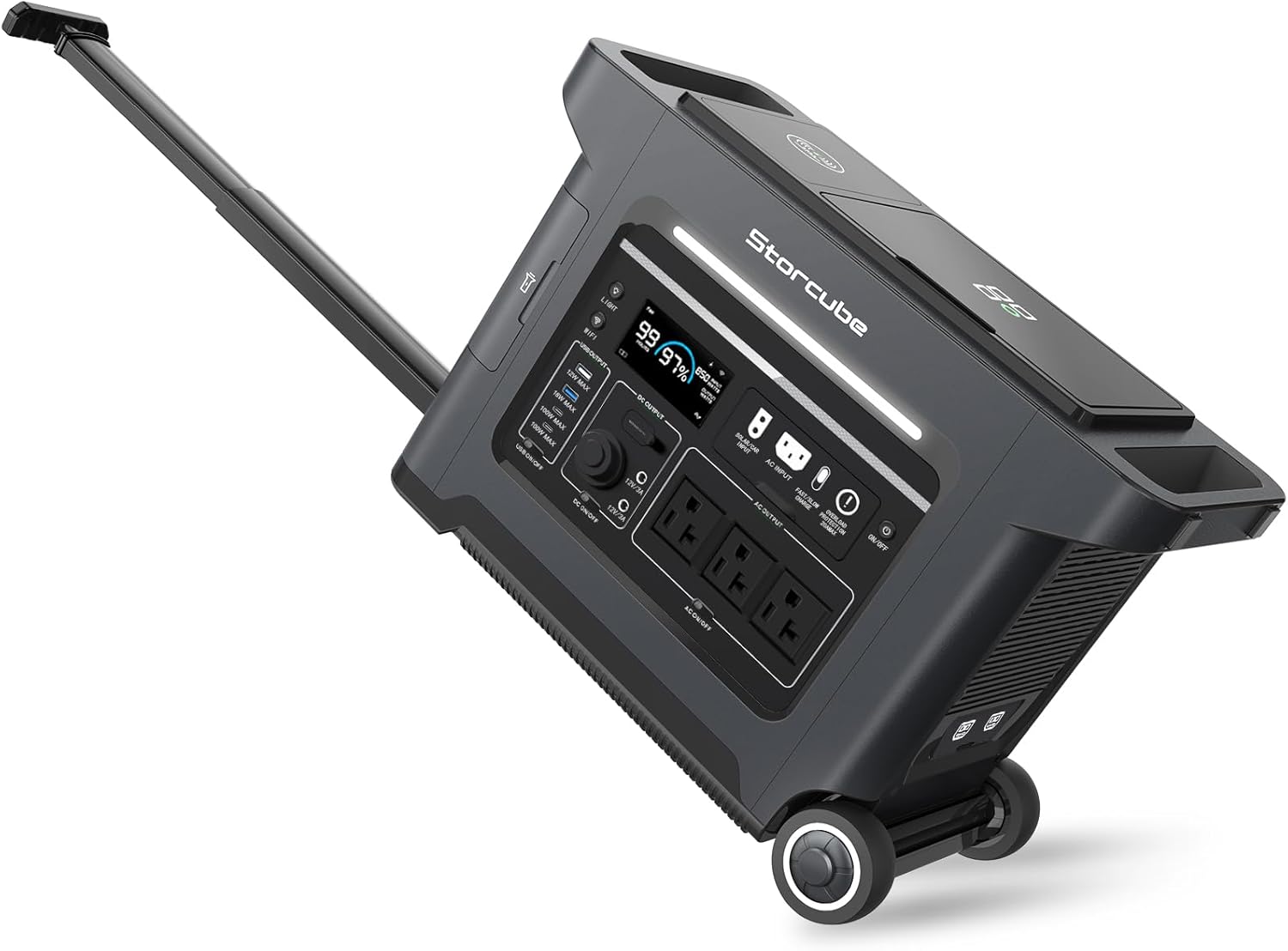
Image: The STORCUBE S2500 Portable Power Station, showcasing its compact design and extendable pull handle for easy transport.
2. Safety Information
Your safety is paramount. The STORCUBE S2500 Portable Power Station is certified by CE, UL, and FCC, ensuring top-notch quality and reliability. It features EV A-grade LiFePO4 batteries for enhanced safety and longevity, providing over 3500+ cycles. An integrated Battery Management System (BMS) offers multiple layers of protection, including overdischarge, overcharge, overload, short circuit, and overcurrent protection.
- Overdischarge Protection: Prevents the battery from discharging below a safe voltage level.
- Overcharge Protection: Safeguards against overcharging, which can damage the battery.
- Overload Protection: Shuts down the unit if connected devices draw too much power.
- Short Circuit Protection: Automatically disconnects power in case of a short circuit.
- Overcurrent Protection: Protects against excessive current flow.

Image: Visual representation of the integrated Battery Management System (BMS) and its protective features.
3. What's Included
Upon unboxing your STORCUBE S2500 Portable Power Station, you should find the following items:
- STORCUBE S2500 portable power station
- AC charging cable
- Car charging cable
- Solar charging cable (XT60 charging cable)
- Flashlight charging cable (USB to Type C charging cable)
- User manual (this document)
4. Product Overview
The S2500 is equipped with a comprehensive array of ports and features to meet diverse power needs:
- 12 Versatile Outlets: Includes 3 AC Outlets, 2 USB-A ports, 2 DC5521 ports, 1 car outlet, 1 wireless charger, and 2 USB-C PD100W ports.
- 12V/20A Anderson Port: Specifically designed to power your RV life.
- Integrated Flashlight: A convenient flashlight is built into the unit for emergency use.
- Wireless Charging Pad: A 15W wireless charging pad is located on top for compatible devices.
- LCD Screen: Displays real-time power status, input/output wattage, and remaining battery percentage.
- Pull-rod and Wheels: Ergonomic design for ultra-portability, making it easy to transport like luggage.

Image: Detailed view of the S2500's output ports, including AC, USB-A, USB-C, DC, and car outlets.

Image: Labeled diagram illustrating the various input and output ports, LCD screen, and other features of the S2500.
5. Setup
5.1 Initial Charging
Before first use, it is recommended to fully charge your STORCUBE S2500. The unit supports super fast charging via AC input, reaching 0 to 100% in just 1.8 hours with 1800W AC input.
- Connect the provided AC charging cable to the AC input port on the power station.
- Plug the other end of the AC charging cable into a standard wall outlet.
- The LCD screen will indicate the charging status and estimated time to full charge.

Image: The S2500 connected to a wall outlet for fast AC charging.
5.2 Alternative Charging Methods
The S2500 also supports solar charging and 12V car charging for flexibility:
- Solar Charging: Connect compatible solar panels (up to 1200W input) using the provided XT60 solar charging cable. Ensure the solar panel voltage is between 10V-60V. Charging time varies based on solar input and sunlight conditions (e.g., 1200W solar panel in 2.7-5.4 hours).
- Car Charging: Use the car charging cable to charge the unit from your vehicle's 12V car outlet.
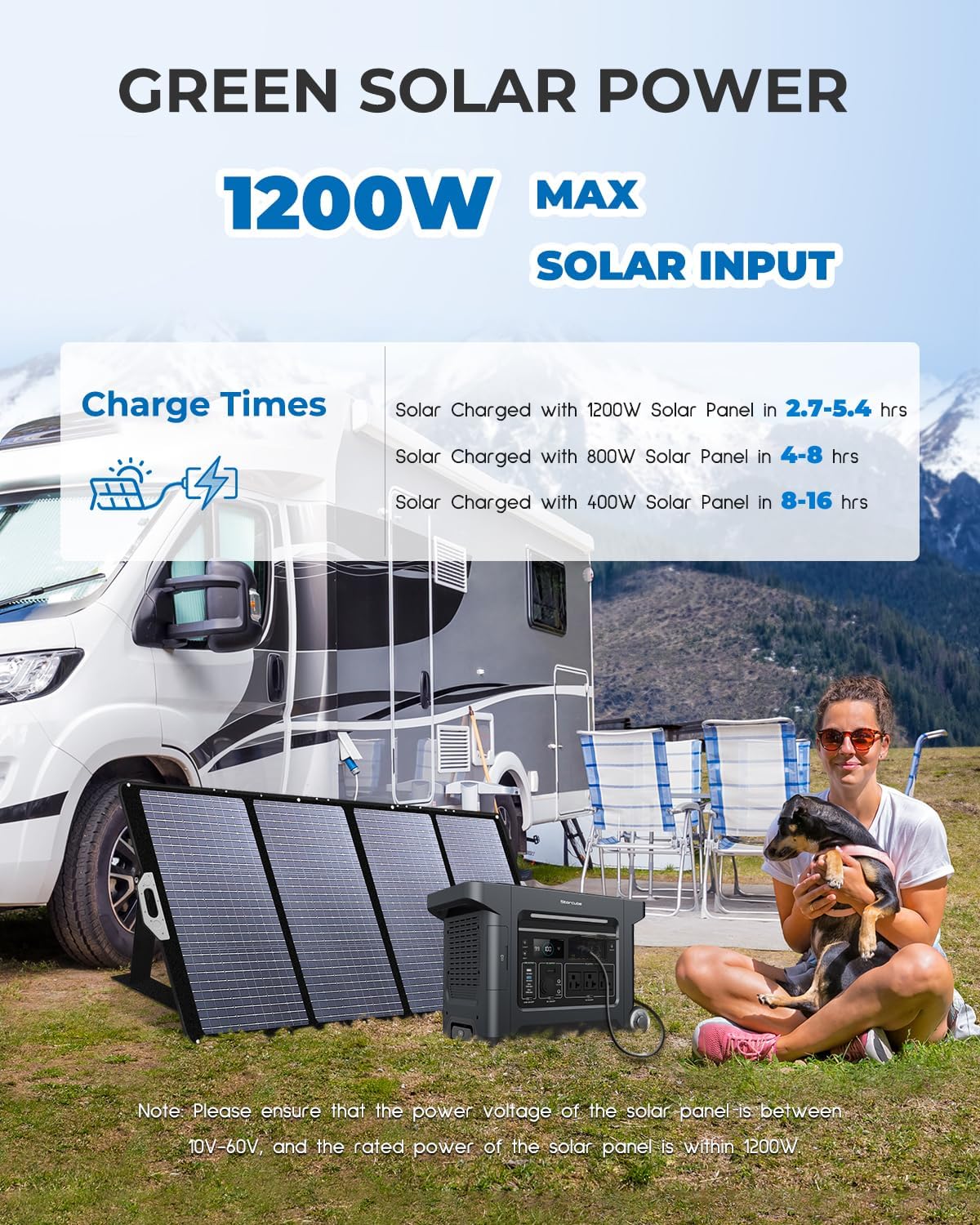
Image: The S2500 connected to solar panels in an outdoor setting, demonstrating solar charging capability.
6. Operating Instructions
6.1 Powering On/Off
To power on the unit, press and hold the main power button until the LCD screen illuminates. To power off, press and hold the same button until the screen turns off.
6.2 Connecting Devices
The S2500 can power 99% of home appliances with its 2000W AC output. Simply plug your devices into the appropriate ports (AC, USB-A, USB-C, DC, or car outlet). Ensure the total wattage of connected devices does not exceed the unit's maximum output.

Image: The S2500 powering a heater, microwave, refrigerator, and coffee machine, illustrating its high power output.
6.3 Using the Built-in Flashlight
The S2500 includes a convenient built-in flashlight. To access and use it, open the small compartment on the side of the unit and retrieve the flashlight. It can be charged via the included USB to Type C cable.

Image: The S2500 demonstrating its wireless charging capability and the integrated portable flashlight.
6.4 Smart App Control
Download the STORCUBE App from the App Store or Google Play to control and monitor your power station remotely. The app allows for energy management, setting standby time, and provides low battery reminders.

Image: A hand holding a smartphone showing the STORCUBE app, which allows for remote control and monitoring of the power station.
6.5 Official Product Videos
Watch the official product overview video for the STORCUBE Portable Power Station S2500:
Video: A comprehensive overview of the STORCUBE Portable Power Station S2500, highlighting its features and uses.
Explore a detailed look at the STORCUBE Portable Power Station S2500:
Video: An in-depth look at the STORCUBE Portable Power Station S2500, providing more details on its design and functionality.
See the STORCUBE S2500 power station in action for outdoors and power outages:
Video: Demonstrating the practical applications of the STORCUBE S2500 power station for outdoor activities and as a reliable backup during power outages.
7. Maintenance
To ensure the longevity and optimal performance of your STORCUBE S2500, follow these maintenance guidelines:
- Regular Charging: Even when not in use, charge the power station at least once every 3-6 months to maintain battery health.
- Storage: Store the unit in a cool, dry place away from direct sunlight and extreme temperatures.
- Cleaning: Use a dry, soft cloth to clean the exterior of the unit. Avoid using harsh chemicals or abrasive materials.
- Battery Lifespan: The S2500's LiFePO4 battery is designed for a long lifespan, lasting over a decade even with everyday use, supporting 3500+ cycles.

Image: An internal view of the S2500 highlighting its LiFePO4 battery cells and their extended lifespan compared to other battery types.
8. Troubleshooting
If you encounter any issues with your STORCUBE S2500 Portable Power Station, please refer to the following general advice:
- Unit Not Powering On: Ensure the battery is charged. If not, connect it to an AC outlet for charging.
- Devices Not Charging: Check if the power station is turned on and the specific output ports (AC, USB, DC) are activated. Verify that the device's power requirements do not exceed the port's maximum output or the unit's total output.
- Overload Protection Activated: If the unit shuts down due to overload, disconnect some devices and restart the power station.
- Unusual Noises or Smells: Immediately power off the unit and disconnect all devices. Contact customer support for assistance.
For more detailed troubleshooting or persistent issues, please contact STORCUBE customer support.
9. Specifications
| Feature | Detail |
|---|---|
| Brand | STORCUBE |
| Model Name | S2500 |
| Wattage | 2000 watts |
| Output Wattage | 2000.00 |
| Starting Wattage | 4000 Watts |
| Running Wattage | 4000 Watts |
| Voltage | 120 Volts (AC) |
| Fuel Type | Non-gasoline |
| Power Source | Solar Powered, Battery Powered |
| Item Weight | 70.6 Pounds |
| Product Dimensions | 20.24"L x 10.16"W x 14.06"H |
| Battery Type | LiFePO4 (1 Lithium Ion battery included) |
| Total Power Outlets | 3 AC Outlets, multiple USB and DC ports |
| Special Features | Portable, Overload Protection, Short Circuit Protection, USB Port, Telescoping Handle |
10. Warranty and Support
The STORCUBE S2500 Portable Power Station comes with a 5-year warranty service, ensuring peace of mind and long-term reliability.
For any inquiries, technical assistance, or warranty claims, please contact STORCUBE customer support. You can find contact information on the official STORCUBE website or through your purchase platform.
Visit the STORCUBE Store for more information and support resources.
Related documentsS2500


Ask a question about this manual
Ask about setup, troubleshooting, compatibility, parts, safety, or missing instructions. Manuals+ will review the question and use this page’s manual context to help answer it.