1. Introduction
This manual provides instructions for the installation, operation, and maintenance of the SODOLA 4-Port Outdoor PoE Gigabit Extender. This device is designed to extend Power over Ethernet (PoE) and data transmission distances for compatible network devices such as IP cameras and wireless access points.

Image 1.1: The SODOLA 4-Port Outdoor PoE Gigabit Extender. This image displays the white extender unit with its protective cover partially open, revealing four Ethernet ports (one PoE In, three PoE Out) and a VLAN dipswitch. Water droplets are depicted on the casing, indicating its outdoor suitability.
2. Product Features
- 4-Port Configuration: Features one PoE input port and three PoE output ports.
- Gigabit Speed: Supports 10/100/1000Mbps data transfer rates.
- PoE Standard Compliance: Compatible with IEEE 802.3af/at PoE protocols.
- Extended Transmission: Each extender unit can extend PoE power and data an additional 100 meters (328 feet).
- Outdoor Durability: IP55 waterproof rating for protection against dust and water splashes.
- No External Power Required: Powered directly by the incoming PoE signal.
- Plug and Play: Requires no software installation or configuration.
- VLAN Functionality: Includes a dipswitch for enabling/disabling Port-Based VLAN to enhance network performance.
- Lightning Protection: Integrated 4KV lightning protection.

Image 2.1: Key features and dimensions of the PoE Extender. This diagram highlights the VLAN dipswitch, output ports (max 24W total, 8W per port), and input port (max 30W). It also shows the device dimensions (5.83 x 3.86 x 1.34 inches) and icons representing 100m transmission, Gigabit speed, 802.3af/at compatibility, IP55 waterproof, and 4KV lightning protection.
3. Package Contents
- SODOLA 4-Port Outdoor PoE Gigabit Extender (Model B0C5WMH9ZD)
4. Safety Information
- Ensure all connections are secure to prevent accidental disconnections, especially in outdoor environments.
- While the device is IP55 waterproof, avoid submerging it in water or exposing it to high-pressure water jets.
- This product must be used with a compatible PoE switch or injector. Do not connect to non-PoE Ethernet ports without proper PoE power sourcing equipment.
- Do not attempt to open or repair the device. Refer to qualified personnel for service.
- Mount the device in a location that minimizes direct exposure to extreme weather conditions for prolonged periods, despite its IP55 rating.
5. Setup and Installation
The SODOLA PoE Extender is designed for simple plug-and-play installation. Follow these steps for proper setup:
5.1 Physical Installation (Wall Mount)
- Mark Mounting Points: Hold the extender against the desired wall surface and mark the positions for the mounting screws.
- Install Screws: Insert screws into the marked positions, leaving a small gap between the screw head and the wall.
- Hang the Extender: Align the keyhole slots on the back of the extender with the screws and hang the device.
- Secure the Extender: Use additional screws through the side mounting holes to firmly secure the extender to the wall.
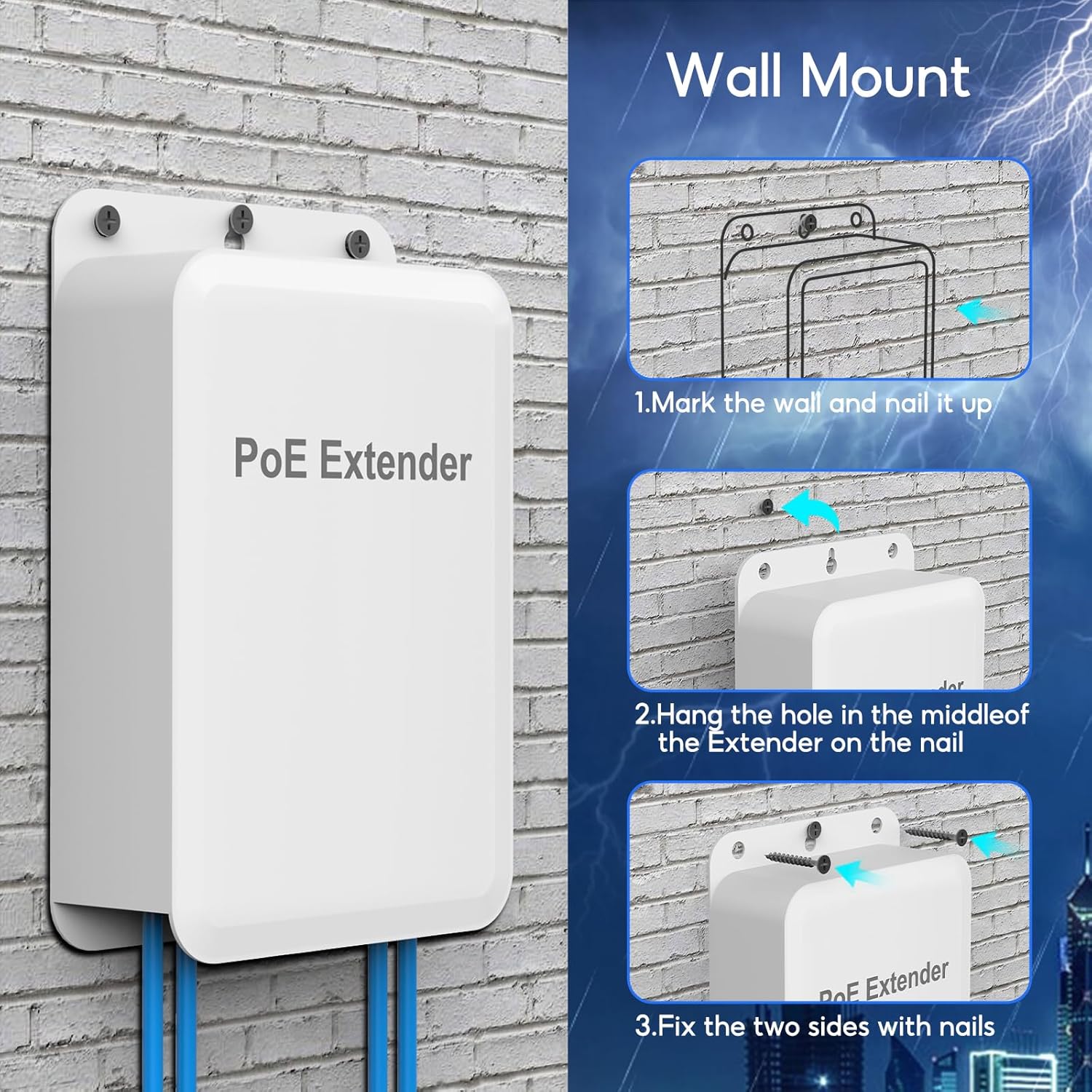
Image 5.1: Wall mounting steps. This image illustrates the three steps for securely mounting the PoE Extender: 1. Marking the wall and installing screws, 2. Hanging the extender by its keyhole slots, and 3. Fixing the two sides with additional screws.
5.2 Cable Connection
- Open Protective Cover: Gently press the snap to slide out the protective cover of the PoE Extender, revealing the Ethernet ports.
- Connect PoE Input: Connect an Ethernet cable from your PoE source (e.g., PoE switch or injector) to the port labeled 'PoE IN'.
- Connect PoE Outputs: Connect Ethernet cables from your PoE-powered devices (e.g., IP cameras, access points) to the 'PoE OUT' ports (1, 2, or 3).
- Close Protective Cover: Slide the protective cover back into place until you hear a 'click' sound, ensuring the ports are protected from environmental elements.

Image 5.2: Cable connection and IP55 waterproof feature. This image shows the three steps: 1. Pushing to remove the extender's cover, 2. Plugging in Ethernet cables to the ports, and 3. Closing the case until it clicks, demonstrating the IP55 waterproof design.

Image 5.3: Plug and Play connection. This image illustrates the simplicity of connecting the PoE Extender, highlighting that it works with a PoE switch and requires no external power supply.
6. Operation
Once connected, the SODOLA PoE Extender operates automatically, extending both power and data to your connected PoE devices. No additional configuration is typically required for basic operation.
6.1 VLAN Configuration
The extender features a dipswitch to enable or disable Port-Based VLAN functionality. This feature isolates the three PoE output ports from each other, while allowing them to communicate with the uplink (PoE IN) port. This can improve network performance and security by preventing direct communication between devices connected to the output ports.
- OFF Position: VLAN mode is disabled. All ports can communicate with each other.
- ON Position: VLAN mode is enabled. Output ports 1, 2, and 3 are isolated from each other but can communicate with the PoE IN port.
Note: Adjust the VLAN dipswitch before connecting devices or power cycling the extender for the setting to take effect.

Image 6.1: VLAN dipswitch functionality. This image shows the 'OFF' and 'ON' positions of the VLAN dipswitch and illustrates how enabling VLAN isolates the output ports (VLAN1, VLAN2, VLAN3) from each other, while allowing communication with the uplink port.
6.2 Cascading Multiple Extenders
For applications requiring even longer transmission distances, multiple SODOLA PoE Extenders can be cascaded. Each extender adds an additional 100 meters (328 feet) to the total range. It is important to consider the power budget when cascading, as power decreases with each extender in the chain.
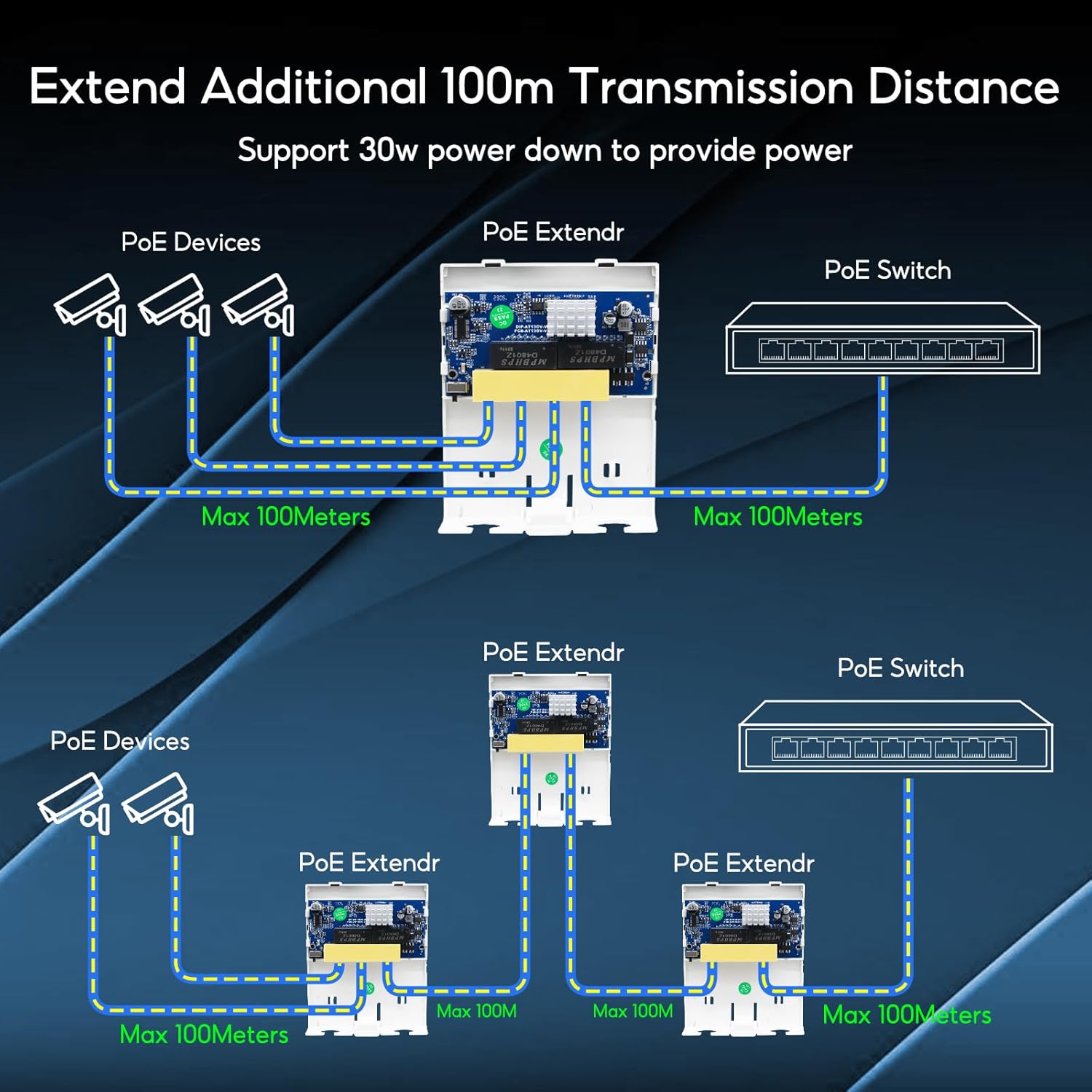
Image 6.2: Cascading PoE Extenders. This diagram illustrates how multiple PoE Extenders can be connected in series to extend the transmission distance beyond 100 meters, showing a PoE switch connected to an extender, which then connects to another extender, and finally to PoE devices.
7. Maintenance
- Regular Inspection: Periodically check the device and cable connections for any signs of damage or wear, especially in outdoor installations.
- Cleaning: If necessary, gently wipe the exterior of the device with a soft, dry cloth. Do not use liquid cleaners or solvents.
- Environmental Protection: Ensure the protective cover for the ports remains securely closed to maintain the IP55 rating.
8. Troubleshooting
- No Power to Devices:
- Verify that the upstream PoE source (switch/injector) is active and providing power.
- Check all Ethernet cable connections for proper seating. Loose connections can prevent power transmission.
- Ensure the total power draw of connected devices does not exceed the extender's output capacity (Max 24W total, 8W per port).
- No Data Transmission:
- Confirm that the Ethernet cables are not damaged and are correctly connected to the 'PoE IN' and 'PoE OUT' ports.
- Test the network connection directly from the PoE source to a device, bypassing the extender, to isolate the issue.
- Intermittent Connection:
- Inspect cable ends and ports for any physical damage or debris.
- Ensure the protective cover is fully closed to prevent environmental interference.
- VLAN Not Working as Expected:
- Verify the VLAN dipswitch is in the desired 'ON' or 'OFF' position.
- Power cycle the extender after changing the VLAN setting.
9. Specifications
| Feature | Specification |
|---|---|
| Model | B0C5WMH9ZD |
| Ports | 1 PoE In, 3 PoE Out |
| Data Transfer Rate | 10/100/1000 Mbps (Gigabit) |
| PoE Standard | IEEE 802.3af/at |
| Input Power | Max 30W |
| Output Power | Max 24W total, Average 8W per port |
| PoE Voltage | 44-57 Vdc |
| PoE Pin Assignment (Input) | 1/2 (-), 3/6 (+), 4/5(+), 7/8(-) |
| PoE Pin Assignment (Output) | 1/2 (+), 3/6 (-) |
| Transmission Distance | Up to 100m (328ft) per extender |
| Waterproof Rating | IP55 |
| Lightning Protection | 4KV |
| Case Material | Plastic |
| Product Dimensions | 5.71 x 3.86 x 1.34 inches |
| Item Weight | 6.4 ounces |
| Operating Temperature | (Information not provided in source data) |
10. Warranty and Support
SODOLA provides a product replacement service within 2 years for this device. For technical support, warranty claims, or further assistance, please contact your retailer or the manufacturer directly through their official support channels.


