
1. Introduction
This manual provides detailed instructions for the safe and effective use of your TELESIN Multifunctional Phone Tripod Mount Holder Adapter Clip. Please read this manual thoroughly before using the product to ensure optimal performance and longevity.

Figure 1: TELESIN Multifunctional Phone Tripod Mount Holder Adapter Clip
2. Product Features
- Cold Shoe Interface: Equipped with a cold shoe for connecting external accessories such as microphones or RGB fill lights, enhancing video recording capabilities.
- V-shaped Rubber Groove: Features soft rubber grips with a V-shaped design to ensure stable clamping of your phone without causing damage.
- 360° Rotation: The rotary axis allows for infinite 360° adjustment, facilitating easy switching between horizontal and vertical shooting orientations. The 'Z' structure design supports various angles, including low-angle and high-angle shots.
- Strong Grip & Wide Compatibility: A heavy spring clip with a clamping range of 1.2 inches to 3.7 inches accommodates most smartphones, including various iPhone and Samsung Galaxy models.
- Dual 1/4” Threaded Ports: The main body of the clamp and the bottom of the foldable bracket each include a 1/4" threaded port for connecting to selfie sticks, tripods, and other compatible devices.

Figure 2: V-shaped Rubber Groove for Secure Phone Holding

Figure 3: Adjustable Clamping Range
3. Package Contents
Verify that all items are present in your package:
- Multifunctional Mobile Phone Clip * 1
- 1/4 Double-Layer Cold Shoe * 1

Figure 4: Compact and Portable Design
4. Product Overview
Familiarize yourself with the main components of the phone tripod mount:
- Phone Clamp (with V-shaped rubber grooves)
- 360° Rotary Axis
- Cold Shoe Interface (top)
- 1/4" Threaded Ports (bottom and side)
- Foldable Bracket/Stand
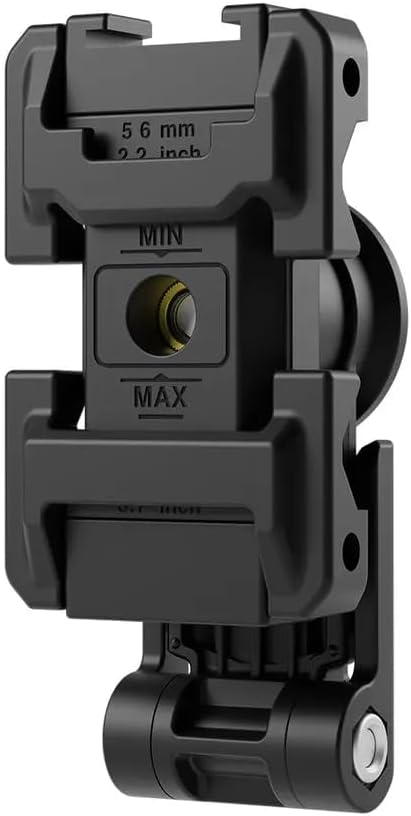
Figure 5: Rear View with Key Features
5. Setup and Installation
5.1 Attaching to a Tripod or Selfie Stick
- Locate the 1/4" threaded port at the bottom of the phone clamp or the foldable bracket.
- Align the threaded port with the screw on your tripod or selfie stick.
- Rotate the phone clamp clockwise onto the tripod/selfie stick until securely fastened.
5.2 Inserting Your Smartphone
- Gently pull apart the spring-loaded arms of the phone clamp.
- Carefully place your smartphone into the V-shaped rubber grooves, ensuring it is centered and securely held by the clamp.
- Release the arms slowly to allow them to grip the phone firmly.
5.3 Attaching Cold Shoe Accessories
- Identify the cold shoe interface located on the top of the phone clamp.
- Slide your cold shoe compatible accessory (e.g., microphone, LED light) into the interface until it clicks into place or is securely tightened.

Figure 6: Phone Mount with Cold Shoe Accessory
Video 1: User Guide for TELESIN Phone Tripod Mount Holder Adapter. This video demonstrates the assembly and various uses of the phone mount, including attaching it to a tripod and using the cold shoe.
6. Operating Instructions
6.1 Adjusting Shooting Angle (360° Rotation)
The integrated 360° rotary axis allows for flexible adjustments:
- To switch between horizontal (landscape) and vertical (portrait) modes, simply rotate your phone within the clamp. The mechanism is designed for smooth transitions.
- Utilize the 'Z' structure design to achieve unique low-angle or high-angle shots by adjusting the foldable bracket.

Figure 7: 360° Rotation for Multi-Angle Shooting
6.2 Using as a Desktop Stand
The foldable bracket can be extended to function as a stable desktop stand:
- Fold out the bottom bracket until it forms a stable base.
- Place the phone mount on a flat surface. Adjust the phone's angle using the rotary axis for comfortable viewing.

Figure 8: Instant Desktop Stand Functionality
Video 2: TELESIN Phone Tripod Mount Holder Adjustable with Cold Shoe. This video highlights the adjustable features and cold shoe compatibility of the mount.
7. Maintenance
- Cleaning: Wipe the product with a soft, dry cloth. Avoid using harsh chemicals or abrasive materials.
- Storage: Store the phone mount in a dry and cool environment when not in use.
- Handling: Do not forcefully disassemble or bend the product to prevent deformation or damage.
8. Troubleshooting
- Phone not fitting: Ensure your phone's width is within the clamping range of 1.2 to 3.7 inches. Remove bulky phone cases if necessary.
- Unstable phone: Verify that the phone is properly centered and the clamp arms are fully gripping the device. The V-shaped rubber grooves are designed for secure holding.
- Accessories not attaching: Confirm that your accessory has a standard cold shoe or 1/4" screw mount compatible with the phone clamp's interfaces.
9. Specifications
| Attribute | Detail |
|---|---|
| Product Material | Plastic, Aluminum alloy |
| Product Weight | 2.82 ounces (80 grams) |
| Clamping Range | 1.2 inch ~ 3.7 inch (56mm - 95mm) |
| Item Model Number | CO-PM-001 |
| Mounting Type | Tripod |
| Compatible Devices | Smartphones (iPhone 15/14/13/12/11 series, Samsung Galaxy, etc.) |
10. Warranty and Support
This product is covered by a standard manufacturer's warranty. For warranty claims, technical support, or any inquiries, please contact the retailer or manufacturer directly. Keep your purchase receipt as proof of purchase.