Introduction
The Deftun MINIDX5 is the world's smallest Bluetooth portable card reader, designed for efficient data transfer from magnetic stripe cards. It is an ideal solution for various applications including trade shows, racing events, point-of-sale systems, attendance tracking (student ID, membership cards), and law enforcement (DMV cards). This device can read both Lo-co and Hi-co magnetic cards (300-4000 OE) across all three tracks.
The MINIDX5 features 2M bytes of memory, capable of storing data from up to 8000 card swipes. It is battery-powered with a low battery indicator and includes an auto power-off function configurable by the user. Data can be downloaded to a computer via USB, compatible with MSR605X, MSRX6, and MSRX6BT devices. It supports ISO format and special formats upon request, requiring no programming for ease of use.
Key Features
- Compact Design: Dimensions of L 1.6 x W 0.8 x H 1.2 inches (4.7 x 2.2 x 3.1 cm), making it the smallest Bluetooth portable reader.
- Versatile Card Reading: Reads 300-4000 OE (Lo-co and Hi-co) magnetic cards across all three tracks.
- Large Storage Capacity: 2M bytes memory, capable of storing data from up to 8000 card swipes.
- Battery Powered: Operates on a 3.7V 250 MAH rechargeable battery with a low battery indicator.
- Data Transfer: Data can be downloaded to a computer via USB, compatible with MSR605X, MSRX6, MSRX6BT.
- Software Compatibility: Works with Windows 98/2000/ME/XP/Vista/Win 7/8/10, Mac OS. Mobile app "EasyMSR" available on Google Play and App Store for Android/iOS devices.
- User-Friendly: No programming required for basic operation.
Package Contents
Upon opening your MINIDX5 package, please ensure all the following items are present:
- 1x MINI DX5 Reader
- 1x Software CD
- 1x USB cable
Setup
- Charge the Device: Before first use, connect the MINI DX5 Reader to a USB power source using the provided USB cable. The device has a 3.7V 250 MAH rechargeable battery. Ensure it is fully charged for optimal performance.
- Software Installation (for PC/Mac):
Insert the provided Software CD into your computer's CD drive. Follow the on-screen instructions to install the necessary drivers and software for data transfer and management. If your computer does not have a CD drive, please visit the official Deftun website for software downloads.
- Mobile App Installation (for Android/iOS):
For mobile use, download the "EasyMSR" application from the Google Play Store (for Android devices) or the Apple App Store (for iPhone, iPad, iPod touch). Search for "EasyMSR" and install the official application.
- Power On: Locate the power button on the MINIDX5 device and press it to turn the reader on. A status indicator light should illuminate.
Operating Instructions
1. Reading Magnetic Cards
- Ensure the MINIDX5 is powered on.
- Hold the magnetic card with the magnetic stripe facing the reader's slot.
- Swipe the card smoothly and consistently through the slot. The device is designed to read all three tracks (Track 1, Track 2, Track 3).
- A successful read is typically indicated by a brief flash of an LED light or an audible beep (if enabled). The data is automatically stored in the device's internal memory.

Image: The Deftun MINIDX5 Bluetooth Portable Card Reader, showing its compact blue design with a card slot on top and indicator lights.

Image: The MINIDX5 device resting in the palm of a hand, illustrating its extremely small and portable size. The text overlay indicates "Store the info then later connect it to the APP 'EasyMSR' by bluetooth and upload."
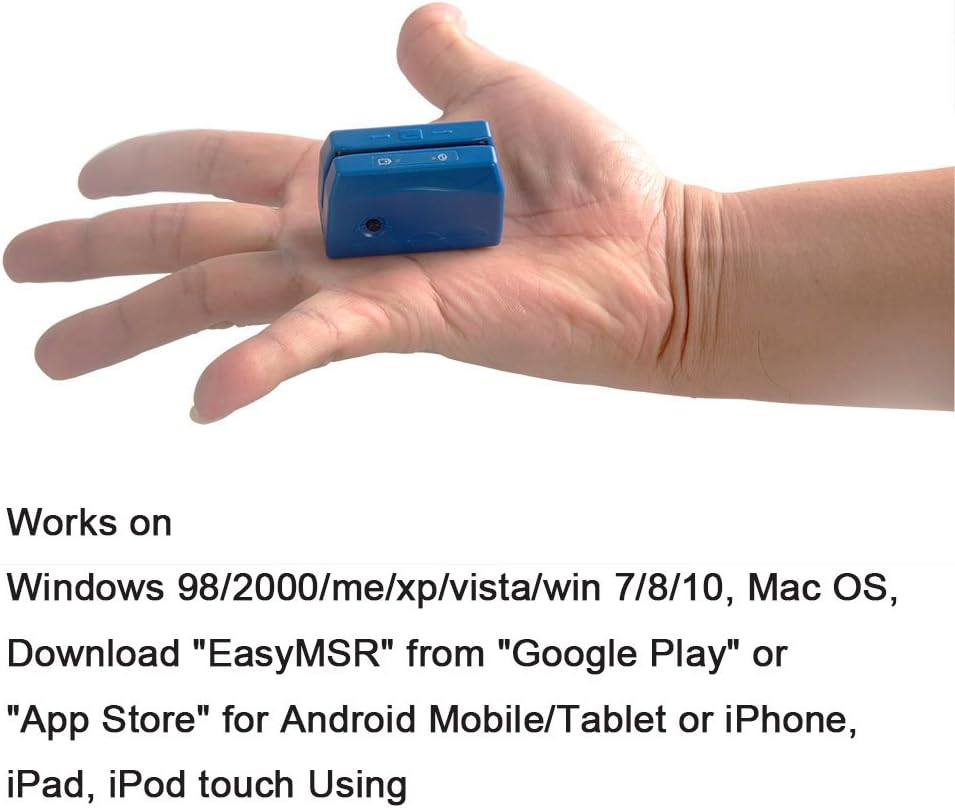
Image: The MINIDX5 device being held between two fingers, further emphasizing its miniature size. The text overlay describes its compatibility with various operating systems and the availability of the "EasyMSR" app.

Image: A close-up view of the MINIDX5 device held by a thumb and forefinger, highlighting its compact and ergonomic design for portability.
2. Data Download to Computer (USB)
- Connect the MINIDX5 to your computer using the provided USB cable.
- Ensure the installed software (from the CD or website) is running.
- Follow the software's instructions to download the stored card data to your computer. The data can be transferred to MSR605X, MSRX6, or MSRX6BT devices.
3. Data Transfer via Bluetooth (Mobile App)
- Ensure Bluetooth is enabled on your mobile device (smartphone or tablet).
- Open the "EasyMSR" app on your mobile device.
- On the MINIDX5, activate Bluetooth pairing mode (refer to device indicators or specific button press, if any, for Bluetooth).
- Within the "EasyMSR" app, search for and connect to your MINIDX5 device.
- Once connected, follow the app's instructions to upload the stored card data from the MINIDX5 to your mobile device.
Maintenance
- Cleaning: Use a soft, dry cloth to clean the exterior of the device. Do not use liquid cleaners or abrasive materials. For the card reading head, use a specialized magnetic head cleaning card periodically to ensure optimal reading performance.
- Storage: Store the device in a cool, dry place away from direct sunlight and extreme temperatures.
- Battery Care: To prolong battery life, avoid fully discharging the battery frequently. Recharge the device when the low battery indicator appears. If storing for an extended period, charge the battery to about 50% every few months.
- Avoid Impact: Handle the device with care to prevent damage from drops or impacts.
Troubleshooting
| Problem | Possible Cause | Solution |
|---|---|---|
| Device does not power on. | Low or depleted battery. | Charge the device using the provided USB cable. |
| Cannot read cards consistently. | Dirty reading head; Incorrect swipe speed/direction; Damaged card. | Clean the reading head with a cleaning card. Ensure a smooth, consistent swipe. Try with a different card. |
| Data not transferring to computer. | USB cable issue; Software not installed/running; Driver issue. | Check USB cable connection. Ensure software is installed and open. Reinstall drivers if necessary. Try a different USB port. |
| Cannot connect via Bluetooth. | Bluetooth not enabled on mobile device; Device not in pairing mode; App issue. | Ensure Bluetooth is on. Put MINIDX5 in pairing mode. Restart "EasyMSR" app. Restart both devices. |
| "EasyMSR" app not found. | Incorrect search term; Regional availability. | Ensure you are searching for "EasyMSR" in the correct app store (Google Play for Android, Apple App Store for iOS). Check your region's app store. |
Specifications
| Feature | Detail |
|---|---|
| Model | MINIDX5 |
| Dimensions (L x W x H) | 1.6 x 0.8 x 1.2 inches (4.7 x 2.2 x 3.1 cm) |
| Net Weight | 25g (0.88 oz) |
| Battery Type | 3.7V 250 MAH Rechargeable Lithium Ion Battery |
| Working Temperature | 0°C ~ 55°C (32°F ~ 131°F) |
| Storage Temperature | -10°C ~ 55°C (14°F ~ 131°F) |
| Humidity | 10% ~ 90% Relative Humidity |
| Communication Interface | USB, Bluetooth |
| Magnetic Card Standard | ISO format, 300-4000 OE (Lo-co and Hi-co) |
| Memory Capacity | 2M bytes (approx. 8000 3-track records) |
| Compatible Operating Systems | Windows 98/2000/ME/XP/Vista/Win 7/8/10, Mac OS |
| Mobile App | EasyMSR (Android, iOS) |
Warranty and Support
For warranty information and technical support, please refer to the documentation included with your purchase or visit the official Deftun website. Keep your purchase receipt as proof of purchase for warranty claims.
For further assistance, you may contact Deftun customer support through their official channels. Please have your product model (MINIDX5) and purchase details ready when contacting support.
Online Resources:
- Deftun Store on Amazon: Visit Deftun Store


