
Introduction
This manual provides instructions for the proper use, adjustment, and care of your Haworth Zody Office Chair. Please read this manual thoroughly before using the chair to ensure optimal comfort and longevity.

Image: The Haworth Zody Office Chair, a grey ergonomic chair with mesh back and padded seat, positioned in a modern home office environment next to a desk.
Setup
The Haworth Zody Office Chair arrives fully assembled. No additional assembly is required. Simply remove the packaging and position the chair in your desired location.
Operating Adjustments
The Zody chair offers multiple adjustments to customize your seating experience. Familiarize yourself with these controls for personalized comfort.

Image: A direct front view of the Haworth Zody Office Chair, showcasing its mesh back, upholstered seat, and the various adjustment levers located beneath the seat.
- Pneumatic Seat Height Adjustment: Locate the lever on the right side, beneath the seat. To raise the seat, lift the lever while taking your weight off the seat. To lower the seat, lift the lever while seated. Adjust until your feet are flat on the floor and your knees are at a 90-degree angle.
- Seat Depth Adjustment: Find the lever or button on the left side, under the seat. Lift or press the control and slide the seat forward or backward to ensure a 2-3 inch gap between the edge of the seat and the back of your knees.
- 4D Armrests: The armrests can be adjusted in four dimensions:
- Height: Press the button on the side of the armrest and move it up or down.
- Width: Slide the armrest pads inward or outward.
- Depth: Slide the armrest pads forward or backward.
- Pivot: Rotate the armrest pads left or right.
- Tilt Tension: The knob located under the front of the seat controls the resistance when reclining. Turn clockwise to increase tension (more resistance) and counter-clockwise to decrease tension (less resistance).
- Back Stop / Tilt Lock: Use the lever on the left side to lock the backrest in an upright position or in a reclined position. Engage the lock by pushing the lever down, and disengage by pulling it up.
- Forward Tilt: This feature allows the seat to tilt slightly forward, promoting an open hip angle. Consult your chair's specific controls for engaging and disengaging the forward tilt mechanism, typically a separate lever or button.
- Swivel: The chair base allows for 360-degree rotation.
- Reclining: The chair supports multiple reclining positions. Adjust tilt tension for desired recline resistance.
Maintenance
To maintain the appearance and functionality of your Haworth Zody Office Chair, follow these guidelines:
- Cleaning: Spot clean upholstered areas as needed. Use a mild detergent and a damp cloth. Avoid harsh chemicals or abrasive cleaners.
- Inspection: Periodically check all bolts and screws to ensure they are tight. Tighten if necessary.
- Casters: Keep casters free of debris (hair, lint) to ensure smooth rolling.
Troubleshooting
If you encounter issues with your Zody chair, refer to the following common solutions:
- Chair Sinks or Does Not Hold Height: This typically indicates an issue with the pneumatic cylinder. Contact customer support for assistance.
- Squeaking Noises: Check all connections and tighten any loose bolts. Applying a small amount of silicone lubricant to moving parts may help.
- Casters Not Rolling Smoothly: Clean any debris from the caster wheels. If issues persist, casters may need replacement.
- Adjustments Not Working: Ensure levers and knobs are fully engaged or disengaged. If a mechanism is stuck, do not force it. Contact customer support.
Specifications
Key specifications for the Haworth Zody Office Chair:
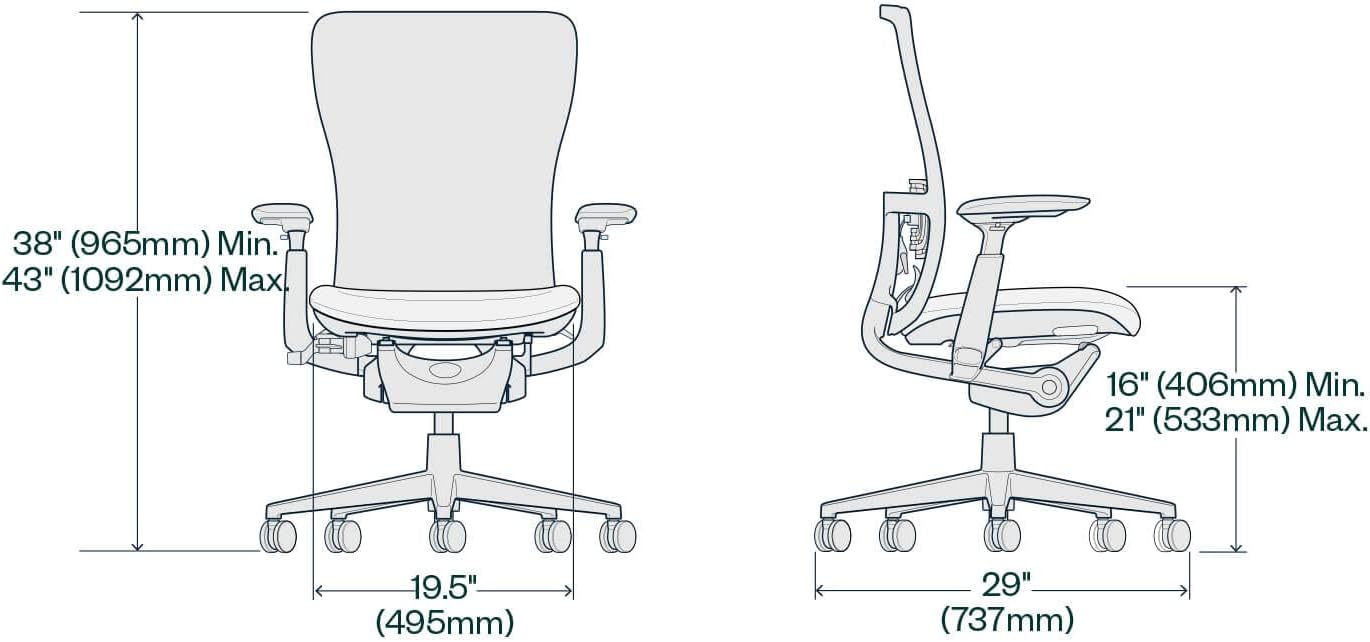
Image: A technical diagram illustrating the minimum and maximum dimensions of the Haworth Zody Office Chair, including height, width, and depth measurements in inches and millimeters.
| Feature | Detail |
|---|---|
| Brand | Haworth |
| Model | Zody |
| Product Dimensions (D x W x H) | 29"D x 29"W x 38"H |
| Item Weight | 55 Pounds |
| Maximum Weight Recommendation | 325 Pounds |
| Material | Upholstered (Polyester seat, Foam fill), Aluminum frame |
| Assembly Required | No (Already Assembled) |
| Adjustments | Pneumatic Seat Height, 4D Arms, Back Stop, Tilt Tension, Forward Tilt, Seat Depth, Swivel, Reclining |
| Recommended Uses | Office |
| Surface Recommendation | Hard Floor |
Warranty
The Haworth Zody Office Chair is backed by a 12-year limited warranty. This warranty covers manufacturing defects and component failures under normal use. Please retain your proof of purchase for warranty claims. For full details on warranty coverage, visit the official Haworth website or contact customer support.
Support
For further assistance, questions, or to report an issue with your Haworth Zody Office Chair, please contact Haworth customer support. Refer to the official Haworth website for contact information, including phone numbers and email addresses.


