
Introduction
The Westone Audio AMPRO X30 In-Ear Monitors are designed for musicians and audiophiles, offering high-fidelity audio reproduction and passive ambient technology. This manual provides essential information for the setup, operation, maintenance, and troubleshooting of your AMPRO X30 IEMs.
These monitors feature three proprietary balanced-armature drivers and a 3-way passive crossover, engineered to deliver potent lows, precise mid-range, and clear highs. The ergonomic design ensures comfort during extended use, and the Ambient Patented Technology allows for integration of ambient sound without compromising the monitor signal's frequency response.
Key Features
- 3 Balanced Armature Drivers: Proprietary design for accurate and detailed sound.
- Noise Attenuation: 13dB passive noise isolation.
- All-Day Comfort: Low-profile and ergonomic design for extended use without ear fatigue.
- Acoustic Symmetry: Left and right earpiece responses matched to a +/- 3dB tolerance.
- Proprietary Ambient Technology: Combines passive ambient sound with the monitor mix.
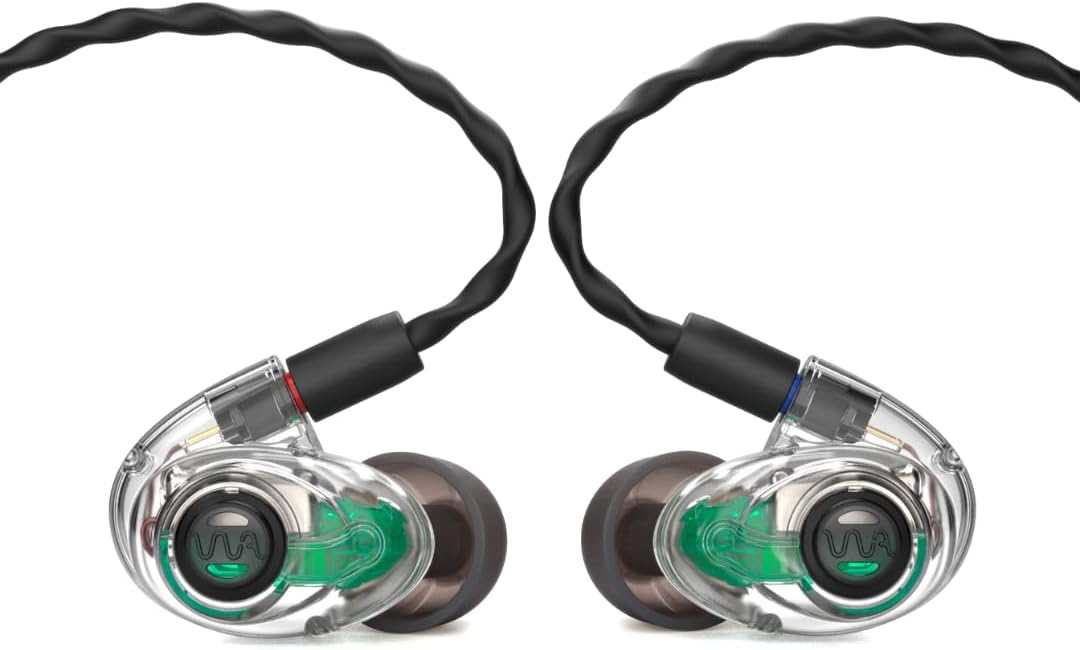
Image: The Westone Audio AMPRO X30 In-Ear Monitors, showcasing their transparent housing and ergonomic design.
What's in the Box
Your Westone Audio AMPRO X30 package includes the following components:
- AMPRO X30 In-Ear Monitors
- EPIC Cable
- Assorted Eartips (Silicone and Foam, five different sizes)
- Protective Case
- Cleaning Tool

Image: All components included with the AMPRO X30, neatly laid out, including the in-ear monitors, cable, various eartips, and protective case.
Setup
- Select Eartips: Choose the eartips (silicone or foam) that provide the most comfortable and secure fit, as well as optimal sound isolation. Experiment with different sizes to find the best seal.
- Attach Cable: Connect the EPIC cable to the in-ear monitors. Ensure the left (blue dot) and right (red dot) connectors are matched to the corresponding earpieces. The connectors should click securely into place.
- Insert Monitors: Gently insert the monitors into your ears. For optimal fit and sound, route the cable over the top of your ear. The ergonomic design is intended to sit flush within the ear.
- Connect to Device: Plug the 3.5mm jack of the cable into your audio source (e.g., smartphone, mixing console, audio interface).

Image: A close-up of a person wearing the AMPRO X30 in-ear monitor, demonstrating its comfortable and low-profile fit within the ear.
Operating Instructions
The AMPRO X30 In-Ear Monitors are designed for straightforward operation. Once connected to your audio source, they will reproduce sound directly.
- Volume Control: Adjust the volume directly from your connected audio device or mixing console. The AMPRO X30 does not feature inline volume controls.
- Ambient Sound Integration: The patented Ambient Technology allows for natural sound pass-through, enabling awareness of your surroundings while monitoring. This feature is passive and does not require activation.
- Cable Management: Utilize the retractable cable feature for convenient storage and to prevent tangling.

Image: A conceptual graphic illustrating the Passive Ambient Filtertechnology, showing how external sounds are integrated with the audio signal.
Maintenance
Proper maintenance will extend the lifespan and performance of your AMPRO X30 In-Ear Monitors.
- Cleaning: Regularly clean the eartips and the monitor nozzles to prevent wax buildup. Use the provided cleaning tool to gently remove any debris from the sound bore. Wipe the exterior with a soft, dry cloth.
- Storage: When not in use, store your IEMs in the provided protective case to prevent damage from impacts, dust, and tangling.
- Cable Care: Avoid sharp bends or excessive pulling on the cable. Disconnect the cable by gripping the connector, not the cable itself.
- Eartip Replacement: Eartips may degrade over time. Replace them periodically to maintain optimal fit and sound isolation.
Troubleshooting
If you encounter issues with your AMPRO X30 In-Ear Monitors, refer to the following common troubleshooting steps:
| Problem | Possible Cause | Solution |
|---|---|---|
| No Sound or Low Volume |
|
|
| Poor Sound Quality (Muffled, Distorted) |
|
|
| Discomfort or Poor Fit |
|
|
If the issue persists after attempting these steps, please contact Westone Audio customer support.
Specifications
| Model Name | AMPRO X30 |
| Audio Driver Type | 3 Balanced Armature Drivers |
| Connectivity Technology | Wired |
| Headphones Jack | 3.5 mm Jack |
| Frequency Range | 20 Hz - 20,000 Hz |
| Noise Attenuation | 13dB, Passive Noise Isolating |
| Material | Plastic |
| Color | Black |
| Item Weight | 12.1 ounces |
| Manufacturer | Westone Audio |
| Item Model Number | WA-AM-PRO-X30 |
| UPC | 810074480987 |
Warranty and Support
For warranty information and technical support, please refer to the official Westone Audio website or contact their customer service directly. Keep your proof of purchase for any warranty claims.
For additional resources and frequently asked questions, visit the Westone Audio Store on Amazon.