
Mount-It! MI-4884B
Mount-It! Dual Monitor Arm MI-4884B User Manual
Model: MI-4884B
1. Introduction
This manual provides detailed instructions for the safe and proper installation, operation, and maintenance of your Mount-It! Dual Monitor Arm, model MI-4884B. This monitor arm is designed to support two monitors ranging from 17 to 32 inches, with a maximum weight capacity of 19.8 lbs per arm. It features a gas spring system for easy height adjustment and full motion capabilities including tilt, swivel, and rotation.
Please read this manual thoroughly before installation and keep it for future reference. If you have any questions or require assistance, please contact Mount-It! customer support.
2. Important Safety Information
- Weight Capacity: Do not exceed the maximum weight capacity of 19.8 lbs (9 kg) per arm. Exceeding this limit may result in instability and potential injury.
- Monitor Size: Ensure your monitors are within the recommended size range of 17 to 32 inches.
- VESA Compatibility: Verify your monitors have VESA mounting patterns of 75x75mm or 100x100mm.
- Desk Thickness: For C-clamp installation, the desk thickness must be between 0.4 inches (10mm) and 3.34 inches (85mm). For grommet installation, the desk thickness must be between 0.4 inches (10mm) and 3.14 inches (80mm).
- Secure Installation: Ensure all screws and bolts are securely tightened before use. Do not overtighten.
- Assembly: Assemble the product according to the instructions. Improper assembly can lead to damage or injury.
- Moving Parts: Be aware of pinch points when adjusting the monitor arm.
3. Package Contents
Please verify that all components are present and undamaged. If any parts are missing or damaged, contact Mount-It! customer support.
- Dual Monitor Arm Assembly
- Desk Clamp Base
- Grommet Base Components
- VESA Plates (2x)
- Hardware Kit (various screws, washers, spacers, Allen wrenches)
- Instruction Manual (this document)

Image: Overview of the Mount-It! Dual Monitor Arm and its primary components, including the C-clamp and grommet base options.
4. Setup and Installation
4.1 Choose Your Mounting Option: C-Clamp or Grommet
The monitor arm offers two installation methods: C-clamp for desks with edges, and grommet for desks with existing holes or where a hole can be drilled.
- C-Clamp: Suitable for desk edges. Ensure desk thickness is between 0.4" and 3.34".
- Grommet: Suitable for desks with a hole. Ensure desk thickness is between 0.4" and 3.14".

Image: Diagram illustrating the C-clamp and grommet mounting options, showing maximum desk thickness for each.
4.2 Attach the Mount to Your Desk
Follow the instructions for your chosen mounting method:
- C-Clamp Installation:
- Attach the C-clamp components to the main pole.
- Position the clamp on the edge of your desk and tighten the knob until secure.
- Grommet Installation:
- If using an existing grommet hole, ensure it is large enough for the grommet base components.
- Assemble the grommet base through the desk hole and tighten the nut from underneath the desk.
4.3 Attach VESA Plates to Monitors
Each monitor requires a VESA plate attached to its back.
- Carefully place your monitor face down on a soft, clean surface.
- Align the VESA plate with the mounting holes on the back of your monitor (75x75mm or 100x100mm).
- Secure the VESA plate using the appropriate screws and washers from the hardware kit. Do not overtighten.

Image: Rear view of the monitor arm showing the VESA mounting plates ready for monitor attachment.
4.4 Mount Monitors to Arms
The monitor arm features a quick-release VESA system for easy attachment.
- Carefully lift a monitor with the attached VESA plate.
- Slide the VESA plate onto the mounting head of one arm until it clicks into place.
- Ensure the quick-release lever is engaged to secure the monitor.
- Repeat for the second monitor.

Image: Diagram showing the quick-release mechanism for attaching the VESA plate to the monitor arm.
4.5 Adjust Gas Spring Tension
The gas spring tension needs to be adjusted to match the weight of your monitors for smooth movement and stability.
- With monitors attached, if an arm sags, increase the tension by turning the adjustment screw (usually located on the arm joint) clockwise using the provided Allen wrench.
- If an arm springs up too easily, decrease the tension by turning the screw counter-clockwise.
- Adjust until the monitor stays in position when moved and can be adjusted smoothly.

Image: Illustration demonstrating how to adjust the gas spring tension using an Allen wrench to balance the monitor arm for monitors up to 19.8 lbs.
4.6 Cable Management
Route your monitor cables through the integrated cable management clips on the arms to maintain a tidy workspace.

Image: Close-up view of the integrated cable management hooks on the monitor arm, showing how to route cables for an organized setup.
5. Operating and Adjustments
The Mount-It! Dual Monitor Arm offers full motion adjustment to optimize your viewing experience and ergonomics.
- Height Adjustment: Gently push or pull the monitor up or down to your desired height. The gas spring will hold it in place once tension is correctly set.
- Tilt: Tilt your monitors +/-45° up or down to reduce glare and find the optimal viewing angle.
- Swivel: Swivel the monitors +/-90° (180° total) left or right for flexible working angles or screen sharing.
- Rotation: Rotate your monitors 360° from landscape to portrait orientation, or vice versa, without removing them.

Image: Diagram illustrating the full motion capabilities of the monitor arm, including 360° rotation, +/-90° tilt, and +/-90° swivel.

Image: Comparison showing the recommended ergonomic distance for monitor placement with a space-saving arm versus a conventional arm that positions monitors too close.
6. Maintenance
- Cleaning: Wipe the monitor arm with a soft, damp cloth. Avoid harsh chemicals or abrasive cleaners.
- Periodic Checks: Periodically check all screws and connections to ensure they remain tight and secure. Re-tighten if necessary.
- Gas Spring Adjustment: If monitor weight changes or over time, re-adjust the gas spring tension as described in Section 4.5 to maintain optimal performance.
7. Troubleshooting
| Problem | Possible Cause | Solution |
|---|---|---|
| Monitor sags or does not stay at desired height. | Gas spring tension is too low for monitor weight. | Increase gas spring tension by turning the adjustment screw clockwise (refer to Section 4.5). |
| Monitor springs up too easily. | Gas spring tension is too high for monitor weight. | Decrease gas spring tension by turning the adjustment screw counter-clockwise (refer to Section 4.5). |
| Monitor is unstable or wobbles. | Mounting clamp/grommet is not securely tightened; VESA screws are loose. | Ensure the desk clamp or grommet base is fully tightened. Check and tighten all VESA plate screws. |
| Difficulty rotating or tilting monitor. | Joints may be too tight. | Loosen the corresponding joint screws slightly with an Allen wrench. |
8. Specifications
- Model: MI-4884B
- Monitor Size Compatibility: 17" to 32" screens (including curved)
- Weight Capacity: 19.8 lbs (9 kg) per arm
- VESA Compatibility: 75x75mm, 100x100mm
- Mounting Options: C-Clamp, Grommet Base
- Desk Thickness (C-Clamp): 0.4" - 3.34" (10mm - 85mm)
- Desk Thickness (Grommet): 0.4" - 3.14" (10mm - 80mm)
- Movement:
- Tilt: +/-45°
- Swivel: +/-90° (180° total)
- Rotation: 360°
- Material: Steel, Aluminum, Plastic
- Color: Black
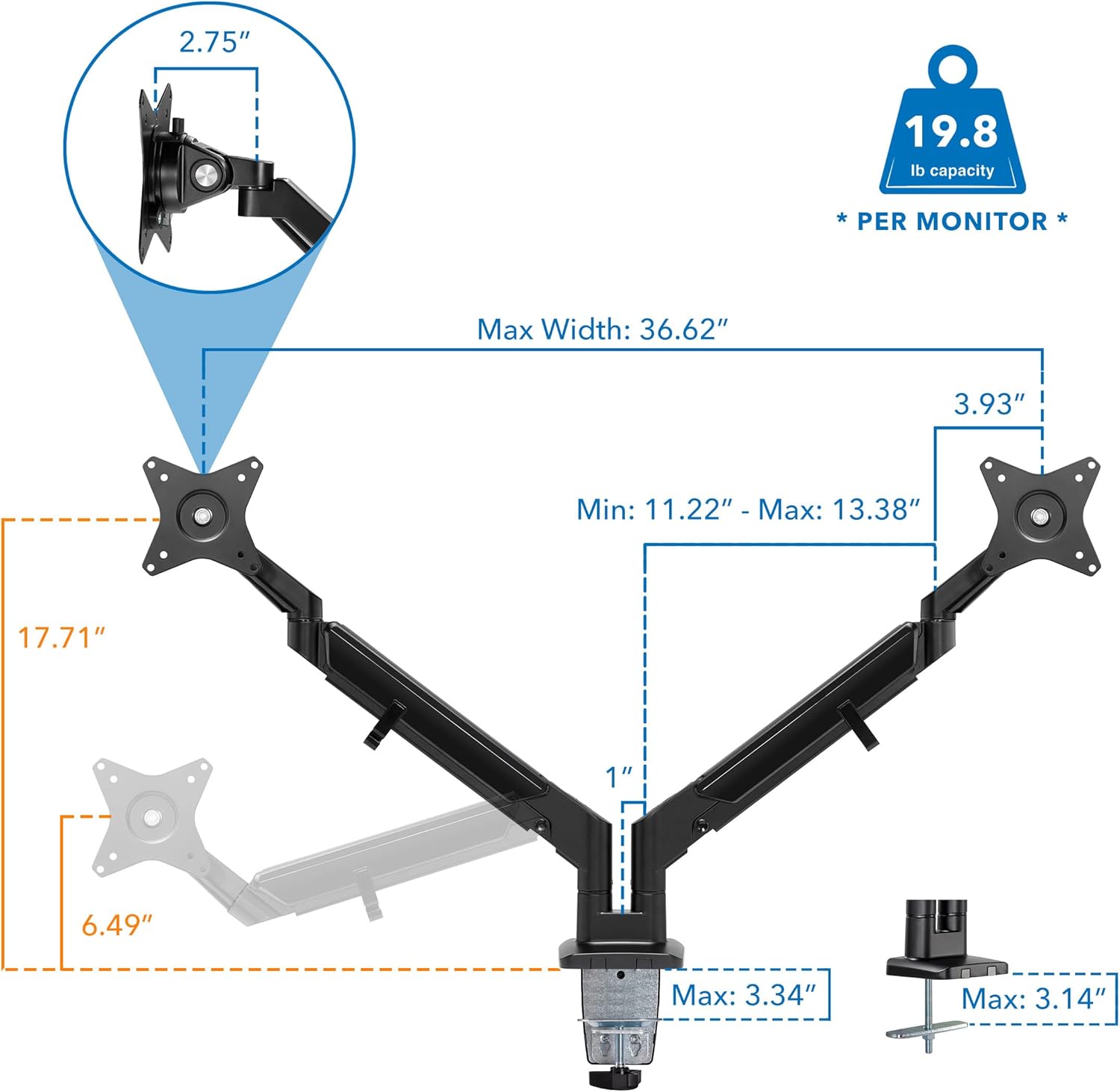
Image: Detailed dimensional diagram of the Mount-It! Dual Monitor Arm, showing height, width, and arm extension measurements.
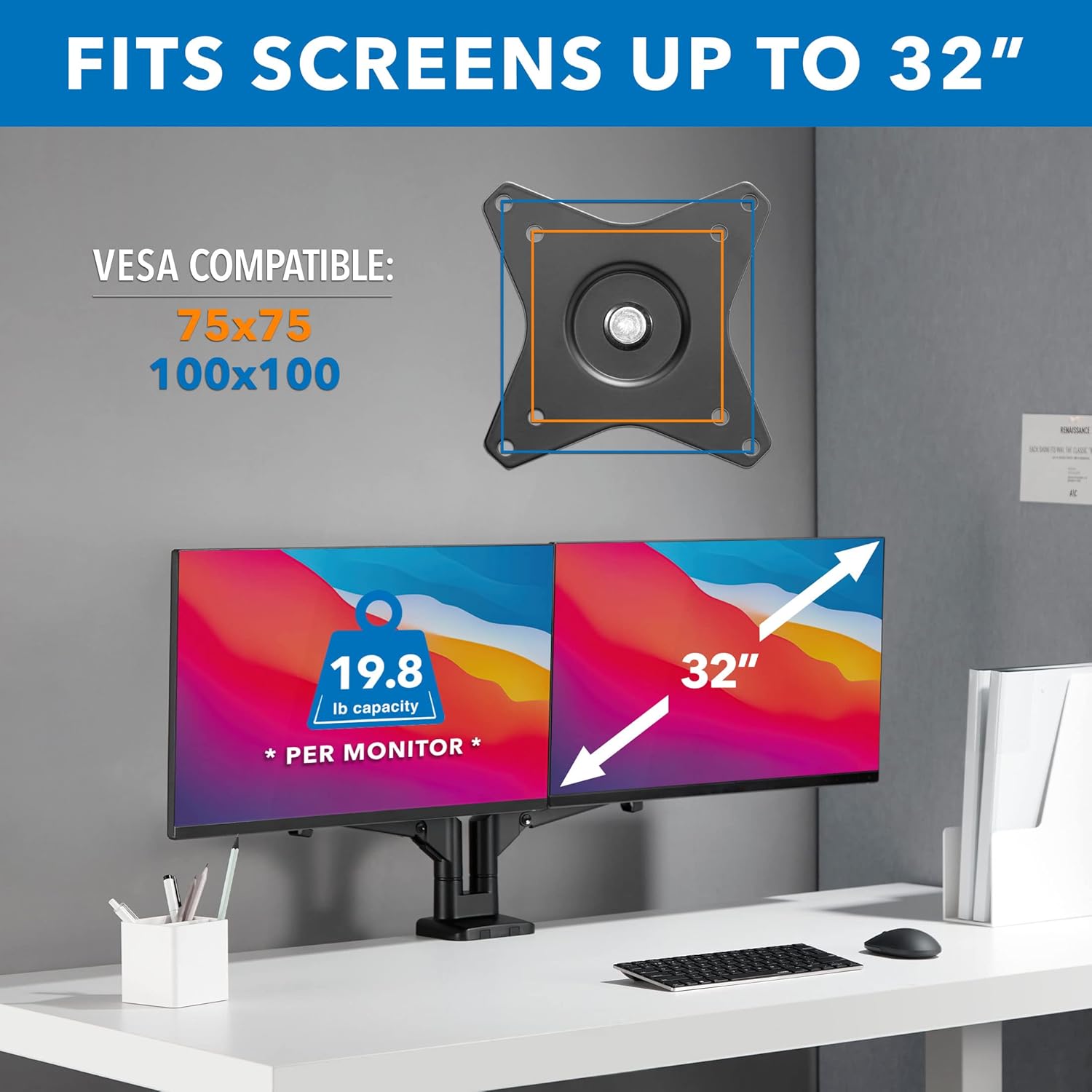
Image: Illustration highlighting VESA compatibility (75x75 and 100x100) and the maximum monitor size of 32 inches with a 19.8 lb capacity per monitor.
9. Warranty and Customer Support
Mount-It! stands behind the quality of its products. This monitor arm is backed by a lifetime warranty.
For technical assistance, missing parts, or warranty claims, please contact our US-based customer support team during standard business hours.
Contact Information:
- Website: www.mount-it.com
- Email: Refer to product packaging or website for current email address.
- Phone: Refer to product packaging or website for current phone number.
Related documentsMI-4884B


Ask a question about this manual
Ask about setup, troubleshooting, compatibility, parts, safety, or missing instructions. Manuals+ will review the question and use this page’s manual context to help answer it.