
1. Important Safety Information
Please read and understand all safety instructions before assembling and using the Radio Flyer Momentum Jogging Stroller. Failure to follow these instructions could result in serious injury.
- Always secure your child with the 5-point safety harness.
- Never leave your child unattended in the stroller.
- Ensure the stroller is fully open and locked before placing a child inside.
- Do not overload the stroller or storage basket. Maximum weight capacity for child is 50 pounds. Maximum weight capacity for basket is 49 pounds.
- Use the wrist strap when jogging to maintain control of the stroller.
- Engage the brakes when the stroller is stationary.
- This stroller is suitable for children aged 6 months to 5 years.
2. Setup and Assembly
The Radio Flyer Momentum Jogging Stroller comes mostly pre-assembled. Only minimal assembly is required, primarily attaching the rear wheels.
2.1 Unboxing and Initial Inspection
Carefully remove all components from the packaging. Inspect all parts for any damage. If any parts are missing or damaged, do not proceed with assembly and contact customer service.
2.2 Attaching the Rear Wheels
- Locate the two rear wheels. Note that they may be marked for left and right orientation.
- Align each wheel with its corresponding axle on the stroller frame.
- Push firmly until you hear a click, indicating the wheel is securely locked in place.
- Pull on each wheel to ensure it is properly attached and cannot be easily removed.
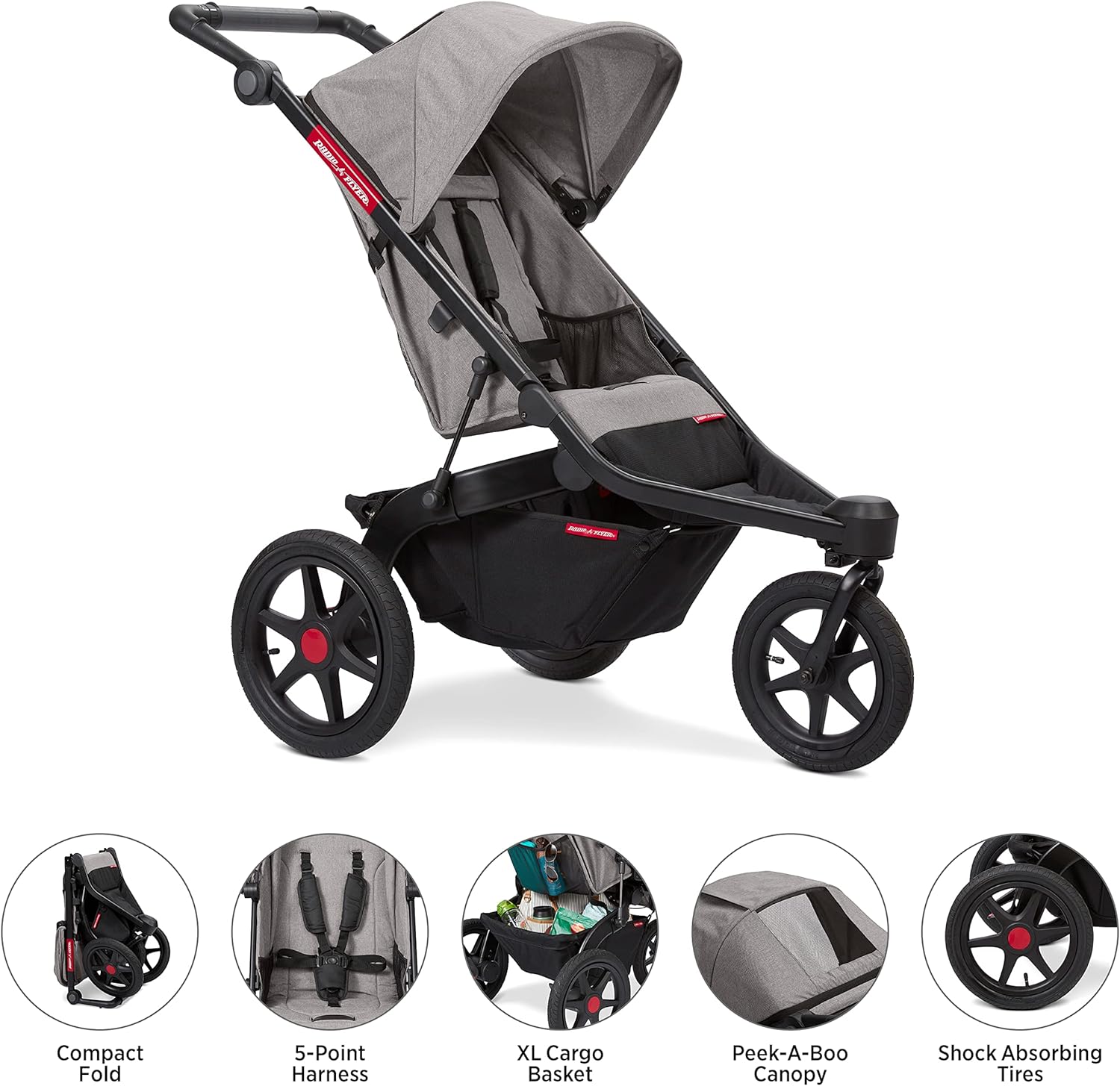
Figure 1: The fully assembled Radio Flyer Momentum Jogging Stroller.
3. Operating Instructions
3.1 Quick Switch Steering (Walk Mode / Jog Mode)
The Quick Switch Steering feature allows you to easily transition between walking and jogging modes by locking or unlocking the front swivel wheel directly from the handlebar.
- Walk Mode (Unlocked Front Wheel): For daily errands and maneuvering in tight spaces, twist the dial on the handlebar to unlock the 12-inch front swivel wheel. This allows for 360-degree rotation and easy steering.
- Jog Mode (Locked Front Wheel): For smooth jogging or navigating uneven terrain, twist the dial on the handlebar to lock the front wheel in a forward-facing position. This provides stability and prevents the wheel from swiveling unexpectedly.

Figure 2: Demonstrating the Quick Switch Steering on the handlebar.
3.2 Handlebar Adjustment
The handlebar is height-adjustable to accommodate users of different heights, ensuring comfortable pushing and control. To adjust, locate the adjustment points on the handlebar and follow the instructions provided in the full assembly guide.
3.3 Folding and Unfolding the Stroller
The Momentum Jogging Stroller features a one-hand fold mechanism and stands upright when folded for compact storage and easy transport.
- Folding: Ensure the child is removed from the stroller. Locate the one-hand fold release mechanism (typically a strap or handle within the seat area). Pull or lift this mechanism while simultaneously pushing the handlebar down. The stroller will collapse and lock into a self-standing position.
- Unfolding: Release the side lock. Lift the handlebar upwards until the stroller frame fully extends and locks into place. Ensure all locking mechanisms are engaged before use.

Figure 3: The stroller in its compact, self-standing folded position.
3.4 Engaging the Brakes
The stroller is equipped with two separate rear wheel brakes for maximum stopping power. To engage the brakes, press down firmly on the brake levers located near each rear wheel until they click into place. Ensure both brakes are engaged when the stroller is stationary. To release, lift the levers upwards.

Figure 4: Engaging the foot-activated rear wheel brake.
3.5 Securing Your Child with the 5-Point Harness
Always secure your child using the adjustable 5-point safety harness. This harness includes shoulder straps, waist straps, and a crotch strap that all connect to a central buckle.
- Place your child in the seat.
- Bring the shoulder straps over your child's shoulders and the waist straps around their hips.
- Connect the shoulder and waist strap buckles into the central buckle until they click.
- Adjust all straps to ensure a snug, secure fit without being too tight.
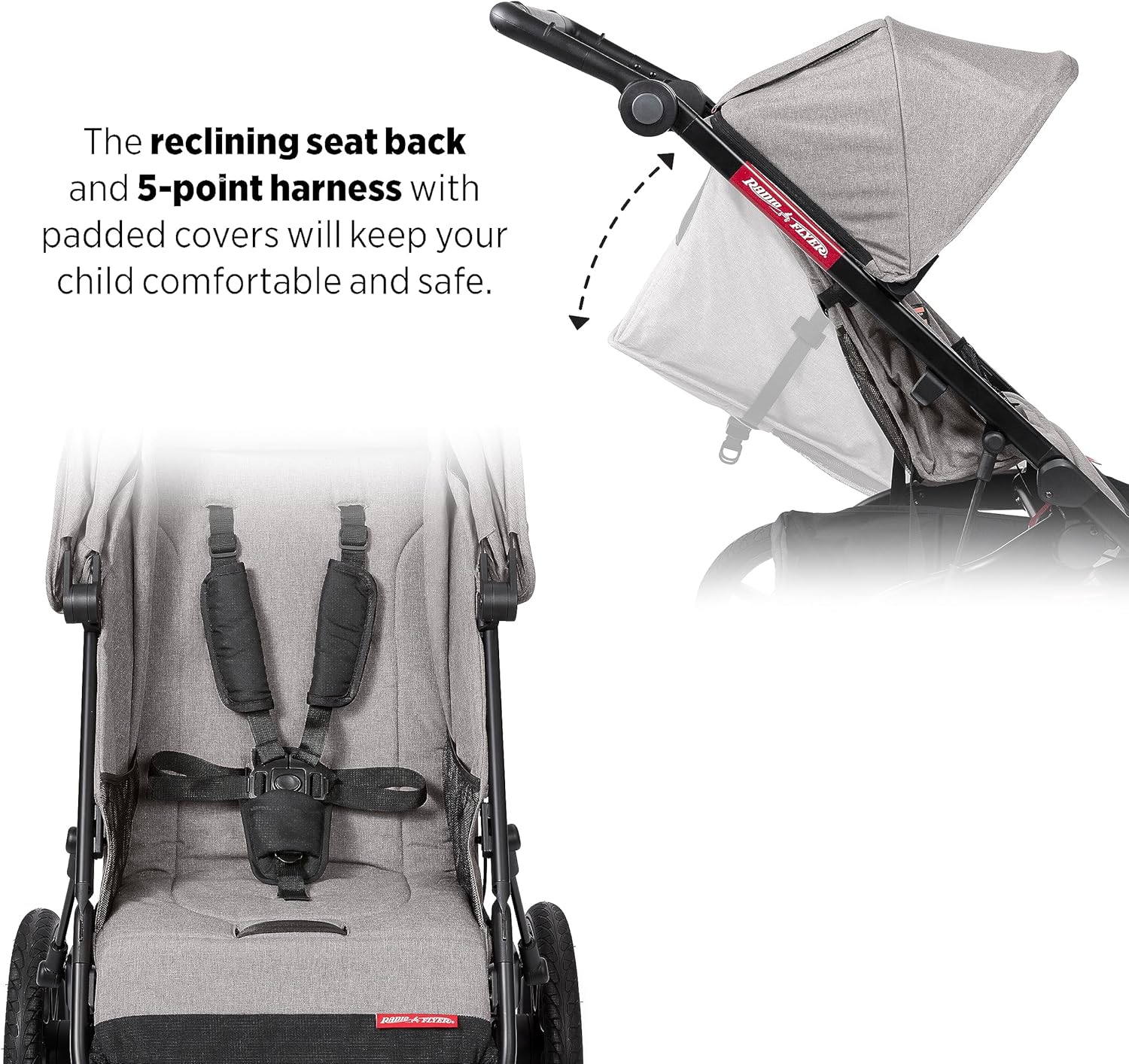
Figure 5: The 5-point safety harness for child security.
3.6 Reclining the Seat
The stroller seat can be reclined to multiple positions for your child's comfort, whether they are awake or napping. Locate the recline adjustment strap or lever behind the seat and adjust to the desired angle.
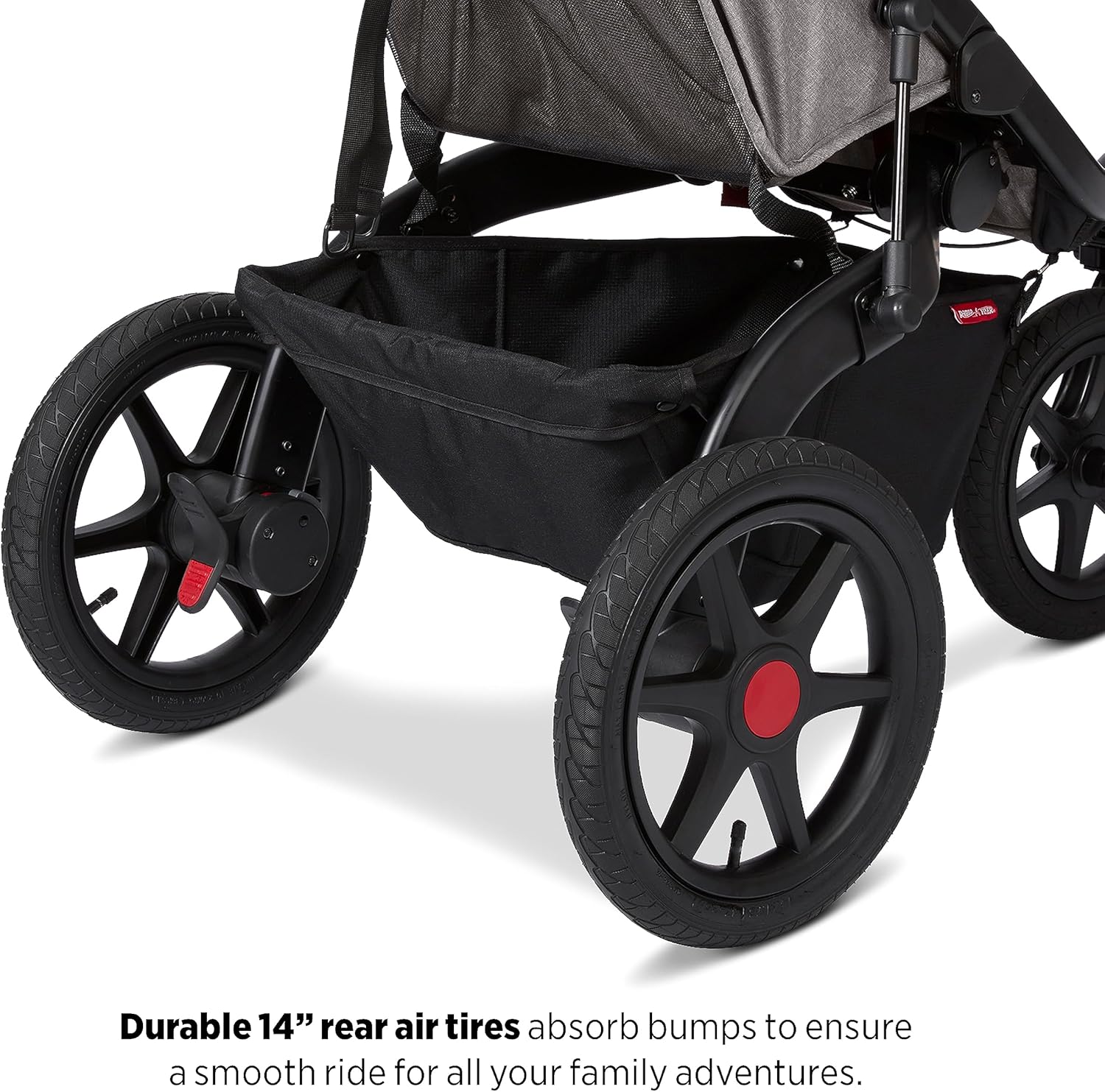
Figure 6: The adjustable reclining seat for child comfort.
3.7 Using the Extendable Canopy
The stroller features an extendable canopy with UPF 50+ protection to shield your child from the sun. It also includes a peek-a-boo mesh window for ventilation and easy visibility of your child.
- Extend the canopy by pulling it forward. For additional coverage, unzip the extra mesh extension.
- Use the peek-a-boo window to check on your child without disturbing them.

Figure 7: The extendable canopy with UPF 50+ protection.

Figure 8: Child visible through the canopy's peek-a-boo mesh window.
3.8 Storage Features
The stroller offers ample storage for your essentials:
- Extra-Large Cargo Basket: Located beneath the seat, this basket provides generous space for diaper bags, backpacks, and other items.
- Internal Zippered Pocket: A secure pocket within the cargo basket is ideal for safely storing small valuables like keys or a phone.
- Internal Snack Pouches: Dual snack pouches are integrated into the child's seat for easy access to snacks and small toys.
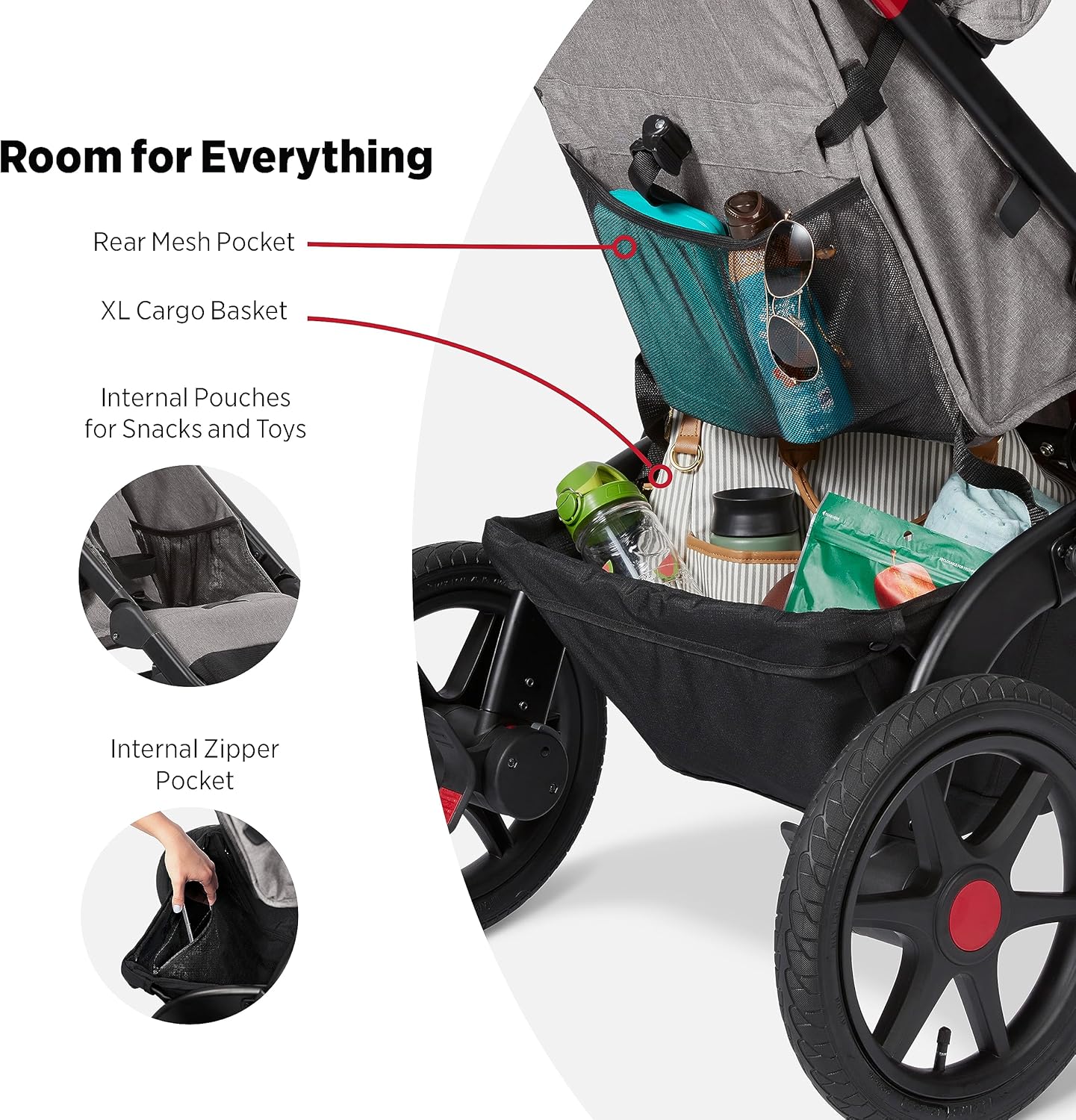
Figure 9: The extra-large cargo basket and internal snack pouches.

Figure 10: Utilizing the internal zippered pocket for valuables.
3.9 Air-Filled Tires
The stroller features 14-inch air-filled rear tires and a 12-inch air-filled front tire, designed to absorb bumps and provide a smooth ride across various terrains. Periodically check tire pressure and inflate as needed using a standard bicycle pump.
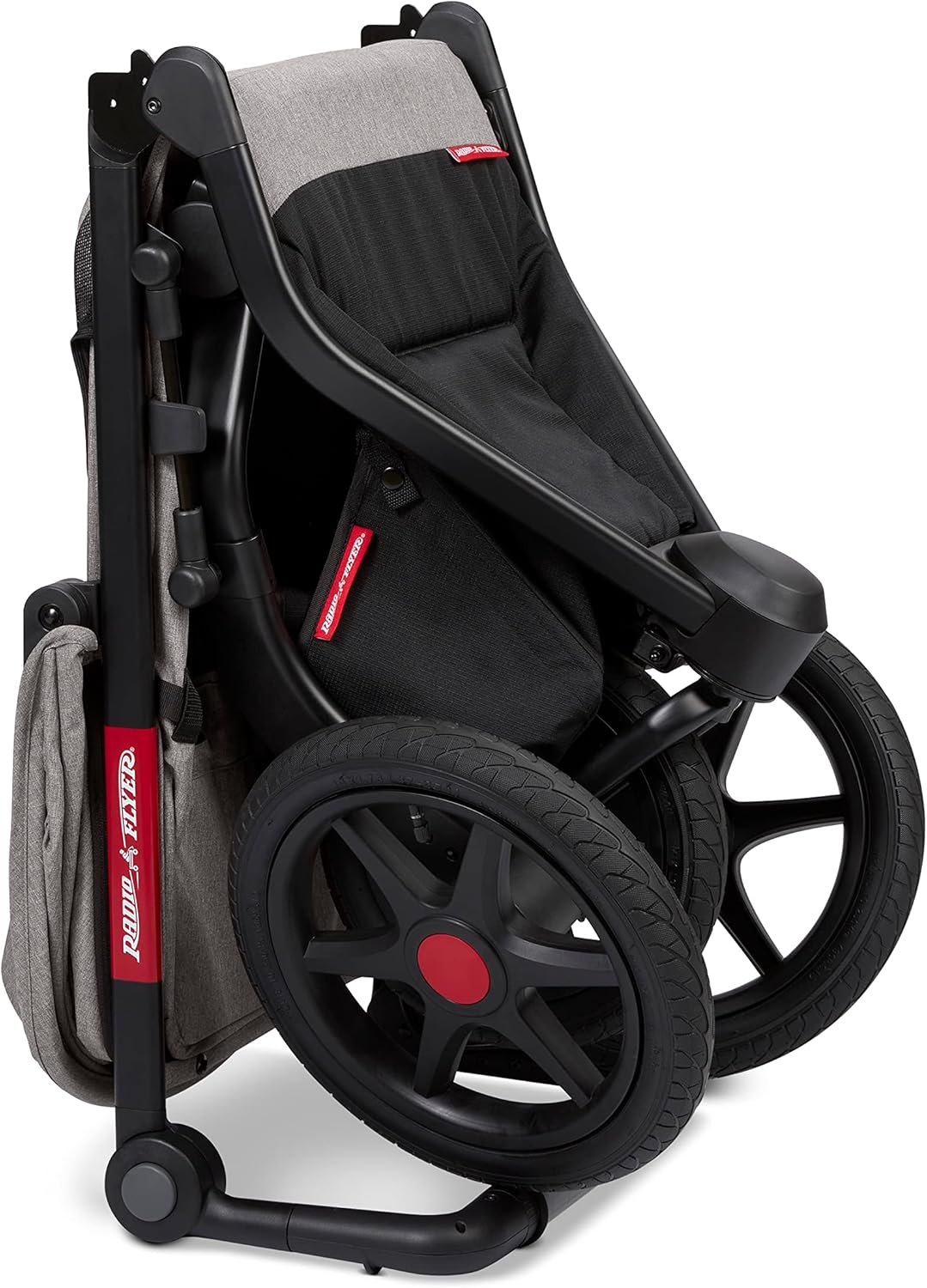
Figure 11: Durable 14-inch air-filled rear tires for a smooth ride.
3.10 Official Product Video
Video 1: Official overview of the Radio Flyer Momentum Jogging Stroller, demonstrating key features and functionality.
4. Maintenance
Regular maintenance ensures the longevity and safe operation of your stroller.
- Cleaning: Clean plastic, aluminum, and steel components with a damp cloth and mild soap. Fabric parts can be spot cleaned. Do not use abrasive cleaners.
- Tires: Regularly check the air pressure in the tires and inflate as needed. Inspect tires for wear and tear.
- Moving Parts: Periodically check all moving parts, such as wheels and folding mechanisms, to ensure they operate smoothly. Lubricate as necessary with a silicone-based lubricant.
- Fasteners: Ensure all screws, bolts, and fasteners are tight. Do not overtighten.
- Storage: Store the stroller in a clean, dry place away from direct sunlight and extreme temperatures.
5. Troubleshooting
If you encounter any issues with your Radio Flyer Momentum Jogging Stroller, please refer to the following common solutions. If the problem persists, contact customer service.
| Problem | Possible Cause | Solution |
|---|---|---|
| Stroller does not fold or unfold smoothly. | Locking mechanism engaged; debris in mechanism; improper technique. | Ensure all locks are disengaged. Clear any obstructions. Refer to Section 3.3 for correct folding/unfolding steps. |
| Front wheel does not swivel or lock correctly. | Quick Switch Steering dial not fully engaged/disengaged; debris in wheel mechanism. | Twist the Quick Switch Steering dial firmly to the desired position. Check for and remove any debris around the front wheel axle. |
| Stroller pulls to one side. | Uneven tire pressure; bent wheel axle; front wheel not aligned. | Check and equalize tire pressure in all three wheels. Ensure the front wheel is properly locked in jog mode or freely swiveling in walk mode. If problem persists, contact support. |
| Brakes are not holding securely. | Brake mechanism needs adjustment; debris obstructing brake. | Clear any debris from the brake area. Ensure the brake levers are fully pressed down. If adjustment is needed, consult the full product manual or contact customer service. |
6. Specifications
| Feature | Detail |
|---|---|
| Brand | Radio Flyer |
| Model Number | 1000 |
| Color | Gray |
| Age Range (Recommended) | 6 Months - 5 Years |
| Maximum Weight Recommendation (Child) | 50 pounds |
| Item Weight | 30.1 pounds |
| Item Dimensions (L x W x H) | 47.2" x 25.8" x 43.3" |
| Folded Size (L x W x H) | 30" x 17" x 12" |
| Frame Material | Plastic, Aluminum, Steel |
| Seat & Canopy Material | Fabric |
| Tire Material | Rubber (Air-filled) |
| Front Wheel Diameter | 12 inches |
| Back Wheel Diameter | 14 inches |
| Basket Weight Capacity Maximum | 49 pounds |
| Harness Type | 5 Point |
| Additional Features | Quick Switch Steering, Height-Adjustable Handlebar with Wrist Strap, One-Hand Fold Mechanism, UPF 50+ Extendable Canopy, Peek-a-Boo Window, Extra-Large Cargo Basket, Internal Snack Pouches, Internal Zippered Pocket |
7. Warranty Information
The Radio Flyer Momentum Jogging Stroller Model 1000 comes with a 1 Year Warranty Against Manufacturer Defects from the date of purchase. This warranty covers defects in materials and workmanship under normal use. It does not cover damage caused by misuse, accidents, unauthorized modifications, or normal wear and tear.
Please retain your proof of purchase for warranty claims.
8. Customer Support
For additional questions, support, or concerns regarding your Radio Flyer Momentum Jogging Stroller, please contact our customer service team:
- Website: https://www.radioflyer.com/customer-service/
- Phone: 1 (800) 621-7613