
Introduction
The Airgain ULTRAMAX Glass antenna is engineered to deliver high-performance connectivity for fleet and public safety vehicles and assets. This manual provides essential instructions for the proper installation, operation, and maintenance of your ULTRAMAX Glass antenna, ensuring optimal performance and longevity.
Product Overview
The ULTRAMAX Glass antenna is a versatile 4-in-1 solution designed for robust in-vehicle communication. Key features include:
- Powerful MIMO Technology: Two embedded LTE elements provide high-performance connectivity for fleet and public safety vehicles and assets.
- Wi-Fi 6 Support: One 2.4 & 5-6 GHz Wi-Fi element supports full HD streaming video and other high-bandwidth applications.
- Global Positioning: One GPS/GNSS element enables accurate vehicle location tracking and route optimization.
- Windshield Mount Design: Utilizes adhesive mounting for installation on the windshield or dashboard, eliminating the need for drilling.
- Covert Installation: The antenna is designed to be discreetly hidden inside the vehicle.
Setup and Installation
Follow these steps for proper installation of your ULTRAMAX Glass antenna:
- Select Mounting Location: Choose a clean, flat surface on your vehicle's windshield or dashboard for optimal signal reception and discreet placement.
- Prepare Surface: Thoroughly clean the chosen mounting surface with an alcohol wipe and allow it to dry completely. This ensures maximum adhesion.
- Apply Adhesive Mount: Carefully peel the backing from the adhesive pad on the antenna. Position the antenna firmly onto the prepared surface, applying pressure for at least 30 seconds to secure it.
- Route Cables: Route the four integrated cables (two LTE, one Wi-Fi, one GNSS) to your compatible router or modem. Ensure cables are routed safely, away from moving parts or areas where they could be pinched or damaged.
- Connect to Device: Connect the SMA Male connectors for LTE and GNSS, and the RP-SMA Male connector for Wi-Fi, to the corresponding ports on your 4G/5G router or modem. Ensure all connections are secure.

Image: The ULTRAMAX Glass antenna with its 10-foot cables, illustrating the connection points for 4G/5G, Wi-Fi, and GNSS to a compatible router or modem.

Image: A driver in a vehicle, demonstrating the antenna's capability to provide reliable 4G and 5G data connectivity on the go.
Operating Instructions
Once the ULTRAMAX Glass antenna is correctly installed and connected to your compatible 4G/5G router or modem, it will begin providing enhanced cellular, Wi-Fi, and GNSS signal reception. Ensure your router/modem is powered on and configured according to its own instruction manual to utilize the antenna's capabilities.
- The two LTE elements work in conjunction with your cellular modem to optimize 4G/5G data speeds and reliability.
- The Wi-Fi element enhances your vehicle's Wi-Fi hotspot capabilities, supporting devices connected to your router.
- The GNSS element provides precise location data to compatible tracking systems or navigation applications.
Maintenance
The ULTRAMAX Glass antenna is designed for durability and requires minimal maintenance. To ensure continued optimal performance:
- Cleaning: Periodically wipe the antenna's exterior with a soft, damp cloth to remove dust or grime. Avoid using harsh chemicals or abrasive cleaners.
- Cable Inspection: Occasionally inspect the cables and connectors for any signs of wear, damage, or loose connections. Ensure cables are not kinked or exposed to excessive heat.
- Adhesive Check: Verify that the adhesive mount remains securely attached to the windshield or dashboard.
Troubleshooting
If you experience issues with your ULTRAMAX Glass antenna, consider the following:
- No Signal or Poor Signal:
- Verify all cable connections are secure at both the antenna and the router/modem.
- Ensure the router/modem is powered on and functioning correctly.
- Check for any obstructions that might be blocking the antenna's signal path.
- Intermittent Connectivity:
- Inspect cables for damage or loose connections.
- Ensure the antenna is firmly mounted and not vibrating excessively.
- GPS/GNSS Inaccuracy:
- Ensure the vehicle has a clear view of the sky for optimal satellite reception.
- Check the GNSS cable connection.
For further assistance, refer to your router/modem's manual or contact Airgain support.
Specifications
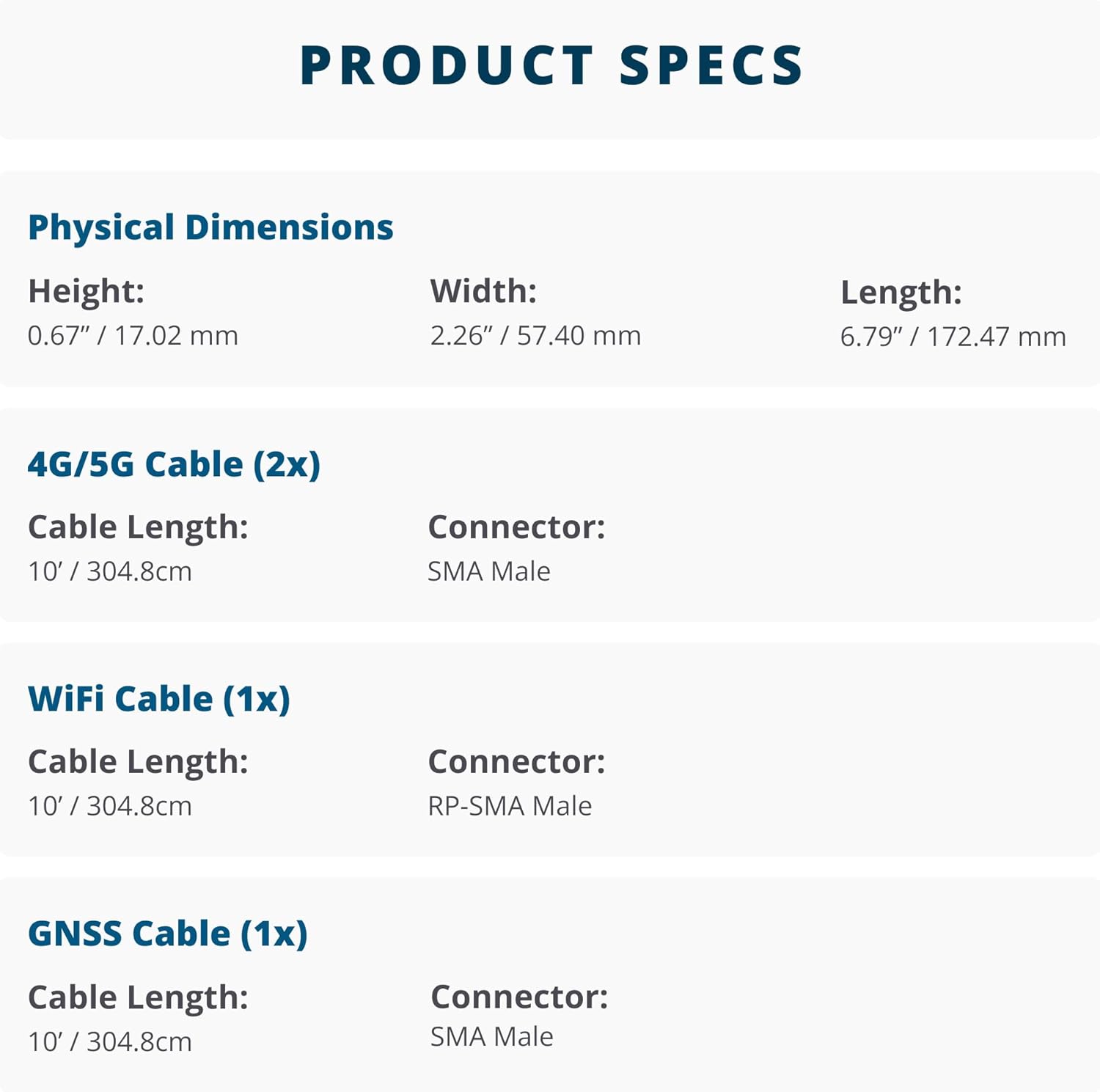
Image: Detailed product specifications including physical dimensions and cable characteristics.
| Feature | Detail |
|---|---|
| Product Dimensions (L x W x H) | 6.79 x 2.26 x 0.67 inches (172.47 x 57.40 x 17.02 mm) |
| Item Weight | 11.2 ounces |
| Impedance | 50 Ohms |
| Color | Black |
| Antenna Type | Multi-band (2x LTE, 1x Wi-Fi, 1x GNSS) |
| 4G/5G Cables (2x) | 10 feet (304.8 cm) length, SMA Male connectors |
| Wi-Fi Cable (1x) | 10 feet (304.8 cm) length, RP-SMA Male connector |
| GNSS Cable (1x) | 10 feet (304.8 cm) length, SMA Male connector |
Compatibility
The Airgain ULTRAMAX Glass antenna is designed for broad compatibility with various networking devices and carriers:

Image: Visual representation of compatible 4G LTE and 5G routers, modems, and major cellular carriers.
- Compatible 4G LTE and 5G Routers and Modems:
- Sierra Wireless
- Cradlepoint
- Peplink
- Cisco
- Meraki
- NETGEAR
- MoFi Network
- MiFi by Inseego
- Compatible Carriers:
- Verizon
- AT&T
- T-Mobile
This antenna works with any 4G/5G devices that feature external antenna ports compatible with the specified connector types.
Warranty and Support
For detailed warranty information, terms, and conditions, please refer to the official Airgain website or the product packaging. For technical support or further inquiries, please contact Airgain customer service through their official channels.


