
AODK Vintage 61 inches
AODK 61" L Shaped Desk Instruction Manual
Model: Vintage 61 inches
Brand: AODK
Introduction
Thank you for choosing the AODK 61" L Shaped Desk. This versatile desk is designed to enhance your home office or gaming setup with ample storage, integrated power outlets, and dynamic LED lighting. This manual provides detailed instructions for assembly, operation, and maintenance to ensure you get the most out of your new desk.
Safety Information
For safe use, do not exceed the maximum weight recommendation of 100 kilograms. Ensure proper assembly for stability and safety. If necessary, anchor the desk to the wall to prevent tipping. Always follow the assembly instructions carefully. Keep small parts away from children during assembly.
Package Contents
Please verify that all components listed below are included in your package before beginning assembly:
- Monitor Stand
- CPU Stand
- Iron Hook
- 2 Open Shelves
- 4 Tier of Drawers
- Power Outlets (3 AC outlets, 2 USB charging ports)
- Engineered Wood Top
- Alloy Steel Base
- LED Lighting Strip
- Assembly Hardware (screws, tools)
Setup and Assembly
For ease and safety, we recommend two people for assembly. Please take out the parts from the package and check all parts are included and in good condition. Follow the steps below carefully.
Assembly Overview Video
Official AODK L Shaped Desk with 4 Drawers installation guide. This video provides a comprehensive visual walkthrough of the assembly process.
Step-by-Step Instructions
- Install Foot Pads: Attach the adjustable foot pads to the bottom of all metal frame components (K, L, R, S, Q).
- Assemble Drawer Unit Frame: Connect the side frames (K, L) with the horizontal bars (M) using the specified screws. Ensure correct orientation for the drawer slides.
- Connect Main Desk Frame: Join the L-shaped sections of the desk frame (Q, L) using the connecting bars (I) and screws. Pay attention to the arrow indications for proper alignment.
- Install Bottom Shelves: Secure the bottom wooden shelves (F, G) to the assembled metal frames using the designated screws.
- Assemble Monitor Stand Frame: Connect the monitor stand legs (R) with the horizontal bars (H) using the specified screws.
- Install Monitor Stand Shelves: Attach the wooden shelves (E, D) to the monitor stand frame (S, R).
- Attach Main Desktop Panels: Carefully place and secure the large desktop panels (A, B) onto the assembled metal frames. Note: Use screws 3 for this step; using incorrect screws may damage the board.
- Install Crossbars: Attach the diagonal crossbars (T) to the back of the desk frame (R, Q) for added stability.
- Assemble Fabric Drawers: Open the fabric drawers (U) and place the drawer base (V) into each. Install the handles (10) using screws (7).
- Insert Drawers: Slide the four assembled fabric drawers into their designated slots in the drawer unit.
- Install Monitor Stand: Secure the monitor stand (C) to the main desk frame (S, N) using the specified screws. The height of the monitor stand can be adjusted as your preference.
- Install LED Strip: First, light the LED strip (15) to distinguish the front and back. Then, stick the 3M adhesive stickers on the back of the strip. Light will be blocked if the stickers are stuck on the front side.
- Attach LED Strip: Stick the LED strip (15) below the monitor stand and use the cable ties (16) to attach the cable to the stand (N).
- Attach Iron Hook: Hang the iron hook (11) on the side of the table leg for headphones or bags.

The AODK L-shaped desk fully assembled, showcasing its spacious design, monitor shelf, and integrated storage.
Operating Instructions
LED Lighting
The desk is equipped with LED lighting featuring 7 colors and 20 lighting modes. Use the control panel located under the monitor shelf to cycle through colors and modes. The memory function ensures the lights stay on the last selected mode when turned on again.
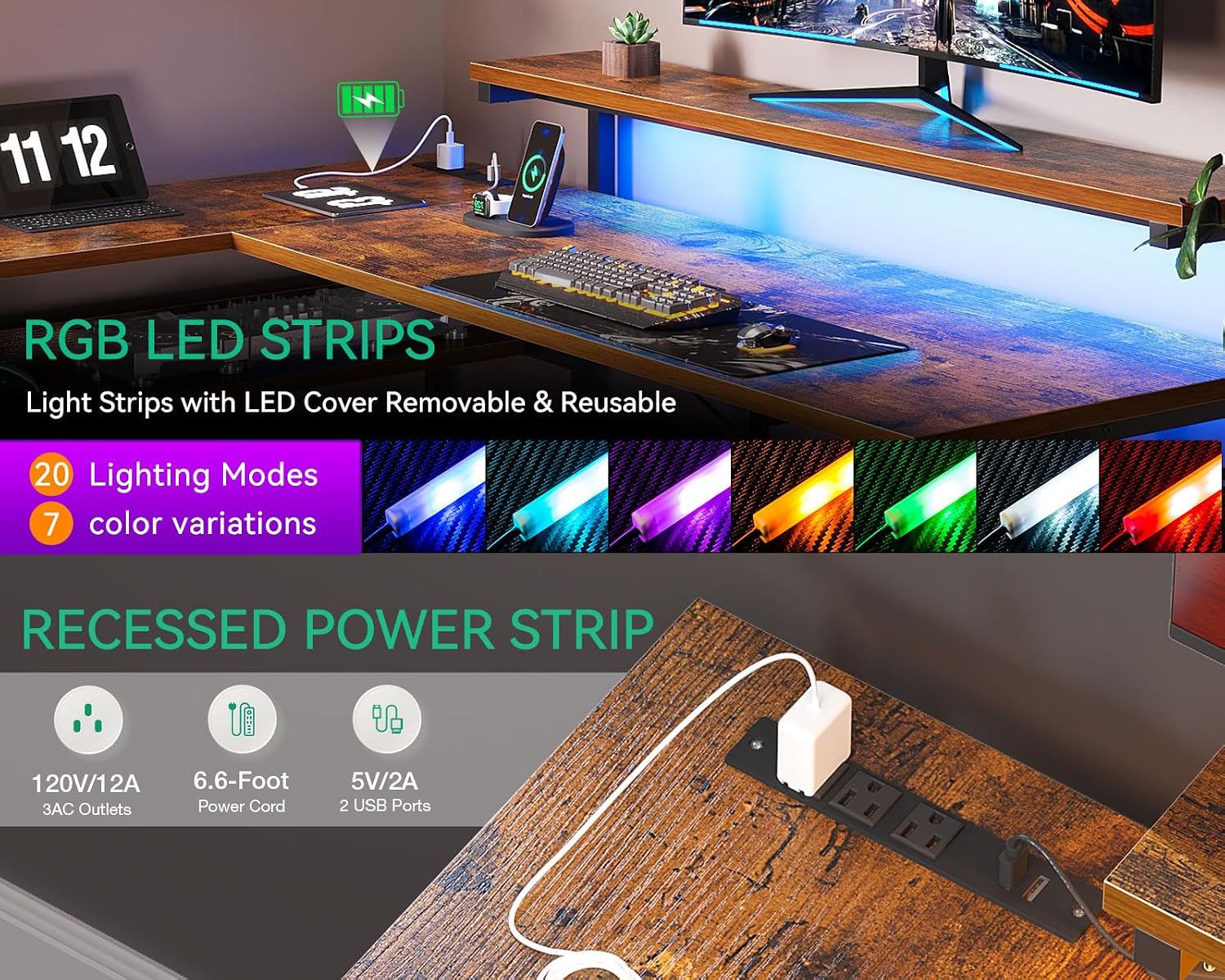
Detailed view of the RGB LED strips and the convenient recessed power strip with AC outlets and USB ports.
USB Charging Ports & Power Outlets
The L-shaped computer desk includes 3 power outlets and 2 USB charging ports. These are conveniently located on the desktop for easy access, allowing you to charge your electronic devices, gaming gear, or Bluetooth devices while working or gaming.
Adjustable Monitor Stand
The ergonomic monitor stand is height-adjustable to reduce back and neck stress by promoting a better sitting posture. Adjust the stand to your preferred height for optimal viewing comfort.

The monitor stand offers multiple height adjustments for ergonomic comfort.
Storage Space
The desk provides extensive storage with 1 monitor stand, 1 CPU stand, 1 iron hook, 2 open shelves, and 4 tiers of drawers. These features help organize books, work files, and small office items, making your workspace more efficient.

The four fabric storage drawers provide ample space to keep your desktop neat and tidy.
Maintenance
To maintain the quality and appearance of your AODK desk, follow these simple guidelines:
- Cleaning: Wipe surfaces with a soft, damp cloth. Avoid harsh chemicals or abrasive cleaners that may damage the finish.
- Dusting: Regularly dust the desk with a dry, soft cloth to prevent buildup.
- Spills: Clean up spills immediately to prevent staining or damage to the wood and metal components.
- Weight Limit: Do not exceed the maximum weight recommendation of 100 kilograms to ensure stability and prevent damage.
Troubleshooting
If you encounter any issues with your AODK desk, please refer to the common problems and solutions below:
- Missing Parts: If your desk arrives with missing parts, please contact AODK customer support immediately.
- Assembly Difficulties: Ensure all parts are correctly oriented according to the instructions. Some holes may appear misaligned if parts are flipped. Refer to the assembly video for visual guidance.
- LED Lights Not Working: Check all cable connections for the LED strip and power supply. Ensure the power outlet is functional.
- Desk Instability: Verify that all screws are tightened securely. Ensure the adjustable foot pads are properly leveled on an even surface.
For further assistance, please contact our professional customer support team.
Specifications
| Feature | Detail |
|---|---|
| Brand | AODK |
| Product Dimensions | 18.9"D x 61.02"W x 29.72"H |
| Color | Vintage |
| Style | Vintage |
| Base Material | Alloy Steel |
| Top Material Type | Engineered Wood |
| Special Feature | Reversible, LED Lighting |
| Recommended Uses | Working, Gaming |
| Item Weight | 68 Pounds |
| Number of Drawers | 4 |
| Maximum Weight Recommendation | 100 Kilograms |
| Required Assembly | Yes (Recommended 2 people) |
Warranty and Support
AODK offers a 30-day easy returns policy. If your AODK computer desk arrives damaged, missing parts, or scratched, please feel free to contact us. Our professional customer support team will help you solve the problem within 24 hours.
For direct support, please visit the AODK Store on Amazon.
Ask a question about this manual
Ask about setup, troubleshooting, compatibility, parts, safety, or missing instructions. Manuals+ will review the question and use this page’s manual context to help answer it.