Introduction
This manual provides comprehensive instructions for the PERFASCIN replacement remote control, designed for use with various AUX Air Conditioner models. This remote control operates via infrared (IR) technology and requires no programming or pairing. Simply insert batteries to begin operation.
Setup
Battery Installation
- Locate the battery compartment on the back of the remote control.
- Slide the battery compartment cover downwards to open it. Refer to the image below for guidance.
- Insert two (2) new 1.5V AAA alkaline batteries, ensuring the correct polarity (+ and -) as indicated inside the compartment.
- Slide the battery compartment cover back into place until it clicks securely.

Figure 1: Back view of the remote control, highlighting the battery compartment. The cover slides down for battery access.
The remote control is now ready for use with your compatible AUX Air Conditioner.
Operating Instructions
Point the remote control directly at the infrared receiver on your AUX Air Conditioner unit. Ensure there are no obstructions between the remote and the unit.
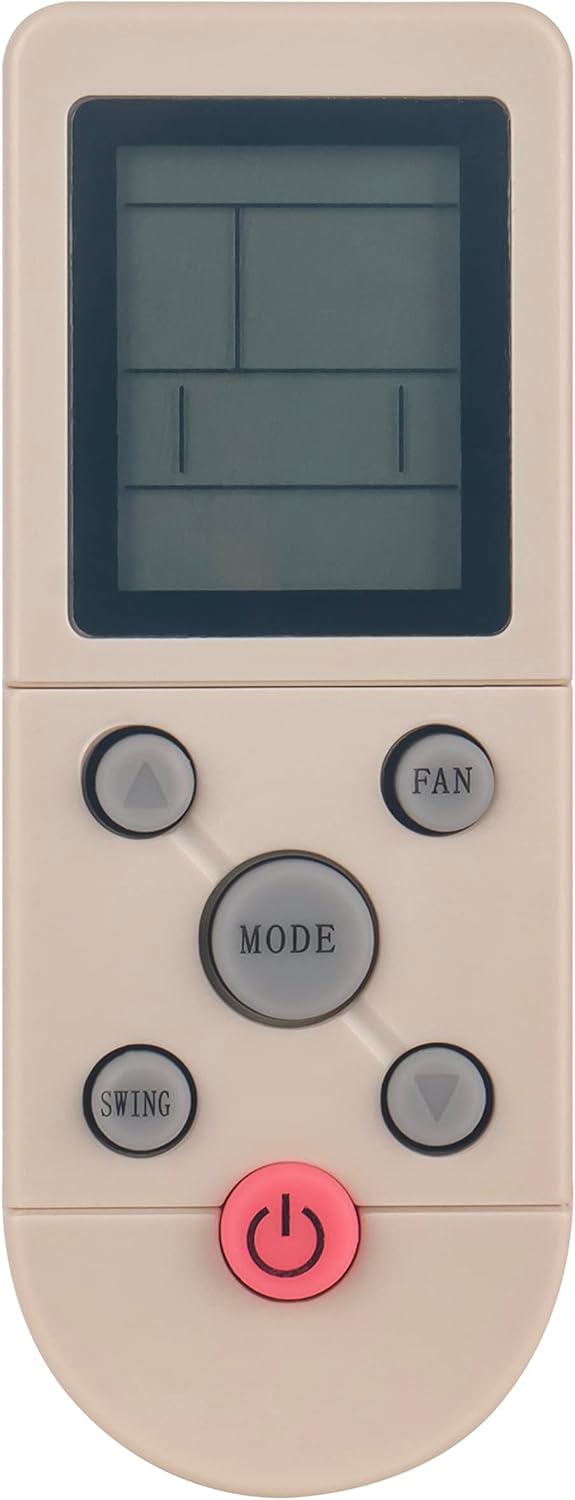
Figure 2: Front view of the remote control, displaying the LCD screen and primary control buttons.
Button Functions
- Power Button (Red, bottom center): Press to turn the air conditioner ON or OFF.
- MODE Button (Center): Press repeatedly to cycle through available operating modes (e.g., Cool, Heat, Fan, Dry, Auto). The current mode will be displayed on the remote's LCD screen.
- FAN Button (Top right): Press to adjust the fan speed (e.g., Low, Medium, High, Auto).
- SWING Button (Bottom left): Press to activate or adjust the louver swing function, controlling airflow direction.
- Temperature Adjustment Buttons (Up/Down arrows, top left and bottom right): Use these buttons to increase or decrease the desired temperature setting.

Figure 3: Angled view of the remote control, providing a clearer perspective of the button layout and ergonomic design.
Maintenance
Battery Replacement
Replace batteries when the remote control's display becomes dim or when the air conditioner no longer responds reliably to commands. Always replace both batteries simultaneously with new 1.5V AAA alkaline batteries.
Cleaning
Wipe the remote control with a soft, dry cloth. Do not use liquid cleaners, abrasive materials, or chemical solvents, as these can damage the remote's surface or internal components.
Troubleshooting
| Problem | Possible Cause | Solution |
|---|---|---|
| Remote control not working. | Dead or incorrectly inserted batteries. | Replace batteries with new 1.5V AAA alkaline batteries, ensuring correct polarity. |
| Air conditioner not responding. | Obstruction between remote and AC unit; remote out of range; AC unit's IR receiver blocked. | Ensure a clear line of sight. Move closer to the AC unit. Check if anything is blocking the AC unit's IR receiver. |
| Limited operating range. | Weak batteries. | Replace batteries. |
Specifications
- Product Dimensions: 7 x 2 x 0.65 inches
- Item Weight: 2.3 ounces
- Power Supply: 2 x 1.5V AAA Alkaline Battery (not included)
- Connectivity Technology: Infrared (IR)
- Compatible Devices: AUX Air Conditioners (YKR-F/001, YKR-F/09R/010, YKR-F/09E, YK-F/001, YKR-F/006, YKR-F/06)
- Model Number: ANG-AUX-F06-US
Warranty and Support
This PERFASCIN replacement remote control is designed to function as described. For any issues or further assistance, please contact the seller or manufacturer directly. Specific warranty details may vary and are typically provided at the point of purchase.


