
Lemorele R100
Contents
Lemorele R100 Wireless HDMI Video Transmission System User Manual
Model: R100 | Brand: Lemorele
1. Introduction and Overview
The Lemorele R100 Wireless HDMI Video Transmission System is designed for seamless wireless video and audio transmission, ideal for photography, videography, live broadcasts, and home theater setups. This plug-and-play kit requires no drivers or complex network configurations. It features a built-in electrostatic discharge (ESD) protection circuit for stable operation and includes loop-out and infrared (IR) functions for enhanced versatility.

Image: The Lemorele R100 Wireless HDMI Transmitter (TX) and Receiver (RX) units.
2. Product Features
- Wireless HDMI Video Transmission System: Plug and play, no drivers or network required. Features built-in ESD protection, loop-out, and infrared functions for various scenarios like live broadcasts, sporting events, weddings, photography, videography, and home theater.
- 2.4/5.8G Dual Frequency & 656FT Long Distance: Dual-antenna design with 2.4/5.8G dual-band wireless transmission protocol. Automatically switches frequency in complex environments for stable signal. Achieves up to 656 feet (200 meters) transmission in open environments. Note: Walls or obstacles may affect distance and speed.

Image: Illustration of the 2.4 GHz and 5 GHz dual-band technology for stable wireless transmission.

Image: Demonstrates the 656ft (200M) transmission range in an outdoor setting.
- HDMI Local Loop-out + IR Backhaul: The R100 transmitter (TX) includes one HDMI input and one HDMI loop output. This allows for local monitoring of captured footage during photography or video recording. Supports IR return function (20-60KHz) for remote control.

Image: The transmitter unit highlighting HDMI In and HDMI Out ports for looping out to a monitor.
- 1080P Full HD: Supports full HD uncompressed input/output resolution up to 1080P@60Hz, ensuring clear and vivid video details. Compatible with various HDMI devices including DVD players, DVRs, Blu-ray players, set-top boxes, HDTVs, projectors, and monitors.

Image: Demonstrates direct video for live streaming in 1080P 60Hz with no compression.
- 0.06s Low Latency and 1TX to Multiple RX Support: Features ultra-low latency of 0.06 seconds. Supports flexible expansion modes from 1 transmitter to up to 4 receivers, allowing quick switching between devices and easy signal sharing. Additional receivers can be purchased separately. Note: Transmission distance may decrease with more receivers.
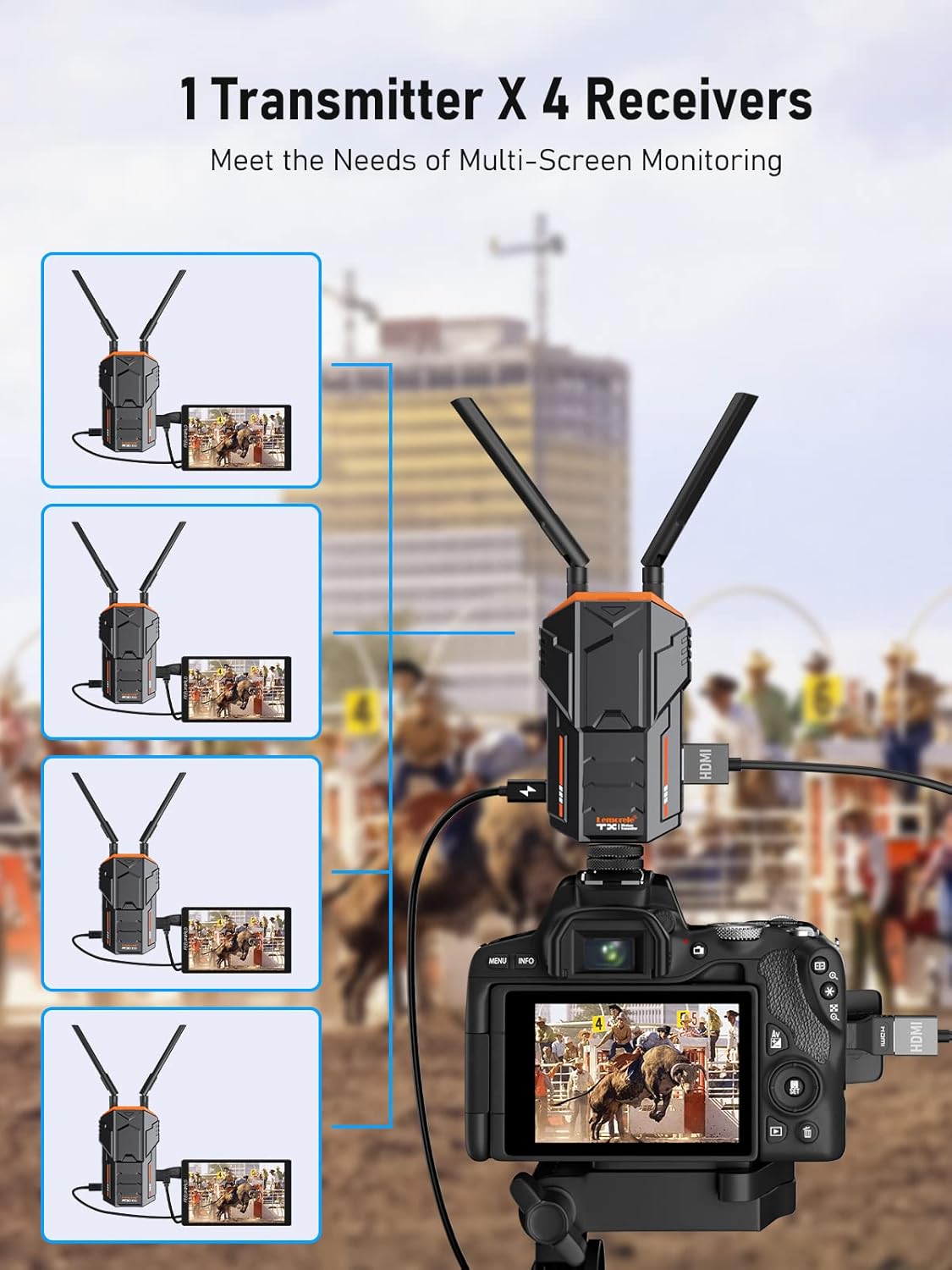
Image: Illustrates the capability of one transmitter connecting to up to four receivers for multi-screen monitoring.
3. Package Contents
The Lemorele R100 Wireless HDMI Video Transmission System package includes the following components:
- 1 x HDMI Transmitter (TX)
- 1 x HDMI Receiver (RX)
- 4 x Antennas
- 2 x HDMI Cables (50CM)
- 2 x Power Adapters (with interchangeable international plugs)
- 2 x USB-C Power Cables
- 1 x IR Receiver Cable
- 1 x IR Transmitter Cable
- 1 x Cold Shoe mount
- 1 x Micro-HDMI Adapter
- 1 x Mini-HDMI Adapter
- 1 x User Manual (this document)
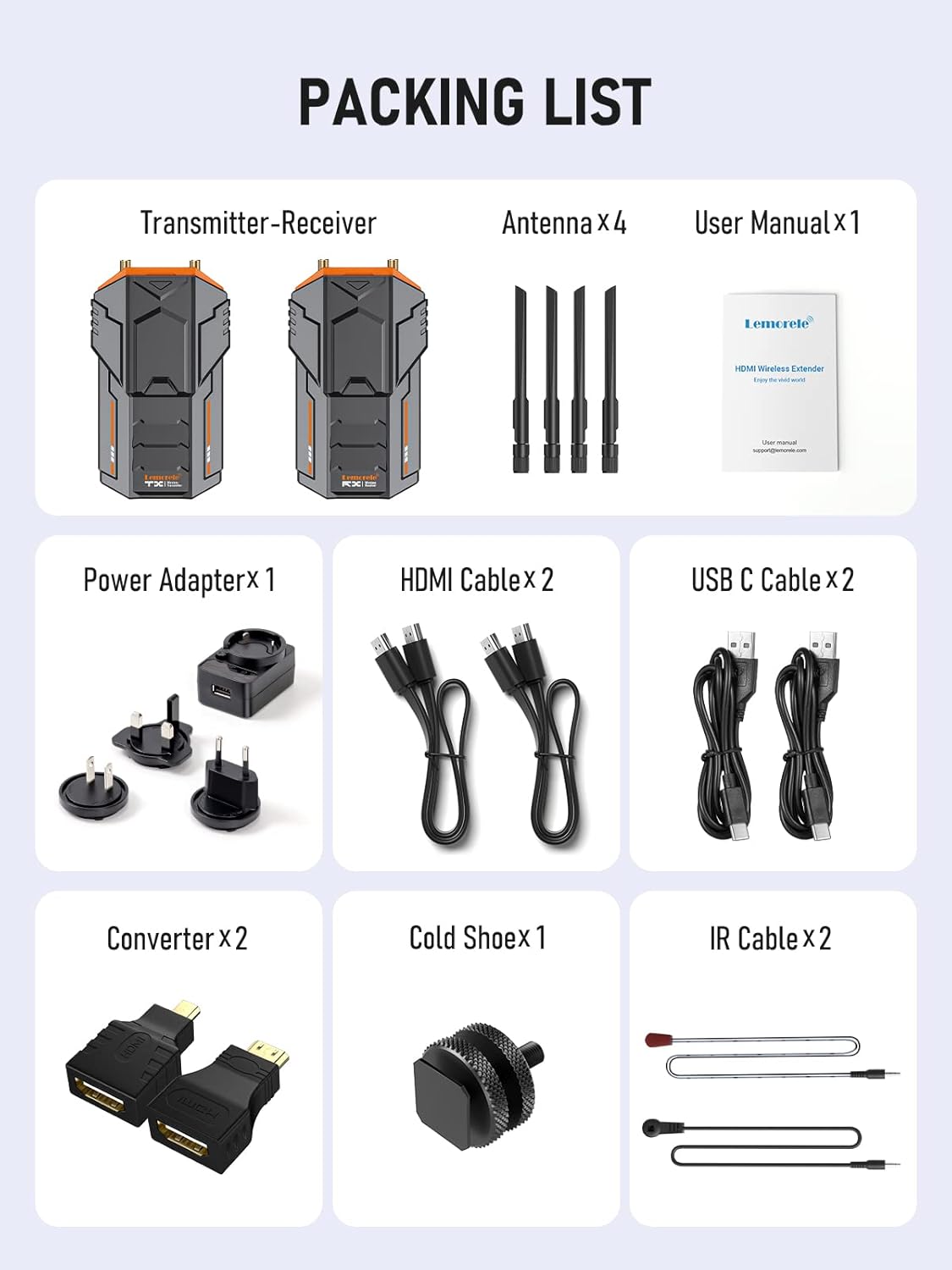
Image: Detailed view of all items included in the product package.
4. Setup Guide
Follow these steps to set up your Lemorele R100 Wireless HDMI Video Transmission System:
- Connect TX Antennas: First, connect the two antennas to the designated ports on the Transmitter (TX) unit. Ensure they are securely tightened.
- Power the TX Unit: Connect one of the provided power adapters and USB-C cable to the TX unit's power input.
- Connect HDMI to TX: Connect an HDMI cable from your video source (e.g., camera, laptop) to the HDMI IN connector on the TX unit. If connecting to a camera, you may use the included Micro-HDMI or Mini-HDMI adapters as needed.
- Mount TX (Optional): If using with a camera, insert the cold shoe mount into your camera's hot shoe, then attach the TX unit to the cold shoe.

Image: Easy installation of the transmitter onto a camera using the integrated cold shoe.
- Power the RX Unit: Connect the second power adapter and USB-C cable to the Receiver (RX) unit's power input.
- Connect RX to Monitor: Connect an HDMI cable from the RX unit's HDMI OUT port to your display monitor's HDMI input.
- Power On: Ensure both TX and RX units are powered on. The units will automatically attempt to connect. Wait for a successful connection, indicated by stable indicator lights, and your system will be ready for use.
Video: R100 Wireless HDMI Transmitter and Receiver Operating Guide. This video demonstrates the step-by-step setup and initial operation of the system, including connecting antennas, power, HDMI cables, and mounting the transmitter to a camera.
5. Operating Instructions
5.1 Basic Operation
Once both the Transmitter (TX) and Receiver (RX) units are powered on and connected as per the setup guide, they will automatically establish a wireless connection. The video signal from your source connected to the TX will be transmitted to the monitor connected to the RX.
5.2 Loop-Out Function
The TX unit features an HDMI loop-out port. This allows you to connect a local monitor directly to the TX unit to view the input signal simultaneously while it is being wirelessly transmitted to the RX unit. This is particularly useful for on-site monitoring during filming or presentations.
5.3 IR Backhaul Function
The IR backhaul function enables you to control your source device (e.g., DVD player, set-top box) remotely from the location of your receiver. Connect the IR transmitter cable to the TX unit and position its emitter near the IR sensor of your source device. Connect the IR receiver cable to the RX unit and position its receiver to face your remote control. This allows your remote control signals to be sent back to the source device.
5.4 Multi-Receiver Setup (1-to-4)
The Lemorele R100 system supports connecting one transmitter to up to four receivers simultaneously. To add additional receivers, ensure they are powered on and within range. The system will automatically detect and connect to them. While this offers great flexibility for multi-screen monitoring, be aware that adding more receivers may slightly reduce the overall wireless transmission distance.

Image: Examples of wide-ranging applications for the Lemorele R100 system.
6. Maintenance
To ensure the longevity and optimal performance of your Lemorele R100 system, follow these maintenance guidelines:
- Cleaning: Use a soft, dry cloth to clean the exterior of the units. Avoid using liquid cleaners or solvents, which may damage the surface or internal components.
- Storage: When not in use, store the units and accessories in a cool, dry place, away from direct sunlight and extreme temperatures.
- Antennas: Handle the antennas with care. Avoid bending or applying excessive force, as this can damage the connectors.
- Ventilation: Ensure the units have adequate ventilation during operation. Do not block the ventilation holes. The transmitter has a built-in fan for effective cooling.

Image: Illustration of the built-in fan for effective cooling within the transmitter.
7. Troubleshooting
If you encounter issues with your Lemorele R100 system, refer to the following common troubleshooting steps:
| Problem | Possible Cause | Solution |
|---|---|---|
| No signal on monitor / "No HDMI Signal" message |
|
|
| Intermittent signal / Video flickering |
|
|
| Audio/Video Sync Issues (Latency) |
|
|
| IR Remote Control not working |
|
|
8. Specifications
| Feature | Detail |
|---|---|
| Product Dimensions | 4.61 x 2.76 x 0.98 inches |
| Item Weight | 0.176 ounces |
| Model Number | R100 |
| Color | Black |
| Connector Type | HDMI |
| Compatible Devices | Satellite Receiver, Monitor, DVD Player, IPTV, CCTV, Camera |
| Cable Type | USB, HDMI |
| Transmission Range | Up to 656 feet (200 meters) in open environment |
| Latency | 0.06 seconds |
| Resolution Support | Up to 1080P@60Hz Full HD |
| Wireless Frequency | 2.4G/5.8G Dual Band |
| Multi-RX Support | 1 Transmitter to up to 4 Receivers |
9. Warranty and Support
Lemorele provides comprehensive support for your R100 Wireless HDMI Video Transmission System:
- Warranty: Enjoy a 1-year warranty from the date of purchase.
- Returns & Exchanges: Hassle-free returns or exchanges are available.
- Customer Service: 24/7 customer service is available to assist with any inquiries or issues.
- User Manual (PDF): For a downloadable version of the user manual, please refer to the official product page or contact customer support.
Ask a question about this manual
Ask about setup, troubleshooting, compatibility, parts, safety, or missing instructions. Manuals+ will review the question and use this page’s manual context to help answer it.