1. Product Overview
The Scubapro Classic BCD with AIR2 is a robust and reliable buoyancy control device designed for scuba diving. It combines traditional design principles with modern construction techniques to offer durability and performance. This BCD is constructed from puncture-resistant 420 denier nylon with RF welded seams for maximum integrity.
Key features include:
- Puncture-resistant polyurethane-coated 420 denier nylon construction.
- RF welded seams for maximum durability and leak prevention.
- Stainless steel Super-Cinch tank band buckle system for secure tank attachment.
- High-quality web waist belt and stainless steel cam buckle.
- Large pre-bent stainless steel D-rings for accessory attachment.
- Integrated quick-release weight system for safety and convenience.
- Available with a balanced power inflator or AIR2 alternate air source.
- Fully adjustable cummerbund for a snug fit and suit compression compensation.
- Two large Velcro pockets with knife attachment grommets and two zippered pockets for gear storage.
- Rear trim pouches for achieving a balanced swimming position.
- Four large pre-bent stainless steel D-rings and two small stainless steel D-rings for additional clip-on points.

Figure 1: Front view of the Scubapro Classic BCD with AIR2. This image shows the overall design, including the integrated AIR2 system, pockets, and D-rings.
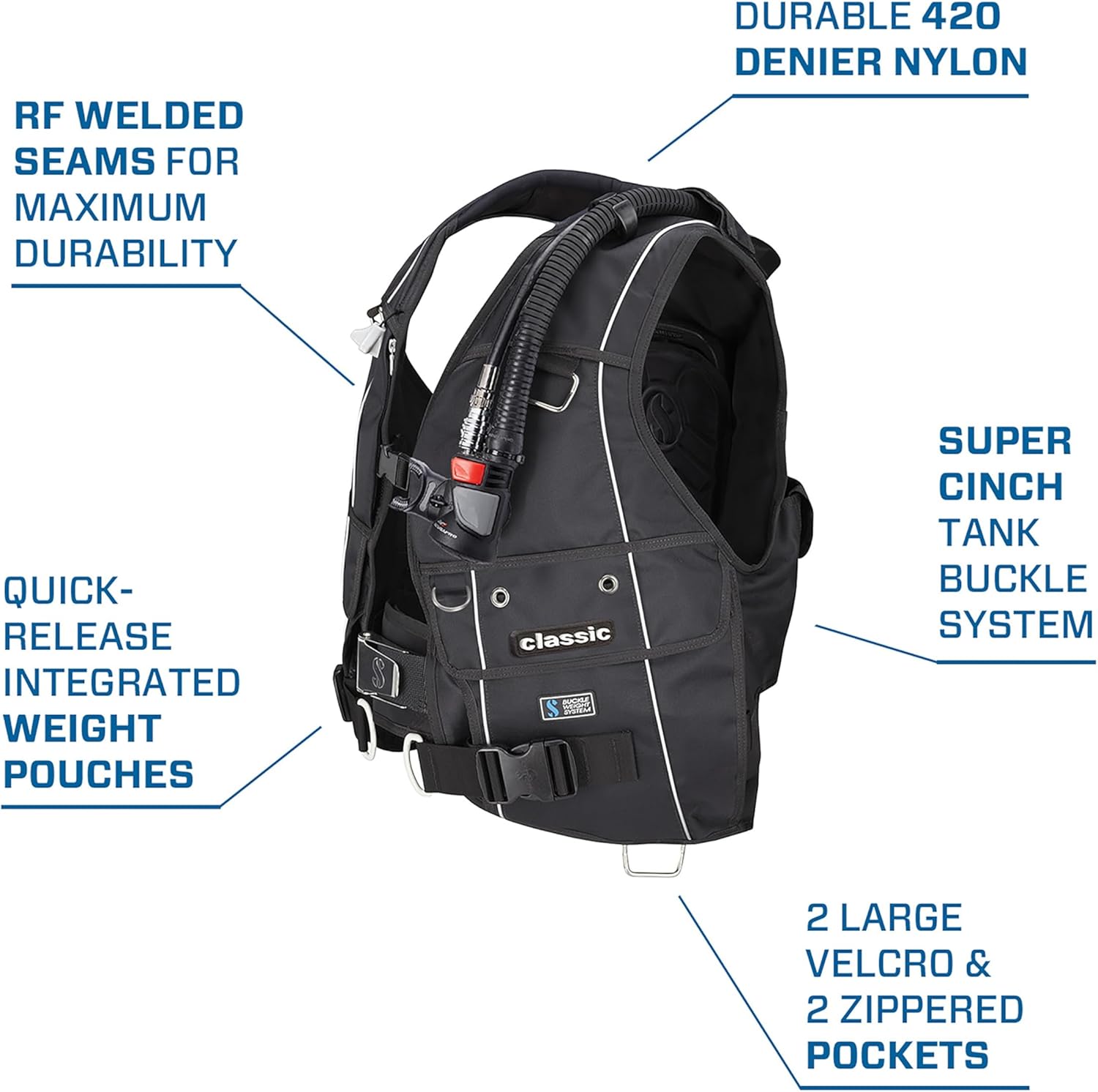
Figure 2: Detailed view highlighting key features of the Scubapro Classic BCD, including durable nylon, RF welded seams, Super Cinch tank buckle system, quick-release integrated weight pouches, and multiple pockets.
2. Setup Instructions
Before your first dive, ensure the BCD is correctly assembled and fitted.
- Attach to Scuba Tank:
- Position the BCD on the tank so the tank valve aligns with the BCD's tank band.
- Secure the stainless steel Super-Cinch tank band buckle system firmly around the tank. Ensure the tank is centered and stable.
- Connect Inflator Hose:
- Connect the low-pressure inflator hose from your first stage regulator to the BCD's inflator mechanism (either balanced power inflator or AIR2).
- Ensure a secure connection by pushing the hose connector onto the BCD's inflator post until it clicks into place.
- Adjust Straps:
- Don the BCD and adjust the shoulder straps, cummerbund, and chest strap for a snug, comfortable fit. The BCD should not shift excessively when moving.
- The fully adjustable cummerbund helps maintain fit at various depths and compensates for suit compression.
- Load Integrated Weight System:
- Insert appropriate weights into the quick-release integrated weight pouches.
- Securely insert the pouches into their designated slots on the BCD. Ensure the quick-release mechanisms are easily accessible and functional.
- If using rear trim pouches, distribute additional weight as needed for optimal balance.
3. Operating Instructions
Proper operation of your BCD is crucial for safety and comfort during dives.
- Inflation:
- To inflate the BCD, press the inflation button on the power inflator (or AIR2). Use short bursts to control buoyancy.
- For oral inflation, remove the inflator mouthpiece and blow into it.
- Deflation:
- To deflate, press the deflation button on the power inflator (or AIR2).
- Alternatively, use the BCD's dump valves (shoulder, lower rear) by pulling the respective toggles.
- When ascending, hold the inflator hose above your head and press the deflate button to vent air.
- Weight Release:
- In an emergency, pull the quick-release handles on the integrated weight pouches firmly to jettison weights. Practice this procedure in a controlled environment.
- Accessory Attachment:
- Utilize the large pre-bent stainless steel D-rings and smaller D-rings for attaching accessories such as gauges, lights, or cameras.
- The two large Velcro pockets with knife attachment grommets and two zippered pockets provide secure storage for dive essentials.
4. Care and Maintenance
Regular maintenance extends the life of your BCD and ensures its reliability.
- Rinsing: After each dive, thoroughly rinse the BCD with fresh water, both inside and out. Inflate the BCD partially, fill with fresh water through the inflator, shake, and drain through the dump valves.
- Drying: Hang the BCD in a shaded, well-ventilated area to dry completely. Avoid direct sunlight, which can degrade materials.
- Storage: Store the BCD partially inflated in a cool, dry place away from chemicals, heat sources, and direct sunlight. Do not store folded tightly.
- Inspection: Periodically inspect all straps, buckles, hoses, and seams for signs of wear, damage, or corrosion. Check the inflator and dump valves for proper function.
- Professional Servicing: Have your BCD professionally serviced annually by an authorized Scubapro technician.
5. Troubleshooting
This section addresses common issues you might encounter with your BCD.
| Problem | Possible Cause | Solution |
|---|---|---|
| BCD leaks air | Loose inflator hose, faulty inflator valve, damaged bladder, open dump valve. | Check hose connection. Inspect inflator and dump valves for debris or damage. Check bladder for punctures. If issue persists, seek professional service. |
| Inflator button sticks | Salt crystal buildup, debris, worn O-rings. | Thoroughly rinse inflator with fresh water. Gently work the button. If still sticking, professional service is required. |
| Difficulty deflating | Stuck dump valve, kinked inflator hose, debris in valve. | Check all dump valves for free movement. Ensure inflator hose is not kinked. Rinse thoroughly. |
| Weight pouches won't release | Mechanism jammed, improper insertion. | Ensure pouches are inserted correctly. Practice release mechanism regularly. If jammed, inspect for debris. |
6. Product Specifications
| Feature | Detail |
|---|---|
| Product Model Number | 22.108.150 |
| Color | Black |
| Size | X-Small |
| Hand Orientation | Ambidextrous (1 set) |
| Material | Nylon |
| Type | Outdoor Lifestyle, Boat |
| Batteries Included or Built-in | No |
| Package Dimensions | 53.34 x 49.53 x 12.7 cm; 4.22 kg |
| Target Audience | Unisex |
| ASIN | B005VYO7L8 |
| First Available on Amazon.co.jp | 2023/5/19 |

Figure 3: Scubapro Classic BCD size chart, providing dimensions for height, weight, cummerbund circumference, lift capacity, and jacket weight across various sizes.
7. Warranty and Support
For warranty information, please refer to the official Scubapro website or contact your authorized Scubapro dealer. Keep your proof of purchase for any warranty claims.
For technical support, service, or spare parts, please contact an authorized Scubapro service center. Regular professional servicing is recommended to maintain product performance and validate warranty.
You can find more information and contact details on the official Scubapro website: www.scubapro.com


