1. Introduction
This manual provides essential information for the safe and efficient use of your iiyama ProLite XB2481HSU-B5 monitor. Please read this manual thoroughly before operating the product and retain it for future reference.
The iiyama ProLite XB2481HSU-B5 is a 23.8-inch Full HD (1920x1080) monitor featuring a VA panel, designed to provide stable color display from various viewing angles. It includes versatile ergonomic adjustments such as height, pivot, swivel, and tilt, along with multiple connectivity options.
2. Safety Information
- Always place the monitor on a stable, level surface to prevent it from falling.
- Do not block ventilation openings. Ensure adequate space around the monitor for proper airflow.
- Use only the power cord and adapters supplied with the monitor.
- Avoid exposing the monitor to extreme temperatures, humidity, or direct sunlight.
- Do not attempt to repair the monitor yourself. Refer all servicing to qualified service personnel.
- Disconnect the power plug from the outlet during lightning storms or when unused for long periods.
3. Package Contents
Verify that all the following items are included in your product package:
- iiyama ProLite XB2481HSU-B5 Monitor
- Stand Base (with fixing screw)
- Stand Neck
- HDMI Cable (1.5m)
- DisplayPort Cable (1.8m)
- USB Cable (1.5m)
- Power Cord (1.8m, for AC100V)
- L-shaped Driver
- Safety & Quick Start Guide (includes Warranty Card)
4. Setup
4.1. Monitor Assembly
Follow these steps to assemble the monitor stand:
- Carefully place the monitor screen face down on a soft, clean cloth to prevent scratches.
- Attach the stand neck to the back of the monitor. Ensure it clicks securely into place or is fastened with screws if applicable.
- Attach the stand base to the bottom of the stand neck. Secure it with the provided fixing screw using the L-shaped driver.

4.2. Connecting Cables
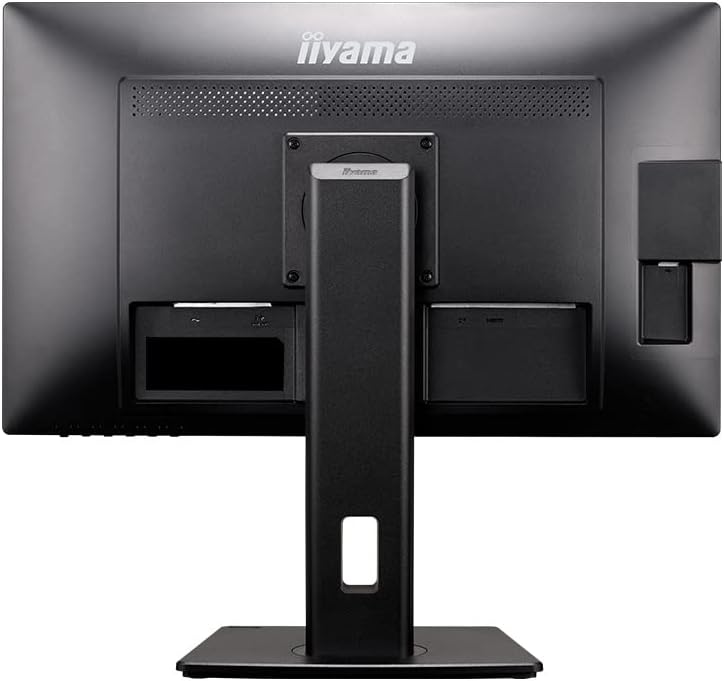
Connect the necessary cables to the corresponding ports on the monitor and your computer:
- Video Connection: Connect one end of the HDMI cable or DisplayPort cable to the monitor's input port and the other end to the corresponding output port on your computer.
- USB Connection: Connect the USB cable from your computer to the monitor's upstream USB port to enable the monitor's USB hub functionality.
- Power Connection: Connect the power cord to the monitor's AC input and then plug the other end into a grounded electrical outlet.

4.3. Power On
Press the power button located on the front or bottom of the monitor to turn it on. The power indicator light will illuminate.
5. Operating the Monitor
5.1. On-Screen Display (OSD) Controls
The monitor features an On-Screen Display (OSD) menu for adjusting various settings. Use the control buttons, typically located on the bottom right bezel, to navigate the menu:
- Menu Button: Opens the OSD menu.
- Navigation Buttons: Used to move through menu options (Up/Down, Left/Right).
- Enter/Select Button: Confirms a selection or enters a sub-menu.
- Exit Button: Exits the current menu or OSD.
5.2. Ergonomic Adjustments
The ProLite XB2481HSU-B5 offers several ergonomic adjustments for optimal viewing comfort:
- Height Adjustment: The monitor can be adjusted vertically by 150mm. Gently push or pull the monitor panel up or down while holding the base for stability.
- Tilt: The screen can be tilted upwards by 23 degrees and downwards by 5 degrees. Hold the top and bottom edges of the screen and gently adjust the angle.
- Swivel: The monitor can swivel 45 degrees to the left and 45 degrees to the right. Rotate the monitor panel horizontally on its stand.
- Pivot: The screen can be rotated 90 degrees clockwise into portrait mode. Ensure the screen is at its highest position and tilted back slightly before pivoting to avoid contact with the desk.


5.3. Input Selection
To switch between HDMI and DisplayPort inputs, use the OSD menu or a dedicated input selection button if available on your monitor model.
6. Maintenance
6.1. Cleaning the Monitor
- Always unplug the monitor from the power outlet before cleaning.
- Use a soft, lint-free cloth lightly dampened with water or a mild, non-abrasive screen cleaner.
- Do not spray cleaner directly onto the screen.
- Avoid using harsh chemicals, solvents, or abrasive materials, as they can damage the screen and casing.
7. Troubleshooting
If you encounter issues with your monitor, refer to the following common problems and solutions:
- No Power: Ensure the power cord is securely connected to both the monitor and a working electrical outlet. Check if the power indicator light is on.
- No Image: Verify that the video cable (HDMI or DisplayPort) is correctly connected to both the monitor and your computer. Ensure the correct input source is selected on the monitor.
- Flickering or Distorted Image: Check the video cable for damage or loose connections. Try a different video cable or port. Ensure your computer's display resolution and refresh rate are compatible with the monitor's specifications.
- OSD Menu Not Appearing: Ensure the monitor is powered on. Press the Menu button firmly.
- No Sound from Speakers: Check the audio settings in the OSD menu and on your computer. Ensure the volume is not muted and is set to an audible level.
If the problem persists after attempting these solutions, please contact iiyama support.
8. Specifications
Detailed technical specifications for the iiyama ProLite XB2481HSU-B5 monitor:
| Feature | Specification |
|---|---|
| Brand | iiyama |
| Model Number | XB2481HSU-B5 |
| Screen Size | 23.8 inches |
| Panel Type | VA Panel, Non-glare |
| Resolution | 1920 x 1080 (Full HD 1080p) |
| Refresh Rate | 60 Hz |
| Response Time | 4ms (GtoG) |
| Connectivity | HDMI x 1, DisplayPort x 1, USB |
| Speakers | 2W x 2 |
| Height Adjustment | 150mm |
| Swivel | 45 degrees left / 45 degrees right |
| Pivot | 90 degrees right rotation |
| Tilt | Up 23 degrees / Down 5 degrees |
| VESA Compatibility | VESA DDC2B |
| Product Dimensions (W x D x H) | 55.25 x 20.95 x 34.95~49.95 cm |
| Item Weight | 5.8 kg |
| Power Source | AC |

9. Warranty and Support
9.1. Manufacturer's Warranty
The iiyama ProLite XB2481HSU-B5 monitor comes with a 3-year manufacturer's warranty. Please refer to the Warranty Card included in your Quick Start Guide for full terms and conditions.
In case of initial defects or any issues covered under warranty, please contact iiyama support directly.
9.2. Customer Support
For technical assistance, troubleshooting, or warranty claims, please contact iiyama customer support:
- Phone: 03-3570-6374
- Website: iiyama Official Product Page (for reference and additional information)


