
SimpliSafe CM006-01RUS
SimpliSafe Smart Alarm Wireless Indoor Security Camera User Manual
Model: CM006-01RUS
Introduction
The SimpliSafe Smart Alarm Wireless Indoor Security Camera is designed to enhance your home security system with advanced monitoring capabilities. This camera integrates seamlessly with your SimpliSafe Gen 3 security system, providing real-time intruder intervention and comprehensive surveillance.
Key features include:
- Intruder Intervention: Allows security agents to see and speak to intruders through two-way audio, deterring them and enabling faster emergency dispatch.
- Built-in Siren: An 80 dB siren can be triggered to further deter intruders.
- Advanced Motion Detection with AI: Differentiates between pets (under 50 lbs) and potential intruders to reduce false alarms.
- High-Definition Video: Captures 1536p HD video with 10x digital zoom and 125° field of view, even in low light conditions with night vision.
- Real-time Monitoring: Livestream, record, and download videos via the SimpliSafe App.
- Instant Alerts: Receive phone notifications for unusual activity.
- Automated Privacy Shutter: Provides peace of mind by physically covering the camera lens when not in use.
- Flexible Power Options: Can be powered via a 10-foot USB charging cable or its built-in rechargeable battery for wireless placement.
Setup and Installation
Before installation, ensure your SimpliSafe Gen 3 security system is set up and operational, and you have a stable Wi-Fi connection (2.4 GHz recommended, as 5G Wi-Fi is not supported).
Package Contents:
- SimpliSafe Smart Alarm Wireless Indoor Security Camera
- 10-foot USB charging cable
- Option to wall mount or table stand
- Screw kit
Placement Guidelines:
Optimal placement is crucial for effective monitoring and motion detection. Consider the following:
- For table placement, position the camera on a flat shelf at least 4 feet off the ground.
- For wall mounting, install the camera near a wall corner, 6 to 7 feet high, and angled approximately 20 degrees downwards for maximum coverage.
- Avoid placing the camera directly next to light-colored walls if using night vision, as infrared light can reflect and reduce image clarity.

Figure 1: The camera can be easily mounted to a wall or placed on a shelf for flexible positioning.
Powering the Camera:
The camera can be powered in two ways:
- Wired Connection: Plug the provided 10-foot USB charging cable into the camera and a USB power adapter (not included) connected to a wall outlet.
- Wireless Operation: Utilize the built-in rechargeable Lithium Ion battery. This allows for placement without a constant power connection. Ensure the battery is fully charged before initial wireless use.

Figure 2: Front view of the camera, showing the lens and motion sensor.

Figure 3: Angled view of the camera, highlighting its compact design.
Operating the Camera
Connecting to Your System:
The camera is designed for seamless integration with the SimpliSafe Gen 3 security system. Follow the instructions in your SimpliSafe app to add the camera to your existing system. A stable Wi-Fi connection is required for operation.
Live View and Recording:
Access live video feeds, record events, and download real-time videos of your home directly from the SimpliSafe App. The camera provides 1536p HD video capture with a 125° field of view and 10x digital zoom.

Figure 4: Livestreaming and recording capabilities through the SimpliSafe App.

Figure 5: Visual representation of the camera's high-definition and night vision capabilities.
Motion Detection and AI:
The camera features advanced, AI-powered motion detection that can distinguish between pets (under 50 lbs) and potential human intruders. This helps to minimize false alarms and ensures you receive relevant alerts.
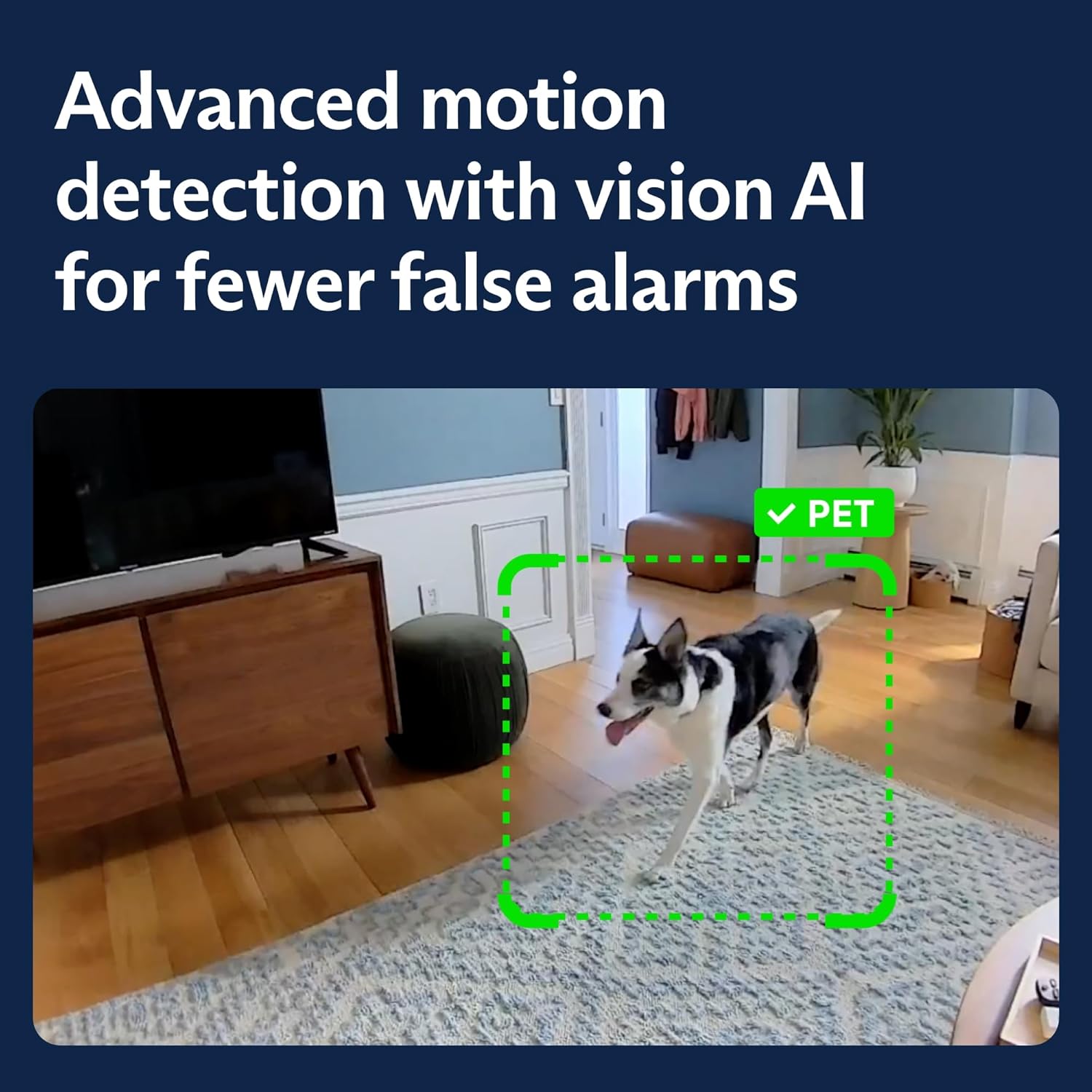
Figure 6: Advanced motion detection with vision AI for fewer false alarms.
Intruder Intervention and Siren:
In the event of an alarm, SimpliSafe security agents can utilize the camera's two-way audio feature to communicate directly with intruders, deterring them. The camera also has a built-in 80 dB siren that can be activated to create additional noise and scare away unauthorized individuals.

Figure 7: Intruder intervention feature, allowing agents to communicate through the camera.

Figure 8: The camera triggers the alarm and sounds a built-in 80 dB siren.
Privacy Shutter:
The camera includes an automated privacy shutter that physically covers the lens when the system is disarmed or in "Home" mode, ensuring your privacy when you are present.
Instant Phone Alerts:
Receive immediate notifications on your smartphone when the camera detects unusual activity, keeping you informed about what's happening at home, even when you're away.

Figure 9: Instant phone alerts notify you of detected activity.
Maintenance
To ensure optimal performance and longevity of your SimpliSafe Smart Alarm Wireless Indoor Security Camera, regular maintenance is recommended:
- Cleaning: Gently wipe the camera lens and body with a soft, dry cloth to remove dust and smudges. Avoid using harsh chemicals or abrasive materials.
- Battery Management: If operating wirelessly, monitor the battery level via the SimpliSafe App and recharge as needed using the provided USB cable.
- Software Updates: Ensure your SimpliSafe app and camera firmware are up to date. Updates often include performance improvements and new features.
- Connectivity Check: Periodically verify that the camera maintains a stable Wi-Fi connection to prevent interruptions in monitoring.
Troubleshooting
If you encounter issues with your SimpliSafe Smart Alarm Wireless Indoor Security Camera, refer to the following common solutions:
| Problem | Possible Cause / Solution |
|---|---|
| Camera not connecting to Wi-Fi or frequently dropping connection. |
|
| Frequent false alarms from motion detection. |
|
| Poor night vision quality. |
|
| Camera not recording or livestreaming. |
|
Specifications
| Feature | Detail |
|---|---|
| Model Name | Smart Alarm Indoor Camera |
| Model Number | CM006-01RUS |
| Indoor/Outdoor Usage | Indoor |
| Video Capture Resolution | 1536p HD |
| Field of View | 125° |
| Digital Zoom | 10x |
| Night Vision | Yes (Night Color technology) |
| Audio | 2-Way Audio |
| Siren Sound Level | 80 dB |
| Motion Sensor | Yes, with AI detection (pets under 50 lbs) |
| Privacy Feature | Automated privacy shutter |
| Connectivity | Wi-Fi (2.4 GHz) |
| Power Source | Built-in rechargeable Lithium Ion battery, USB charging cable |
| Compatible Devices | SimpliSafe Gen 3 security system, Desktop, Laptop, Smartphone (via App) |
| Dimensions (L x W x H) | 2.95 x 1.46 x 4.53 inches |
| Item Weight | 0.49 ounces (approx. 13.88 g) |
| Color | White |
| Control Method | App, Amazon Alexa |
| UPC | 843261113153 |
Warranty Information
The SimpliSafe Smart Alarm Wireless Indoor Security Camera comes with a 1 Year Manufacturer Warranty. For detailed terms and conditions, please refer to the warranty documentation included with your product or visit the official SimpliSafe website.
Support
For further assistance, technical support, or to purchase additional SimpliSafe products, please visit the official SimpliSafe website or contact their customer service. You can also find more information and resources on the SimpliSafe Store on Amazon.
Ask a question about this manual
Ask about setup, troubleshooting, compatibility, parts, safety, or missing instructions. Manuals+ will review the question and use this page’s manual context to help answer it.