1. Important Safety Information
Please read this manual thoroughly before operating your Mylek Portable Air Conditioning Unit. Keep this manual for future reference.
General Safety Precautions
- Ensure the unit is placed on a flat, stable surface to prevent tipping.
- Do not block air inlets or outlets. Maintain at least 30cm clearance around the unit.
- Do not insert objects into the unit's openings.
- Keep the unit away from heat sources, direct sunlight, and flammable materials.
- This appliance is not intended for use by persons (including children) with reduced physical, sensory or mental capabilities, or lack of experience and knowledge, unless they have been given supervision or instruction concerning use of the appliance by a person responsible for their safety.
- Children should be supervised to ensure that they do not play with the appliance.
Electrical Safety
- Only connect the unit to a properly grounded power outlet with the correct voltage (240 Volts).
- Do not use extension cords or adapters.
- Do not operate the unit with a damaged cord or plug.
- Always unplug the unit before cleaning or performing any maintenance.
2. Product Overview
The Mylek Portable Air Conditioning Unit is a versatile 4-in-1 appliance designed to provide cooling, dehumidification, ventilation, and a sleep mode for optimal comfort.
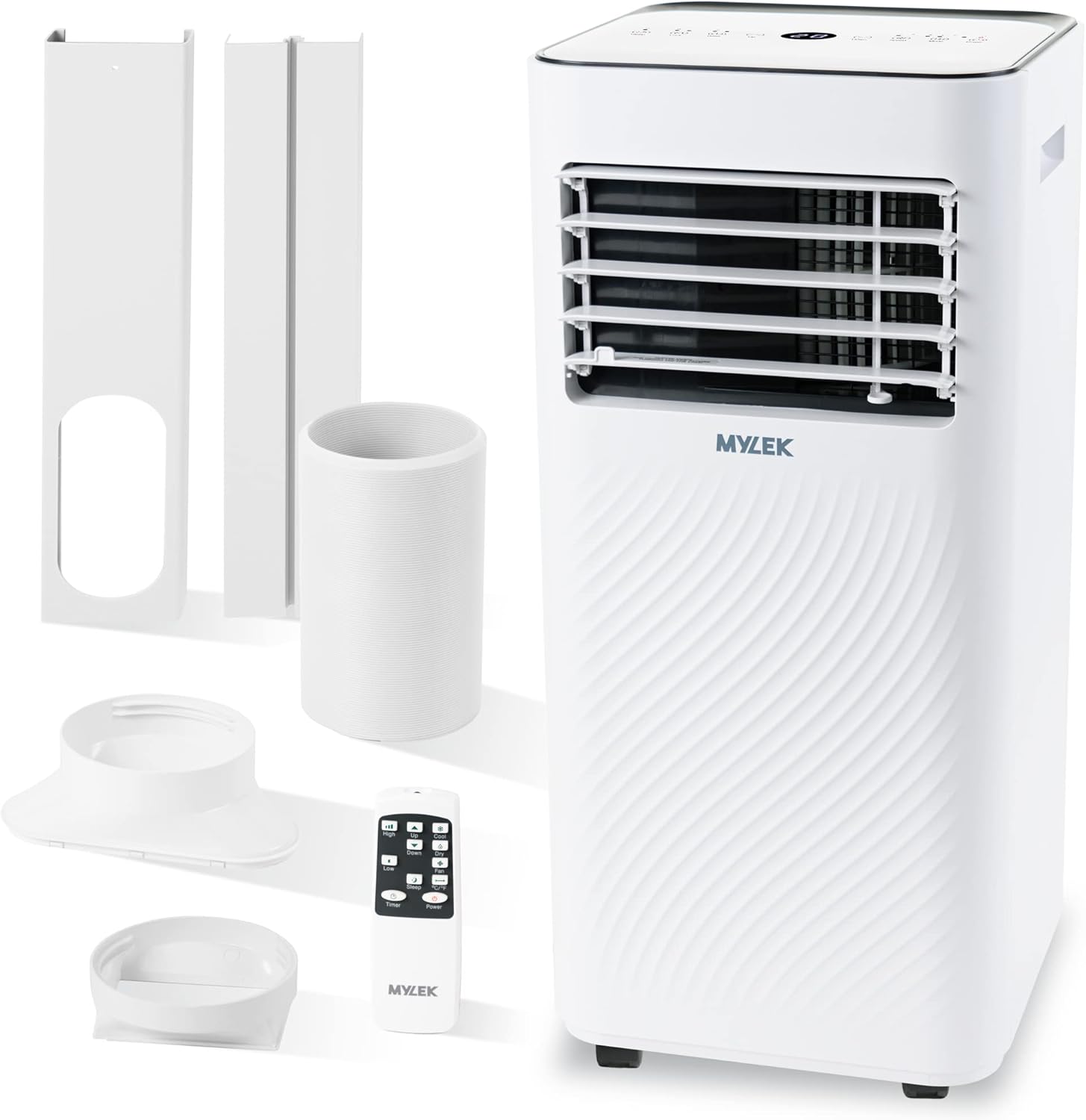
Image: Mylek Portable Air Conditioning Unit with its included accessories: exhaust hose, window venting kit components, and remote control.
Key Features
- Powerful 9000 BTU Cooling: Provides immediate cooling for spaces up to 215 sq ft (approx. 20m²).
- 4-in-1 Functions: Offers Cooling, Fan, Dehumidifier, and Sleep modes.
- Digital Display & Remote Control: User-friendly interface with current temperature, timer, and settings, controllable via the unit or remote.
- Dehumidifier Mode: Effectively removes excess moisture, ideal for humid conditions or drying clothes.
- Eco-Friendly Refrigerant: Uses Certified R290 Refrigerant with a Class A energy efficient rating.
- Portability: Equipped with lockable castors for easy movement.
- Child Lock Function: For added safety.

Image: The Mylek Air Conditioning Unit shown alongside its top-mounted digital control panel and the included remote control, highlighting user interface options.
3. Setup and Installation
Proper installation is crucial for the efficient operation of your air conditioning unit. The unit requires an exhaust hose to vent hot air outside.
Components Included
- Mylek Air Conditioning Unit
- Expandable 5ft Exhaust Hose
- Window Venting Kit (for sliding windows)
- Remote Control
Installation Steps
- Positioning: Place the unit on a flat, stable surface near a window or door that can be used for venting. Ensure there is at least 30cm of space around the unit for proper airflow.
- Attach Exhaust Hose: Connect one end of the expandable exhaust hose to the air outlet on the back of the unit. Twist clockwise until securely fastened.
- Ventilation:
- For Sliding Windows: Assemble the window venting kit according to the diagrams provided. Insert the other end of the exhaust hose into the window kit and secure it. Adjust the kit to fit your window opening, ensuring a tight seal to prevent hot air from re-entering the room.
- For Pull/Push Windows or Doors: Simply pass the 5ft exhaust hose through a slightly open window or door. Ensure the opening is as small as possible to maximize cooling efficiency.
- Power Connection: Plug the power cord into a grounded 240V electrical outlet.

Image: Illustration demonstrating two methods for venting the unit: using the supplied kit for sliding windows, and extending the hose through a slightly open door or pull/push window.
4. Operating Instructions
Your Mylek Air Conditioning Unit can be operated via the digital control panel on top of the unit or the included remote control.
Control Panel and Remote Functions
| Button/Indicator | Function |
|---|---|
| Power | Turns the unit ON or OFF. |
| Mode | Cycles through Cooling, Fan, Dehumidifier, and Sleep modes. |
| Up/Down Arrows | Adjusts temperature settings (Cooling mode) or timer duration. |
| Speed | Selects fan speed (High/Low). |
| Timer | Sets the 24-hour countdown timer for automatic ON/OFF. |
| Sleep | Activates Sleep mode, which adjusts temperature and fan speed for quiet operation and dims the display. |
| Lock (Child Lock) | Locks the control panel to prevent accidental changes. |
| Digital Display | Shows current temperature, set temperature, and timer settings. |
Operating Modes
- Cooling Mode: Select "Cool" mode and set your desired temperature using the Up/Down arrows. The unit will cool the room to the set temperature.
- Fan Mode: Select "Fan" mode to circulate air without cooling. Choose between high and low fan speeds.
- Dehumidifier Mode: Select "Dry" mode to remove excess moisture from the air. This mode is ideal for humid environments or for assisting with drying laundry. Ensure the continuous drainage hose (not included, but connection point available) is used for prolonged operation in this mode, or manually empty the water tank when full.

Image: The Mylek unit operating in dehumidify mode, illustrating its capability to extract moisture from the air, which can be collected in a bucket or drained continuously. This mode is perfect for drying clothes indoors.
- Sleep Mode: Activates a quieter operation suitable for nighttime. The unit will gradually adjust the temperature and fan speed to maintain comfort while minimizing noise.
5. Maintenance and Storage
Regular maintenance ensures optimal performance and extends the lifespan of your Mylek Air Conditioning Unit.
Cleaning
- Before Cleaning: Always unplug the unit from the power outlet.
- Exterior: Wipe the exterior with a soft, damp cloth. Do not use harsh chemicals, abrasives, or solvents.
- Air Filter: The air filter should be cleaned every two weeks or more frequently depending on usage.
- Locate the air filter (usually at the back or side of the unit).
- Remove the filter.
- Clean the filter with a vacuum cleaner or wash it gently with warm water and mild detergent.
- Allow the filter to dry completely before reinserting it into the unit.
- Water Tank: If using the dehumidifier mode without continuous drainage, regularly empty the water tank to prevent overflow and mold growth.
Storage
- Before storing, ensure the unit is completely dry. Run the fan-only mode for a few hours to dry the internal components.
- Empty any remaining water from the tank.
- Clean the air filter.
- Coil the power cord neatly.
- Store the unit in a cool, dry place, away from direct sunlight and extreme temperatures. It is recommended to cover the unit to protect it from dust.
6. Troubleshooting Guide
If you encounter issues with your Mylek Air Conditioning Unit, please refer to the following common problems and solutions before contacting customer support.
| Problem | Possible Cause | Solution |
|---|---|---|
| Unit does not turn on. | No power, power cord loose, circuit breaker tripped. | Check power connection, try another outlet, reset circuit breaker. |
| Unit is not cooling effectively. | Windows/doors open, exhaust hose not properly vented, air filter dirty, room too large, temperature setting too high. | Close all windows/doors, ensure exhaust hose is properly installed and sealed, clean air filter, verify room size is within specifications, lower temperature setting. |
| Unit is noisy. | Unit not on a level surface, air filter dirty, internal components vibrating. | Ensure unit is on a flat surface, clean air filter. Some operational noise is normal for portable AC units. |
| Water leakage. | Water tank full (dehumidifier mode), drainage hose blocked/disconnected. | Empty water tank, check drainage hose for blockages or proper connection. |
| Remote control not working. | Batteries dead/incorrectly inserted, obstruction between remote and unit. | Replace batteries, ensure clear line of sight to the unit's receiver. |
7. Specifications
Detailed technical specifications for your Mylek Portable Air Conditioning Unit.
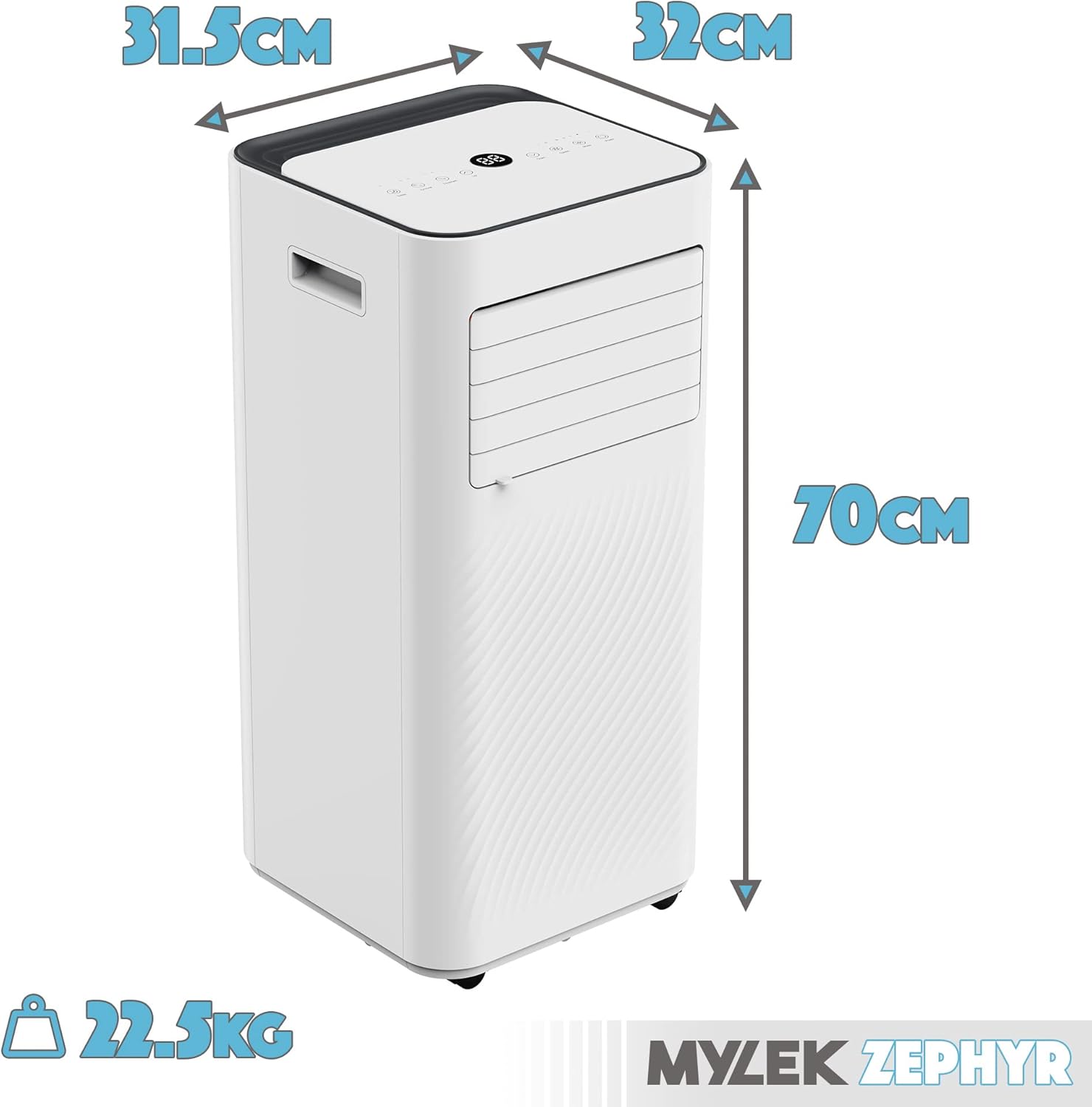
Image: Visual representation of the unit's dimensions (31.5cm D x 32cm W x 70cm H) and weight (22.5kg).
| Specification | Value |
|---|---|
| Brand | MYLEK |
| Model | MYAC26S |
| Cooling Power | 9000 BTU |
| Product Dimensions | 32 x 31.5 x 70 cm |
| Item Weight | 22.5 kg |
| Energy Efficiency Rating | A |
| Noise Level | 65 dB |
| Voltage | 240 Volts |
| Wattage | 1005 watts |
| Refrigerant | R290 (Eco-friendly) |
| Installation Type | Portable / Window Venting |

Image: The official energy label for the Mylek Portable Air Conditioner, confirming its Class A energy efficiency and noise level of 65dB.
8. Warranty and Support
For warranty information and customer support, please refer to the documentation provided with your purchase or visit the official MYLEK website. Keep your proof of purchase for any warranty claims.
Typical warranty periods cover manufacturing defects under normal use. Damage caused by improper use, neglect, or unauthorized repairs may not be covered.
For technical assistance or spare parts, please contact MYLEK customer service through their official channels.


