
POWLAND iCharer MPPT 8048
Contents
POWLAND 80A MPPT Solar Charge Controller User Manual
Model: iCharer MPPT 8048
1. Product Overview
The POWLAND 80A MPPT Solar Charge Controller is an advanced device designed to efficiently manage power flow from solar panels to batteries. It utilizes Maximum Power Point Tracking (MPPT) technology to optimize energy harvest, ensuring fast, efficient, and safe charging for various battery types. This controller is compatible with 12V, 24V, 36V, and 48V photovoltaic systems and features comprehensive protection mechanisms.

Image: The POWLAND 80A MPPT Solar Charge Controller, highlighting its 80A capacity, 12V/24V/36V/48V auto compatibility, multiple protection features, 3-stage charging mode, and LCD display.
2. Key Features
- 80A MPPT Charging: Features a 4-level battery charging algorithm (batch charging, boost charging, float charging, and equalizing) for optimized battery health and performance.
- High Efficiency: Employs optimized MPPT technology for rapid tracking of the maximum power point, achieving ≥99% photovoltaic utilization and a maximum efficiency of ≥98.1%.
- Multiple Protections: Includes short circuit protection, open circuit protection, reverse protection, and overload protection to ensure system safety and longevity.
- Battery Compatibility: Automatically identifies 12V, 24V, 36V, and 48V systems. Supports various battery types including flooded, AGM, GEL, and lithium-ion batteries.
- LCD Display: A multi-function LCD provides clear operating data and status. Features 4 buttons for easy navigation and parameter adjustment.
- Modbus Protocol Communication: Supports Modbus protocol for remote monitoring and configuration.
- Smart Fan Design: Dual fan design for efficient heat dissipation, with fans activating only when temperature exceeds 45°C to save energy.

Image: A visual representation of the comprehensive protection features, including overcharging, over-release, overload, short-circuiting, temperature compensation, reverse current, and reverse polarity protection.
3. Setup and Installation
Proper installation is crucial for the safe and efficient operation of your MPPT solar charge controller. Always ensure all connections are secure and follow local electrical codes.
3.1. Included Components
- MPPT Solar Charge Controller
- User Manual (this document)
- Connection Cable
3.2. Connection Diagram
Connect the solar panels, battery, and inverter to the controller as shown in the diagram below. Ensure correct polarity for all connections.
- Connect the battery to the controller first.
- Connect the solar panels to the controller.
- Connect the load (inverter) to the controller (if applicable).
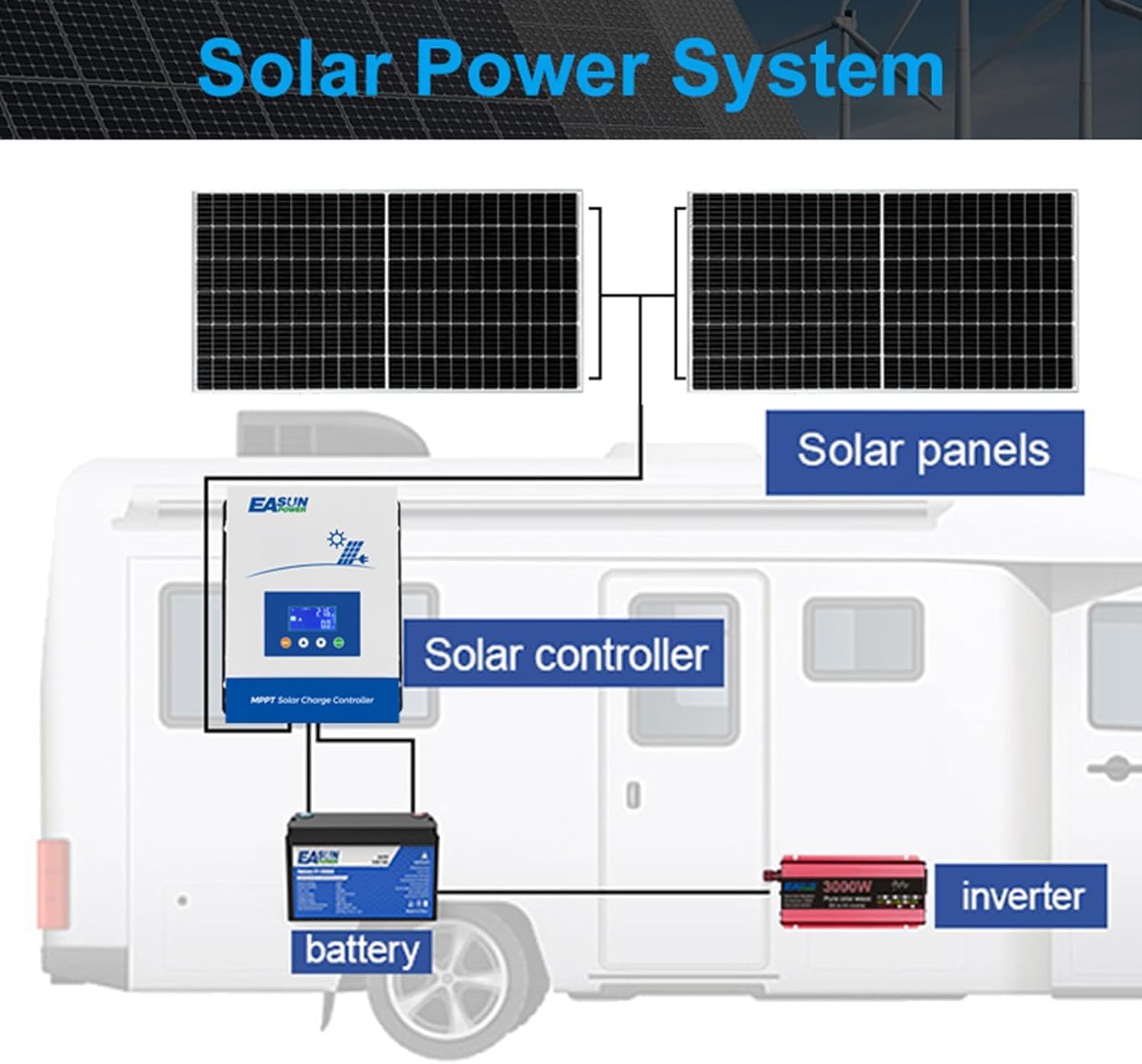
Image: A schematic diagram illustrating the typical setup of a solar power system, showing solar panels connected to the solar controller, which then connects to a battery and an inverter.
3.3. Mounting
The controller is designed for easy mounting. Choose a well-ventilated area, away from direct sunlight and moisture. Ensure sufficient clearance around the unit for proper airflow and heat dissipation.
4. Operating Instructions
The controller features an LCD display and four buttons for operation and monitoring. The system automatically identifies the battery voltage (12V/24V/36V/48V).
4.1. LCD Display and Buttons
The LCD displays real-time operating data such as battery voltage, charging current, and system status. The buttons allow for navigation and parameter adjustments.
| Function Key | System Mode | Operation | Operation Indication |
|---|---|---|---|
| ENTER | Setting Mode | Long Press | Exit from setting & saving the present settings data |
| ENTER | Setting Mode | Short Press | Enter the next setting page |
| UP Arrow | Setting Mode | Short Press | Adjust the parameter by increase the value |
| DOWN Arrow | Setting Mode | Short Press | Adjust the parameter by decrease the value |
| ESC | Setting Mode | Short Press | Exit SET Mode without saving data |

Image: A visual guide to the LCD display and the functions of the four control buttons (ESC, Up, Down, Enter) for navigating and adjusting settings on the controller.
4.2. Charging Algorithm
The controller employs a 4-level charging algorithm to maximize battery life and performance:
- Batch Charging: Initial stage where the battery is charged at maximum current until a set voltage is reached.
- Boost Charging: The voltage is held constant while the current gradually decreases.
- Float Charging: Once the battery is fully charged, the voltage is reduced to a lower level to maintain a full charge without overcharging.
- Equalizing: Periodically applies a higher voltage to balance cell voltages in flooded lead-acid batteries.
5. Maintenance
Regular maintenance ensures the longevity and optimal performance of your POWLAND MPPT Solar Charge Controller.
- Cleanliness: Keep the controller clean and free from dust and debris. Use a dry cloth for cleaning.
- Connections: Periodically check all wiring connections to ensure they are tight and free from corrosion.
- Ventilation: Ensure the ventilation openings are not blocked to allow for proper heat dissipation. The smart fan system will activate as needed.
- Environmental Conditions: Ensure the controller operates within its specified environmental temperature range (-20°C to +55°C).

Image: An illustration of the dual fan design, explaining that the fans do not turn below 40°C (saving energy loss) and start turning above 45°C to ensure normal operation and heat dissipation.
6. Troubleshooting
This section provides solutions to common issues you might encounter with your solar charge controller.
| Problem | Possible Cause | Solution |
|---|---|---|
| Controller not turning on / No display | Battery not connected or low voltage; reversed polarity. | Ensure battery is connected first with correct polarity and sufficient voltage. Check battery terminals. |
| Battery not charging | Solar panels not connected; insufficient sunlight; panel voltage too low/high; faulty wiring. | Check solar panel connections and voltage. Ensure adequate sunlight. Inspect all wiring for damage. |
| Overcharging / Undercharging | Incorrect battery type setting; faulty battery. | Verify battery type setting on the controller. Test battery health. |
| Error codes on display | Internal fault; specific protection activated. | Refer to the detailed error code list in the full manual (if available) or contact customer support. Try power cycling the unit (disconnect battery then solar, wait, reconnect solar then battery). |
If the problem persists after attempting these solutions, please contact customer support.
7. Specifications
Detailed technical specifications for the POWLAND 80A MPPT Solar Charge Controller.
| Parameter | Value |
|---|---|
| Model | iCharer MPPT 8048 |
| Charging Mode | 3-stage: Constant Current (MPPT), Constant Voltage, Floating |
| System Voltage | 12V/24V/36V/48V Auto Recognition |
| Max PV Input Power | 1200W (12V) / 2400W (24V) / 3600W (36V) / 4800W (48V) |
| Max PV Input Voltage | 150 VDC |
| Battery Voltage Auto Recognition | 12V System (DC8.7V-DC15.5V), 24V System (DC16V-DC31V), 36V System (DC33V-DC41V), 48V System (DC42V-DC64V) |
| Overcharging Protection Voltage | 12V System (16V), 24V System (32V), 36V System (48V), 48V System (64V) |
| Limited Current Protection | 80 A |
| Max Efficiency | ≥98.1% |
| PV Utilization | ≥99% |
| Auto Temperature Compensation | -3mV/2V/°C |
| Temperature Protection | 80°C |
| Fan-on Temperature | >45°C |
| Fan-off Temperature | <40°C |
| Size (mm) | 247.3*201*80.3 |
| Net Weight (Kg) | 2.05 |
| Electromagnetic Compatibility | Accord to EN61000, EN55022, EN55024 |
| Enclosure | IP21 |
| Environmental Temperature | -20°C ~ +55°C |
| Storage Temperature | -40°C ~ +75°C |
| Display Type | LCD |
| Brand | POWLAND |
| Manufacturer | EASUNPOWER |
| UPC | 716963961813 |

Image: A comprehensive table listing various technical specifications and application details for the iCharer MPPT 8048 solar charge controller.
8. Warranty and Support
The POWLAND 80A MPPT Solar Charge Controller comes with a 1-Year Warranty from the date of purchase.
This warranty covers defects in materials and workmanship under normal use. It does not cover damage caused by improper installation, misuse, accidents, unauthorized repairs, or natural disasters.
For technical support, warranty claims, or further assistance, please contact POWLAND customer service through the retailer where the product was purchased or visit the official POWLAND website.
Documents and downloads
Ask a question about this manual
Ask about setup, troubleshooting, compatibility, parts, safety, or missing instructions. Manuals+ will review the question and use this page’s manual context to help answer it.