
Douk Audio T8 PRO
Douk Audio T8 PRO HiFi Vacuum Tube 7-Band EQ Preamp Equalizer
Model: T8 PRO | Brand: Douk Audio
Introduction
The Douk Audio T8 PRO is an advanced 7-band vacuum tube equalizer and pre-amplifier designed to enhance your audio experience. It offers precise control over various frequency bands, allowing you to fine-tune your sound to compensate for speaker characteristics or room acoustics. Featuring real balanced XLR and RCA inputs/outputs, the T8 PRO delivers high-quality audio with excellent separation and a warm, rich tube sound. Its robust design and versatile connectivity make it an ideal addition to any HiFi audio setup.
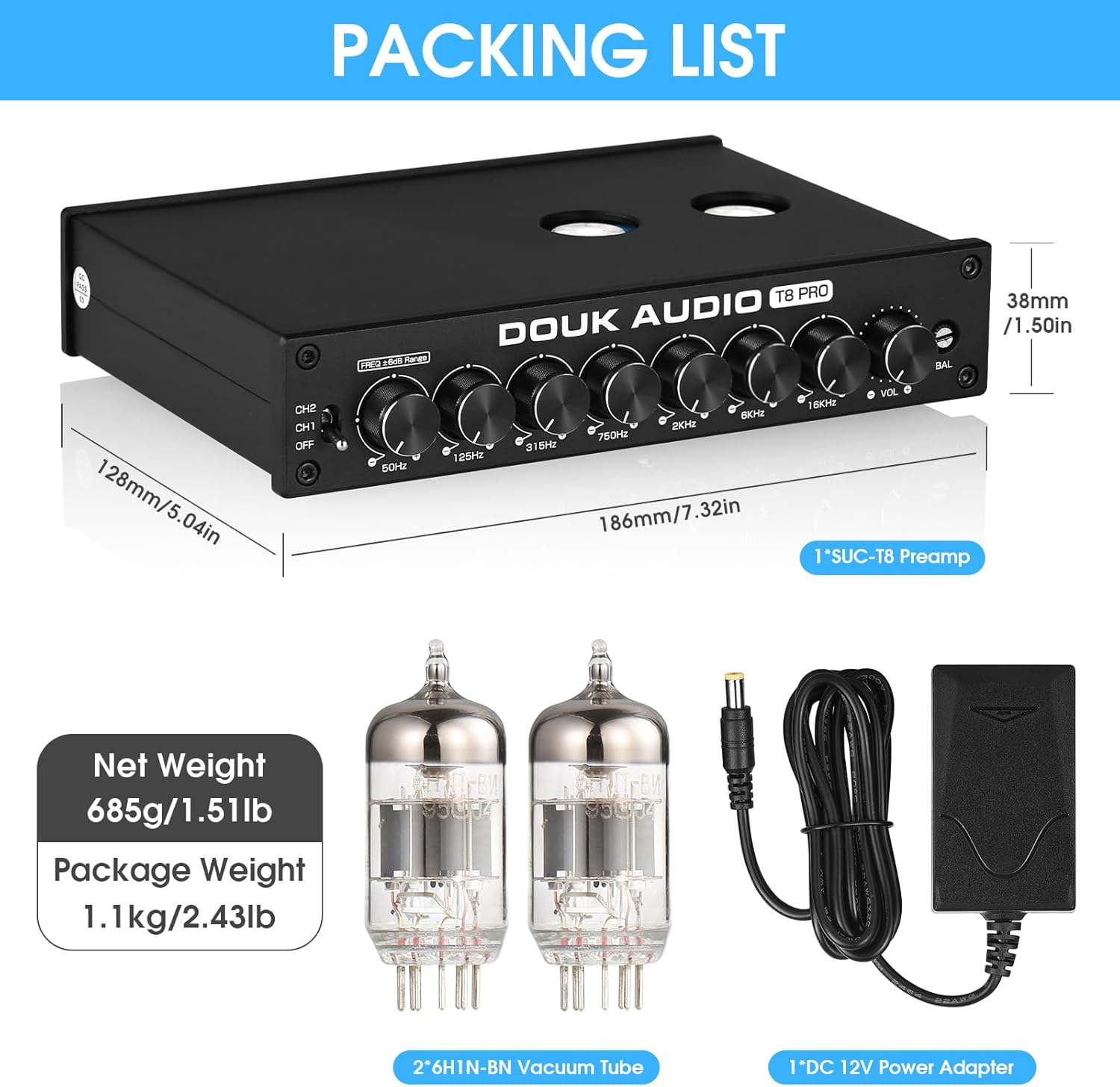
What's in the Box
- 1*T8 Preamp
- 2*6H1N-BN Tube
- 1*DC 12V Power Adapter
- 1*User Manual
Product Features
- Upgraded 7-Band EQ Preamp: Offers precise control over 50Hz, 125Hz, 315Hz, 750Hz, 2KHz, 6KHz, and 16KHz frequency bands. This allows for detailed sound shaping to correct speaker deficiencies or adjust to room acoustics, modifying timbre and loudness for various sound effects.
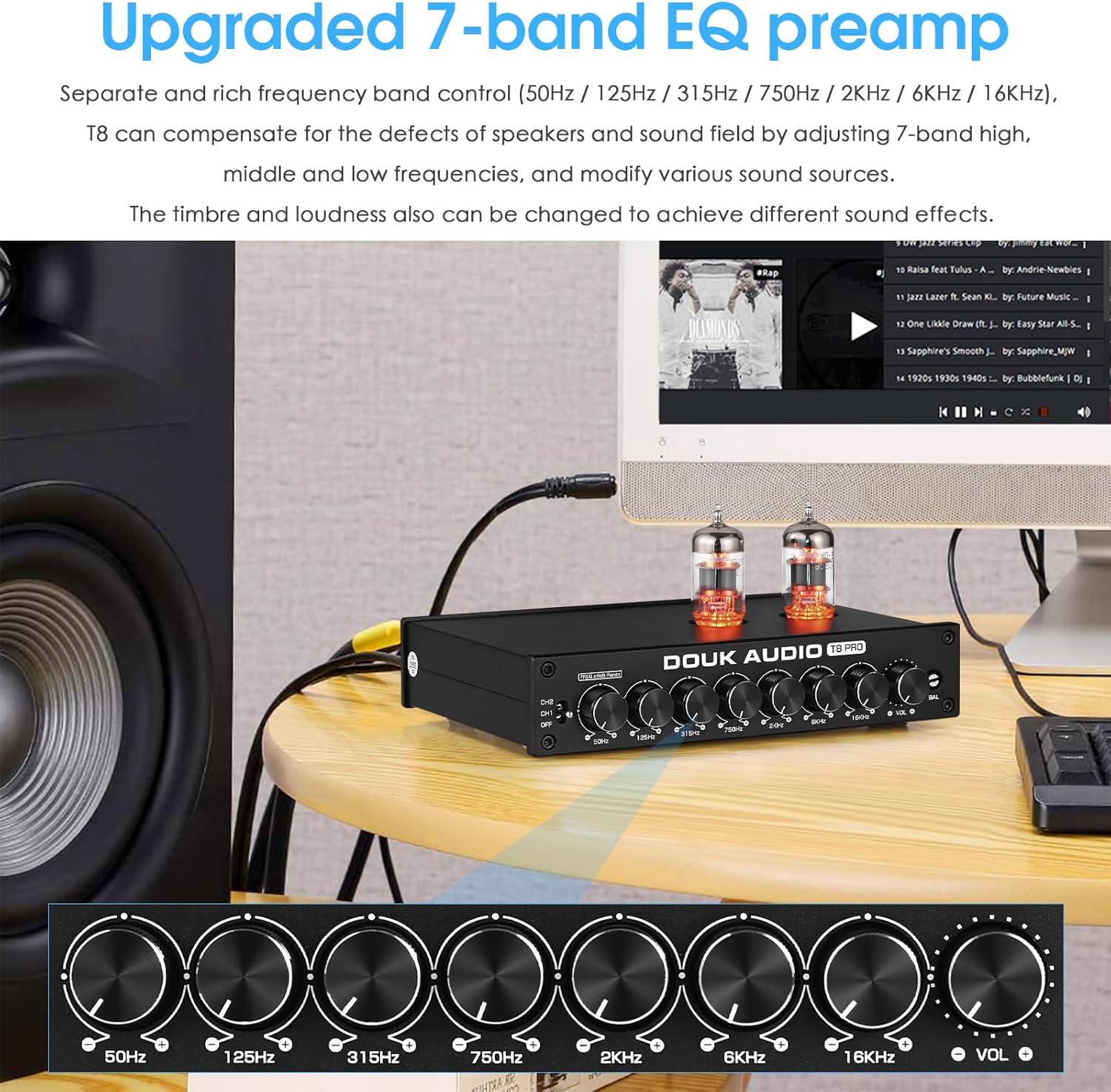
Figure 2: Front view highlighting the 7-band EQ controls. - Real Balanced XLR Preamp: Supports both XLR and RCA inputs and outputs. The T8 PRO is designed to reproduce high-quality audio with excellent separation, resolution, sound field, and a clean background, ideal for amplifiers or active speakers. Includes a balance control to compensate for left and right channel output, ensuring accurate soundstage positioning.

Figure 3: Connectivity options including XLR and RCA. - HiFi Warm & Sweet Tube Sound: Utilizes classic pluggable Soviet Union 6H1N-BN tubes, enhancing audio with a warm, delicate, full, and melodious sound. The pluggable socket design allows for "tube rolling," enabling users to experiment with different compatible tubes (e.g., 12AU7, ECC85, 6SN7GT, 6N1, 6AQ8) to customize the sound signature.

Figure 4: Detail of the vacuum tubes, highlighting their warm glow. - Advanced Design and Attractive Appearance: Features an electrolytic iron plate for superior shielding performance and precise balance. The black aluminum alloy chassis, complemented by vintage warm tube lights, offers a cool, exquisite, and durable aesthetic, making it a perfect fit for audiophiles.

Figure 5: Overall view of the T8 PRO's sleek design. - Versatile Outputs and Tube Compatibility: Equipped with dual RCA/XLR outputs and neutral frequency settings at the midpoint of the knobs. The default 6H1N-BN tubes can be interchanged with models like 12AU7, ECC85, 6SN7GT, 6N1, or 6AQ8 for enhanced audio performance.
Setup Guide
1. Unpacking and Inspection
Carefully remove all components from the packaging. Inspect the T8 PRO unit, tubes, power adapter, and user manual for any signs of damage. If any damage is found, contact your retailer immediately.
2. Tube Installation
The T8 PRO comes with two 6H1N-BN vacuum tubes. Gently insert each tube into its designated socket on the top of the unit. Ensure the pins align correctly with the socket holes and apply gentle, even pressure until the tubes are fully seated. Do not force the tubes, as this may damage the pins or sockets.
3. Connecting Audio Sources and Outputs
The T8 PRO supports both XLR and RCA connections for inputs and outputs. Choose the appropriate cables for your audio setup.
- Inputs (CH1/CH2):
- XLR Input (CH1): Connect your balanced audio source (e.g., DAC, CD player with XLR output) to the XLR input ports labeled 'CH1' on the rear panel.
- RCA Input (CH2): Connect your unbalanced audio source (e.g., turntable with phono preamp, media player) to the RCA input ports labeled 'CH2' on the rear panel.
- Outputs:
- XLR Output: Connect the XLR output ports to your balanced amplifier or active speakers.
- RCA Output: Connect the RCA output ports to your unbalanced amplifier or active speakers.


4. Power Connection
Connect the provided DC 12V power adapter to the 'DC 12V IN' port on the rear of the T8 PRO. Plug the power adapter into a suitable wall outlet. The unit will power on automatically once connected.
Operating Instructions
1. Front Panel Controls

- CH1/CH2/OFF Switch: Selects between XLR (CH1) and RCA (CH2) inputs, or turns the unit OFF.
- Frequency Adjustment Knobs (50Hz, 125Hz, 315Hz, 750Hz, 2KHz, 6KHz, 16KHz): Adjust the gain for each specific frequency band. Turning the knob clockwise increases the gain, while turning it counter-clockwise decreases it. The neutral position is at the midpoint.
- Volume Knob: Controls the overall output volume.
- Balance Knob: Adjusts the balance between the left and right audio channels.
2. Adjusting the Equalizer
Use the seven frequency adjustment knobs to tailor the sound to your preference. Experiment with boosting or cutting specific frequencies to achieve desired tonal characteristics or to correct imbalances in your audio system or listening environment. For example, boosting 50Hz can add more bass, while adjusting 16KHz can affect treble clarity.
3. Input Selection
Use the CH1/CH2/OFF switch to select the active input source. Ensure the switch is set to the input you wish to use (CH1 for XLR, CH2 for RCA).
4. Volume and Balance Control
Adjust the 'VOL' knob to set the desired listening volume. Use the 'BAL' knob to fine-tune the left/right channel balance, ensuring the soundstage is centered and balanced.
5. Official Product Video
Watch this official video from Douk Audio for a visual overview of the T8 PRO's features and connectivity.
Maintenance
1. Cleaning
To maintain the appearance and performance of your T8 PRO, regularly wipe the unit with a soft, dry cloth. Avoid using abrasive cleaners or solvents, as these can damage the finish. Ensure the unit is powered off and unplugged before cleaning.
2. Tube Replacement (Tube Rolling)
The vacuum tubes in your T8 PRO have a finite lifespan and may degrade over time, affecting sound quality. They can also be replaced to alter the sound signature (tube rolling). To replace tubes:
- Power off the unit and unplug the power adapter.
- Allow the tubes to cool completely before handling (they can be very hot).
- Gently grasp the tube and pull it straight up from its socket. Avoid twisting or wiggling, which can damage the pins or socket.
- Align the pins of the new compatible tube (e.g., 12AU7, ECC85, 6SN7GT, 6N1, 6AQ8) with the holes in the socket.
- Carefully push the new tube straight down into the socket until it is firmly seated.
- Reconnect power and test the unit.
Always ensure replacement tubes are compatible with the T8 PRO to prevent damage and ensure optimal performance.
Troubleshooting
| Problem | Possible Cause | Solution |
|---|---|---|
| No sound output. |
|
|
| Distorted or weak sound. |
|
|
| Channel imbalance (sound louder on one side). |
|
|
Specifications
- Package Dimensions: 12.01 x 9.69 x 2.8 inches
- Item Weight: 2.25 pounds
- Manufacturer: Douk Audio
- ASIN: B0C5MHZ68Y
- Date First Available: May 18, 2023
- EQ Bands: 7-band (50Hz, 125Hz, 315Hz, 750Hz, 2KHz, 6KHz, 16KHz)
- Inputs: XLR (CH1), RCA (CH2)
- Outputs: XLR, RCA
- Tubes: 6H1N-BN (default), interchangeable with 12AU7, ECC85, 6SN7GT, 6N1, 6AQ8
Warranty and Support
For warranty information, technical support, or service inquiries, please refer to the official Douk Audio website or contact the seller directly. Keep your proof of purchase for warranty claims.
Related documentsT8 PRO


Ask a question about this manual
Ask about setup, troubleshooting, compatibility, parts, safety, or missing instructions. Manuals+ will review the question and use this page’s manual context to help answer it.