1. Introduction
This manual provides essential instructions for the safe and effective use of your eeTao STC-8137LD 48V AC/DC Adapter. This adapter is designed to provide a stable 48V DC output for charging compatible Li-ion batteries, including those used with STC Charger Model: STC-8137LD and Super 73 48V 2A Battery 54.6V 2A Charger systems. Please read this manual thoroughly before operation and retain it for future reference.
2. Safety Information
WARNING: Failure to follow these safety instructions may result in electric shock, fire, personal injury, or property damage.
- Risk of Electric Shock: For indoor use only. Do not expose the adapter to rain, moisture, or extreme temperatures.
- Risk of Fire: Before charging, always read the instructions provided with your battery and device.
- Battery Compatibility: This charger is designed for Li-ion type rechargeable batteries only. Charging other types of batteries may cause them to burst, leading to personal injury and damage.
- Connection Safety: Always disconnect the power supply from the wall outlet before making or breaking any connections to the charger or battery.
- Protection Features: This adapter includes Over Voltage Protection (OVP), Over Current Protection (OCP), and Short Circuit Protection (SCP) to ensure safe operation.
- Input Voltage: The adapter supports a World Wide Input Voltage of 100-240VAC, 50/60Hz. Ensure your power source matches these specifications.
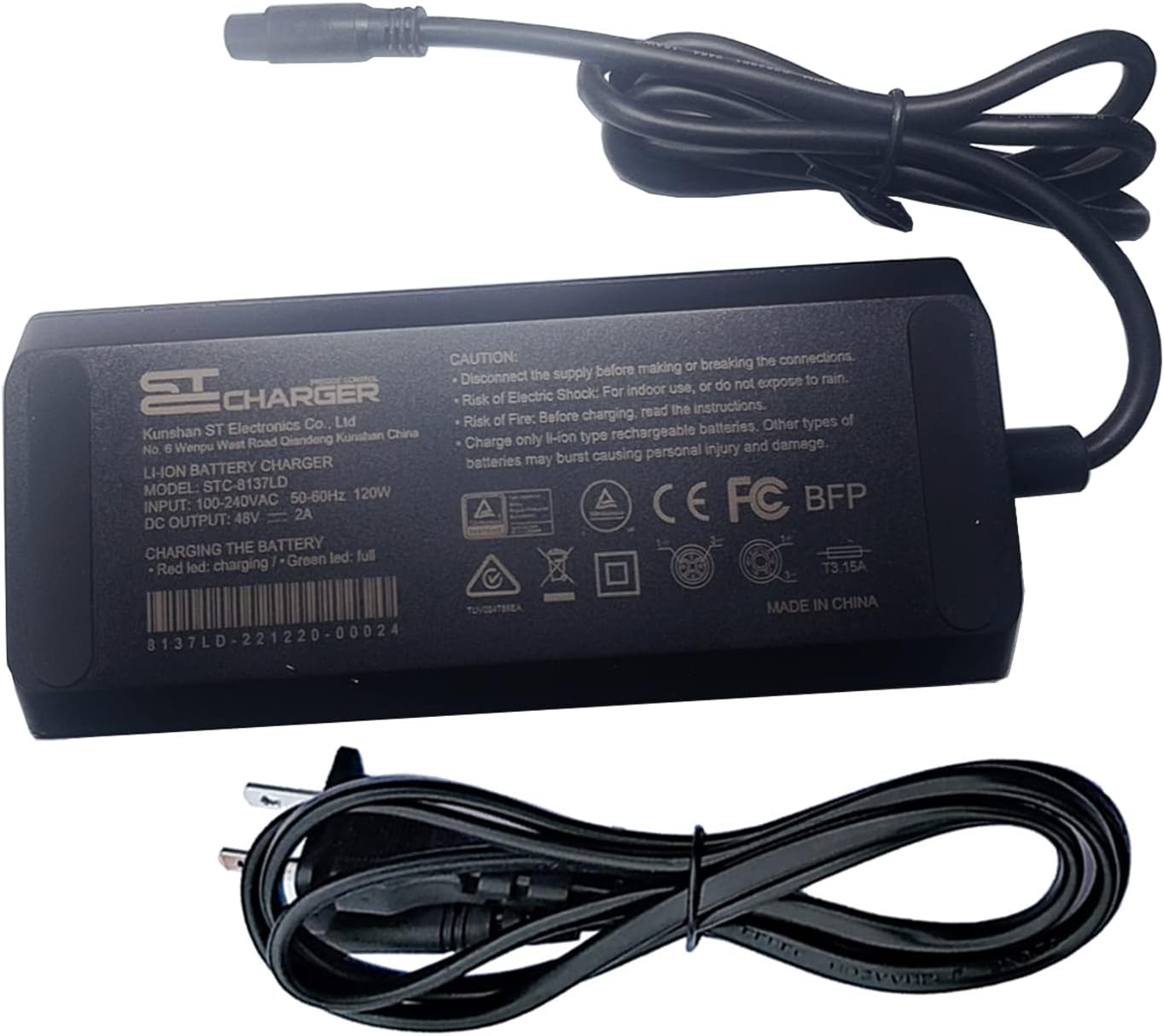
Image: Adapter label with safety warnings and specifications. Always refer to the product label for detailed safety information.
3. Setup Instructions
Follow these steps to set up your eeTao STC-8137LD AC/DC Adapter:
- Unpack Components: Carefully remove the AC/DC adapter and the AC power cord from the packaging.
- Connect AC Power Cord: Insert the 2-pin connector of the AC power cord into the corresponding input port on the adapter. Ensure it is firmly seated.
- Connect to Power Outlet: Plug the 2-prong (Type A - North American) end of the AC power cord into a standard 100-240VAC 50/60Hz wall outlet.
- Connect to Device: Connect the 3-prong output connector of the adapter to the charging port of your compatible device (e.g., STC Charger Model: STC-8137LD or Super 73 48V 2A Battery system). Ensure the connection is secure.

Image: Overview of the eeTao 48V AC/DC Adapter and its power cables.
4. Operating Instructions
Once the adapter is properly set up and connected to your device, it will begin charging. Observe the LED indicator on the charger (if available on your device) for charging status:
- Red LED: Indicates that the battery is currently charging.
- Green LED: Indicates that the battery is fully charged.
Always ensure the charging environment is well-ventilated and free from flammable materials. Disconnect the charger from the device and the wall outlet once charging is complete.
5. Maintenance
Proper maintenance ensures the longevity and safe operation of your adapter:
- Cleaning: Disconnect the adapter from all power sources before cleaning. Use a soft, dry cloth to wipe the exterior. Do not use liquid cleaners or solvents.
- Storage: Store the adapter in a cool, dry place away from direct sunlight and moisture when not in use.
- Cable Care: Avoid bending or crimping the power cords excessively. Do not place heavy objects on the cables.
- Inspection: Periodically inspect the adapter and cables for any signs of damage, such as frayed wires or cracked casing. If damage is found, discontinue use immediately and replace the unit.
6. Troubleshooting
If you encounter issues with your eeTao STC-8137LD AC/DC Adapter, refer to the following common problems and solutions:
| Problem | Possible Cause | Solution |
|---|---|---|
| Adapter not powering on / No LED indicator |
|
|
| Device not charging |
|
|
| Adapter feels excessively hot |
|
|
If the problem persists after trying these solutions, please contact eeTao customer support.
7. Specifications
| Feature | Detail |
|---|---|
| Model Number | STC-8137LD |
| Input Voltage | 100-240VAC, 50/60Hz |
| Output Voltage | 48V DC |
| Output Current | 2 Amps |
| Wattage | 96 Watts |
| Output Connector Type | 3-Prong |
| AC Input Connector Type | 2-Pin |
| Power Plug Type | Type A - 2 pin (North American) |
| Protection Features | OVP (Over Voltage Protection), OCP (Over Current Protection), SCP (Short Circuit Protection) |
| Compatible Devices | STC Charger Model: STC-8137LD, Super 73 48V 2A Battery 54.6V 2A Charger-compatible devices |
| Material | Plastic |
| Item Weight | 20 Ounces |
| Certifications | UL Listed, CE, CCC, ROHS (as per product description) |
8. Warranty and Support
Warranty Information:
- Refund Policy: 30 days refund from the date of purchase.
- Exchange Policy: 24 months exchange from the date of purchase.
This warranty covers manufacturing defects. It does not cover damage caused by misuse, accident, unauthorized modification, or improper installation.
Customer Support:
For technical assistance, warranty claims, or any questions regarding your eeTao STC-8137LD AC/DC Adapter, please contact eeTao customer support through the retailer where the product was purchased or visit the official eeTao website for contact details.


