
Geloo OKD520A
Contents
Geloo 500W Portable Solar Generator (Model OKD520A) User Manual
Your comprehensive guide to safe and efficient operation.
1. Introduction
Thank you for choosing the Geloo 500W Portable Solar Generator. This device is designed to provide reliable power for your outdoor adventures, emergency home backup, and various portable power needs. With a 499Wh (135000mAh) capacity and multiple output ports, it offers versatility and convenience. Please read this manual thoroughly before using the product to ensure safe operation and optimal performance.

Image 1.1: The Geloo 500W Portable Solar Generator being used with solar panels in an outdoor setting, powering devices like phones, cameras, laptops, and iPads.
2. Safety Instructions
To prevent injury, damage to the unit, or damage to connected devices, always follow these basic safety precautions:
- Do not disassemble, repair, or modify the unit.
- Do not place the unit near fire or expose it to heat.
- Do not store or use the unit in high temperatures or direct sunlight.
- Do not use or store the unit in a bathroom or in areas exposed to water or moisture.
- Use only the provided or approved accessories.
- Do not insert foreign objects into the ports.
- Do not drop, hit, or subject the unit to strong impacts.
- Keep the unit away from children and pets.
- Ensure proper ventilation during use to prevent overheating.
- If the unit emits smoke, strange odors, or unusual noise, stop using it immediately and contact customer support.
3. Package Contents
Please check that all the following items are included in your package:
- Geloo 500W Portable Solar Generator (Model OKD520A)
- AC Adapter
- Car Charging Cable
- Solar Charging Cable
- LED Light (USB powered)
- User Manual (this document)
4. Product Overview
Familiarize yourself with the various ports and features of your Geloo Portable Solar Generator.

Image 4.1: The Geloo 500W Portable Solar Generator showcasing its multiple output ports, including AC, wireless charging, USB, DC5521, car charging, and PD outlet, powering various devices.
Front Panel Components:
- AC Output Port (110V/500W): For standard household appliances.
- DC Input Port (15V/8A): For charging the power station via AC adapter, solar panel, or car charger.
- USB-A Output Ports (5V/2.4A): For charging smartphones, tablets, and other USB devices.
- USB-C PD Output Port (5V-20V): For fast charging compatible devices.
- DC 12V Output Ports (5521): For 12V DC powered devices.
- 12V Car Port (12V/120W): For car appliances.
- Wireless Charging Pad: For wirelessly charging compatible smartphones.
- LCD Display: Shows battery level, input/output wattage, and port status.
- LED Light: Built-in illumination with multiple modes.
- Power Buttons: Separate buttons for AC, DC, and LED light functions.
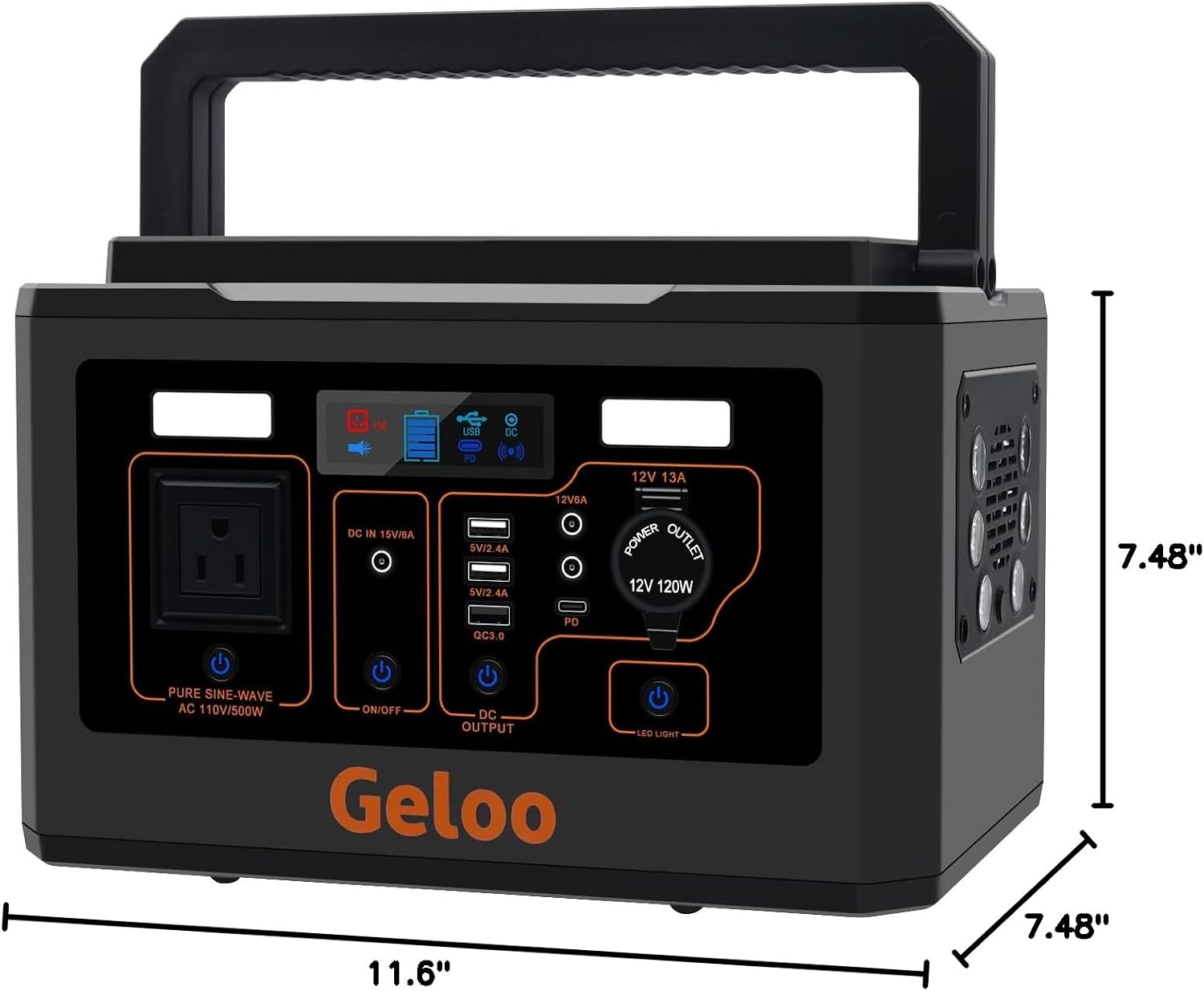
Image 4.2: Detailed dimensions of the Geloo 500W Portable Solar Generator, indicating its length (11.6 inches), width (7.48 inches), and height (7.48 inches).
5. Setup
5.1 Unpacking
Carefully remove the power station and all accessories from the packaging. Retain the packaging for future storage or transport.
5.2 Initial Charge
It is recommended to fully charge the Geloo Portable Solar Generator before its first use. This ensures the battery is conditioned and ready for optimal performance. Refer to the 'Charging Modes' section for detailed instructions.
6. Operating Instructions
6.1 Powering On/Off
Press and hold the main power button for a few seconds to turn the unit on or off. The LCD display will illuminate.
6.2 Using AC Output
Press the 'AC' button to activate the 110V/500W AC outlet. Plug your appliance into the AC port. Ensure your appliance's power consumption does not exceed 500W. Press the 'AC' button again to turn off the AC output when not in use to conserve power.
6.3 Using DC Output (USB, DC 12V, Car Port)
Press the 'DC' button to activate the DC output ports (USB-A, USB-C PD, DC 5521, Car Port). Connect your devices to the appropriate ports. Press the 'DC' button again to turn off DC outputs when not in use.
6.4 Wireless Charging
Ensure the DC output is active. Place your Qi-compatible smartphone on the wireless charging pad located on top of the unit. Charging will begin automatically. Remove your device once fully charged.
6.5 Using the LED Light
Press the 'LED Light' button to cycle through the light modes: Low Brightness, High Brightness, and SOS Flashing. Press again to turn off the light.

Image 6.1: The Geloo 500W Portable Solar Generator's integrated LED lights providing illumination for outdoor camping and as a bedside lamp, featuring an SOS function.
7. Charging Modes
Your Geloo Portable Solar Generator can be recharged using three methods:

Image 7.1: Visual representation of the three charging methods for the Geloo 500W Portable Solar Generator: wall outlet, solar panel, and car outlet.
7.1 AC Wall Charging
Connect the provided AC adapter to the DC input port on the power station and then plug the adapter into a standard wall outlet. The LCD display will show charging status. Charging time is approximately 4-5 hours to reach 80% capacity.
7.2 Solar Panel Charging
Connect compatible 60-100W solar panels (not included) to the DC input port using the provided solar charging cable. Place solar panels in direct sunlight for optimal charging. Charging time is approximately 6-8 hours to reach 80% capacity, depending on sunlight intensity.
7.3 Car Charging
Connect the provided car charging cable to the DC input port on the power station and plug the other end into your vehicle's 12V auxiliary power outlet. Charging time is approximately 5-6 hours to reach 80% capacity.
8. Maintenance
8.1 Storage
Store the power station in a cool, dry place, away from direct sunlight and extreme temperatures. For long-term storage, it is recommended to fully charge the unit every 3 months to maintain battery health and prolong its lifespan.
8.2 Cleaning
Wipe the exterior of the unit with a dry, soft cloth. Do not use abrasive cleaners, solvents, or immerse the unit in water.
8.3 Heat Dissipation
The unit features dual built-in cooling fans to manage internal temperature. Ensure the ventilation vents are not blocked during operation. The fans will automatically activate when needed.

Image 8.1: The Geloo 500W Portable Solar Generator demonstrating its efficient heat dissipation system with a visible fan exhaust, ensuring safe operation.
9. Troubleshooting
If you encounter issues with your Geloo Portable Solar Generator, please refer to the following common problems and solutions:
- Unit not turning on: Ensure the main power button is pressed and held for a few seconds. Check the battery level on the LCD display; if empty, recharge the unit.
- AC output not working: Ensure the 'AC' button is pressed and the AC indicator is on. Verify that the appliance's power consumption does not exceed 500W. If an overload occurs, the unit may shut down; disconnect the appliance and restart the AC output.
- DC/USB output not working: Ensure the 'DC' button is pressed and the DC indicator is on. Check cable connections.
- Unit not charging: Verify that the charging cable is securely connected to both the power station and the power source. Ensure the power source (wall outlet, solar panel, car outlet) is functional.
- Overload Protection: If the connected device draws more power than the unit's rated output (500W), the power station will automatically shut down to prevent damage. Disconnect the high-power device and restart the output.
If the problem persists, please contact Geloo customer support.
10. Specifications
| Feature | Specification |
|---|---|
| Brand | Geloo |
| Model Name | OKD520A |
| Capacity | 499Wh (135000mAh) |
| AC Output | 110V, 500W (Pure Sine Wave) |
| DC Output | 4 x DC Ports, 1 x 12V Car Port (Total 120W) |
| USB Output | 3 x USB-A (5V/2.4A), 1 x USB-C PD |
| Wireless Charging | Yes |
| Input (Charging) | DC 15V/8A (AC Adapter, Solar Panel, Car Charger) |
| Charging Time (AC) | Approx. 4-5 hours (to 80%) |
| Charging Time (Solar) | Approx. 6-8 hours (to 80%, with 60-100W panel) |
| Charging Time (Car) | Approx. 5-6 hours (to 80%) |
| Battery Type | Lithium-ion |
| Dimensions (L x W x H) | 11.6" x 7.48" x 7.48" |
| Item Weight | 19 pounds |
| Material | ABS |
| Special Feature | Portable, LED Light |
11. Warranty and Support
Geloo products come with a limited warranty. For specific warranty terms, conditions, and duration, please refer to the warranty card included with your product or visit the official Geloo website. For technical support, troubleshooting assistance, or any other inquiries, please contact Geloo customer service through the contact information provided on our website or your purchase platform.
Ask a question about this manual
Ask about setup, troubleshooting, compatibility, parts, safety, or missing instructions. Manuals+ will review the question and use this page’s manual context to help answer it.