
GOOLOO DISCOVERY P600
Contents
GOOLOO Portable Power Station P600 User Manual
Model: DISCOVERY P600
Introduction
Thank you for choosing the GOOLOO Portable Power Station P600. This manual provides essential information for the safe and efficient operation of your device. The P600 is a versatile 626Wh solar generator designed to provide reliable power for outdoor adventures, camping, and emergency backup situations. It features 110V/600W (Peak 1200W) AC outlets, multiple USB ports, and a built-in LED flashlight.

Image: The GOOLOO P600 Portable Power Station highlighting its 600W rated power and 626Wh capacity.
Product Overview
The GOOLOO P600 Portable Power Station is a compact and robust power solution. Familiarize yourself with its components and their functions.

Image: Front view of the GOOLOO P600 Portable Power Station, showcasing its compact design and various output ports.
Component Identification

Image: Detailed diagram of the GOOLOO P600, highlighting key components such as the LED Power Switch, DC Power Switch, USB Power Switch, Handle, DC Input, LCD Screen, and AC Power Switch.
- LED Power Switch: Activates the LED flashlight.
- DC Power Switch: Controls the 12V cigarette lighter socket and 2x 12V DC outputs.
- USB Power Switch: Manages the Type-C 60W Input/Output, QC 3.0, and 3x USB outputs.
- Handle: Ergonomic handle for easy portability.
- DC Input (12-30V): Port for charging the power station via car charger or solar panel.
- LCD Screen: Displays battery power, available time, and power consumption.
- AC Power Switch: Activates the 110V 600W AC output.
Setup
Unboxing and Initial Inspection
Upon receiving your GOOLOO P600, carefully unpack all components and inspect for any damage. Ensure all accessories are present.

Image: The GOOLOO P600 Power Station displayed with its packaging and included accessories, such as the car charging cable, user guide, USB cables, and AC charger.
What's in the Box:
- 1x GOOLOO P600 Portable Power Station
- 1x AC Charger
- 1x Car Charging Cable
- 2x USB Cables
- 1x User Guide
Initial Charge
It is recommended to fully charge the GOOLOO P600 before first use to optimize battery performance and lifespan. Use the provided AC charger for the fastest initial charge.
Operating Instructions
Charging the P600
The GOOLOO P600 offers multiple charging options:
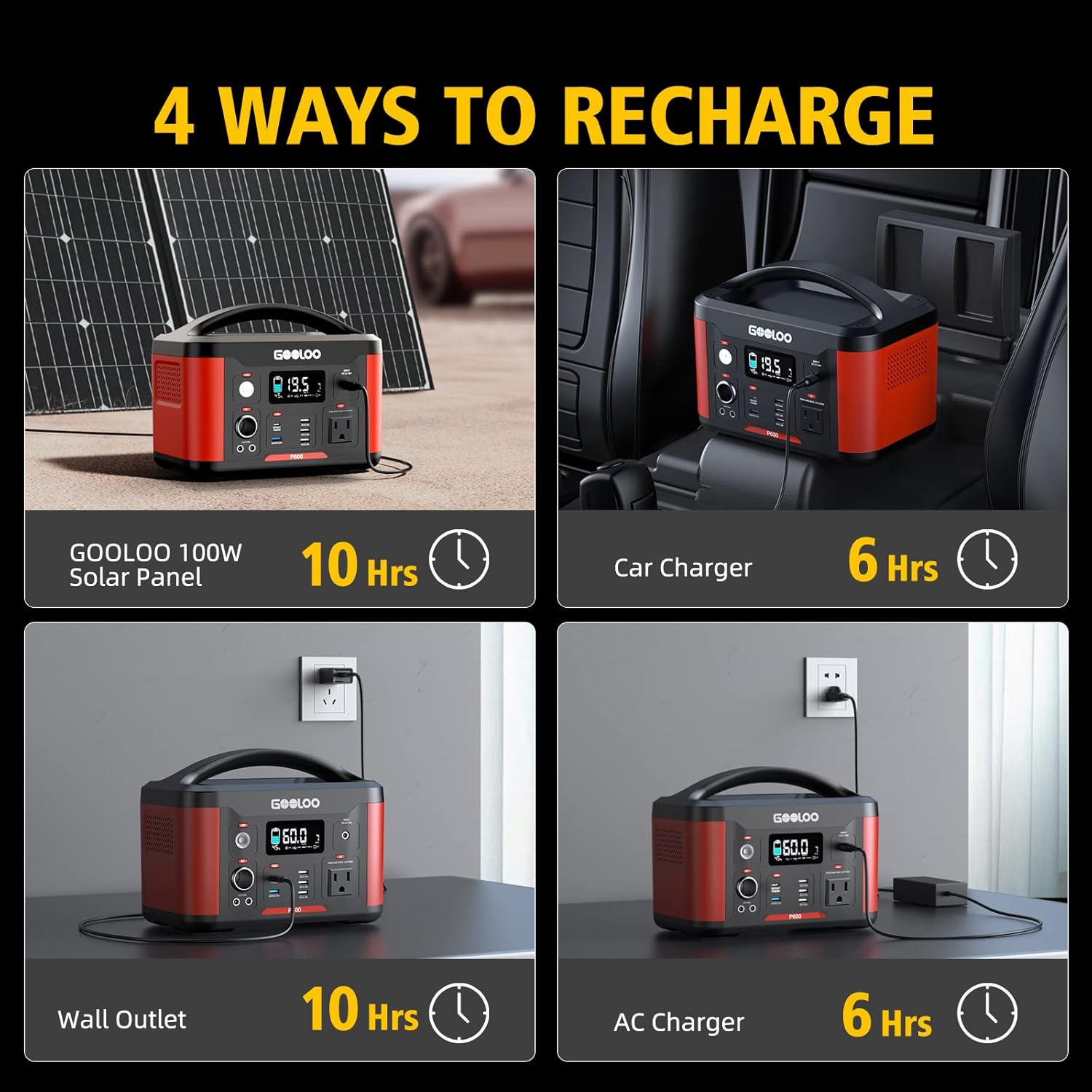
Image: Visual representation of the four charging methods for the GOOLOO P600: Solar Panel, Car Charger, Wall Outlet, and AC Charger.
- AC Wall Charger: Connect the provided AC adapter to the DC Input port (12-30V) and plug it into a standard wall outlet. Full charge takes approximately 6-7 hours.
- Car Charger: Connect the car charging cable to the DC Input port and plug it into your vehicle's 12V cigarette lighter socket. Full charge takes approximately 9-10 hours.
- Solar Panel (Optional): Connect a compatible 60W/80W/100W/120W solar panel (not included) to the DC Input port. Charging time varies based on solar light intensity. The P600 has a built-in MPPT function for efficient solar charging.

Image: The GOOLOO P600 being charged by a solar panel in an outdoor setting, demonstrating its solar charging capability.
- Type-C 60W Input: Use a compatible Type-C 60W wall charger (not included) to charge the unit via the Type-C port. This port also supports pass-through charging.

Image: The GOOLOO P600 connected to a laptop, illustrating its PD60W input/output capability for charging devices.
Using the P600 Outputs
The P600 provides various output ports to power your devices:

Image: An illustration showing various devices the GOOLOO P600 can power, such as Macbooks, DJI drones, iPad Airs, and car refrigerators.
- AC Outlets: Press the AC Power Switch to activate the 110V/600W (Peak 1200W) pure sine wave AC outlet. Plug in your AC-powered devices.
- USB Outputs: Press the USB Power Switch. The P600 has 3x 5V/2.4A USB outputs, 1x QC 3.0 (5V/3A;9V/2A;12V/1.5A) output, and 1x Type-C PD 60W Input/Output.
- DC Outputs: Press the DC Power Switch. The P600 includes a 12V cigarette lighter socket and 2x 12V DC outputs (120W Max).
LED Flashlight Operation
The built-in LED flashlight has four modes:
- Press the LED Power Switch once for weak light.
- Press again for strong light.
- Press a third time for SOS mode.
- Press a fourth time to turn off the flashlight.
LCD Screen Information
The multifunction LCD screen provides real-time information:
- Battery Power: Displays the current battery charge level.
- Available Time: Estimates the remaining operating time based on current power consumption.
- Power Consumption: Shows the current input/output wattage.
Maintenance
Storage
- Store the P600 in a cool, dry place away from direct sunlight and extreme temperatures.
- For long-term storage, charge the unit to 50-80% every 3-6 months to preserve battery health.
- Avoid storing in environments with high humidity or corrosive substances.
Cleaning
- Use a soft, dry cloth to clean the exterior of the power station.
- Do not use abrasive cleaners or solvents.
- Ensure all ports are free of dust and debris.
Troubleshooting
If you encounter issues with your GOOLOO P600, refer to the following common problems and solutions:
| Problem | Possible Cause | Solution |
|---|---|---|
| Unit does not turn on. | Battery is depleted. | Charge the unit using an AC adapter, car charger, or solar panel. |
| AC output not working. | AC switch is off; device draws too much power; unit is overheated. | Ensure AC switch is on. Check device wattage (max 600W). Allow unit to cool down if overheated. |
| USB/DC output not working. | USB/DC switch is off; device is incompatible. | Ensure respective switch is on. Verify device compatibility and cable connection. |
| Slow charging. | Low input power; environmental factors (solar). | Ensure charger meets specifications. For solar, optimize panel angle and sunlight exposure. |
If the problem persists, please contact GOOLOO customer support.
Specifications
| Feature | Detail |
|---|---|
| Model Number | DISCOVERY P600 |
| Battery Capacity | 626Wh |
| AC Output | 110V/600W (Peak 1200W) Pure Sine Wave |
| USB Output | 3x 5V/2.4A |
| QC 3.0 Output | 5V/3A; 9V/2A; 12V/1.5A |
| Type-C PD Input/Output | 60W |
| DC Output | 12V Cigarette Lighter Socket, 2x 12V DC Output (120W Max) |
| DC Input | 12-30V |
| Charging Time (AC Adapter) | 6-7 hours |
| Charging Time (Car Charger) | 9-10 hours |
| Item Weight | 4.5 kg |
| Special Features | Portable, LED Flashlight, LCD Screen, SuperSafe Battery Management System |
Safety Information
Please read and understand all safety instructions before operating the GOOLOO P600 to prevent injury or damage to the device.
- Do not disassemble, repair, or modify the unit.
- Keep the device away from fire, heat sources, and direct sunlight.
- Do not use or store the unit in a bathroom or in areas exposed to rain or moisture.
- Keep out of reach of children and pets.
- Use only original or certified charging cables and adapters.
- Avoid dropping, impacting, or subjecting the unit to strong vibrations.
- Ensure proper ventilation during use and charging to prevent overheating.
- The GOOLOO P600 features a SuperSafe Battery Management System (BMS) providing protection against overcurrent, overvoltage, over-temperature, over-charge, over-discharge, and short-circuit.

Image: Diagram illustrating the GOOLOO SuperSafe Battery Management System (BMS) and its protective features, including over-charge, over-discharge, over-voltage, over-current, short-circuit, and high-temperature protection.
Warranty and Support
GOOLOO provides a warranty of 12 + 6 months from the date of purchase for the DISCOVERY P600 power station. This warranty covers defects in materials and workmanship under normal use.
Contact Support
For technical assistance, warranty claims, or any questions regarding your GOOLOO P600, please contact GOOLOO customer support through their official website or the retailer where the product was purchased.
Please have your purchase receipt and product model number (DISCOVERY P600) ready when contacting support.
Ask a question about this manual
Ask about setup, troubleshooting, compatibility, parts, safety, or missing instructions. Manuals+ will review the question and use this page’s manual context to help answer it.