
OLIXIS En3895-2
OLIXIS Office Ergonomic Computer Gaming Desk Racing Chair User Manual
Brand: OLIXIS | Model: En3895-2
Introduction
This manual provides detailed instructions for the assembly, operation, and maintenance of your new OLIXIS Office Ergonomic Computer Gaming Desk Racing Chair. Designed for comfort and durability, this chair is suitable for extended periods of use, whether for gaming or office work. Please read this manual thoroughly before assembly and use to ensure proper function and safety.

Figure 1: OLIXIS Office Ergonomic Computer Gaming Desk Racing Chair (Red/Black)
Safety Information
This chair has a maximum weight capacity of 275 pounds and is recommended for adults only. Ensure all bolts are securely tightened before use. Do not stand on the chair. Avoid placing heavy objects on the chair's armrests or backrest when not in use. Keep children and pets away from the chair during assembly.
Components List
The OLIXIS Gaming Chair package includes the following components:
- Arm Pads
- Chair Backrest
- Seat Cushion
- Installation Instructions
- Hardware (Bolts, Wrench, etc.)
- Chair Base with Wheels
- Gas Lift
Setup and Assembly
Follow these steps carefully to assemble your OLIXIS Gaming Chair. It is recommended to have a clear, flat workspace.
Video 1: This video provides a step-by-step guide on how to assemble the OLIXIS Office Ergonomic Computer Gaming Desk Racing Chair, covering all components and installation procedures.
- Assemble the Base: Turn the base upside down. Insert the five legs into the base. Use the provided wrench and bolts to securely fix the base and legs.
- Attach Casters and Gas Lift: Insert the casters into the holes at the end of each leg. Then, insert the gas lift into the center hole of the base.
- Attach Mechanism to Seat: Align the mechanism over the pre-drilled holes underneath the seat. Ensure the front of the mechanism faces the front of the seat. Attach the mechanism to the seat using four bolts, tightening them with the wrench.
- Attach Armrests to Seat: Turn the seat upright and align the center hole of the seat plate over the gas lift. Push the seat down firmly until the connection is secure. Attach the armrests to the seat with two bolts each. The bolts only need to be screwed in 50% at this stage. Note: Armrests are labeled "L" (left) or "R" (right).
- Attach Backrest to Arms: Set the backrest upright. Attach the backrest to the arms by inserting one bolt into the holes. The bolt only needs to be screwed in 50%.
- Secure Backrest and Arms: Rotate the back of the chair up, then secure it with the remaining bolts. Adjust the balance on each side of the chair, and 100% tighten all the bolts from steps 4 and 5 at this step.
- Apply Caps: Press the decorative caps into the screw holes on each side of the chair.
Operating Instructions
Your OLIXIS Gaming Chair offers several adjustable features for personalized comfort:
- Height Adjustment: Use the lever located under the seat to adjust the chair's height. Pull the lever up to raise the chair, or pull it up while seated to lower it.
- Rocking Function: The chair features a rocking function between 90 to 120 degrees. Use the tension knob under the seat to adjust the resistance of the rocking motion.
- Flip-up Armrests: The armrests can be flipped up to save space or provide extra support. Simply lift them to raise or lower them as needed.
- 360-Degree Swivel: The chair's smooth-rolling casters and swivel mechanism allow for full 360-degree rotation and easy movement across various floor types.
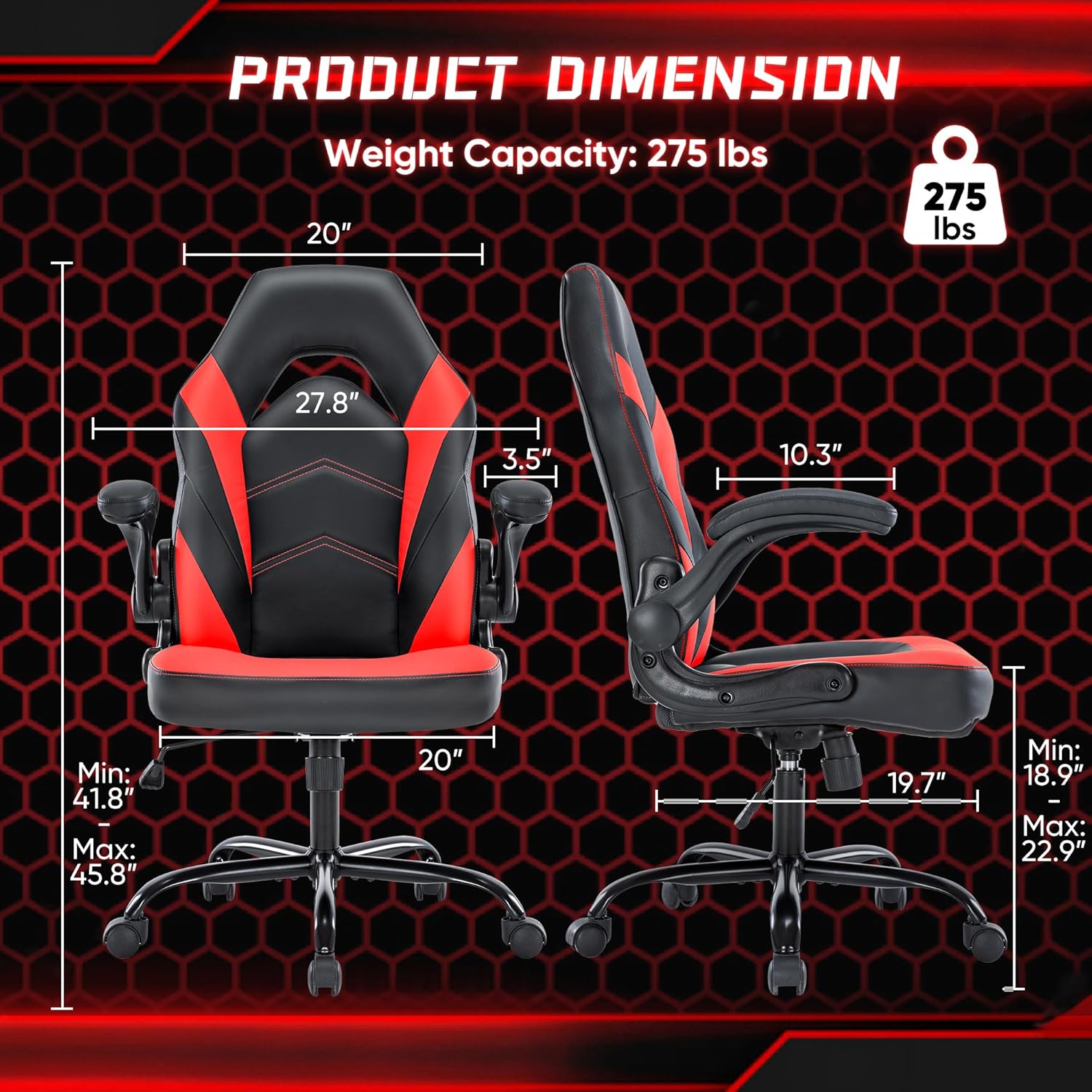
Figure 2: Adjustable Features of the OLIXIS Gaming Chair
Video 2: This video demonstrates the key features and functionality of the OLIXIS Gaming Desk Chair, including its adjustable armrests, height, and rocking mechanism, showcasing its versatility for both office and gaming use.
Maintenance
To maintain the quality and longevity of your OLIXIS Gaming Chair, simply wipe it clean with a damp cloth. Avoid using harsh chemicals or abrasive cleaners, as these may damage the PU leather. Regularly check and tighten all bolts to ensure stability.
Specifications
| Feature | Detail |
|---|---|
| Brand | OLIXIS |
| Model Name | Office Ergonomic Computer Gaming Desk Racing Chair for Adults |
| Item Model Number | En3895-2 |
| Color | Red |
| Product Dimensions | 27.5"D x 27.8"W x 45.8"H |
| Seat Adjustable Height | 18.9" to 22.9" |
| Load Capacity | 275 pounds maximum weight |
| Backrest Size | 20 inches (width) and 27.8 inches (height) |
| Seat Size | 19.7 inches (depth) and 20 inches (width) |
| Rocking Function | Between 90 to 120 degrees |
| Material | PU Leather, Memory Foam (fill), Metal (form factor) |
| Arm Style | Flip-up Arms |
| Furniture Base Movement | Swivel |
| Item Weight | 30 pounds |
| Country of Origin | China |
| UPC | 760790194845 |

Figure 3: Product Dimensions and Weight Capacity

Figure 4: Ergonomic Design Features
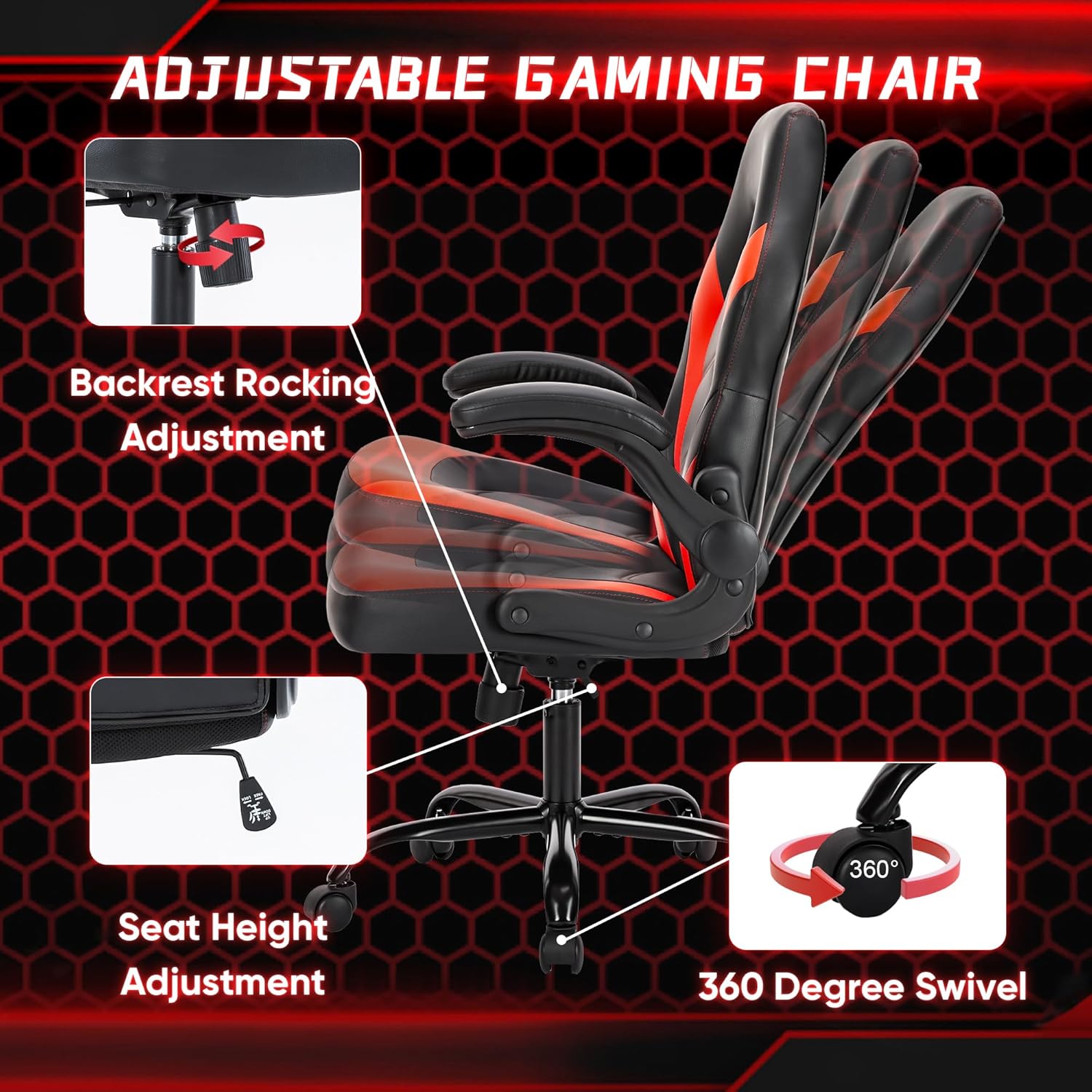
Figure 5: Upgraded Wheels and Sturdy Metal Base
Troubleshooting
If you encounter any issues with your OLIXIS Gaming Chair, please consider the following common solutions:
- Chair Wobbles: Ensure all assembly bolts are fully tightened. Check that the gas lift is properly seated in the base and seat mechanism.
- Difficulty Adjusting Height: Verify that the gas lift is correctly installed and not obstructed. Ensure the height adjustment lever is fully engaged.
- Squeaking Noises: Apply a small amount of lubricant to moving parts, especially where metal components meet. Check for any loose bolts and tighten them.
- Casters Not Rolling Smoothly: Check for any debris (hair, dust) caught in the casters and clean them. Ensure the casters are fully inserted into the base legs.
If problems persist, please refer to the full user guide or contact OLIXIS customer support.
Warranty and Support
For detailed warranty information and customer support, please refer to the official user guide provided with your product. You can also download the full installation manual in PDF format for further assistance.
Download User Guide: OLIXIS Gaming Chair Installation Manual (PDF)
For additional inquiries or support, please visit the official OLIXIS store or contact their customer service.
Related documentsEn3895-2


Ask a question about this manual
Ask about setup, troubleshooting, compatibility, parts, safety, or missing instructions. Manuals+ will review the question and use this page’s manual context to help answer it.