
1. Introduction
The Yahboom Jetson Orin NX 16GB Basis Kit is a high-performance single-board computer designed for artificial intelligence and robotics development. It features an NVIDIA Ampere architecture GPU and an 8-core Arm Cortex-A78AE v8.2 64-bit CPU, delivering significant AI computing power. This kit provides a robust platform for advanced AI applications, including large AI models, enhanced human-computer interaction, and various industrial applications.
Core Parameters:
- AI Performance: 117/157 TOPS
- GPU: 1024-core NVIDIA Ampere architecture GPU with 32 Tensor Cores
- CPU: 8-core Arm Cortex-A78AE v8.2 64-bit CPU 2MB L2 + 4MB L3
- Memory: 16GB 128-bit LPDDR5 | 102.4GB/s
- Storage: Supports external NVMe
Key Features:
- Large AI Model Support: Leverages three AI models and incorporates an AI voice interaction module for multimodal visual and voice interaction.
- High Performance: Ampere architecture GPU and new generation deep learning accelerators provide high-speed I/O and fast memory bandwidth.
- Versatile Applications: Ideal for small, low-power robotics, autonomous machines, manufacturing, logistics, retail, agriculture, medical, and life sciences.
- Comprehensive Software Support: Based on Ubuntu 22.04, supporting NVIDIA CUDA 12.6, TensorRT 10.7.0, cuDNN 9.6.0, OpenCV 4.10.0, and more.
2. Package Contents
Verify that all items listed below are included in your Yahboom Jetson Orin NX 16GB Basis Kit package:
- Orin NX module
- 19 V DC power supply
- SSD (Solid State Drive)
- Acrylic case
- DP-to-HDMI cable
3. Hardware Overview
The Yahboom Jetson Orin NX 16GB Basis Kit is designed for compact and efficient operation. Below is an overview of its physical components and interfaces.

Figure 3.1: Function Distribution of the Jetson Orin NX board. This image highlights various ports and connectors including the power switch button, MIPI CSI camera interface, PoE reverse power interface, USB 3.1*4 ports, DisplayPort interface, DC5525 power interface, CAN bus, Fan interface, 40PIN GPIO expansion interface, Core module card holder, PoE interface, RJ45 Ethernet interface, Power indicator, and USB Type-C interface. The underside shows M.2 Key E and M.2 Key M connectors, and an RTC battery holder.
Ports and Interfaces:
- DC Power Jack: For 19V/5A power input.
- DisplayPort (DP): For video output to a monitor.
- USB 3.1 Type-A Ports (x4): For connecting peripherals such as keyboards, mice, and external storage.
- RJ-45 Gigabit Ethernet: For wired network connectivity.
- USB 2.0 Type-C: For data transfer.
- MIPI CSI Camera Interface (22-pin): Supports dual-channel 4-lane 22-pin CSI cameras.
- 40-Pin GPIO Expansion Header: For connecting various sensors and actuators.
- M.2 Key M Slot: For NVMe SSD expansion.
- M.2 Key E Slot: For wireless modules (Wi-Fi/Bluetooth).
Internal Components:
- Jetson Orin NX Module: The core processing unit.
- Cooling Fan: Integrated for thermal management.
- NVMe SSD: Pre-installed 256GB SSD with system image (AI visual function, ROS examples, AI large model examples).
- Wireless Network Card: Pre-installed 8822CE NGW dual-band wireless network card supporting BT 5.0 and dual-band Wi-Fi.
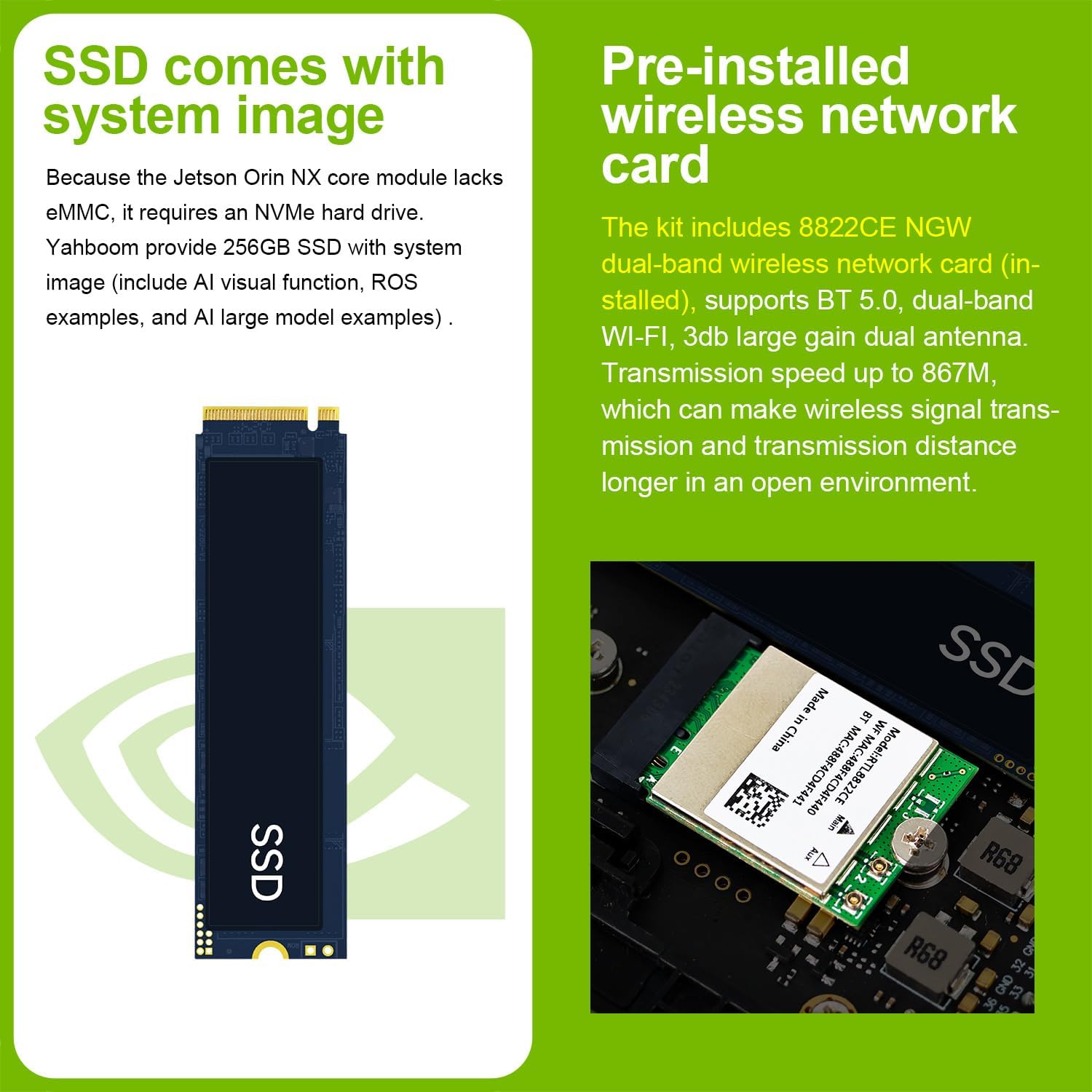
Figure 3.2: The pre-installed 256GB NVMe SSD and 8822CE NGW dual-band wireless network card, providing high-speed storage and connectivity.
Dimensions:
- Item Weight: 2 pounds
- Package Dimensions: 14.65 x 12.71 x 2.24 inches
4. Setup Instructions
4.1 Physical Assembly
The Jetson Orin NX module comes pre-assembled on its carrier board. The kit includes an acrylic case for protection. Follow these steps to prepare your device:
- Case Assembly: If your kit includes an unassembled acrylic case, carefully follow the provided instructions to enclose the Jetson Orin NX board. Ensure all screws are tightened appropriately.
- Antenna Installation: If external antennas are provided, screw them onto the corresponding connectors on the case.
Video 4.1: This video demonstrates the assembly process for the Jetson Orin NX development kit, including mounting the board into a case and connecting peripherals. It provides a visual guide for users to correctly set up their hardware.
4.2 Connecting Peripherals
Before powering on your Jetson Orin NX, connect the necessary peripherals:
- Display: Connect your monitor to the DisplayPort (DP) using the provided DP-to-HDMI cable.
- Input Devices: Connect a USB keyboard and mouse to the USB 3.1 Type-A ports.
- Network: For wired internet access, connect an Ethernet cable to the RJ-45 port.
- Power: Connect the 19V DC power supply to the DC power jack. Ensure the power cable is appropriate for your region.
Video 4.2: This video provides a detailed unboxing and plug-in guide for the reComputer J4012, which shares similar setup procedures with the Jetson Orin NX. It illustrates how to connect essential peripherals and power the device.
4.3 Software Setup
The included 256GB NVMe SSD comes pre-installed with Ubuntu 22.04 and NVIDIA Jetpack 5.1.1, along with various AI visual functions, ROS examples, and AI large model examples. This allows for direct power-on without initial flashing or complex configurations.
- First Boot: After connecting all peripherals and power, the system should boot directly into the Ubuntu desktop environment.
- Initial Configuration: Follow any on-screen prompts for initial setup, such as language, time zone, and user account creation.
- Software Updates: It is recommended to update the system software regularly. Open a terminal and run
sudo apt update && sudo apt upgradeto ensure all packages are up-to-date.
5. Operating Instructions
The Yahboom Jetson Orin NX 16GB Basis Kit is a powerful platform for AI and robotics. It supports various programming environments and applications.
5.1 Powering On/Off
- Power On: Once the power supply is connected, the device should automatically power on. A green LED indicator will confirm it is operational.
- Power Off: To safely shut down the system, use the graphical user interface (GUI) shutdown option in Ubuntu or open a terminal and type
sudo shutdown now.
5.2 AI and Robotics Programming
The kit is pre-configured with essential tools for AI and robotics development:
- Ubuntu 22.04: Provides a complete desktop Linux environment.
- NVIDIA Jetpack: Includes CUDA, TensorRT, cuDNN, and OpenCV for accelerated AI computing.
- ROS/ROS2: Supports Robot Operating System for robotics applications.
- Python: Python programming is widely used for AI and robotics development on this platform.
5.3 Example AI Applications
The kit is capable of running complex AI models and applications:
- Multimodal Visual System: Enables environmental awareness and AI visual gameplay, matching scenes with descriptions.
- Voice Interaction: Combined with a large-scale voice module, it supports speech-to-text, semantic analysis, natural conversation, and real-time video analysis.
- Deep Learning: Granular structured sparsity improves operating throughput of Tensor Cores, supporting large and complex AI model development in natural language understanding, 3D perception, and multi-sensor fusion.
Video 5.1: This video showcases the capabilities of the Rosmaster X3 Plus, a robotics platform powered by Jetson. It demonstrates voice control for robotic arms, learning actions, Mecanum wheel omnidirectional movement, Lidar scanning and 3D mapping, autonomous navigation, object recognition, and remote control via APP and PS2 handle.
6. Maintenance
Proper maintenance ensures the longevity and optimal performance of your Jetson Orin NX Basis Kit.
6.1 Cooling
The Jetson Orin NX module includes a cooling fan. Ensure the fan is free from dust and obstructions to maintain efficient heat dissipation, especially during intensive AI computations.
6.2 Storage
The kit uses an NVMe SSD for storage. Regularly back up important data to prevent loss. Monitor SSD health using appropriate Linux tools.
6.3 Software Updates
Keep your Ubuntu operating system and NVIDIA Jetpack components updated. Regular updates provide security patches, performance improvements, and access to new features. Use the terminal commands sudo apt update and sudo apt upgrade for system updates.
7. Troubleshooting
This section provides solutions to common issues you might encounter.
7.1 No Power/No Boot
- Check Power Supply: Ensure the 19V DC power supply is correctly connected and functioning. Verify the power outlet is active.
- Power Indicator: Look for the green power indicator LED on the board. If it's not lit, recheck power connections.
7.2 No Display Output
- Cable Connection: Ensure the DP-to-HDMI cable is securely connected to both the Jetson Orin NX and your monitor.
- Monitor Input: Verify your monitor is set to the correct input source (HDMI).
- Power Cycle: Try power cycling both the Jetson Orin NX and the monitor.
7.3 Network Connectivity Issues
- Wired Ethernet: Check the Ethernet cable connection to the RJ-45 port and your router/switch. Verify router status.
- Wi-Fi: Ensure the wireless network card is properly installed and antennas are attached. Check Wi-Fi settings in Ubuntu.
7.4 Peripheral Not Detected
- USB Devices: Try connecting USB devices to different USB 3.1 Type-A ports. Ensure devices are powered if required.
- Camera: Verify the camera ribbon cable is correctly inserted with the metal side facing downward.
8. Specifications
Detailed technical specifications for the Yahboom Jetson Orin NX 16GB Basis Kit:
| Feature | Specification |
|---|---|
| Brand | Yahboom |
| Model Name | Jetson Orin NX |
| AI Performance | 117/157 TOPS |
| GPU | 1024-core NVIDIA Ampere architecture GPU with 32 Tensor Cores |
| CPU | 8-core Arm Cortex-A78AE v8.2 64-bit CPU |
| RAM | 16 GB LPDDR5 (102.4GB/s) |
| Storage | 256 GB SSD (NVMe) |
| Operating System | Linux (Ubuntu 22.04 with Jetpack 5.1.1) |
| USB Ports | 4x USB 3.1 Type-A, 1x USB 2.0 Type-C |
| Network | Gigabit Ethernet, Wi-Fi (8822CE NGW, BT 5.0) |
| Display Output | DisplayPort |
| Item Weight | 2 pounds |
| Package Dimensions | 14.65 x 12.71 x 2.24 inches |
9. Support & Resources
Yahboom provides extensive tutorial materials and support for the Jetson Orin NX Basis Kit.
9.1 Tutorial Materials
The kit includes access to comprehensive programming courses and development materials:
- ROS2 Ubuntu Programming Courses: Detailed courses for robotics development.
- ROS Programming Courses: Additional resources for Robot Operating System.
- AI LLM, VLM, and Visual Transformer: Performance improvements and development solutions for advanced AI models.

Figure 9.1: An overview of the advanced development materials available for the Jetson Orin NX, covering various courses and topics for AI and robotics.
9.2 Certifications
The product is compliant with various international standards:
- ROHS
- CE
- KC
- UKCA
- FCC