
1. Introduction
Thank you for choosing the Avantalk Lingo Open-Ear Bluetooth Headphones. This manual provides detailed instructions on how to set up, operate, and maintain your new headset. The Lingo headset is designed for crystal clear calls and surroundings awareness, featuring an open-ear design and a noise-filtering boom microphone.
2. Package Contents
Please check the box for the following items:
- Avantalk Lingo Headset
- USB-C Charging Cable

Image: Rear view of the Lingo headset packaging, showing the headset and USB-C charging cable as included items.
3. Product Overview
Familiarize yourself with the main components of your Avantalk Lingo headset:
- Open-Ear Earpieces: Designed to rest on your ears without covering them, allowing you to hear your audio and surroundings simultaneously.
- Adjustable Boom Microphone: Features a cVc 8.0 dual-mic noise-filtering system for clear calls. It can rotate 240 degrees for optimal positioning or storage.
- Integrated Controls: Buttons for power, volume, call management, and microphone mute are located on the headset.

Image: The Avantalk Lingo headset, showcasing its open-ear design and the extended boom microphone.
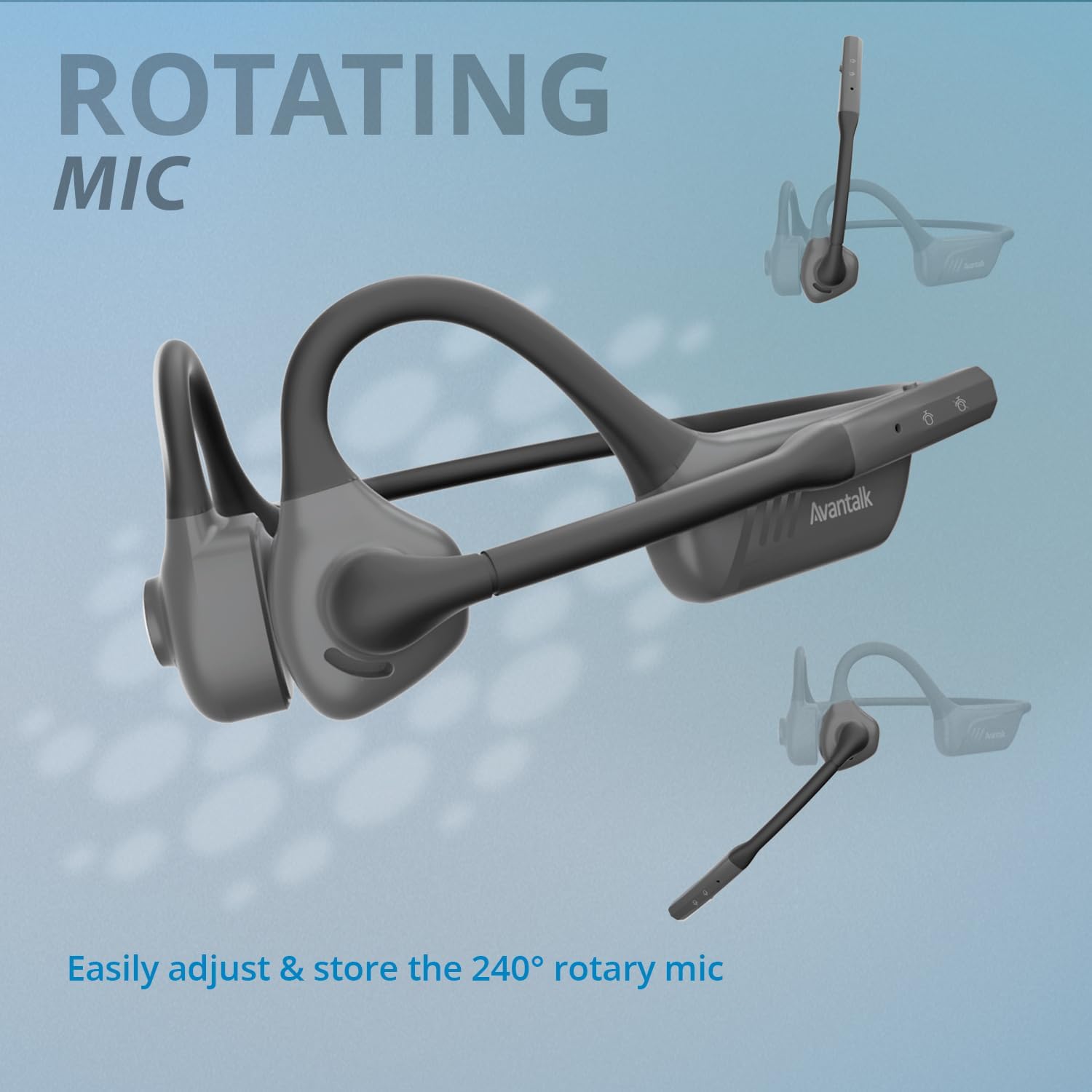
Image: A visual representation of the headset's boom microphone, illustrating its 240-degree rotation capability for flexible use and storage.
4. Setup
4.1 Charging the Headset
Before first use, fully charge your Lingo headset. Connect the provided USB-C charging cable to the charging port on the headset and the other end to a USB power source (e.g., computer USB port, wall adapter). The charging indicator light will show the charging status. A full charge takes approximately 1.5 hours.
4.2 Pairing with Your Device
The Lingo headset uses Bluetooth 5.1 for wireless connectivity. Follow these steps to pair it with your device:
- Ensure the headset is turned off.
- Press and hold the Multi-function button (usually the power button) until the LED indicator flashes blue and red, indicating pairing mode.
- On your device (PC, laptop, phone, tablet), go to Bluetooth settings and enable Bluetooth.
- Search for new devices. Select "Avantalk Lingo" from the list of available devices.
- Once connected, the LED indicator on the headset will turn solid blue or flash blue slowly.
The headset has a Bluetooth range of up to 10 meters (33 feet).

Image: A user wearing the Avantalk Lingo headset while engaged with a laptop, illustrating its wireless connectivity and ease of use for communication.
5. Operating Instructions
5.1 Power On/Off
- Power On: Press and hold the Multi-function button for 3 seconds.
- Power Off: Press and hold the Multi-function button for 5 seconds.
5.2 Call Management
The Lingo headset is optimized for clear communication:
- Answer/End Call: Press the Multi-function button once.
- Reject Call: Press and hold the Multi-function button for 2 seconds.
- Microphone Mute: The boom mic features a dedicated mute switch. Slide the switch to mute or unmute the microphone. The mic can be rotated 240 degrees to position it optimally or to store it out of the way when not in use.

Image: A man wearing the Avantalk Lingo headset, demonstrating the effectiveness of its cVc 8.0 dual-mic noise-filtering technology for crystal clear calls.
5.3 Audio Playback
- Play/Pause: Press the Multi-function button once.
- Volume Control: Use the volume up (+) and volume down (-) buttons on the headset.
- Surroundings Awareness: The open-ear design allows you to listen to audio while remaining aware of your environment, enhancing safety and interaction.

Image: A woman wearing the Lingo headset, engaging in conversation with another person, illustrating how the open-ear design allows for simultaneous audio listening and environmental awareness.
5.4 Qualcomm aptX Technology
The Lingo headset incorporates Qualcomm aptX technology, providing stable connection, auto-reconnect capabilities, wide compatibility, and high-definition audio for an enhanced listening experience.

Image: Two people are shown enjoying audio, symbolizing the high-quality sound and stable connection provided by Qualcomm aptX technology in the Lingo headset.
6. Maintenance
To ensure the longevity and optimal performance of your Avantalk Lingo headset, follow these maintenance guidelines:
- Cleaning: Wipe the headset with a soft, dry cloth. Avoid using harsh chemicals or abrasive materials.
- Storage: Store the headset in a cool, dry place away from direct sunlight and extreme temperatures.
- Battery Care: For extended storage, charge the battery to approximately 50% every three months to prevent deep discharge.
7. Troubleshooting
If you encounter issues with your Lingo headset, refer to the following common problems and solutions:
| Problem | Solution |
|---|---|
| Headset does not power on. | Ensure the headset is fully charged. Connect it to a power source and allow it to charge for at least 15 minutes before attempting to power on again. |
| Cannot pair with device. | Make sure the headset is in pairing mode (LED flashing blue and red). Ensure Bluetooth is enabled on your device and it is within the 10-meter range. Try restarting both the headset and your device. |
| No sound or low volume. | Check the volume levels on both the headset and your connected device. Ensure the headset is correctly paired and selected as the audio output device. |
| Microphone not working. | Ensure the microphone mute switch is in the unmute position. Check your device's audio settings to confirm the Lingo headset microphone is selected as the input device. |
| Intermittent connection. | Move closer to your connected device to reduce interference. Avoid physical obstructions between the headset and the device. Ensure no other strong wireless signals are causing interference. |
8. Specifications
| Feature | Detail |
|---|---|
| Model Name | Lingo |
| Model Number | ATBH-NB19M |
| Connectivity Technology | Wireless (Bluetooth) |
| Wireless Communication Technology | Bluetooth 5.1 |
| Bluetooth Range | 10 Meters |
| Ear Placement | Open Ear |
| Microphone | Dual Noise Canceling Mic (cVc 8.0) with Mute Switch |
| Battery Life | Up to 12 Hours (Talking Time) / 10 Hours (Playing Time) |
| Charging Time | 1.5 Hours |
| Item Weight | 40 Grams (1.41 ounces) |
| Material | Acrylonitrile Butadiene Styrene (ABS), Silicone |
| Compatible Devices | Bluetooth enabled devices like most PCs, Computers, Laptops, Smartphones, Tablets |

Image: The Avantalk Lingo headset with an overlay indicating 'Extended Playtime' and 'Up to 12h', highlighting its long battery life.
9. Warranty and Support
9.1 Warranty Information
Avantalk products are covered by a manufacturer's warranty. For specific details regarding the warranty period and terms for your Lingo headset, please refer to the official Avantalk website or the warranty card included with your product.
9.2 Customer Support
For setup guides, frequently asked questions (FAQs), video tutorials, and further assistance, please visit the Avantalk support website:
Website: support.avantree.com
You can also contact customer support via email or phone:
Email: support@avantree.com
USA/CA Phone: 1-800-232-2078
10. Official Product Videos
No official product videos from the seller were available in the provided data for embedding in this manual.