
1. Introduction
Thank you for choosing the Marsail Electric Standing Desk. This adjustable height desk is designed to provide a versatile and ergonomic workspace, allowing you to easily switch between sitting and standing positions. This manual provides essential information for the safe assembly, operation, and maintenance of your new desk. Please read it thoroughly before use and retain it for future reference.
2. Safety Information
- Weight Capacity: Do not exceed the maximum weight capacity of 176 lbs (80 kg). Overloading can cause damage or injury.
- Power Supply: Ensure the power cord is properly connected to a grounded outlet. Do not use if the cord or plug is damaged.
- Clearance: Keep the area around the desk clear during height adjustments to prevent obstructions from interfering with movement.
- Children and Pets: Keep children and pets away from the desk during operation. The desk contains moving parts that could cause injury.
- Anti-Collision System: The desk is equipped with an anti-collision sensor. If the desk encounters an obstruction during movement, it will stop and reverse slightly. Do not intentionally block the desk's movement.
- Stability: Ensure the desk is placed on a level surface. Adjust the leveling feet if necessary to maintain stability.
- Liquid Spills: Avoid spilling liquids on the control panel or motor components. In case of a spill, immediately unplug the desk and allow it to dry completely before reconnecting power.
3. Package Contents
Please verify that all components are present before beginning assembly:
- Electric Standing Desk Frame
- Desktop (48 x 24 inches)
- Control Panel with Memory Presets
- Power Adapter and Cable
- Headphone Hook
- Cable Clip
- Installation Instruction Manual
- Necessary installation tools (Allen Wrench)
4. Assembly Instructions
The Marsail Electric Standing Desk is designed for straightforward assembly. For detailed, step-by-step instructions, please refer to the dedicated Installation Instruction Manual included in your package. A general overview of the assembly process is provided below:
- Unpack all components and verify against the package contents list.
- Attach the lifting columns to the desk feet.
- Connect the crossbar between the lifting columns.
- Secure the desktop to the assembled frame. Note that the desktop may consist of two pieces that join together.
- Install the control panel, headphone hook, and cable clips as directed.
- Connect all necessary cables (motor to control box, control box to control panel, power adapter to control box).
- Plug the power adapter into a wall outlet.
Tip: It is recommended to assemble the desk with two people to ensure stability and ease of handling, especially when attaching the desktop.

Image: Components of the Marsail Electric Standing Desk ready for assembly.
5. Operating Instructions
5.1 Height Adjustment
Use the Up (^) and Down (v) arrow buttons on the control panel to adjust the desk height. Press and hold the button until the desired height is reached. The current height will be displayed on the LED screen.
5.2 Memory Presets
The desk features three memory preset buttons (1, 2, 3) to save and recall your preferred sitting and standing heights.
- Adjust the desk to your desired height using the Up (^) or Down (v) buttons.
- Press the 'S' button (Set). The LED display will show 'S-'.
- Within 3 seconds, press one of the memory buttons (1, 2, or 3). The current height is now saved to that preset.
- To recall a saved height, simply press the corresponding memory button (1, 2, or 3). The desk will automatically move to the saved position.

Image: The control panel for the Marsail Electric Standing Desk, showing the LED display, 'S' (Set) button, memory presets (1, 2, 3), and Up/Down arrow buttons.

Image: Visual representation of the desk's wide height adjustment range, from 28.3 inches to 46.5 inches, suitable for various user heights and scenarios.
5.3 Anti-Collision System
The desk is equipped with an anti-collision feature. If the desktop encounters an obstacle during upward or downward movement, it will automatically stop and reverse slightly to prevent damage to the desk or objects.
Video: Official Marsail product video demonstrating the electric standing desk's height adjustment and features.
6. Maintenance
- Cleaning: Wipe the desk surfaces with a dry cloth. Avoid using harsh chemicals or abrasive cleaners that could damage the finish.
- Inspections: Periodically check all screws and bolts to ensure they are tight. Retighten if necessary.
- Cable Management: Use the included cable clips to manage power and device cables, preventing them from getting caught during height adjustments.
7. Troubleshooting
| Problem | Possible Cause | Solution |
|---|---|---|
| Desk does not move. | Power cord disconnected; motor cable loose; overload. | Check all cable connections. Ensure power is supplied. Reduce weight on the desk. |
| Desk moves unevenly or makes unusual noise. | Loose connections; uneven weight distribution. | Check all screws and bolts for tightness. Redistribute weight evenly on the desktop. |
| Anti-collision system frequently triggers. | Obstruction in the path of movement. | Ensure there are no objects under or above the desk that could interfere with its movement. |
| Memory presets not working. | Presets not saved correctly. | Follow the instructions in Section 5.2 to re-save your desired heights. |
If you encounter issues not listed here or if the problem persists, please contact Marsail Customer Support for assistance.
8. Specifications
| Feature | Detail |
|---|---|
| Brand | Marsail |
| Model Number | JZSTZESD11B |
| Desktop Dimensions (D x W) | 24" x 48" (or 24" x 55" depending on variant) |
| Height Adjustment Range | 28.3" to 46.5" |
| Maximum Weight Capacity | 176 lbs (80 kg) |
| Material | CARB P2 Engineered Wood (Desktop), Carbon Steel (Frame) |
| Motor Type | High-tech worm gear motor |
| Noise Level | Less than 50 dB |
| Special Features | Electric height adjustment, 3 memory presets, Anti-collision technology, Headphone hook |
| Assembly Required | Yes (Recommended 2 people) |
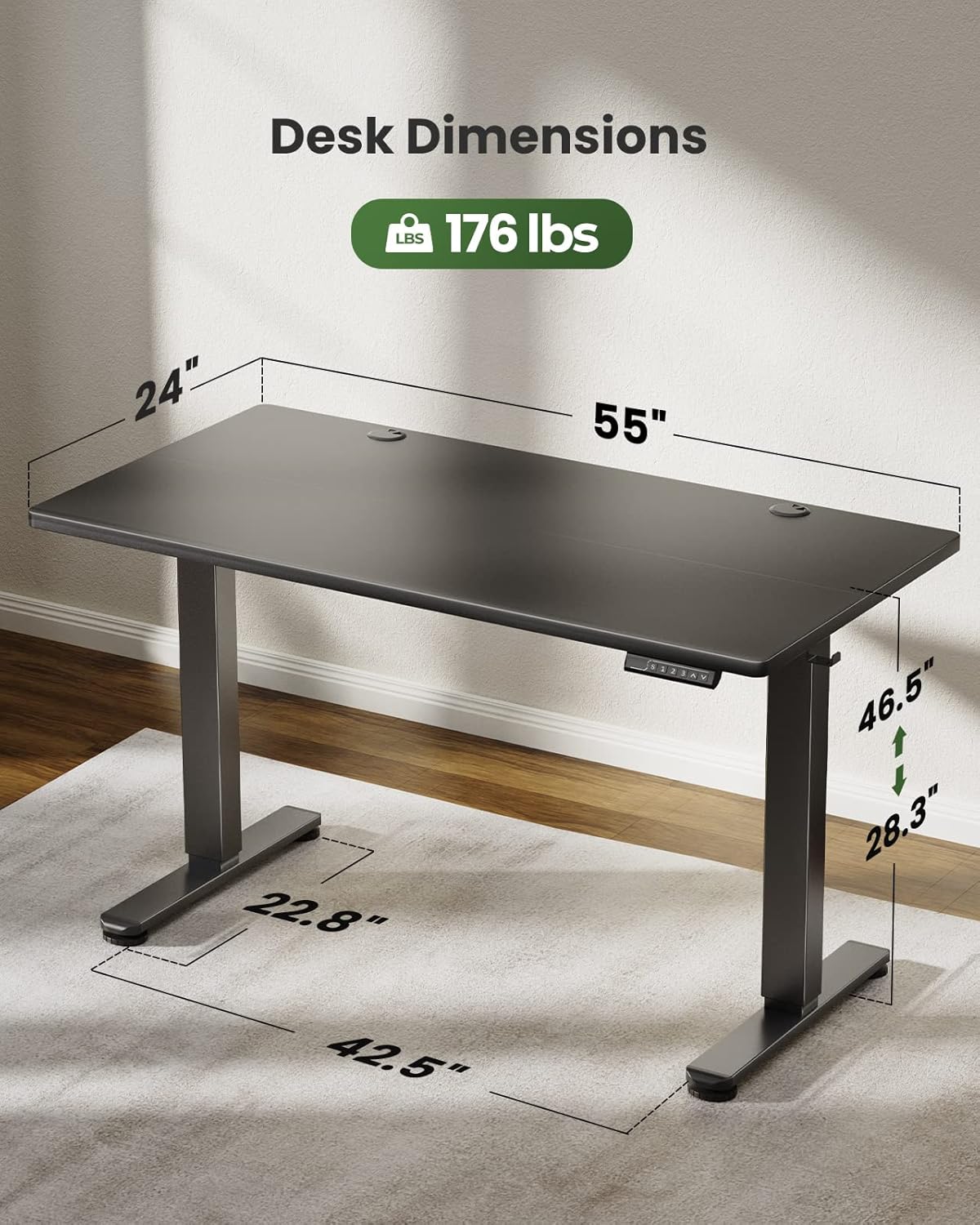
Image: Detailed dimensions of the Marsail Electric Standing Desk, illustrating its adjustable height and desktop size.
9. Warranty and Support
9.1 Manufacturer's Warranty
The Marsail Electric Standing Desk comes with a 5-year manufacturer's warranty. This warranty covers defects in materials and workmanship under normal use. Please retain your proof of purchase for warranty claims.
9.2 Customer Support
For any questions, technical assistance, or warranty claims, please contact Marsail Customer Support. Refer to the contact information provided in your purchase documentation or visit the official Marsail website.