
1. Product Overview
The Klarus WL3 is a versatile and powerful camping and work light designed for various outdoor and indoor applications. It features high brightness, multiple light modes, and a large capacity rechargeable battery, making it an essential tool for camping, DIY projects, emergency situations, and car repairs.
Key Features
- 1500 Lumens Super Bright: Offers powerful illumination with a maximum output of 1500 lumens.
- 6 Light Modes: Includes Low, Medium, High, Maximum, Red, and SOS modes to suit different lighting needs.
- 180° Rotation Design: Allows for flexible adjustment of the light direction and angle.
- Multiple Mounting Options: Equipped with a magnetic base, a convenient hook, and a tripod hole for versatile placement.
- 13500mAh High Capacity Battery: Built-in rechargeable lithium battery provides extended runtime and can function as a power bank.
- Long-lasting Durability: Constructed from high-quality ABS material with IPX5 waterproof rating, suitable for various weather conditions.
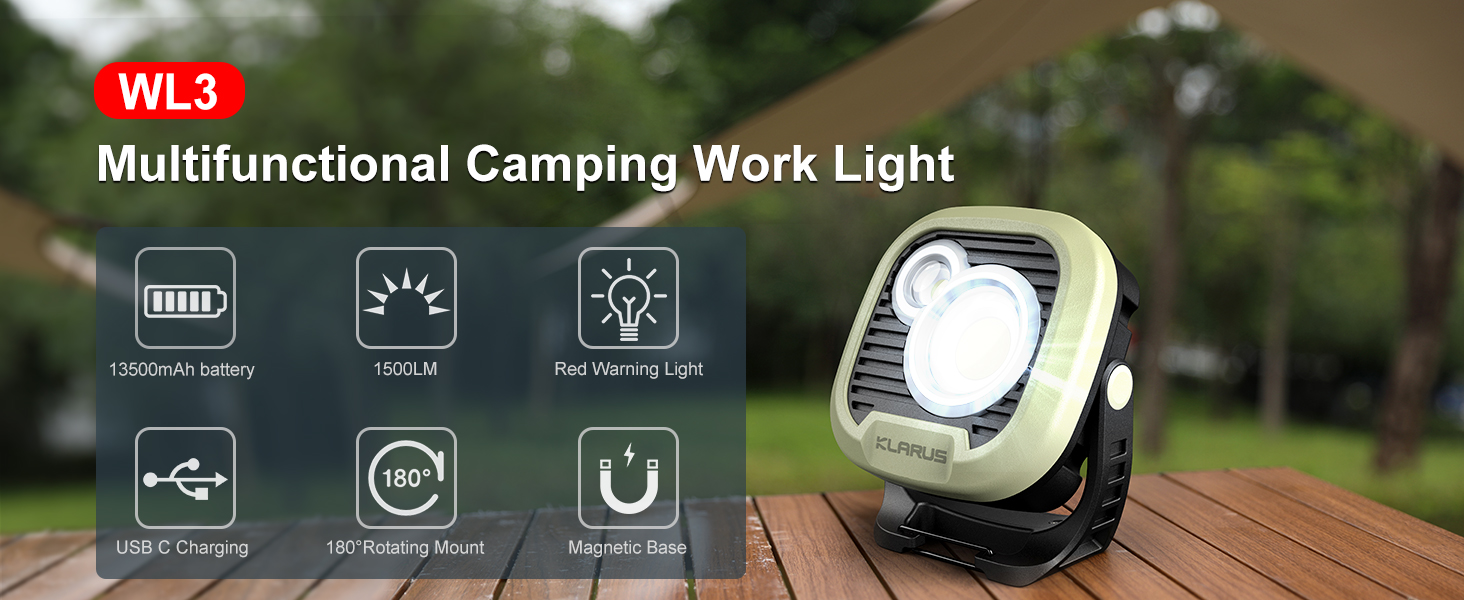
Overview of Klarus WL3 features including 13500mAh battery, 1500LM, red warning light, USB-C charging, 180° rotating mount, and magnetic base.
2. Setup and Charging
Initial Charge
Before first use, fully charge the Klarus WL3 Camping Light. The device comes with a built-in 13500mAh rechargeable lithium battery.
- Locate the USB-C input port, typically covered by a protective flap.
- Connect the provided USB-C cable to the input port on the light and to a compatible USB power adapter (not included).
- The battery indicator lights on the back of the device will illuminate to show charging progress. A full charge typically takes approximately 5.5 hours.
- Once fully charged, all indicator lights will be solid. Disconnect the charging cable and ensure the protective flap is securely closed to maintain water resistance.
Power Bank Function
The Klarus WL3 can also be used to charge other devices.
- Locate the USB-A output port, typically covered by a protective flap.
- Connect your device's charging cable to the USB-A output port on the light.
- The light supports 5V/3A, 9V/2A, and 12V/1A output power for charging Android mobile phones or other Android USB devices in emergency situations.
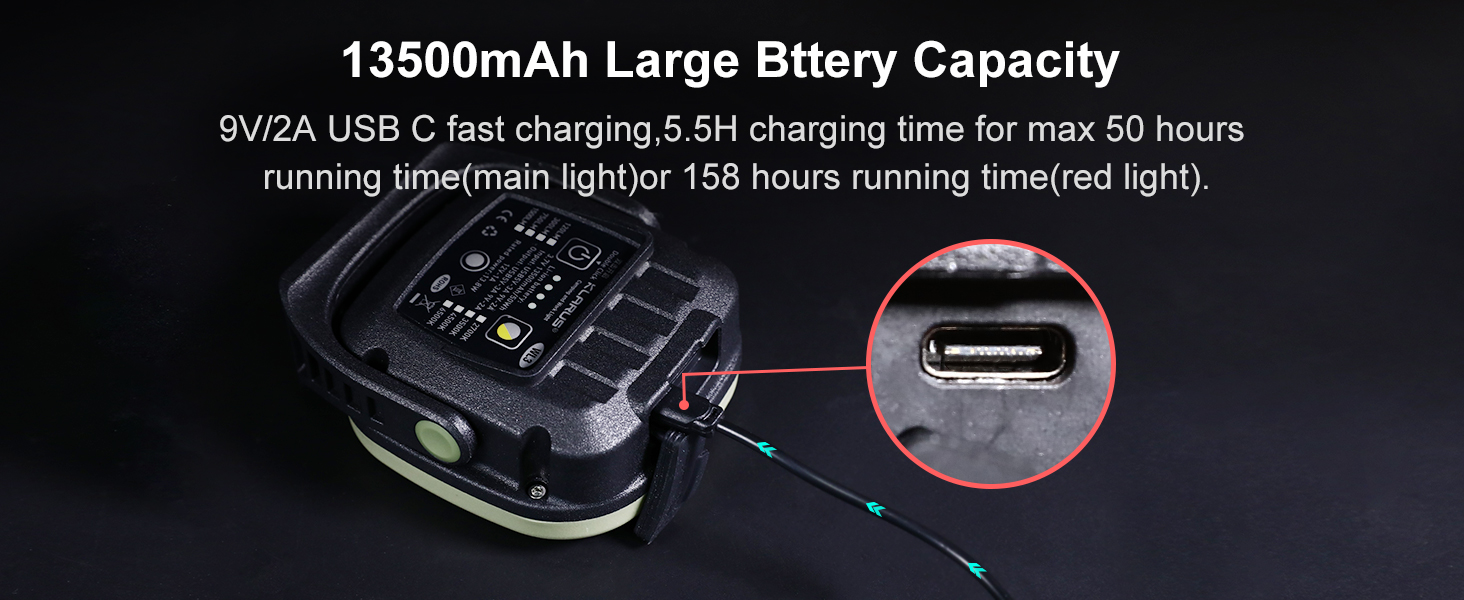
Detailed view of the Klarus WL3's 13500mAh battery, 9V/2A USB-C fast charging, and battery life indicators, alongside its power bank capability.
3. Operating Instructions
Power On/Off and Brightness Adjustment
The Klarus WL3 features a main power button and a brightness adjustment button.
- To Power On/Off: Double-click the power button (marked with a power symbol) on the back of the device.
- To Adjust Brightness: Once the light is on, single-click the brightness button (next to the power button) to cycle through the main light modes: 120LM, 300LM, 750LM, and 1500LM.
Color Temperature and Red Light Modes
The light offers various color temperatures and a red light function for different environments.
- To Adjust Color Temperature: While the main light is on, press the color temperature adjustment button (marked with a sun symbol) to cycle through different color temperatures: 2700K, 3500K, 4500K, and 6500K.
- To Activate Red Light: Press the red light switch (circular button below the main controls) to turn on the red light. Press again to activate the red light flashing (SOS) mode. This can be used as a warning or distress signal.

Klarus WL3 Camping Light displaying five different light color temperatures and brightness levels, from 120LM 2700K to 1500LM 6500K, plus a red light mode.
Official product video demonstrating the Klarus WL3 Camping Light's features, including its compact size, battery life, multiple light modes, and versatile mounting options.
4. Mounting and Versatility
The Klarus WL3 is designed with multiple mounting options for convenience and adaptability.
- Magnetic Base: The strong magnetic base allows the light to be securely attached to metallic surfaces, such as car hoods, workshop benches, or metal poles. The 180° adjustable angle provides precise light positioning.
- Integrated Hook: A built-in hook enables easy hanging from tents, backpacks, branches, or other elevated points.
- Tripod Hole: A standard 1/4-inch screw interface is included for mounting the light on most tripods, offering stable and elevated illumination.

Klarus WL3 Camping Light demonstrating various usage scenarios: hanging from a hook, attached magnetically under a car hood, placed on a surface, and mounted on a tripod.
5. Maintenance
Proper maintenance ensures the longevity and optimal performance of your Klarus WL3 Camping Light.
- Cleaning: Wipe the light with a soft, damp cloth to remove dirt and debris. Avoid using harsh chemicals or abrasive cleaners, as these can damage the surface or internal components.
- Storage: Store the light in a cool, dry place away from direct sunlight and extreme temperatures. If storing for an extended period, ensure the battery is partially charged (around 50%) to prolong its lifespan. Recharge every 3-6 months.
- Water Resistance: The light has an IPX5 waterproof rating, meaning it is protected against low-pressure water jets from any direction. However, it is not designed for submersion. Ensure all port covers are securely closed before exposure to water.

Klarus WL3 Camping Light being sprayed with water, illustrating its IPX5 waterproof rating and durability against wet weather.
6. Troubleshooting
If you encounter issues with your Klarus WL3, refer to the following common problems and solutions:
- Light Not Turning On:
- Ensure the battery is charged. Connect the light to a power source and check the battery indicator.
- Double-click the power button to ensure it is correctly activated.
- Light Not Charging:
- Verify the USB-C cable is properly connected to both the light and the power adapter.
- Try a different USB-C cable or power adapter to rule out faulty accessories.
- Ensure the charging port is clean and free of debris.
- Light Output is Dim or Inconsistent:
- The battery might be low. Recharge the device.
- Ensure the correct brightness mode is selected by single-clicking the brightness button.
- Power Bank Function Not Working:
- Ensure the light has sufficient battery charge.
- Verify the charging cable for your external device is properly connected to the USB-A output port.
- Some devices may require specific charging protocols; ensure compatibility.
If the issue persists after trying these steps, please contact Klarus customer support for further assistance.
7. Technical Specifications
| Specification | Detail |
|---|---|
| Model Number | WL3 |
| Light Source Type | Light Emitting Diode (LED) |
| Light Output Maximum | 1500 Lumens |
| Battery Capacity | 13500mAh (Li-ion) |
| Battery Life (Max) | 158 Hours |
| Charging Input | USB-C (5V-3A, 9V-2A) |
| Power Bank Output | USB-A (5V-3A, 9V-2A, 12V-1A) |
| Water Resistance Level | IPX5 |
| Material | ABS Plastic |
| Item Weight | 481 Grams |
| Item Dimensions (L x W x H) | 3.86"L x 1.91"W x 4.41"H |
| Mounting Type | Tabletop Mount, Magnetic, Hook, Tripod |
8. Warranty and Support
Klarus provides a manufacturer's warranty for the WL3 Camping Light. For specific warranty details and duration, please refer to the documentation included with your product or visit the official Klarus website.
Customer Support
If you require technical assistance, have questions about product operation, or need to claim warranty service, please contact Klarus customer support through their official channels. Keep your purchase receipt and product model number (WL3) handy when contacting support.