
1. Introduction
Thank you for choosing the WOPET Automatic Cat Feeder FT70. This device is designed to provide convenient and consistent feeding for your cats and small dogs, ensuring they receive their meals on time and in controlled portions. Please read this manual carefully before use to ensure proper operation and maintenance.

The WOPET Automatic Cat Feeder FT70, a sleek black unit designed for automated pet feeding.
2. Included Components
- Automatic Cat Feeder Unit x1
- ABS Bowl x1
- Power Adapter and Type-C Cord x1
- User Manual x1
- Desiccant Bag x1
3. Setup Guide
3.1 Assembly
- Unpack all components from the box.
- Place the ABS bowl securely at the base of the feeder unit.
- Open the top lid of the feeder.
- Insert the provided desiccant bag into its designated compartment under the lid to maintain food freshness.
- Fill the food storage tank with dry pet food. The feeder has a 3L capacity, suitable for kibble sizes within 2-15mm.
- Close the top lid and twist the lock mechanism to secure it, preventing pets from accessing food prematurely.

The feeder's 3L capacity ensures several days of feeding for most pets.
3.2 Power Supply
The WOPET FT70 supports dual power supply options:
- AC Power: Connect the Type-C cord to the feeder and the power adapter to a wall outlet.
- Battery Backup: For continuous operation during power outages, install 3 x D-size batteries (not included) in the battery compartment at the bottom of the feeder.

The feeder can be powered by AC adapter or 3 D-size batteries for backup.
The feeder features a built-in memory function that retains your programmed settings for up to 48 hours in case of power failure, ensuring your pet's feeding schedule remains uninterrupted.
4. Operating Instructions
4.1 Control Panel Overview
The feeder features a high-definition touch screen for easy programming. The auto-lock feature prevents accidental touches.

The intuitive touch screen allows for easy programming of feeding schedules.
4.2 Setting Time and Meals
- Press and hold the unlock button for 2 seconds to unlock the screen.
- Use the arrow buttons to set the current time.
- Press the meal setting button to set up to 6 meals per day. For each meal, you can specify the time and the number of portions (1-8 portions).

Customize up to 6 meals daily with precise portion control.
4.3 Portion Control
Each portion is approximately 1/10 cup (25ml or 5tsp). You can set 1-8 portions per meal to control your pet's diet and prevent overeating.
| Portions | Cup Equivalent | Milliliter (ml) | Tablespoon (Tbsp) | Teaspoon (tsp) |
|---|---|---|---|---|
| 2 Portions | 1/5 cup | 50ml | 3 ⅓ Tbsp | 10 tsp |
| 4 Portions | 2/5 cup | 100ml | 6 ⅔ Tbsp | 20 tsp |
| 5 Portions | 1/2 cup | 125ml | 8 ⅓ Tbsp | 25 tsp |
| 6 Portions | 3/5 cup | 150ml | 10 Tbsp | 30 tsp |
| 8 Portions | 4/5 cup | 200ml | 13 ⅓ Tbsp | 40 tsp |
| 10 Portions | 1 cup | 250ml |
The feeder's design prevents food blockage with a motor that reverses in case of grain jam and a 45° steep slope design for smooth dispensing.
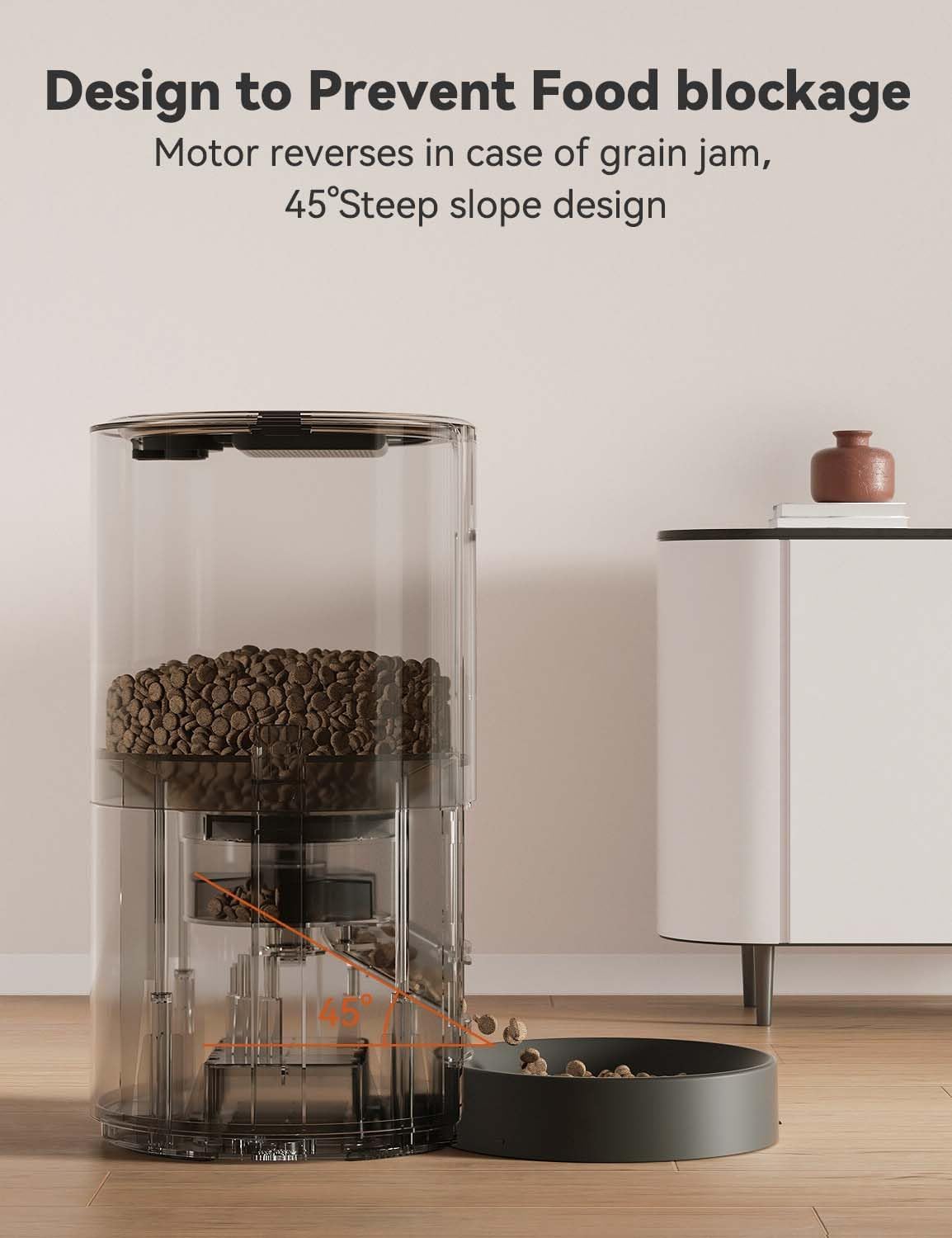
The internal design ensures smooth food dispensing and prevents clogs.
4.4 Voice Recording
Customize a 10-second voice recording to call your pets to their meals. Your familiar voice will make them feel safe and cared for, as if you're right there with them.

Record a personalized message to call your pet for meals.
4.5 Manual Feeding
To dispense food manually, ensure the screen is unlocked and press the manual feed button. This will dispense one portion of food.
4.6 Food Visibility and Safety
The feeder includes a food visible window to instantly monitor remaining food, allowing you to add food on time and ensure your pet never goes hungry. The unit is made from ABS environmentally friendly plastic.

Monitor food levels easily through the transparent window.
The feeder is designed to be pest-proof. When not in operation, the rotating vane seals the food outlet to prevent pests from entering.

The sealed food outlet prevents pests from accessing the food.
The power cord is made of nylon, resistant to pet bites.

Durable nylon power cord designed to resist pet bites.
4.7 Official Product Video
Official video demonstrating the features and operation of the WOPET FT70 Plus Automatic Cat Feeder.
5. Maintenance and Cleaning
The WOPET Automatic Cat Feeder is designed for easy disassembly and cleaning to ensure healthier feeding conditions for your pet.
- Unplug the feeder and remove any remaining food.
- Detach the food storage tank and the feeding bowl from the main unit.
- Wash the food storage tank and bowl with mild soap and water. These parts are dishwasher safe.
- Important: The motor unit cannot be cleaned directly with water. Wipe it clean with a damp cloth only.
- Ensure all parts are completely dry before reassembling the feeder.
- Replace the desiccant bag every 1-2 months for optimal food freshness.

Detachable parts allow for easy and thorough cleaning.
6. Troubleshooting
6.1 Common Issues and Solutions
- Feeder not dispensing food:
- Check if the feeder is powered on and connected to a power source or has sufficient battery power.
- Ensure the food tank is not empty.
- Verify that the food outlet is not blocked by kibble. The anti-clogging mechanism should prevent this, but manual check may be needed.
- Confirm that the feeding schedule is correctly set or try manual dispensing.
- Voice recording not playing:
- Ensure the recording function was properly set and saved.
- Check the volume settings on the feeder.
- Food becoming stale:
- Ensure the top lid is securely locked.
- Replace the desiccant bag regularly (every 1-2 months).
- Store the feeder in a dry place.
- Pet accessing food outside scheduled times:
- Ensure the top lid is securely locked to prevent tampering.
- The pest-proof design should prevent access from the food outlet.
7. Product Specifications
| Feature | Detail |
|---|---|
| Model Name | FT70 |
| Brand | WOPET |
| Item Weight | 3.32 Pounds (1.5 kg) |
| Item Dimensions (LxWxH) | 7.32 x 7.32 x 11.25 inches (18.6 x 18.6 x 28.6 cm) |
| Color | Black |
| Size | 3L |
| Material | Acrylonitrile Butadiene Styrene (ABS) |
| Target Species | Cats, Dogs, Small Animals |
| Recommended Uses For Product | Dry Food |
| Special Features | Portion Control, Timer, Voice Recording, Feeding Schedule, Programmable |
| Power Supply | AC Power Adapter, 3 x D-size batteries (not included) |
| Care Instructions | Keep in a Dry Place, Dishwasher Safe (bowl and tank only) |
8. Warranty Information
The WOPET Automatic Cat Feeder FT70 comes with a 1-year warranty from the date of purchase. This warranty covers manufacturing defects and malfunctions under normal use. Please retain your proof of purchase for warranty claims. The warranty does not cover damage caused by misuse, accidents, unauthorized repairs, or normal wear and tear.
9. Support
For further assistance, technical support, or warranty inquiries, please refer to the official WOPET website or contact their customer service. You can also find additional resources and FAQs on the WOPET Amazon Store.
A digital version of this user manual is available at: User Manual (PDF)