
1. Introduction
Thank you for choosing the Hoco ES64 Easy Sound Sports Wireless Bluetooth Headset. This manual provides detailed instructions on how to set up, operate, and maintain your new headset. Please read this manual carefully before use to ensure optimal performance and longevity of your device.
2. Product Overview
The Hoco ES64 headset is designed for sports and everyday use, offering a comfortable in-ear fit and wireless convenience. It features a neckband design with integrated controls.

Figure 2.1: Front view of the Hoco ES64 Wireless Bluetooth Headset, showing the neckband, control panel, and in-ear earbuds.

Figure 2.2: Close-up view of the Hoco ES64 earbuds, highlighting their magnetic absorption design for convenient storage when not in use.
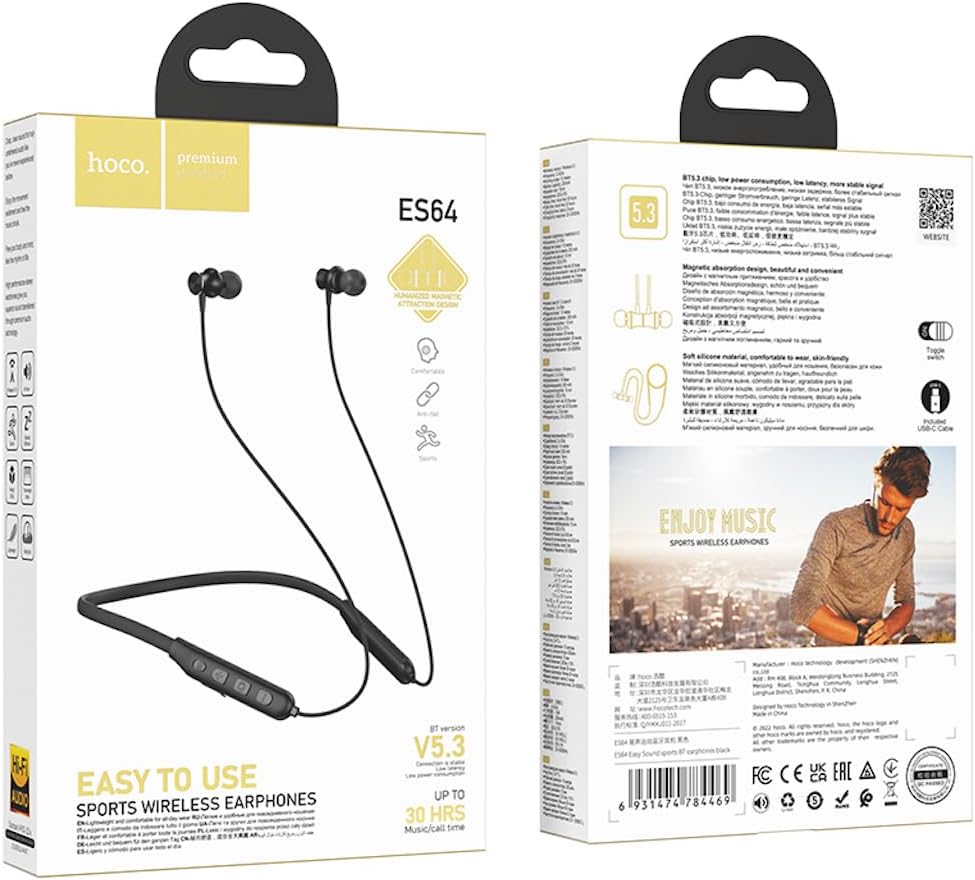
Figure 2.3: Packaging of the Hoco ES64 headset, displaying key features and specifications.
3. Specifications
| Feature | Description |
|---|---|
| Bluetooth Version | 5.3 (JL AC7003 chip) |
| Battery Capacity | 200mAh |
| Charging Time | Approximately 2 hours |
| Use Time | Up to 30 hours |
| Standby Time | Up to 350 hours |
| Total Earphone Length | 85cm |
| Weight | 26.5g |
| Control Type | Toggle switch button |
| Prompt Tones | Chinese and English support |
| Ear Placement | In Ear |
| Noise Control | None |
4. Setup
4.1 Charging the Headset
Before first use, fully charge the headset. Connect the charging cable (USB-C) to the charging port on the headset and the other end to a USB power source (e.g., computer USB port, wall adapter). The charging indicator light will show the charging status. Charging typically takes about 2 hours.
4.2 Powering On/Off
- Power On: Locate the toggle switch button on the control panel. Slide the switch to the 'ON' position. You will hear a power-on prompt.
- Power Off: Slide the toggle switch to the 'OFF' position. You will hear a power-off prompt.
4.3 Bluetooth Pairing
To connect your Hoco ES64 headset to a Bluetooth-enabled device (e.g., smartphone, tablet):
- Ensure the headset is powered off.
- Slide the toggle switch to the 'ON' position. The headset will automatically enter pairing mode, indicated by a flashing LED light.
- On your device, go to Bluetooth settings and turn Bluetooth on.
- Search for available devices. You should see "Hoco ES64" or a similar name appear in the list.
- Select "Hoco ES64" to connect. Once connected, the LED light will stop flashing and you will hear a confirmation prompt.
- If prompted for a password, enter "0000" (four zeros).
The headset will automatically attempt to reconnect to the last paired device when powered on.
5. Operating Instructions
The Hoco ES64 features an intuitive control panel for managing audio and calls.
5.1 Music Playback
- Play/Pause: Press the Multifunction Button (usually the center button) once.
- Next Track: Press and hold the '+' (Volume Up) button.
- Previous Track: Press and hold the '-' (Volume Down) button.
- Volume Up: Short press the '+' button.
- Volume Down: Short press the '-' button.
5.2 Call Management
- Answer/End Call: Press the Multifunction Button once during an incoming call.
- Reject Call: Press and hold the Multifunction Button for 2 seconds during an incoming call.
- Redial Last Number: Double-press the Multifunction Button when not on a call.
5.3 Switching Prompt Tone Language
The headset supports prompt tones in Chinese and English. To switch the language, double-click the Multifunction Button when the headset is not paired with any device.
6. Maintenance
To ensure the longevity and optimal performance of your Hoco ES64 headset, follow these maintenance guidelines:
- Cleaning: Use a soft, dry cloth to wipe the headset. Do not use abrasive cleaners or solvents.
- Storage: When not in use, store the headset in a cool, dry place, away from direct sunlight and extreme temperatures. The magnetic earbuds can help keep them tidy.
- Avoid Water: The headset is not waterproof. Avoid exposure to water, rain, or excessive moisture.
- Charging: Charge the headset regularly, even if not in frequent use, to maintain battery health. Avoid overcharging.
7. Troubleshooting
If you encounter issues with your Hoco ES64 headset, refer to the following common solutions:
- Headset does not power on: Ensure the battery is charged. Connect to a power source and try again.
- Cannot pair with device:
- Ensure the headset is in pairing mode (flashing LED).
- Turn off and on Bluetooth on your device.
- Move the headset closer to your device.
- Clear previous Bluetooth connections on your device and try pairing again.
- No sound:
- Check the volume level on both the headset and your connected device.
- Ensure the headset is properly connected to your device.
- Try playing different audio sources.
- Poor sound quality:
- Ensure there are no obstructions between the headset and your device.
- Move away from sources of strong electromagnetic interference.
- Check if the earbuds are clean and properly seated in your ears.
8. Warranty and Support
The Hoco ES64 headset comes with a standard manufacturer's warranty. Please refer to the warranty card included in your product packaging for specific terms and conditions, including the warranty period and coverage details.
For technical support, troubleshooting assistance beyond this manual, or warranty claims, please contact the retailer where you purchased the product or the official Hoco customer service. Contact information can typically be found on the product packaging or the manufacturer's official website.