1. Introduction
This manual provides essential instructions for the installation, operation, and maintenance of your HOMEPILOT Premium Smart Garage Door Opener. Please read this manual thoroughly before installation and use to ensure safe and efficient operation.
The HOMEPILOT Premium Smart Garage Door Opener offers convenient control and a wide range of automatic functions for secure management of your garage door. It is designed for tilt and sectional doors up to 12.5 m² with a maximum door height of 2.4 meters.

Figure 1: HOMEPILOT Premium Smart Garage Door Opener and included accessories.
2. Safety Information
Important Safety Instructions:
- Always ensure the garage door area is clear before operating the opener.
- Do not allow children to play with the garage door opener controls.
- Regularly inspect the garage door and opener for signs of wear or damage.
- In case of power failure, use the manual release mechanism to open or close the door.
- The opener features obstacle detection with a reverse function for enhanced safety.
- Installation should be performed by qualified personnel or follow the instructions carefully.
3. Package Contents
Verify that all components are present before beginning installation.
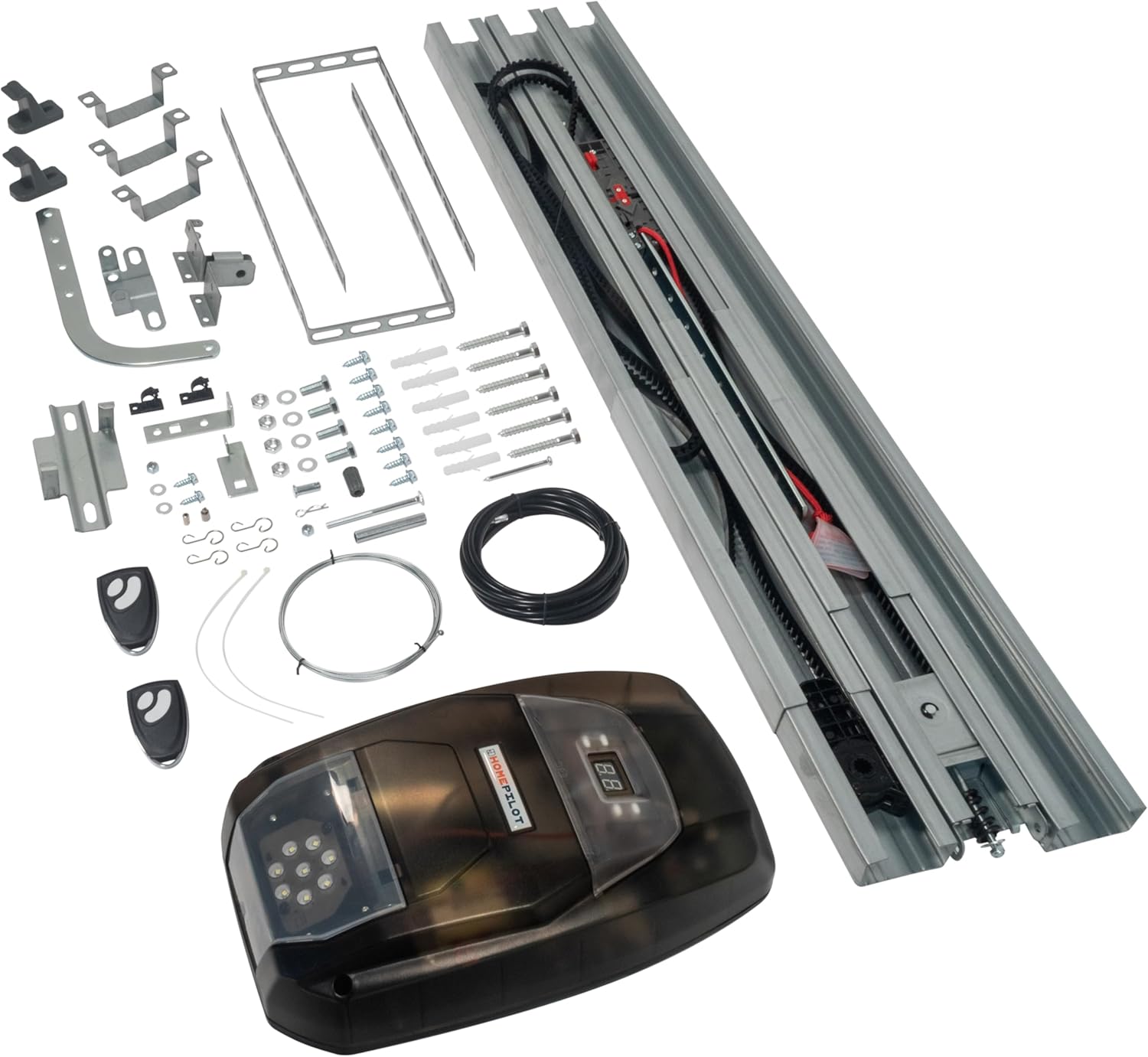
Figure 2: Overview of all included components, including the opener unit, rail, remote controls, and mounting hardware.
- HOMEPILOT Premium Smart Garage Door Opener Unit
- Drive Rail Assembly
- Remote Controls (2 units)
- Mounting Hardware (brackets, screws, anchors)
- Connection Cables
- Instruction Manual
4. Installation
The HOMEPILOT garage door opener is designed for flexible mounting and is suitable for most tilt and sectional doors up to 2.4 meters in height. The drive unit can be rotated by 90° to accommodate various garage configurations.
4.1 Pre-Installation Check
- Ensure your garage door is in good working condition and moves freely.
- Verify that the door area is clear of obstructions.
- Confirm availability of a power outlet near the installation area.
4.2 Mounting the Drive Rail
Assemble the drive rail according to the detailed diagrams in the separate installation guide. Securely attach the rail to the ceiling or wall above the garage door opening.

Figure 3: Side view of the opener unit connected to the drive rail.

Figure 4: Top view of the opener unit showing the belt drive system within the rail.
4.3 Attaching the Opener Unit
Connect the opener unit to the drive rail. The 90° rotatable unit allows for flexible positioning. Ensure all connections are secure.
4.4 Electrical Connection
Plug the power cord into a grounded electrical outlet.
4.5 Programming Remote Controls
Follow the instructions in the separate programming guide to synchronize the remote controls with the opener unit.
5. Operation
The HOMEPILOT Premium Smart Garage Door Opener provides smooth and quiet operation thanks to its strong and silent toothed belt.
5.1 Basic Operation
- Press the button on the remote control to open or close the garage door.
- Pressing the button again during operation will stop the door.
- The opener features automatic force learning, soft start, and soft stop functions.
- Internal LED lighting illuminates the garage during operation.
5.2 Obstacle Detection
The system includes obstacle detection with a reverse function. If the door encounters an obstacle during closing, it will automatically stop and reverse to the open position, ensuring safety.
5.3 Manual Release
In case of a power outage, the garage door can be opened or closed manually from the inside using the manual release mechanism. Refer to the specific instructions for engaging and disengaging the manual release.
5.4 Smart Home Integration (Optional)
When combined with the HOMEPILOT Smart-Home-Central system (gateway required), the garage door opener offers convenient control via a dedicated app. This allows for integration with other smart home devices such as security sensors, additional garage door openers, or code locks.

Figure 5: The HOMEPILOT app provides smart control and monitoring of your garage door opener when connected to the HomePilot gateway.
6. Maintenance
Regular maintenance ensures the longevity and safe operation of your garage door opener.
- Monthly: Inspect the garage door for proper balance and smooth movement. Check all hardware, including springs, cables, rollers, and hinges, for wear or damage.
- Quarterly: Test the obstacle detection system. Place an object (e.g., a wooden block) in the path of the closing door. The door should reverse upon contact.
- Annually: Lubricate moving parts of the garage door (not the opener's belt) as recommended by the door manufacturer. Do not lubricate the drive belt.
- Keep the drive rail clean and free of debris.
Note: For any repairs or adjustments beyond routine maintenance, contact a qualified technician.
7. Troubleshooting
| Problem | Possible Cause | Solution |
|---|---|---|
| Opener does not respond to remote. |
|
|
| Door does not close completely or reverses. |
|
|
| Opener makes unusual noise. |
|
|
| Door opens by itself. |
|
|
8. Technical Specifications
| Feature | Specification |
|---|---|
| Manufacturer | DELTA DORE RADEMACHER GmbH |
| Model Number | 16901001 |
| Product Dimensions | 350 x 25 x 25 cm (approx. 3.47m length) |
| Item Weight | 13.5 kg |
| Material | Aluminum (housing), Steel (exterior finish) |
| Color | Black |
| Power Supply Voltage | 220-240 V / 50, 60 Hz |
| Motor Type | 24 V (DC) Direct Current |
| Traction Force | Max. 900 N / 90 kg |
| Door Travel Speed | Approx. 11-19 cm/s |
| Protection Class | II |
| Operating Temperature | -10 °C to +40 °C |
| Max. Lifting Height | 2.550 mm |
| Max. Door Area | 12.5 m² |
| Max. Door Height | 2.400 mm |
| Handheld Transmitter Frequency | 433 MHz Rolling Code |
| Device Emission Frequency | 434.5 MHz |
| Emission Power | Max. 10 mW |
| Max. Connected Devices | 20 |
| Radio Range | Approx. 100 m in open field, 30 m in buildings (depending on structure) |
| Special Features | Smart Home compatible via gateway |
| Certifications | CE |
9. Warranty and Support
For warranty information and customer support, please refer to the documentation included with your product or visit the official HOMEPILOT website.
You can also visit the HOMEPILOT Store on Amazon for additional product information and accessories.


