Introduction
Thank you for choosing the ARROWMAX SGS PRO PLUS Smart Electric Engraving & Polishing Pen. This precision tool is designed for detailed engraving, polishing, and sanding tasks on various materials. This manual provides essential information for safe and effective operation, maintenance, and troubleshooting. Please read it thoroughly before using the device.
Package Contents
Verify that all items listed below are present in your package:
- ARROWMAX SGS PRO PLUS Engraving & Polishing Pen
- Wireless Magnetic Charging Base
- USB Charging Cable
- 42 Assorted Bits (30 Engraving Bits, 12 Polishing Bits)
- Smart Tool Bag
- User Manual
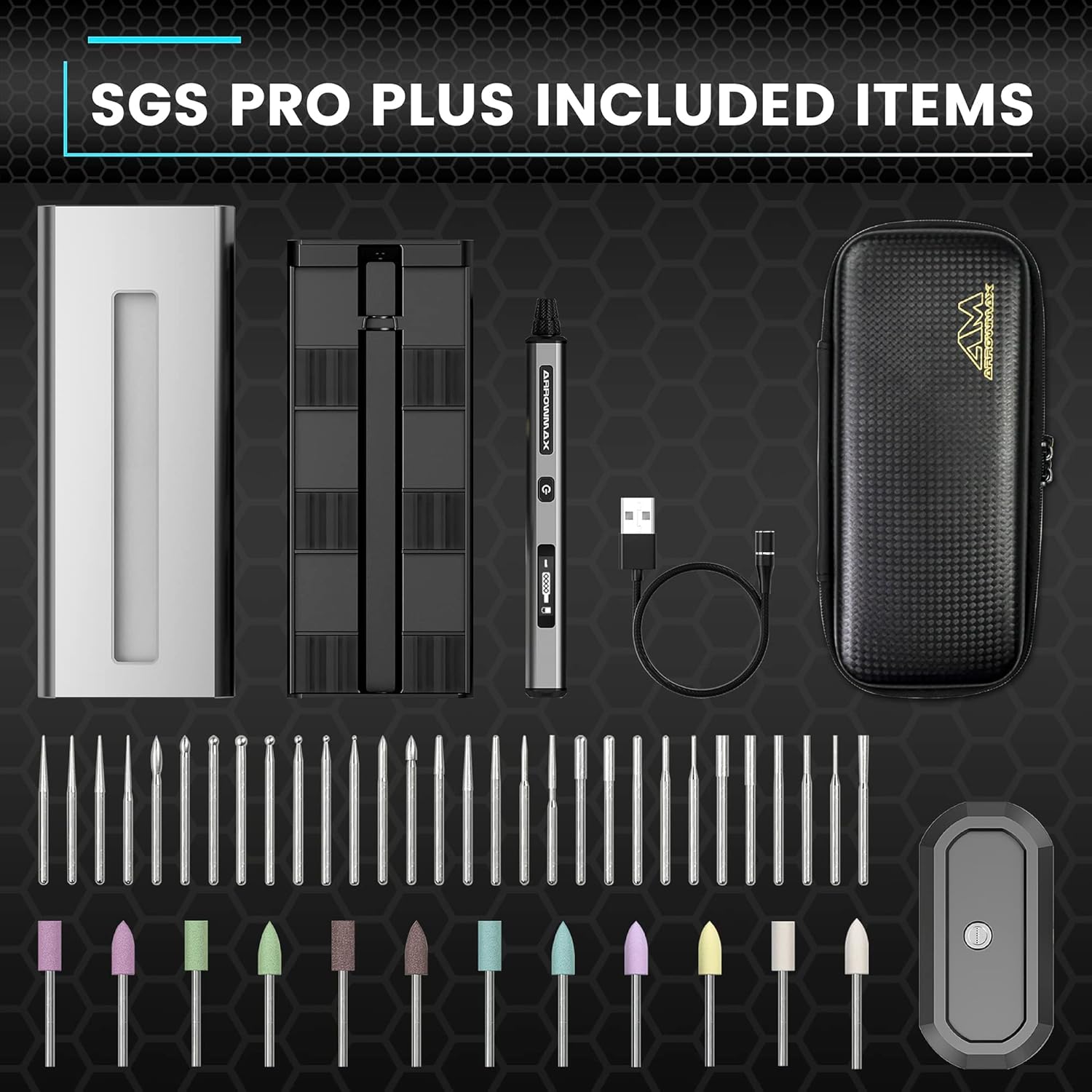
Image: Complete package contents of the ARROWMAX SGS PRO PLUS.
Product Overview
Familiarize yourself with the main components of your ARROWMAX SGS PRO PLUS pen:
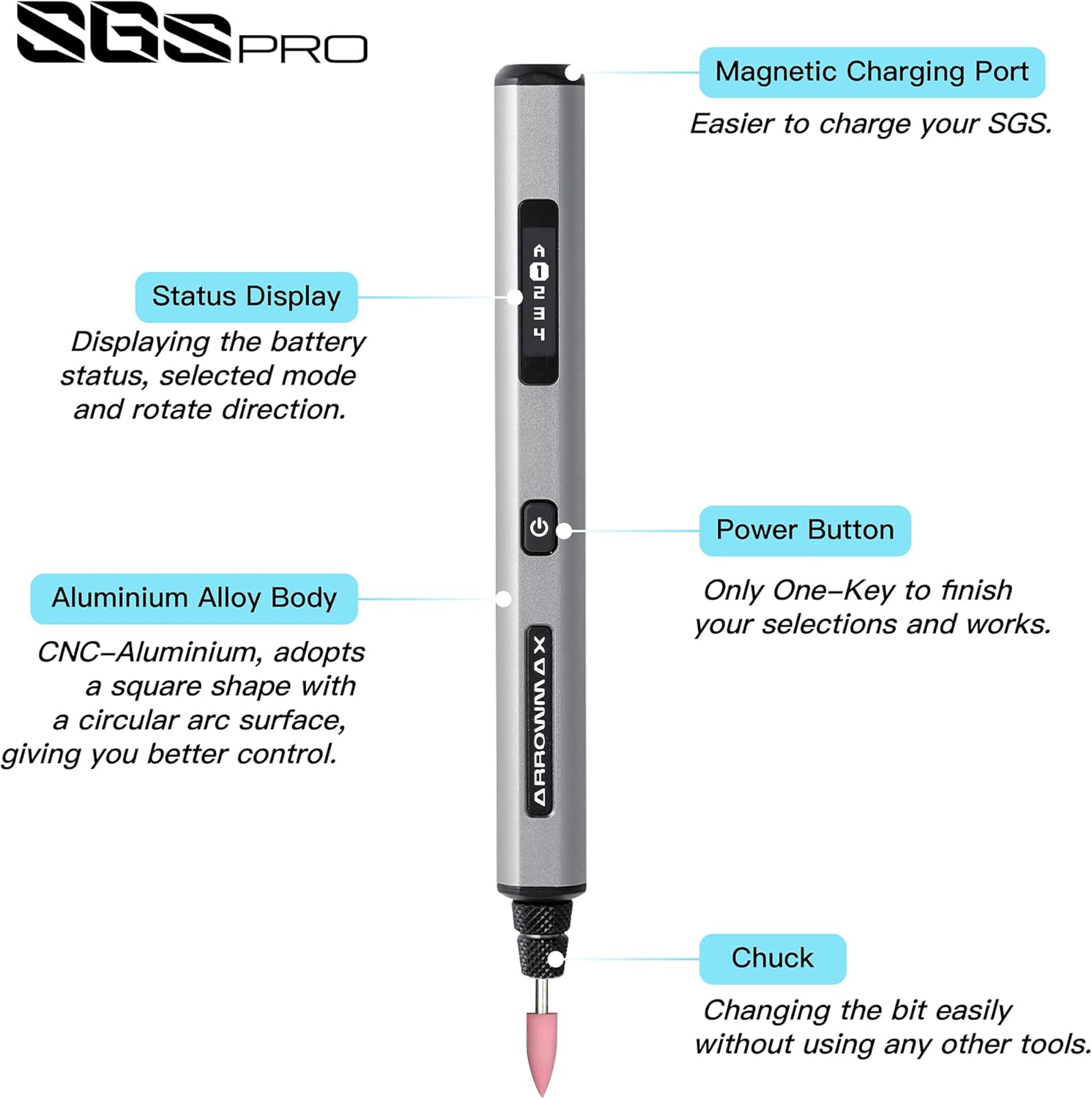
Image: Labeled diagram of the SGS PRO PLUS pen highlighting its key parts.
- Magnetic Charging Port: For connecting to the wireless charging base.
- Status Display (OLED): Shows battery status, selected mode, and rotation direction.
- Power Button: Turns the device on/off and cycles through settings.
- Aluminium Alloy Body: Durable and ergonomic design for comfortable grip.
- Chuck: Holds the engraving or polishing bits securely.
Setup
1. Charging the Device
Before first use, fully charge the ARROWMAX SGS PRO PLUS pen. The device is equipped with a 500 mAh Lithium-polymer battery.
- Connect the USB charging cable to the wireless magnetic charging base and a suitable USB power adapter (not included).
- Place the ARROWMAX pen onto the magnetic charging base. Ensure the magnetic charging port on the pen aligns correctly with the base.
- The OLED display will indicate charging status. A full charge typically takes approximately 120 minutes of uninterrupted work time.

Image: Internal view of the pen showing the 500 mAh LiPo battery and the magnetic charging mechanism.
2. Installing and Changing Bits
The SGS PRO PLUS uses standard 2.35mm diameter bits. Always ensure the device is powered off before changing bits.
- Gently unscrew the chuck at the tip of the pen counter-clockwise.
- Insert the desired engraving or polishing bit into the opening. Ensure the bit is fully seated.
- Screw the chuck clockwise until the bit is securely fastened. Do not overtighten.

Image: Illustration of bit insertion into the chuck.
Operating Instructions
1. Power On/Off and Speed Control
The device features a single power button for basic operation.
- To Power On: Press and hold the Power Button for 2 seconds. The OLED display will illuminate.
- To Adjust Speed: Briefly press the Power Button to cycle through the 5 available speed settings (up to 20,000 RPM). The current speed setting will be shown on the OLED display.
- To Power Off: Press and hold the Power Button for 2 seconds.
2. App Control (Smart Motion Control)
For advanced control and customization, download the ARROWMAX app from Google Play or the App Store.
- Ensure Bluetooth is enabled on your smartphone.
- Open the ARROWMAX app and follow the on-screen instructions to pair with your SGS PRO PLUS pen.
- Through the app, you can precisely adjust the rotation speed (up to 30,000 RPM), change rotation direction (forward/reverse), and monitor battery status.

Image: ARROWMAX app interface for controlling the engraving pen.
3. Usage Tips
- Engraving: Select an appropriate engraving bit for your material (e.g., wood, glass, metal, crystal). Start with a lower speed and apply light, consistent pressure. Practice on scrap material first.
- Polishing: Use the designated polishing bits. Apply polishing compound if necessary for optimal results. Move the pen smoothly over the surface.
- Sanding/Grinding: Choose suitable grinding bits. Maintain a steady hand and avoid excessive pressure to prevent damage to the material or the bit.

Image: Engraving a delicate pattern.

Image: Polishing a metal surface.

Image: Versatile use on different materials.
Maintenance
1. Cleaning
- Always power off the device before cleaning.
- Wipe the pen's body with a soft, dry cloth.
- Remove any dust or debris from the chuck area using a small brush or compressed air.
- Do not use harsh chemicals or abrasive cleaners.
2. Storage
- Store the pen and its accessories in the provided smart tool bag to protect them from dust and damage.
- Keep the device in a cool, dry place, away from direct sunlight and extreme temperatures.
- Ensure the battery is partially charged (around 50%) if storing for extended periods to prolong battery life.
Troubleshooting
| Problem | Possible Cause | Solution |
|---|---|---|
| Device does not turn on. | Low battery. | Charge the device fully using the magnetic charging base. |
| Bit is loose or falls out. | Chuck not tightened sufficiently. | Ensure the bit is fully inserted and the chuck is securely tightened. |
| Device stops unexpectedly during use. | Overload or low battery. | Reduce pressure on the workpiece. Check battery level and recharge if necessary. |
| Cannot connect to ARROWMAX app. | Bluetooth off or pairing issue. | Ensure Bluetooth is enabled on your phone and the pen is powered on. Restart both devices and try pairing again. |
Specifications
- Model: SGS PRO PLUS (AM-199214-3)
- Brand: ARROWMAX
- Power Source: Battery Powered
- Battery Type: 1 Lithium-polymer (500 mAh)
- Voltage: 5 Volts
- Max RPM: 30,000 RPM (via App), 20,000 RPM (on-device)
- Bit Compatibility: 2.35mm diameter
- Special Features: Smart Motion Control, OLED Display, Magnetic Wireless Charger, Bluetooth Connectivity
- Body Material: Aluminium Alloy
- Included Components: Engraving Pen, Magnetic Charger, 42 Bits, Tool Bag
Warranty and Support
For warranty information, technical support, or service inquiries, please refer to the contact details provided with your purchase documentation or visit the official ARROWMAX website. Keep your proof of purchase for warranty claims.


