
1. Introduction and Overview
The ARROWMAX SGS PRO Electric Engraving Pen is a versatile and intelligent rotary tool designed for precision engraving and polishing on various materials such as metal, wood, glass, and plastic. Featuring smart motion control, an OLED display, Bluetooth connectivity for app control, and wireless magnetic charging, this tool offers exceptional control and convenience for DIY enthusiasts, crafters, and professionals alike.
Its ergonomic, pen-shaped design ensures comfortable handling and reduces fatigue during extended use, making intricate tasks more manageable. The SGS PRO comes equipped with a comprehensive set of engraving and polishing bits, providing the flexibility needed for a wide range of creative and detailed projects.

Image: The ARROWMAX SGS PRO Electric Engraving Pen, its aluminum case, 42 bits, and USB charging cable.
2. Product Features
- Smart Motion Control: Allows for easy forward and reverse direction adjustments through body sensing, enhancing precision and control.
- Dual-Mode RPM Control: Provides high or low RPM settings via body sensing, suitable for various engraving and polishing tasks.
- OLED Display: Clearly shows battery status, selected mode, and rotation direction for intuitive operation.
- Bluetooth Connectivity & APP Control: Connects to the optional SGS PRO app for customizable speed adjustments (every 1000 RPM) and seamless switching between forward and reverse modes.
- Wireless Magnetic Charging: Simplifies the charging process for convenience.
- Comprehensive Bit Set: Includes 30 engraving bits and 12 polishing bits, offering versatility for diverse applications.
- Durable Aluminum Alloy Body: Crafted for longevity and designed with a circular arc surface for comfortable grip and reduced fatigue.

Image: Detailed diagram highlighting key features of the SGS PRO pen, such as the magnetic charging port, OLED status display, power button, aluminum alloy body, and chuck.

Image: Visual representation of the SGS PRO's core features, including smart motion control, OLED display, 30000 RPM, one-key operation, high energy long life battery, CVT, 30+12 bits, and magnetizer.
3. Package Contents
Upon opening your ARROWMAX SGS PRO package, please verify that all the following items are included:
- 1 x ARROWMAX SGS PRO Engraving Pen
- 30 x Engraving Bits
- 12 x Polishing Bits
- 1 x Storage Bag
- 1 x User Manual (this document)
- 1 x USB Charging Cable
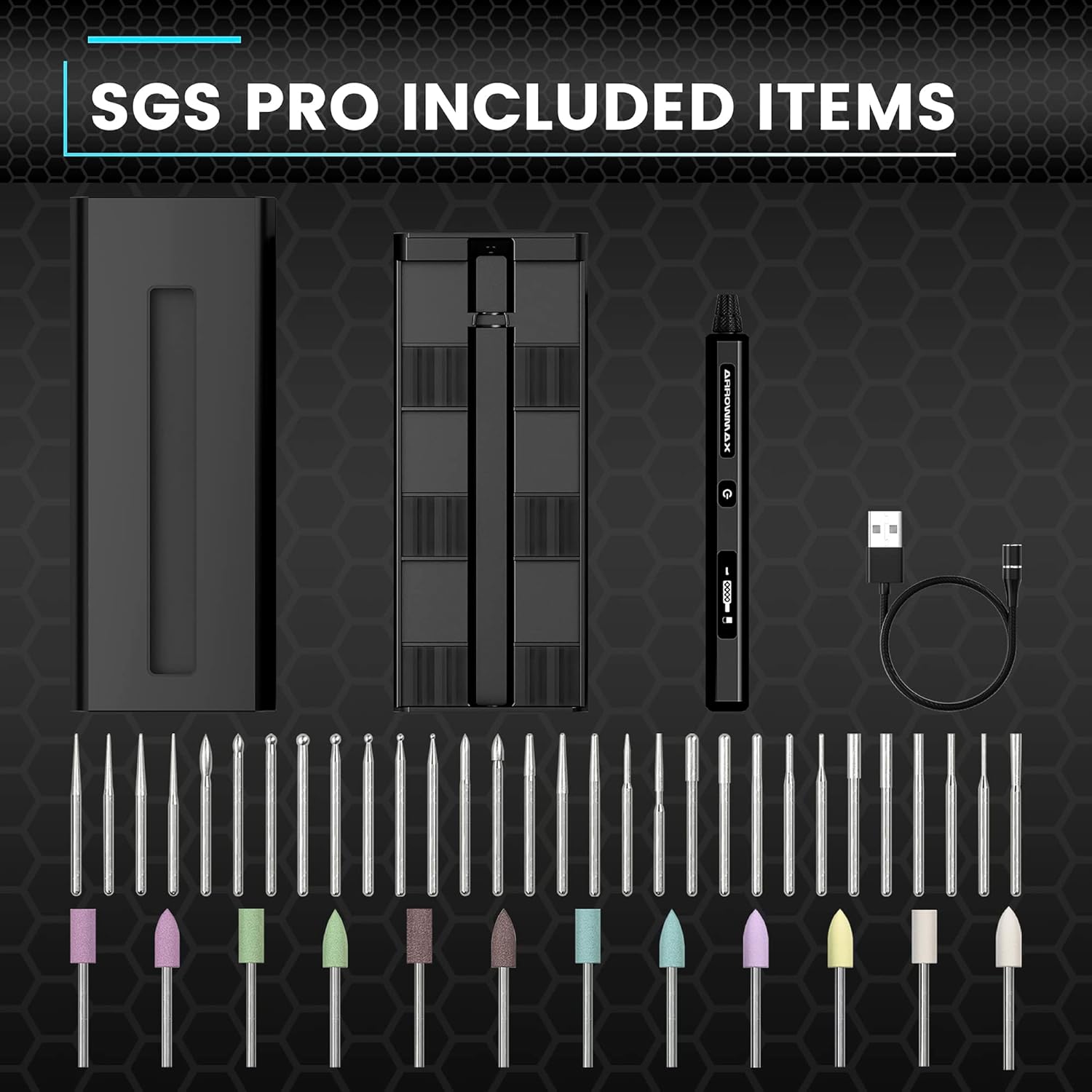
Image: A complete layout of all items included in the SGS PRO package, showing the pen, various engraving and polishing bits, the storage case, and the USB charging cable.

Image: A detailed view of the 30 distinct engraving bits and 12 polishing bits that come with the SGS PRO, showcasing their variety.
4. Setup
4.1 Charging the Device
Before first use, fully charge your SGS PRO engraving pen. Connect the provided USB charging cable to the magnetic charging port on the pen and to a compatible USB power source (e.g., computer USB port, wall adapter). The OLED display will indicate charging status. A full charge typically takes a few hours.
4.2 Installing Bits
To install an engraving or polishing bit:
- Ensure the device is powered off.
- Gently unscrew the chuck at the tip of the pen counter-clockwise.
- Insert the desired bit into the chuck opening.
- Screw the chuck clockwise until the bit is securely fastened. Do not overtighten.
4.3 Connecting to the SGS PRO App (Optional)
For enhanced control and customization, download the official ARROWMAX SGS PRO app from the Google Play Store or Apple App Store. Enable Bluetooth on your mobile device and follow the in-app instructions to pair with your SGS PRO pen. The app allows for precise RPM adjustments and direction control.
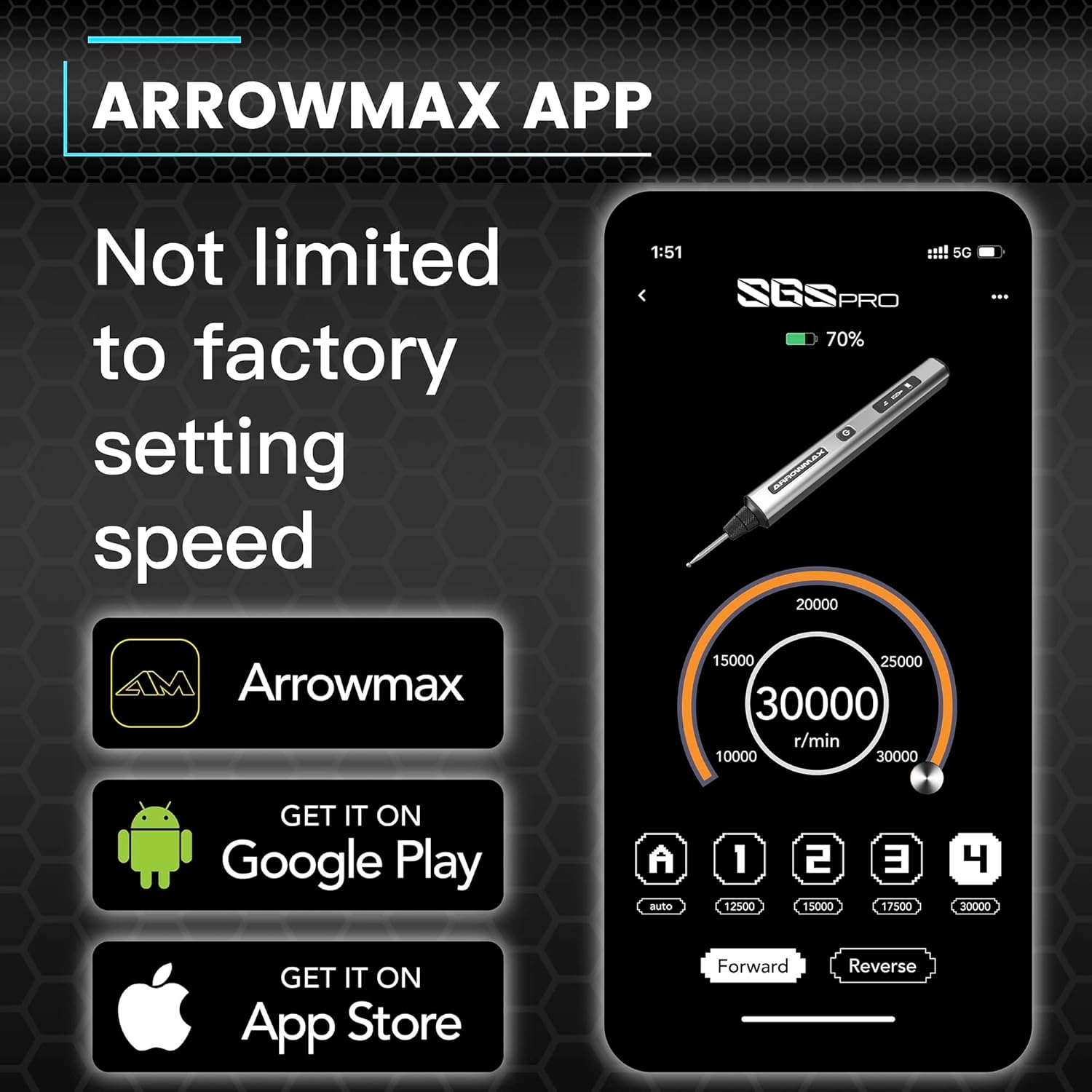
Image: A visual representation of the ARROWMAX SGS PRO mobile application interface, demonstrating its capabilities for speed adjustment and directional control of the engraving pen.
5. Operating Instructions
5.1 Powering On/Off
To power on the SGS PRO, press and hold the power button located on the pen's body until the OLED display illuminates. To power off, press and hold the power button again until the display turns off.
5.2 Adjusting Speed (RPM)
The SGS PRO offers dual-mode RPM control. You can adjust the speed by tilting the pen or through the connected app:
- Motion Control: The pen senses your body's motion to switch between high and low RPM modes. Experiment with different angles and movements to find the desired speed.
- App Control: For precise speed adjustments, use the SGS PRO app. You can set the RPM in increments of 1000, from 10,000 RPM to 30,000 RPM.
5.3 Changing Rotation Direction
The pen supports both forward and reverse rotation. This can be controlled via the smart motion sensing or through the app:
- Motion Control: Tilt the pen to change the direction of rotation. The OLED display will show the current direction.
- App Control: The app provides a direct toggle for switching between forward and reverse modes.
5.4 General Usage Tips
- Always wear appropriate safety gear, such as eye protection, when operating the tool.
- Start with a lower RPM setting and gradually increase it as needed for your material and task.
- Apply light, consistent pressure. Excessive force can damage the bit or the material.
- For engraving, use a steady hand and smooth movements to create clean lines.
- For polishing, use the appropriate polishing bits and compounds, moving the tool evenly across the surface.

Image: Demonstrations of the SGS PRO being used to customize various materials, including crystal, wood, gold, and glass, highlighting its versatility.

Image: Four panels illustrating the SGS PRO's capabilities: polishing a small object, model making, the variety of grinding bits available, and the compact storage solution.
Video: A detailed explanation of the SGS PRO's features and functionality by a seller representative, Jeff.
Video: An explanation of the SGS PRO by a seller representative, Viktor, providing further insights into its use.
Video: Instructions on how to change the speed settings of the SGS PRO engraving pen.
6. Maintenance
6.1 Cleaning
Regular cleaning ensures optimal performance and longevity of your SGS PRO pen:
- After each use, gently wipe the pen's body with a soft, dry cloth to remove dust and debris.
- Remove the bit and clean any accumulated dust or material from the chuck area using a small brush or compressed air.
- Ensure no moisture enters the charging port or internal components.
6.2 Bit Care
- Store bits in their designated slots within the aluminum case to prevent damage and loss.
- Inspect bits regularly for wear and tear. Replace dull or damaged bits to maintain engraving and polishing quality.
6.3 Storage
When not in use, store the SGS PRO pen and its accessories in the provided aluminum case in a cool, dry place, away from direct sunlight and extreme temperatures. This protects the device and its components from environmental damage.
7. Troubleshooting
If you encounter issues with your ARROWMAX SGS PRO, please refer to the following common troubleshooting steps:
| Problem | Possible Cause | Solution |
|---|---|---|
| Device does not turn on. | Low or no battery charge. | Ensure the device is fully charged. Press and hold the power button for a few seconds to activate. |
| Device does not hold a charge. | Faulty charging cable or power source; damaged charging port. | Try a different USB charging cable and power adapter. Ensure the magnetic charging connection is clean and secure. If issues persist, contact customer support. |
| Bit is loose or falls out. | Chuck not tightened sufficiently; incorrect bit size. | Ensure the chuck is securely tightened after inserting the bit. Verify that you are using bits compatible with the SGS PRO's chuck size. |
| Tool lacks power or stalls easily. | Low battery; excessive pressure; material too hard for tool. | Fully charge the device. Reduce the pressure applied during operation. Note that this tool is designed for light-duty engraving and polishing; it may not be suitable for heavy-duty material removal. |
| App connection issues. | Bluetooth off; app not updated; pairing error. | Ensure Bluetooth is enabled on your mobile device. Restart the app and the SGS PRO pen. Try re-pairing the device through the app's settings. |
8. Specifications
| Feature | Specification |
|---|---|
| Brand | ARROWMAX |
| Model Number | AM-199213-B-3 |
| Voltage | 5 Volts |
| Power Source | Battery Powered |
| Recommended Uses | Polishing, Engraving |
| Color | Black |
| Special Feature | Cordless, Electric, Smart Motion Control, OLED Display, Bluetooth, APP Control, Wireless Magnetic Charge |
| Included Components | 1 engraving pen, 30 engraving bits, 12 polish bits, 1 storage bag, 1 manual, 1 USB charging cable |
| Maximum Rotational Speed | 30000 RPM |
| Minimum Rotational Speed | 10000 RPM |
| Number of Batteries | 1 Lithium Polymer (included) |
| Battery Cell Type | Lithium Ion |
| Style | Pencil |
| Material | Aluminum |
| Item Weight | 15.5 ounces |
| Package Dimensions | 8.62 x 3.94 x 1.73 inches |
9. Warranty and Support
For warranty information, technical support, or any inquiries regarding your ARROWMAX SGS PRO Electric Engraving Pen, please refer to the contact details provided in the product packaging or visit the official ARROWMAX website. Keep your proof of purchase for warranty claims.

