
1. Important Safety Information
Before operating your Oraimo Electric Bike, please read this manual thoroughly and retain it for future reference. Adherence to safety guidelines is crucial for preventing accidents and ensuring proper function.
- Always wear a helmet and appropriate safety gear when riding.
- Perform a pre-ride inspection, including brakes, tires, and battery, before each use.
- Understand and comply with all local traffic laws and regulations for electric bicycles.
- Do not operate the bike under the influence of alcohol or drugs.
- The Li-ion battery is UL 2271 certified, and the entire electric bike complies with UL 2789 standards, ensuring safety and reliability.
2. Product Overview
The Oraimo 26-inch City Cruiser Electric Bike is designed for adult riders, offering a comfortable and efficient commuting or leisure riding experience. It features a 350W motor, a UL-certified Li-ion battery providing up to 40 miles of range, and a 7-speed gear system.

Image: The Oraimo 26-inch City Cruiser Electric Bike, showcasing its design and components.
Key Features:
- Motor: 350W for reliable assistance.
- Battery: 374Wh UL-certified Li-ion modular battery, offering up to 40 miles range.
- Charging: 3-amp fast charging capability.
- Comfort: Enlarged inflatable saddle and front fork suspension for a smooth ride.
- Cargo Capacity: Integrated aluminum frame with a double load rear rack, supporting up to 120 lbs.
- Gears: 7-speed gear system for varied terrain.
- Brakes: Front and rear disc brakes for effective stopping power.

Image: The Oraimo Electric Bike featuring its double load rear rack, designed for carrying cargo.
3. Setup and Assembly
Your Oraimo Electric Bike arrives approximately 85% pre-assembled. The package includes necessary instructions and tools for completing the assembly. While assembly is designed to be straightforward, some steps may require careful attention.
Assembly Steps Overview:
- Unpacking: Carefully remove all components from the packaging.
- Handlebar Installation: Attach and secure the handlebars, ensuring proper alignment.
- Front Wheel Installation: Install the front wheel and ensure the disc brake rotor is correctly positioned within the caliper.
- Pedal Attachment: Attach the left and right pedals, noting the 'L' and 'R' markings. Ensure they are tightened securely.
- Seat Post and Saddle Adjustment: Insert the seat post with the saddle and adjust to a comfortable riding height.
- Battery Insertion: Insert the battery into its compartment and lock it securely.
- Final Checks: Inspect all bolts, nuts, and quick releases to ensure they are properly tightened before your first ride.
For visual guidance, it is recommended to search for official Oraimo assembly videos online if available, as they can provide detailed step-by-step instructions.
4. Operating Instructions
Familiarize yourself with the controls and functions of your electric bike before riding.
Powering On/Off:
- To power on the bike, ensure the battery is inserted and locked, then press the power button on the battery or control panel.
- To power off, press and hold the power button.
Riding Modes and Pedal Assist:
The bike features 4 working modes and 3 pedal-assist levels. Use the control panel to select your desired assist level (typically Low, Medium, High). Higher levels provide more motor assistance.

Image: A rider demonstrating the multi-adjustable riding position of the Oraimo Electric Bike, highlighting the enlarged air saddle and adjustable handlebar.
Throttle Control:
The twist throttle allows for motor-only propulsion without pedaling. Apply the throttle gradually to control speed. The maximum speed is capped at 20 mph (32 km/h) for safety.
Gear Shifting:
Utilize the 7-speed gear shifter to adjust your pedaling effort according to terrain and desired speed. Shift gears smoothly to avoid strain on the drivetrain.
Braking:
The bike is equipped with front and rear disc brakes. Apply both brake levers simultaneously for balanced and effective stopping. Practice braking in a safe area to understand their responsiveness.
Battery Charging:
To charge the battery, connect the 3-amp fast charger to the battery port and a power outlet. A full charge provides up to 40 miles of range. A 30-minute charge can provide approximately 5 miles of range.

Image: The Oraimo Electric Bike battery being charged with the 3-amp fast charger, illustrating the quick charging capability.
5. Maintenance
Regular maintenance ensures the longevity and safe operation of your Oraimo Electric Bike.
Battery Care:
- Charge the battery regularly, even if not in use, to maintain its health.
- Avoid fully discharging the battery.
- Store the battery in a cool, dry place away from direct sunlight and extreme temperatures.
- The battery features intelligent safety, overcharge protection, and temperature protection.
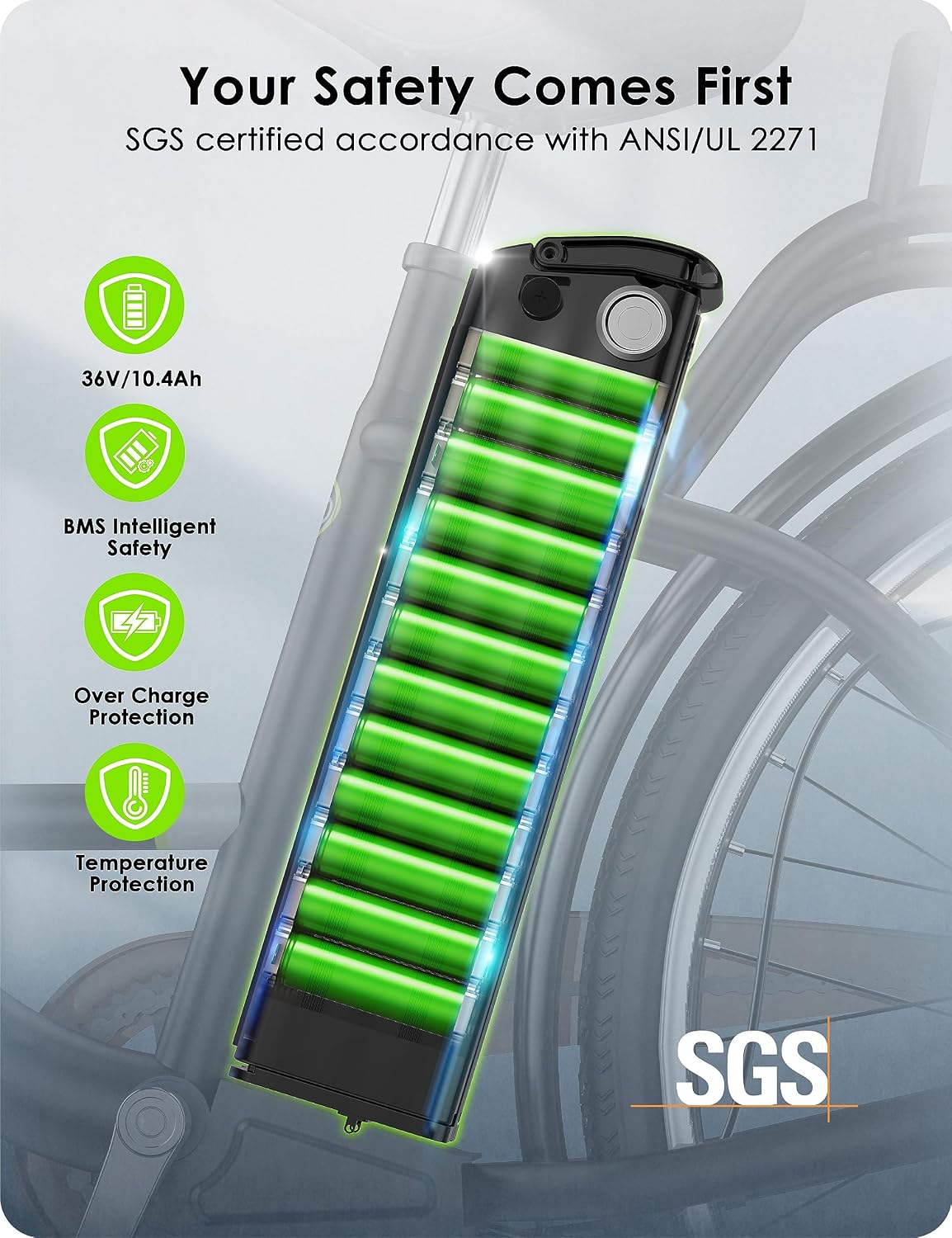
Image: A detailed view of the Oraimo Electric Bike's UL-certified Li-ion battery, highlighting its intelligent safety, overcharge, and temperature protection features.
Tires:
- Check tire pressure before each ride and inflate to the recommended PSI indicated on the tire sidewall.
- Inspect tires for wear, cuts, or punctures.
Brakes:
- Regularly check brake pads for wear and replace them when necessary.
- Ensure brake levers are responsive and provide adequate stopping power. Adjust cable tension if needed.
- Keep disc rotors clean and free from oil or grease.
Drivetrain:
- Keep the chain clean and lubricated.
- Check gear shifting for smoothness and adjust the derailleur if shifting becomes imprecise.
General Cleaning:
Clean the bike regularly with a damp cloth. Avoid using high-pressure washers directly on electrical components.
6. Troubleshooting
This section addresses common issues you might encounter with your Oraimo Electric Bike.
Issue: Bike does not power on.
- Solution: Ensure the battery is fully charged and properly inserted and locked into its compartment. Check all cable connections.
Issue: Motor is not assisting.
- Solution: Verify that the pedal-assist level is selected on the control panel. Check if the battery has sufficient charge. Ensure the brake levers are not partially engaged, as this can cut motor power.
Issue: Brake scrubbing noise or poor braking performance.
- Solution: Inspect the brake pads for wear. Check if the brake caliper is aligned correctly with the disc rotor; minor adjustments to the caliper screws may be needed. Ensure rotors are clean.
Issue: Gear shifting is rough or imprecise.
- Solution: Check the derailleur alignment and cable tension. Lubricate the chain. Adjust the shifter on the handlebar if necessary.
If you encounter issues not listed here or require further assistance, please contact Oraimo customer service.
7. Specifications
Detailed technical specifications for the Oraimo 26-inch City Cruiser Electric Bike.

Image: Diagram illustrating the dimensions and recommended rider height for the Oraimo Electric Bike.
| Feature | Specification |
|---|---|
| Bike Type | Electric Bike, Commuting Bike, Cruiser Bike, City Bike |
| Age Range | Adult |
| Brand | Oraimo |
| Number of Speeds | 7 |
| Colour | Black |
| Wheel Size | 26 Inches |
| Frame Material | Aluminum |
| Suspension Type | Dual Front Fork Suspension |
| Wattage | 350 Watts |
| Lithium Battery Energy Content | 374 Watt Hours |
| Maximum Weight Recommendation | 150 Kilograms (330 lbs) |
| Voltage | 36 Volts |
| Assembly Required | Yes (85% pre-assembled) |
8. Warranty and Support
Oraimo stands behind the quality of its products.
Warranty Information:
Your Oraimo Electric Bike comes with a 12-month warranty from the date of purchase. This warranty covers manufacturing defects under normal use. Please retain your proof of purchase for warranty claims.
Customer Support:
For any assistance, technical support, or warranty inquiries, please contact the Oraimo US local call center. Contact details can typically be found on the official Oraimo website or your purchase documentation.
You can also visit the Oraimo Store on Amazon for additional product information and support resources.