
1. Introduction
The Godox MF-R76N TTL Macro Ring Flash is engineered for precise and shadow-less illumination in macro photography. Its advanced features, including TTL auto-flash, High-Speed Sync (HSS), and 2.4G wireless control, make it an indispensable tool for capturing intricate details in subjects like insects, flowers, jewelry, and medical applications. This manual will guide you through the proper use and care of your MF-R76N.

Image: Godox MF-R76N TTL Macro Ring Flash with its components, including the ring flash head, control unit, battery, charger, USB cable, storage bag, cleaning cloth, and eight adapter rings.
2. Setup and Installation
2.1 Battery Installation
The MF-R76N uses a powerful rechargeable lithium battery. Ensure the battery is fully charged before first use. Insert the battery into the designated compartment on the control unit, ensuring correct polarity.

Image: The MF-R76N's lithium battery, rated at 7.2V/3000mAh, providing long-lasting power for extended shooting sessions.
2.2 Mounting the Flash
- Attach the control unit to your camera's hot shoe.
- Select the appropriate adapter ring (49mm, 52mm, 55mm, 58mm, 62mm, 67mm, 72mm, or 77mm) that matches your lens filter thread.
- Screw the adapter ring onto your lens.
- Mount the ring flash head onto the adapter ring, ensuring it clicks securely into place.

Image: The Godox MF-R76N ring flash head attached to a camera lens, ready for macro photography.
3. Operating Instructions
3.1 Power On/Off
Press and hold the power button on the control unit to turn the flash on or off.
3.2 TTL & HSS Functionality
The MF-R76N supports TTL (Through-The-Lens) auto-flash, which automatically adjusts flash output for correct exposure. High-Speed Sync (HSS) allows the flash to synchronize with shutter speeds faster than the camera's native sync speed, enabling wider apertures in bright conditions or freezing fast motion.

Image: The flash display indicating TTL mode with exposure compensation, simplifying exposure control.
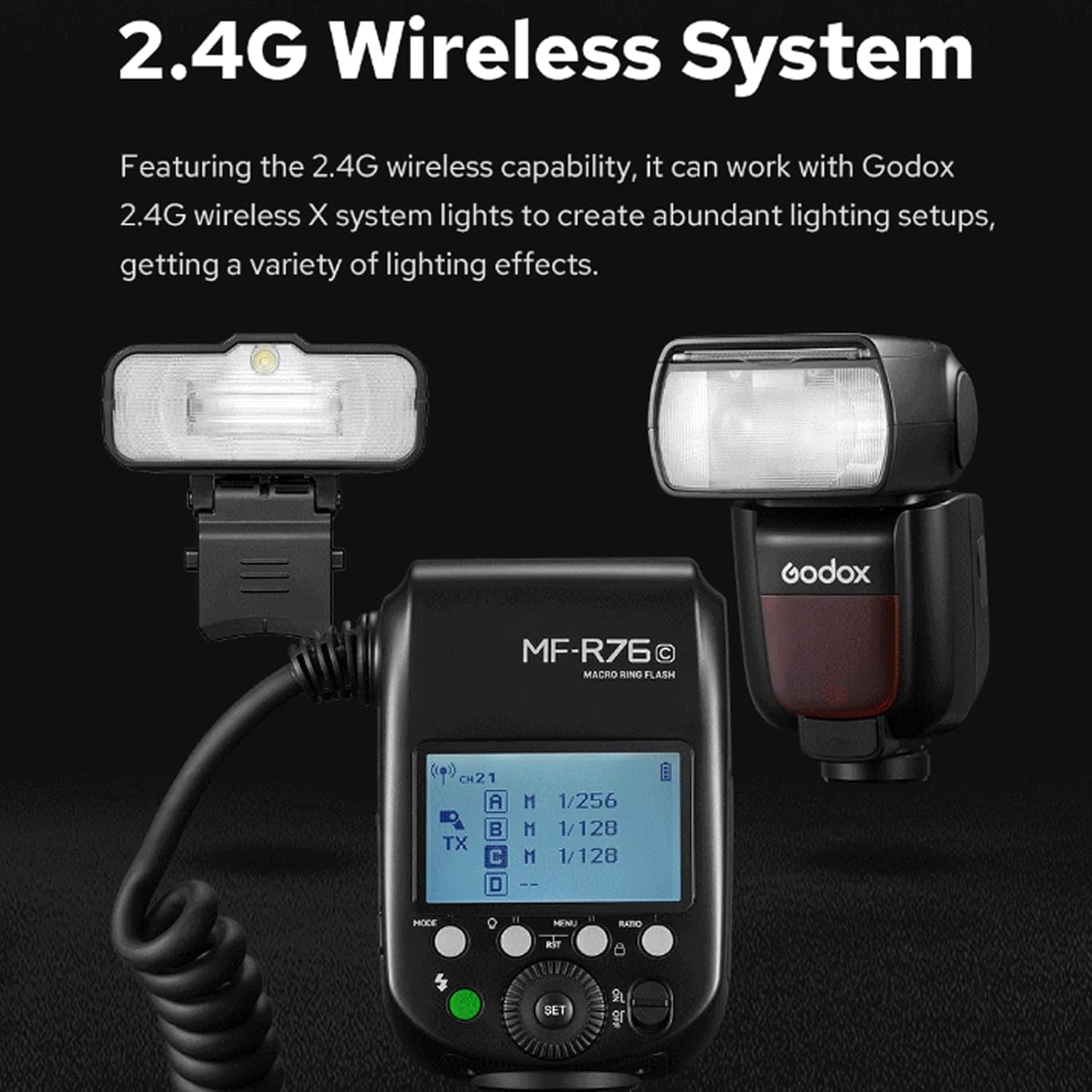
Image: An example of how HSS can capture sharp images of moving subjects, like this butterfly, by synchronizing with fast shutter speeds.
3.3 2.4G Wireless Control
The flash features a built-in 2.4G wireless system, allowing it to integrate with other Godox 2.4G wireless X system lights. This enables complex lighting setups with multiple flashes. It supports 32 channels to prevent interference when multiple systems are in use.

Image: The MF-R76N control unit showing wireless channel and group settings, demonstrating its compatibility with the Godox 2.4G wireless system.
3.4 Versatile Lighting Controls (Dual-Flash Tubes)
The MF-R76N features a dual-flash tube design, allowing independent control over each tube's output. This enables creative lighting effects, such as creating contrast or emphasizing specific areas of your subject, by adjusting the power ratio between the two tubes.

Image: A visual demonstration of the dual-flash tube's effect, showing how adjusting the power ratio (e.g., A:1/32, B:1/16) can create different lighting contrasts on a flower.
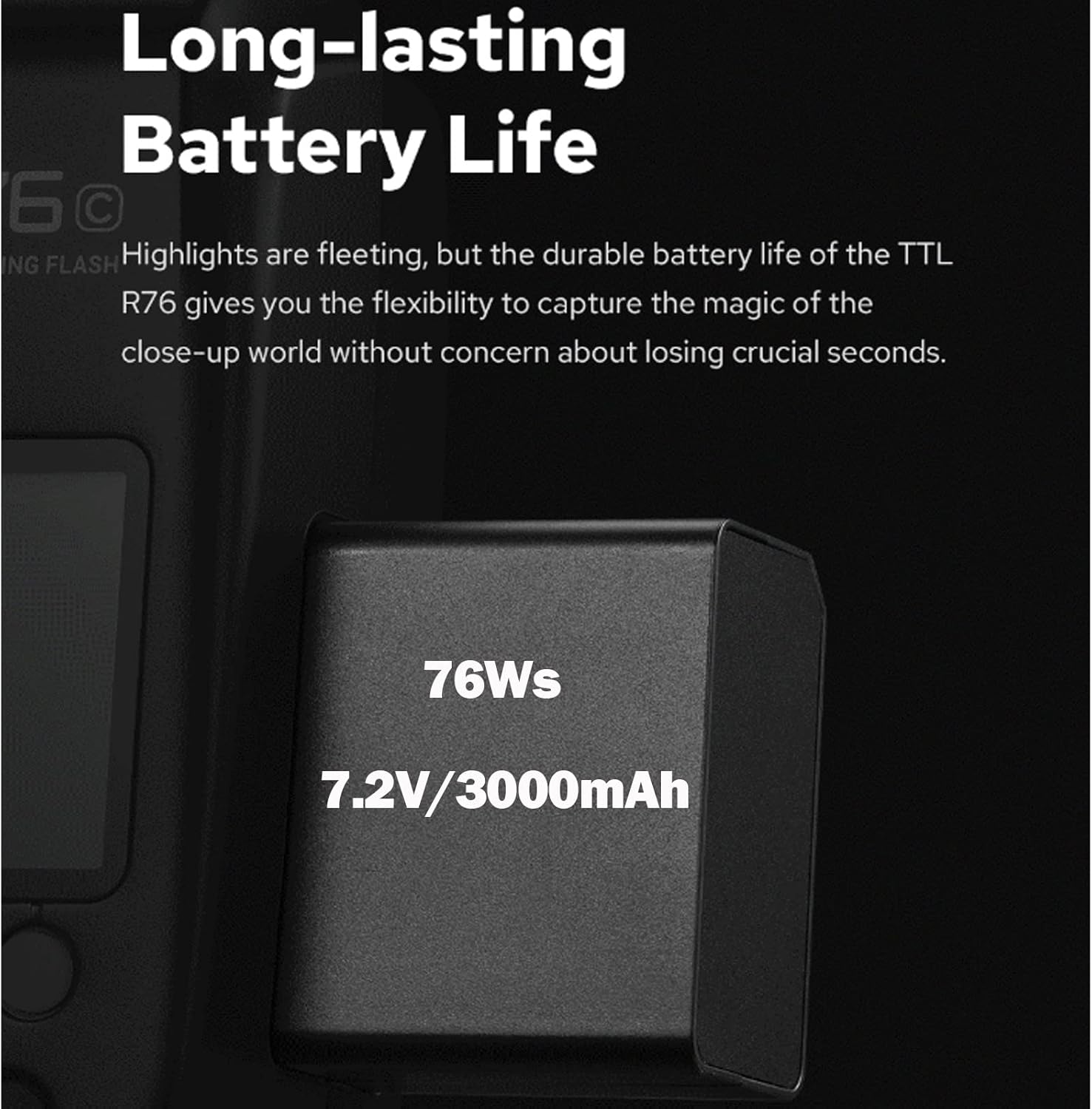
Image: A ladybug on a flower, demonstrating the shadow-less and even illumination provided by the ring flash, highlighting fine details.
3.5 Focus Assist Lamps
Two integrated focus assist lamps provide illumination to aid in focusing in low-light conditions. These lamps have 10 levels of power ratio adjustment, making it simpler to achieve sharp focus on your macro subjects.

Image: The ring flash with its focus assist lamps active, providing necessary light for accurate focusing in dim environments.
4. Maintenance
To ensure the longevity and optimal performance of your Godox MF-R76N, follow these maintenance guidelines:
- Cleaning: Use a soft, dry cloth to clean the flash unit. For stubborn dirt, a slightly damp cloth can be used, but ensure no moisture enters the unit.
- Battery Care: Store the lithium battery in a cool, dry place when not in use. If storing for extended periods, charge the battery to approximately 50% capacity. Avoid fully discharging the battery repeatedly.
- Storage: Store the flash unit in its protective bag or a dry, dust-free environment. Avoid extreme temperatures and high humidity.
- Adapter Rings: Keep the adapter rings clean and free of debris to ensure smooth attachment to lenses.
5. Troubleshooting
If you encounter issues with your Godox MF-R76N, consider the following common troubleshooting steps:
- Flash Not Firing: Check if the battery is properly inserted and charged. Ensure the flash is securely mounted on the camera's hot shoe. Verify camera and flash settings are compatible (e.g., flash mode, sync speed).
- Inconsistent Exposure: In TTL mode, ensure your camera's exposure compensation is not set incorrectly. In Manual mode, adjust flash power output. Check for obstructions between the flash and subject.
- Wireless Connection Issues: Ensure both the flash and the trigger (if used) are on the same channel and group. Check for battery levels on both devices. Reduce distance between devices and avoid obstacles.
- Flash Overheating: Continuous rapid firing can cause the flash to overheat. Allow the unit to cool down if an overheating warning appears.
If problems persist after attempting these steps, please refer to the warranty and support section for further assistance.
6. Specifications
| Feature | Detail |
|---|---|
| Product Dimensions | 9.84 x 7.87 x 2.36 inches |
| Item Weight | 1.25 pounds |
| ASIN | B0C5J1TR2Y |
| Batteries | 1 Lithium Ion batteries required. (included) |
| Date First Available | May 17, 2023 |
| Manufacturer | Godox |
7. Safety Warnings
Please observe the following safety precautions to prevent damage to the product or injury to yourself:
- Always keep this product dry.
- Keep out of reach of children.
- Keep away from ignition sources.

Image: Important safety warnings, including keeping the product dry and away from children and ignition sources.
8. Warranty and Support
For warranty information or technical support, please refer to the documentation included with your purchase or contact Godox customer service directly. Keep your proof of purchase for any warranty claims.