Bella Depot Bella DepotDC2062-B

Bella Depot 52" Modern Black Chandelier Ceiling Fan

Model: Bella DepotDC2062-B

Brand: Bella Depot

1. Introduction

Thank you for choosing the Bella Depot 52" Modern Black Chandelier Ceiling Fan. This manual provides essential information for the safe installation, operation, and maintenance of your new ceiling fan. Please read this manual thoroughly before installation and keep it for future reference.

Bella Depot 52-inch Modern Black Chandelier Ceiling Fan

Figure 1.1: Bella Depot 52" Modern Black Chandelier Ceiling Fan with its unique light ring design.

2. Safety Information

Always follow basic safety precautions when installing and operating electrical appliances to reduce the risk of fire, electric shock, and personal injury.

  • Ensure the power is turned off at the circuit breaker before installation or servicing.
  • All wiring must be in accordance with national and local electrical codes. If you are unsure about wiring, consult a qualified electrician.
  • The mounting structure must be capable of supporting the weight of the fan (approximately 17.71 pounds).
  • Do not bend the blade holders during installation or cleaning.
  • Keep hands, tools, and other objects clear of the fan blades when the fan is operating.

3. Setup and Installation

This section provides a general overview of the installation process. Professional installation is recommended if you are not familiar with electrical wiring or ceiling fan assembly.

3.1 Components Overview

Close-up view of fan components including light ring, motor housing, and reversible blades.

Figure 3.1: Key components include the motor housing, light ring, and reversible fan blades (black and wood grain options).

3.2 Pre-Installation Steps

  1. Unpack all components and verify against the packing list.
  2. Ensure the power supply is disconnected at the main circuit breaker.
  3. Prepare the mounting location, ensuring it can support the fan's weight and is suitable for a flush mount or downrod installation.

3.3 Assembly and Mounting

The fan features a customizable light layout, allowing you to adjust the light ring to a cross or parallel shape during assembly to match your decor.

Images showing the light ring before and after adjustment, demonstrating customizable light layout.

Figure 3.2: The light ring can be adjusted to different configurations during installation.

The fan includes adjustable downrods for flexible installation heights. The reversible blades offer two aesthetic options: a sleek black finish or a warm wood grain finish, which can be chosen during assembly.

Image showing the two-sided fan blades, one side black and the other wood grain.

Figure 3.3: Reversible blades offer dual-finish options to complement your decor.

Follow the detailed instructions provided in the fan's packaging for specific wiring and mounting steps. Ensure all connections are secure and the fan is firmly attached to the ceiling.

4. Operating Instructions

Your Bella Depot ceiling fan comes with a remote control for convenient operation of all its features. An optional mobile app is also available for control.

4.1 Remote Control Functions

The included remote control allows you to manage fan speeds, light settings, and timer functions. Please insert 2 AAA 1.5V batteries (not included) before use.

Remote control and smartphone app interface for the ceiling fan.

Figure 4.1: Remote control and mobile app for fan operation.

  • Power Button: Turns the fan and light on/off.
  • Fan Speed (1-6): Adjusts fan speed from low (1) to high (6). The DC motor provides powerful yet quiet airflow.
  • Reversible Blades: A button on the remote allows you to switch the fan's direction for summer (downward airflow for cooling) or winter (upward airflow to circulate warm air).
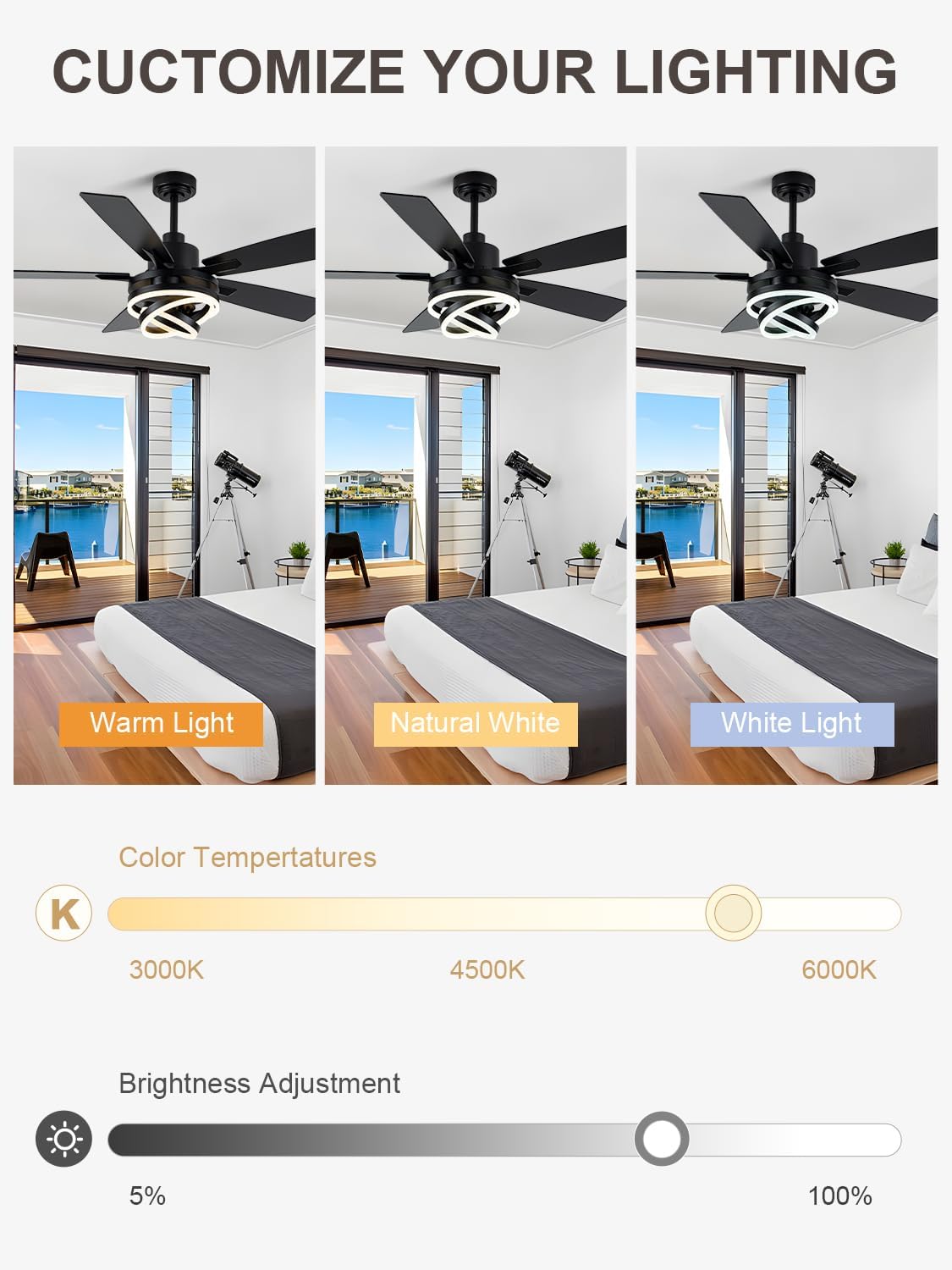
  • Light Modes: Cycle through 3 color temperatures: Warm Light (3000K), Natural White (4000K), and Cool White (6000K).
  • Brightness Adjustment: Use the +/- buttons to adjust the light brightness from 5% to 100%.
  • Timer Function: Set the fan to automatically turn off after 1, 2, or 4 hours.
  • Memory Function: The fan and light retain their last working state when powered off and on again.
Images demonstrating warm, natural, and cool white light settings with a color temperature slider.

Figure 4.2: Adjustable light color temperatures and brightness levels.

Diagram showing reversible DC motor function for summer and winter, and fan speed levels for different activities.

Figure 4.3: Reversible DC motor for year-round comfort and 6-speed settings.

4.2 Mobile App Control

For additional control, you can download the companion app. Scan the QR code provided in the remote control image or visit https://www.jasonghost.com/fanlamppro to download the app. Follow the in-app instructions to pair your device.

5. Maintenance

Regular maintenance ensures the longevity and optimal performance of your ceiling fan.

  • Cleaning: To prevent scratching the finish, clean the fan with a soft, damp cloth. Do not use abrasive cleaners or solvents. Ensure power is off before cleaning.
  • Blade Cleaning: Wipe fan blades regularly to prevent dust buildup, which can affect balance and airflow.
  • Tighten Fasteners: Periodically check and tighten all screws and fasteners on the fan and mounting hardware.
  • No Lubrication Needed: The fan's motor is permanently lubricated and does not require oiling.

6. Troubleshooting

If you experience issues with your ceiling fan, refer to the following common problems and solutions.

ProblemPossible CauseSolution
Fan does not startNo power to the fan; Loose wire connections; Remote control battery dead or not paired.Check circuit breaker and wall switch. Verify all wire connections are secure. Replace remote batteries and re-pair if necessary.
Light does not workLoose wire connection to light kit; Light kit malfunction.Check wiring to the light kit. If the issue persists, contact customer support.
Fan is noisyLoose screws; Bent blade holder; Improperly balanced blades.Ensure all screws are tight. Check blade holders for bends. Use a balancing kit if blades are wobbly.
Remote control not workingDead batteries; Remote not paired; Obstruction between remote and receiver.Replace batteries. Follow pairing instructions in the fan's original manual. Ensure clear line of sight.
Fan wobblesLoose mounting bracket; Unbalanced blades; Loose blade screws.Ensure mounting bracket is securely fastened. Check and tighten all blade screws. Balance blades using a balancing kit.

If the problem persists after attempting these solutions, please contact Bella Depot customer support.

7. Specifications

Detailed technical specifications for the Bella Depot 52" Modern Black Chandelier Ceiling Fan.

Diagram showing the dimensions of the 52-inch ceiling fan, including blade length and downrod options.

Figure 7.1: Key dimensions of the 52-inch ceiling fan.

  • Brand: Bella Depot
  • Model Name: Bella DepotDC2062-B
  • Color: Black
  • Material: Acrylic, Metal
  • Style: Modern
  • Product Dimensions: 52"L x 52"W x 25"H
  • Item Weight: 17.71 pounds
  • Indoor/Outdoor Usage: Indoor
  • Power Source: Corded Electric
  • Installation Type: Flush Mount (with downrod options)
  • Control Method: Remote Control, Mobile App
  • Light Source Type: LED
  • Light Color Temperatures: Warm White (3000K), Natural White (4000K), Cool White (6000K)
  • Brightness: 2000 lumen (Adjustable 5%-100%)
  • Voltage: 120 Volts (AC)
  • Wattage: 37 watts
  • Special Features: Color Changing, Remote Control, Reversible Blades, Timer Function, Memory Function, Quiet DC Motor
  • Assembly Required: Yes

8. Warranty and Support

8.1 Warranty Information

This Bella Depot ceiling fan comes with a 12-month warranty from the date of purchase. This warranty covers defects in materials and workmanship under normal use. It does not cover damage resulting from improper installation, misuse, abuse, or unauthorized repairs.

8.2 Customer Support

For technical assistance, warranty claims, or any questions regarding your Bella Depot ceiling fan, please contact the manufacturer or seller directly. You can also visit the official Bella Depot store on Amazon for more information and contact options:

Visit the Bella Depot Store on Amazon

Related Documents - Bella DepotDC2062-B

Preview Bella Depot Modern Ceiling Fan Installation and Troubleshooting Manual
A comprehensive guide for installing and troubleshooting the Bella Depot Modern Ceiling Fan, including safety rules, tools required, installation steps, and solutions for common issues.
Preview Bella Depot DC2002 Modern Ceiling Fan Installation and Troubleshooting Manual
Bella Depot DC2002 Modern Ceiling Fan: Installation and Troubleshooting Manual. Get step-by-step instructions, safety guidelines, parts list, wiring diagrams, and solutions for common fan and light issues.
Preview Bella Depot FC4076 6-Light Globe Chandelier Installation and Assembly Guide
Detailed installation and assembly guide for the Bella Depot FC4076 6-Light Globe Chandelier, featuring crystal accents. Includes safety precautions, parts list, and step-by-step instructions.
Preview Bella Depot Modern Ceiling Fan Installation and Troubleshooting Manual
A comprehensive guide for installing and troubleshooting the Bella Depot Modern Ceiling Fan, including safety rules, tools required, parts list, installation steps, and common problem solutions.
Preview Bella Depot DC5206 Modern Ceiling Fan: Installation and Troubleshooting Guide
Comprehensive installation and troubleshooting manual for the Bella Depot DC5206 Modern Ceiling Fan, providing step-by-step instructions and solutions for common issues.
Preview Bella Depot Ceiling Fan Remote Control Installation and Troubleshooting Guide
Comprehensive guide for installing and troubleshooting your Bella Depot ceiling fan remote control, including button functions, wiring diagrams, and re-programming instructions.