Introduction
The OSITO Leg Circulatory Stimulator is designed to promote blood circulation and provide relief from various discomforts in the feet and legs. It combines Electrical Muscle Stimulation (EMS) and Transcutaneous Electrical Nerve Stimulation (TENS) technologies to effectively target muscle stiffness, swelling, cramps, and general body pain. This manual provides essential information for the safe and effective operation, maintenance, and troubleshooting of your device.
Important Safety Information
Please read all instructions carefully before using the device. Keep this manual for future reference.
- Consult your doctor before use if you have any pre-existing medical conditions, especially if you have a pacemaker, heart condition, epilepsy, or are pregnant.
- Do not use on open wounds, swollen or inflamed areas, or skin eruptions.
- Keep out of reach of children.
- Do not immerse the device in water or use it in wet environments.
- Use only the provided power adapter.
- Discontinue use if you experience any discomfort or adverse reactions.
Product Components
Your OSITO Leg Circulatory Stimulator package includes the following items:
- Main Stimulator Unit
- Remote Control
- 4 x TENS Electrode Pads
- Connecting Cables for TENS Pads
- Power Adapter
- User Manual (this document)
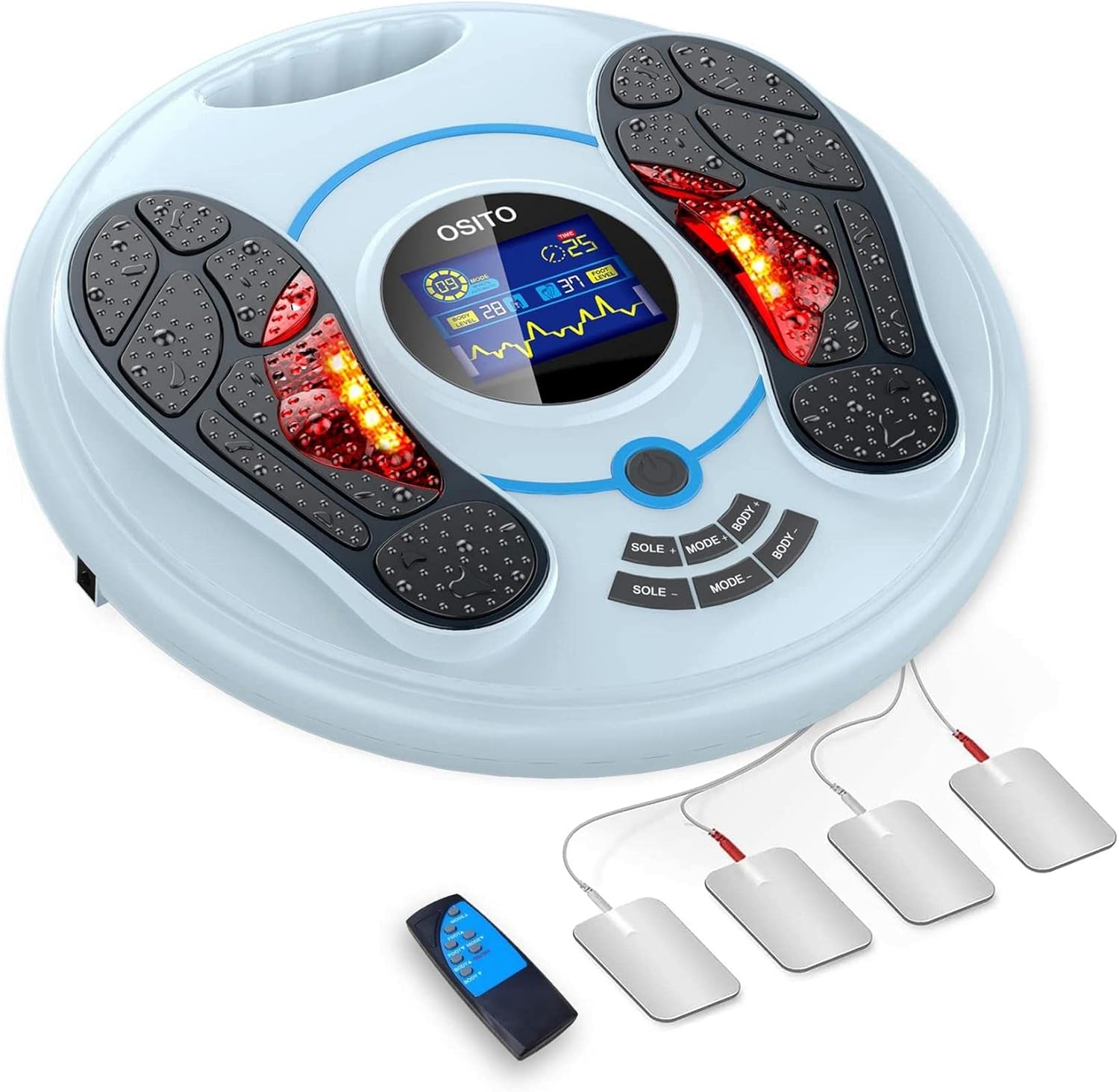
Image: The main OSITO circulatory stimulator unit, showing the foot pads, central display, control buttons, remote control, and four electrode pads with their connecting wires.
Setup
- Placement: Place the main stimulator unit on a flat, stable surface, such as the floor in front of a chair or sofa, ensuring easy access to a power outlet.
- Power Connection: Insert the power adapter into the DC input port on the side or back of the main unit. Plug the other end of the adapter into a standard electrical outlet.
- Remote Control Battery: Ensure the remote control has working batteries (not typically included, but assume for instructions).
- Optional TENS Pad Connection: If you plan to use the TENS electrode pads, connect their cables to the designated ports on the main unit.

Image: Detailed view of the OSITO device's control panel, highlighting the power supply interface, TENS foot-pads, On/Off button, intensity adjustments, and mode selection buttons.
Operating Instructions
Using the Foot Stimulator
- Power On: Press the Power button on the main unit or the remote control to turn on the device. The LCD screen will illuminate.
- Positioning Feet: Place your bare feet on the designated foot pads on the main unit. Ensure full contact for optimal stimulation.
- Select Mode: Use the "MODE" buttons on the unit or remote to cycle through the 25 available massage modes. Each mode offers a different stimulation pattern.
- Adjust Intensity: Use the "SOLE +" and "SOLE -" buttons to adjust the intensity level for the foot stimulation. There are 99 intensity levels. Start with a low intensity and gradually increase until you find a comfortable and effective level.
- Session Duration: The device has an automatic shut-off timer set for 25 minutes. You can enjoy your session without needing to monitor the time.
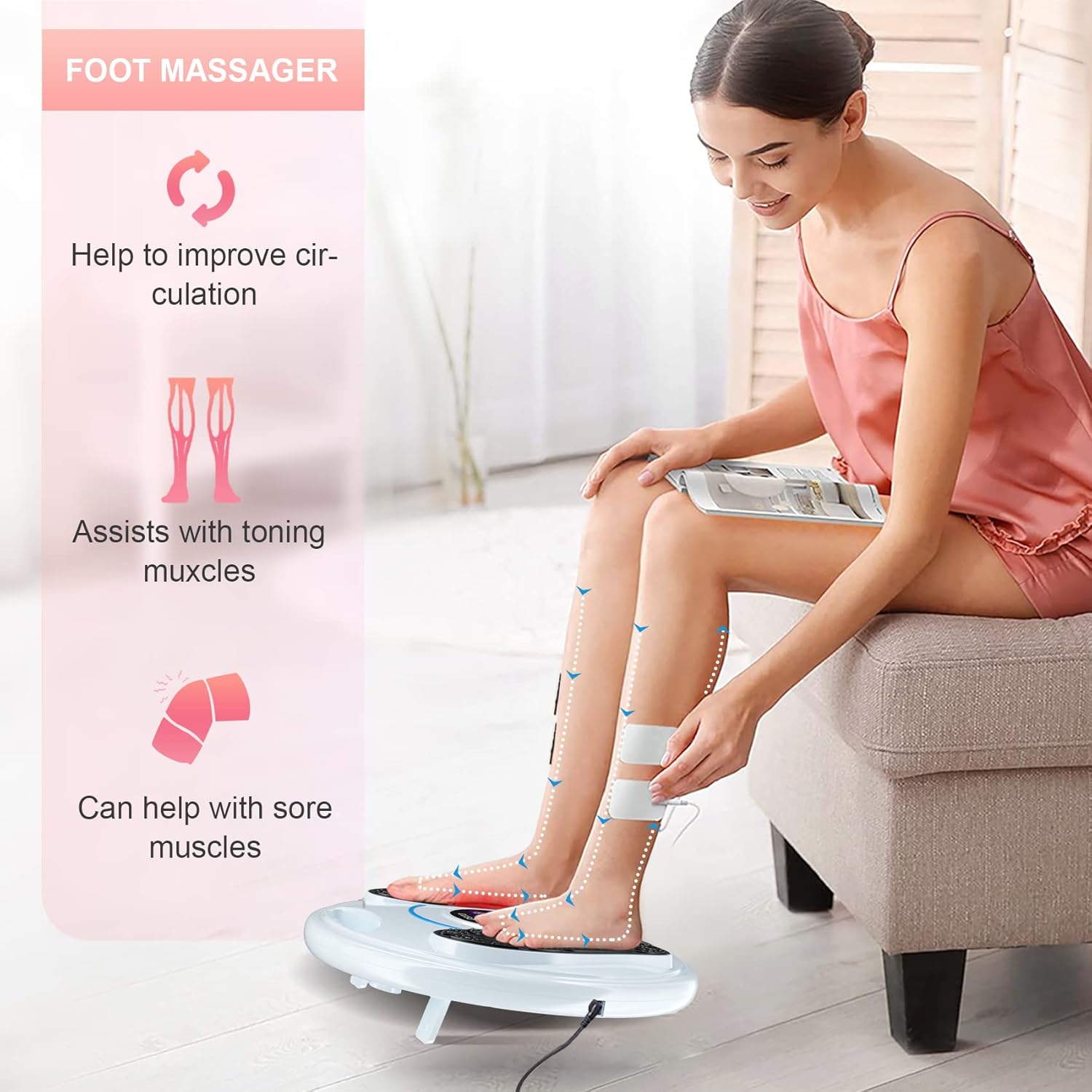
Image: A person comfortably seated, using the OSITO foot massager, demonstrating proper foot placement on the device.
Using the TENS Electrode Pads (for Body Stimulation)
- Prepare Skin: Ensure the skin where you will place the pads is clean, dry, and free of lotions or oils.
- Attach Pads: Peel the protective film from the electrode pads and firmly attach them to the desired body areas (e.g., back, waist, neck, shoulder, leg, ankle).
- Connect Cables: Plug the TENS pad cables into the designated ports on the main unit.
- Adjust Body Intensity: Use the "BODY +" and "BODY -" buttons on the unit or remote to adjust the intensity level for the TENS pads. Start low and increase gradually.
- Simultaneous Use: The foot stimulation and TENS pad stimulation can be used simultaneously, with independent intensity controls.

Image: A visual guide illustrating various body areas where the TENS electrode pads can be applied for pain relief, including the back, waist, neck, shoulders, legs, and ankles.
Remote Control Usage
The remote control allows for convenient adjustment of settings without bending over.
- Power Button: Turns the device on or off.
- Mode Button: Cycles through the 25 stimulation modes.
- SOLE + / SOLE -: Increases or decreases foot stimulation intensity.
- BODY + / BODY -: Increases or decreases TENS pad stimulation intensity.
Modes and Intensity Levels
The OSITO Stimulator offers a wide range of customization with 25 distinct massage modes and 99 intensity levels to suit individual preferences and needs.

Image: A graphic illustrating the 25 massage modes and a breakdown of the 99 intensity levels, ranging from gentle (1-9) to strong (90-99).
- Modes (1-25): Each mode provides a unique pattern of electrical pulses, designed to mimic different massage techniques for varied therapeutic effects. Experiment to find the modes most beneficial for your condition.
- Intensity Levels (1-99):
- Levels 1-9: Gentle (Doux)
- Levels 10-29: Lighter (Plus léger)
- Levels 30-49: Comfortable (Confortable)
- Levels 50-69: Medium (Moyen)
- Levels 70-89: Slightly Stronger (Légèrement plus fort)
- Levels 90-99: Strong (Fort)
Maintenance
Cleaning the Device
- Always unplug the device from the power outlet before cleaning.
- Wipe the main unit and foot pads with a soft, damp cloth. Do not use abrasive cleaners or harsh chemicals.
- For TENS pads, follow the manufacturer's instructions for cleaning and reapplication. Replace pads when they lose their adhesiveness.
- Ensure the device is completely dry before plugging it back in or storing it.
Storage
- Store the device in a cool, dry place, away from direct sunlight and extreme temperatures.
- Keep the original packaging for safe storage and transport if possible.
- Ensure all cables are neatly coiled to prevent damage.
Troubleshooting
If you encounter any issues with your OSITO Leg Circulatory Stimulator, please refer to the following common problems and solutions:
| Problem | Possible Cause | Solution |
|---|---|---|
| Device does not power on. | Not plugged in correctly; Power outlet issue; Faulty adapter. | Ensure power adapter is securely plugged into the device and a working outlet. Try a different outlet. Contact support if adapter is suspected faulty. |
| No sensation or weak sensation. | Intensity too low; Poor foot contact; Dry skin; Worn TENS pads. | Increase intensity. Ensure bare feet are fully on pads. Moisten feet slightly if skin is very dry. Replace TENS pads if they are no longer adhesive. |
| Remote control not working. | Dead batteries; Obstruction between remote and unit. | Replace remote control batteries. Ensure no objects are blocking the signal path. |
If the problem persists after trying these solutions, please contact customer support.
Specifications
| Feature | Detail |
|---|---|
| Model Number | 734257356848 |
| Brand | OSITO |
| Dimensions (L x W x H) | 40 x 40 x 6.5 cm |
| Item Weight | 2.4 Kilograms |
| Power Source | Manual (Note: This likely refers to user interaction, not battery type. The device is electric.) |
| Special Feature | Remote Control |
| Massage Modes | 25 |
| Intensity Levels | 99 |
| Auto-off Timer | 25 minutes |
Warranty and Support
The OSITO Leg Circulatory Stimulator comes with a 2-year warranty, ensuring peace of mind regarding product quality and performance.
For warranty claims, technical support, or any inquiries regarding your device, please contact the manufacturer or your point of purchase. Refer to the contact information provided on the product packaging or the official OSITO website.
No official product videos were found for this model from the manufacturer.


