Product Overview
The Jinghao AID BEAN Hearing Aids are designed to provide an outstanding listening experience for seniors, featuring advanced digital chip technology and intelligent noise reduction. Their comfortable, ergonomic design ensures prolonged wear without discomfort, and the portable charging case offers convenience for on-the-go use. With automatic power on/off detection and simple one-button operation, these hearing aids are user-friendly and effective.

Figure 1: Jinghao AID BEAN Hearing Aids and Portable Charging Case.
Safety Information
Please read all safety instructions carefully before using the device. Failure to do so may result in injury or damage to the product.
- Keep out of reach of children and pets. Small parts may pose a choking hazard.
- Do not expose the device or charging case to extreme temperatures, direct sunlight, or moisture.
- Avoid dropping or subjecting the device to strong impacts.
- Do not attempt to disassemble or modify the device. This will void the warranty and may cause malfunction.
- If you experience any discomfort, pain, or unusual symptoms while using the hearing aids, discontinue use immediately and consult a medical professional.
- Use only the provided charging cable and a compatible power adapter (not included) for charging.
Setup Guide
1. Unboxing and Package Contents
Carefully open the product packaging and ensure all items are present.

Figure 2: Included items: Hearing aids (A62AT), portable charging case, USB charging cable, user manual, various ear tip sizes (S, M, L), and a cleaning brush tool.
- Jinghao AID BEAN Hearing Aids (Left and Right)
- Portable Charging Case
- USB Charging Cable (Micro USB)
- User Manual (this document)
- Silicone Ear Tips (2 sets each of S, M, L sizes)
- Cleaning Brush Tool
2. Initial Charging
Before first use, fully charge the hearing aids and the charging case.
- Place both hearing aids into their respective slots in the charging case. Ensure they are seated correctly for charging contacts to align.
- Connect the provided USB charging cable to the charging port on the case.
- Plug the other end of the USB cable into a compatible USB power source (e.g., wall adapter, computer USB port).
- The indicator lights on the charging case will show the charging status. A full charge for the hearing aids takes approximately 2 hours. The portable charging case, when fully charged, can provide up to 5 full recharges for the hearing aids, offering a week of use without needing to plug in the case.

Figure 3: The portable charging case provides extended battery life, allowing for multiple recharges on the go.
3. Fitting the Hearing Aids
Proper fit is crucial for comfort and optimal sound quality. The device comes with various ear tip sizes (S, M, L) to ensure a secure and comfortable fit.
- Select the ear tip size that best seals your ear canal without causing discomfort. Experiment with different sizes to find the best fit.
- Gently insert the hearing aid into your ear. The device is designed to fit discreetly and ergonomically, similar to an earbud.
- Ensure the hearing aid is securely placed. The device features an in-ear detection sensor that automatically powers on when worn and powers off when removed, preventing whistling.
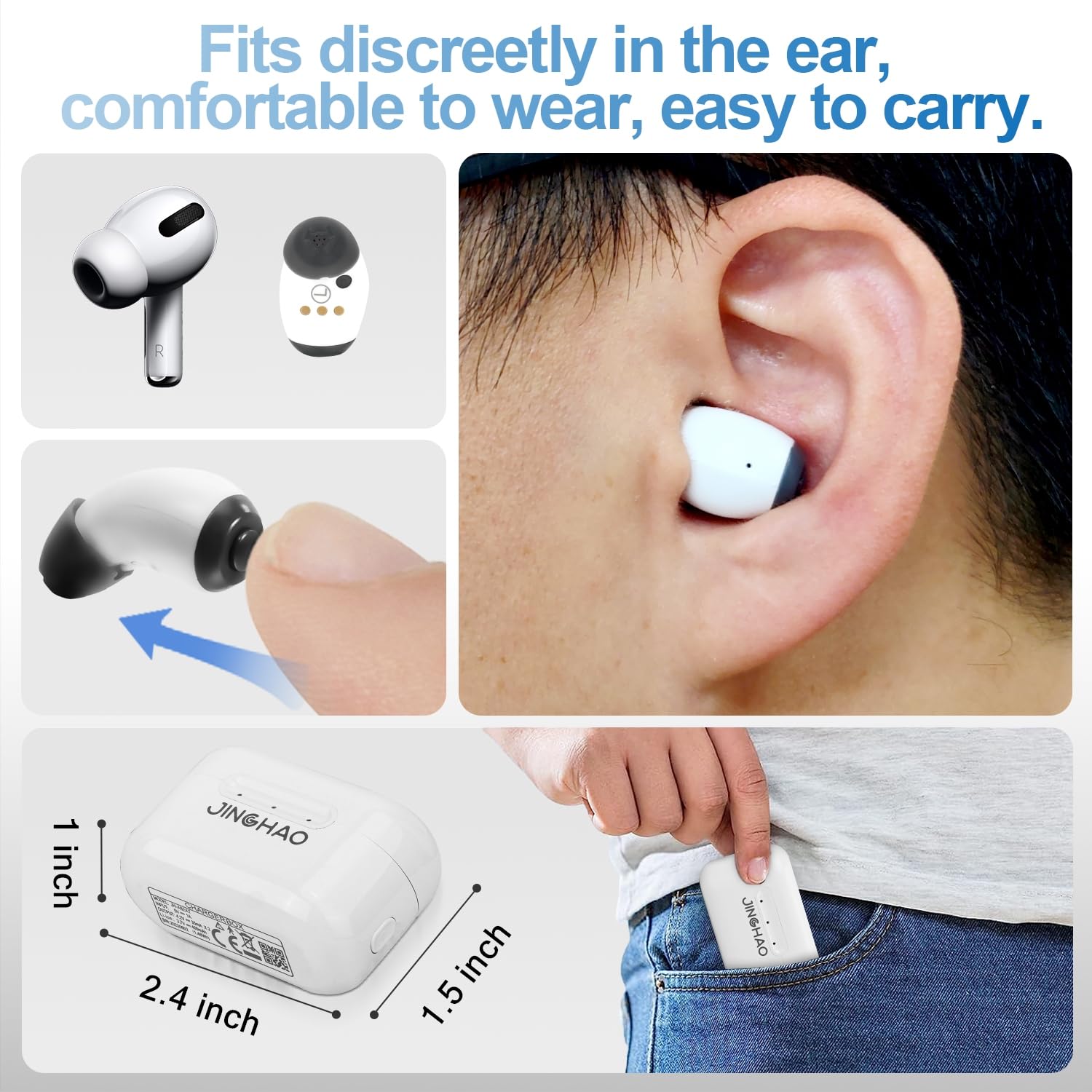
Figure 4: The compact and ergonomic design ensures a comfortable and discreet fit within the ear.

Figure 5: The hearing aids feature a detection port that rejects whistling and automatically powers on/off.
Operating Instructions
1. Power On/Off
The Jinghao AID BEAN hearing aids feature automatic power detection:
- Power On: Simply place the hearing aids into your ears. The in-ear detection sensor will automatically turn them on.
- Power Off: Remove the hearing aids from your ears. They will automatically power off.
2. Volume and Mode Adjustment
The hearing aids are equipped with a single multifunction button for easy control.

Figure 6: The multifunction button is located on the hearing aid for easy access.
- Volume Adjustment: Short press the multifunction button to cycle through 6 volume levels. Each press will increase the volume. Once the maximum volume is reached, the next press will return to the lowest volume.
- Mode Selection: Long press the multifunction button (approximately 3 seconds) to switch between the 4 available modes. These modes are designed for different listening environments:
- Standard Mode
- Restaurant Mode
- Outdoor Mode
- Music Mode

Figure 7: The digital chip technology suppresses noise and amplifies voices for clear sound.
Maintenance
1. Cleaning the Hearing Aids
Regular cleaning ensures optimal performance and hygiene.
- Use the provided cleaning brush to gently remove any earwax or debris from the ear tips and sound output holes.
- Wipe the body of the hearing aids and the charging case with a soft, dry cloth.
- Do not use water, cleaning solutions, or abrasive materials, as this can damage the device.
2. Storage
When not in use, store the hearing aids in their portable charging case to protect them and keep them charged.
- Ensure the charging case is closed securely to prevent dust and damage.
- Store the case in a cool, dry place away from direct sunlight.
Troubleshooting
If you encounter any issues with your Jinghao AID BEAN Hearing Aids, please refer to the following common problems and solutions:
| Problem | Possible Cause | Solution |
|---|---|---|
| No Sound / Low Volume | Low battery; incorrect volume setting; ear tip clogged with wax. | Charge the hearing aids and case. Adjust volume using the multifunction button. Clean ear tips and sound output holes with the cleaning brush. |
| Whistling Sound (Feedback) | Improper fit; ear tip too small; earwax buildup in ear canal. | Ensure the hearing aid is properly seated in the ear. Try a larger ear tip size for a better seal. Consult a doctor for earwax removal if necessary. |
| Device Not Charging | Poor contact with charging pins; faulty cable/adapter; case battery low. | Ensure hearing aids are correctly placed in the case. Clean charging contacts on both aids and case. Try a different USB cable or power adapter. Charge the case itself. |
| Sound is Distorted / Unclear | Incorrect mode selected; ear tip issues; device malfunction. | Cycle through the different listening modes to find the best one. Check ear tips for damage or blockage. If the problem persists, contact customer support. |
Specifications
- Model Name: AID BEAN (JH-A62AT)
- Brand: JingHao
- Color: White
- Product Dimensions: 2.4 x 1 x 1.7 inches
- Weight: 7.05 ounces
- Batteries: 1 Lithium Metal battery required (included)
- Power Source: Battery Powered
- Special Feature: Rechargeable
- Manufacturer: Jinghao
- OSPL90 Max.: ≤115dB+3dB
- EQ Input Noise: ≤29dB+3dB
- Frequency Range: 220Hz~8000Hz (Not narrower than)
- Total Harmonic Distortion: ≤0.5%
Warranty and Support
Jinghao offers technical support and an extended warranty for your AID BEAN Hearing Aids.
- Warranty Period: Extendable to 18 Months (details may be available upon product registration or contacting support).
- Technical Support: For any technical assistance or inquiries, please contact:
- Phone: +1 809 233 8888
- Email: support@jinghaoaids.com


