
Product Overview
This manual provides essential instructions for the safe and effective use of your MYNTA M1612 Full Body Massage Chair. Please read this manual thoroughly before operation and retain it for future reference.
Key Features:
- Newly upgraded larger intelligent massage rollers with a 52-inch SL Track, providing massage from neck to hips.
- Full body air compression massage with airbags in the shoulder, arms, lumbar, calves, and feet.
- Lumbar and calf heating functions to promote improved blood circulation.
- Foot roller massage for targeted foot relief.
- Two control methods: an armrest quick control panel and an LCD touchscreen tablet.
- Four-stage zero gravity recline: Initial Step, Reclining Step, Comfort Step, and Deep Step.
- Twelve automatic massage modes and customizable manual modes for a personalized experience.
- Thai Stretch function for full body extension.
- Integrated HD Bluetooth speakers for audio playback.
Important Safety Information
For your safety and to prevent damage to the product, please adhere to the following guidelines:
- Always follow the weight capacity guidelines specified in the product specifications.
- Do not use the chair while sleeping or under the influence of alcohol.
- Ensure proper handling and placement to prevent tipping or damage to the chair.
- Keep the chair away from heat sources and flammable materials.
- Do not operate the chair if the power cord is damaged or if the chair shows any signs of damage.
- Always turn off the chair and unplug it from the power outlet when not in use or before cleaning.
- Consult the complete user manual for detailed safety instructions and warnings.
Setup Guide
The MYNTA M1612 massage chair is designed for minimal assembly. It arrives largely pre-assembled. Follow these steps for initial setup:
- Unpacking: Carefully remove the chair from its packaging. Ensure all components are present and undamaged.
- Placement: Position the massage chair on a flat, stable surface. Ensure there is sufficient space around the chair for reclining and zero-gravity functions (refer to dimensions).
- Power Connection: Connect the power cord securely to the chair's power inlet and then plug it into a grounded electrical outlet.
- Initial Check: Before first use, inspect the chair for any loose connections or visible damage.

Operating Instructions
Your MYNTA M1612 massage chair offers various functions for a customized massage experience. Familiarize yourself with the controls and features below.
Control Methods:
- Armrest Quick Control Panel: Located on the armrest for easy access to basic functions like power, zero gravity, and recline adjustments.
- LCD Touchscreen Tablet: Provides comprehensive control over all massage programs, intensity levels, heating, and other settings.

Zero Gravity Function:
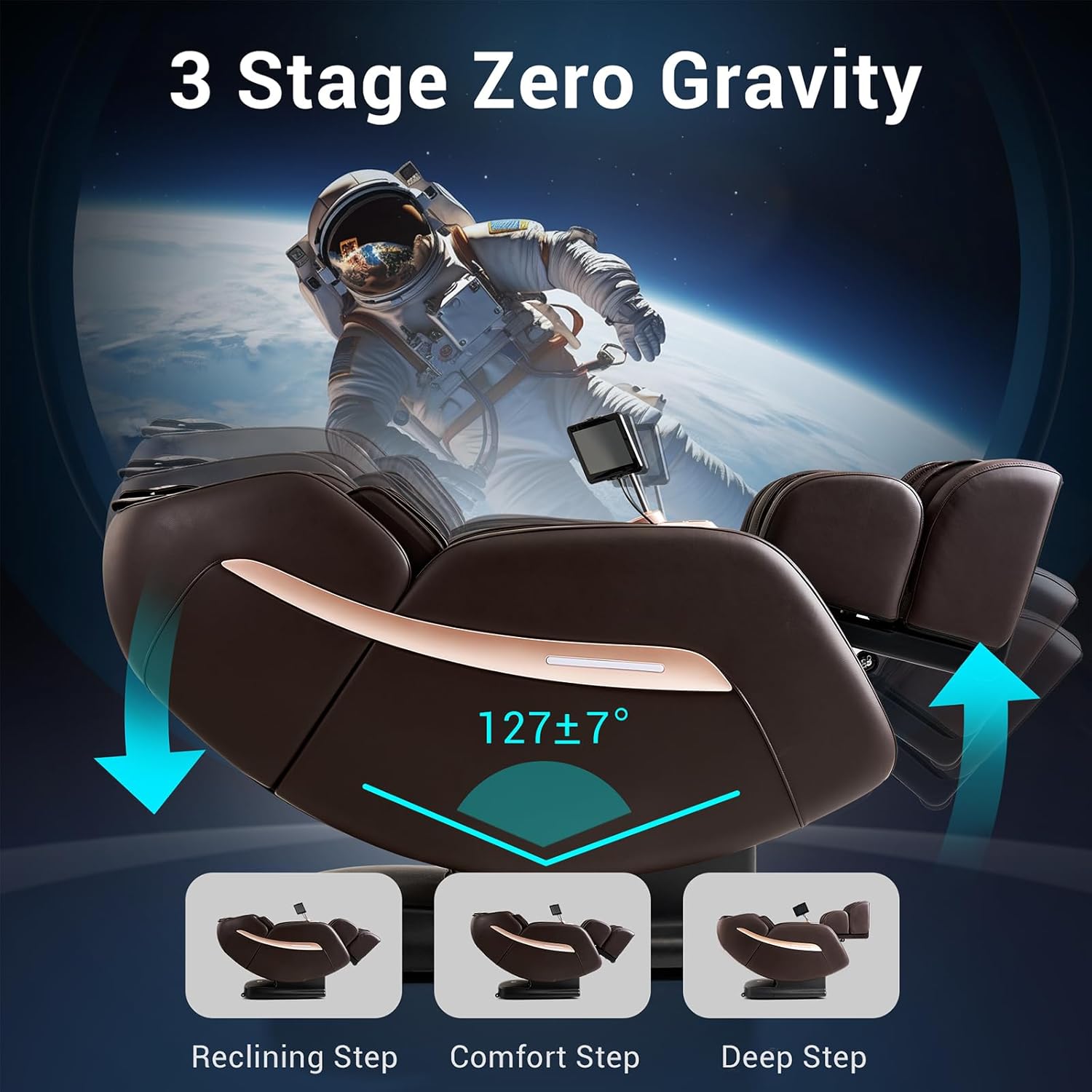
The zero-gravity feature elevates your legs above your heart, reducing pressure on your spine and enhancing the massage experience. The M1612 offers four stages:
- Initial Step
- Reclining Step
- Comfort Step
- Deep Step
Massage Programs and Techniques:
The chair features a 52-inch SL-Track system, providing comprehensive massage coverage from your neck to your hips. Choose from 12 auto modes or customize your massage using various techniques.


- Auto Modes: Select from 12 pre-programmed massage routines tailored for different needs (e.g., Recovery, Deep Tissue, Thai Stretch).
- Manual Modes: Customize your massage by selecting specific techniques (Shiatsu, Kneading, Knocking, Rubbing, Tapping, Knead & Knock) and adjusting intensity, speed, and roller width.
- Air Compression: Activate airbags in the shoulders, arms, lumbar, calves, and feet for a full-body compression massage. Adjust intensity as desired.
- Heating Function: Engage lumbar and calf heating for soothing warmth.
- Foot Roller: Activate the foot rollers for a targeted foot massage.

Thai Stretch Function:
The Thai Stretch program gently stretches your back and legs, promoting flexibility and relieving tension. The back and leg sections can be controlled separately for personalized stretching.

Bluetooth Speakers:
Connect your mobile device via Bluetooth to the chair's integrated HD speakers for an immersive audio experience during your massage session.

Maintenance
Proper maintenance ensures the longevity and optimal performance of your massage chair.
- Cleaning: Wipe the chair's surface with a soft, damp cloth. Avoid using harsh chemicals, abrasive cleaners, or excessive moisture, as these can damage the faux leather material.
- Power Cord: Regularly inspect the power cord for any signs of damage. If damaged, contact customer support for assistance.
- Storage: When not in use for extended periods, unplug the chair and store it in a clean, dry environment away from direct sunlight and extreme temperatures.
- Moving the Chair: If you need to move the chair, ensure it is unplugged. Refer to the setup guide for safe handling practices to prevent damage or injury.
Troubleshooting
If you encounter any issues with your MYNTA M1612 massage chair, refer to the following common troubleshooting steps:
| Problem | Possible Cause | Solution |
|---|---|---|
| Chair does not power on. | Power cord not properly connected; power outlet issue; main power switch off. | Ensure the power cord is securely plugged into both the chair and a working electrical outlet. Check if the main power switch (if present) is in the "ON" position. Try a different outlet. |
| Massage functions are not working. | Chair is not fully reclined; program not selected; safety sensor activated. | Ensure the chair is in an appropriate position for massage. Select an auto mode or manual program from the control panel/tablet. Check for any obstructions that might activate safety sensors. |
| Remote control/tablet is unresponsive. | Low battery (if applicable); connection issue. | If the remote uses batteries, replace them. Ensure the tablet is securely connected (if wired) or within range (if wireless). Restart the chair by unplugging and replugging it. |
| Unusual noises during operation. | Loose components; normal operational sounds. | Some operational sounds are normal. If the noise is loud, grinding, or unusual, power off the chair immediately and contact customer support. |
If the problem persists after attempting these solutions, please contact MYNTA customer service for further assistance.
Product Specifications
| Feature | Detail |
|---|---|
| Brand | MYNTA |
| Model Name | MC1612E |
| Color | Brown |
| Material | Faux Leather (Seat), Alloy Steel (Frame) |
| Item Dimensions (L x W x H) | 57 x 30 x 43 inches |
| Item Depth | 62 inches |
| Chair Backrest Width | 83.82 centimeters |
| Maximum Weight Recommendation | 150 kg |
| Massage Track | 52-inch SL-Track |
| Zero Gravity Stages | 4 (Initial, Reclining, Comfort, Deep) |
| Auto Massage Modes | 12 |
| Massage Techniques | Shiatsu, Kneading, Knocking, Rubbing, Tapping, Knead & Knock |
| Heating Zones | Lumbar, Calf |
| Air Compression | Shoulder, Arms, Lumbar, Calves, Feet |
| Control Methods | Armrest Quick Control Panel, LCD Touchscreen Tablet |
| Additional Features | HD Bluetooth Speakers, Thai Stretch Function |
| Product Care Instructions | Wipe Clean |
Warranty and Customer Support
MYNTA is committed to providing excellent customer service. Your massage chair comes with a manufacturer's warranty. Please refer to the warranty card included with your purchase for specific terms and conditions.
For any questions, technical assistance, or warranty claims, please contact MYNTA customer service. Our team is available to assist you.
- Customer Service Availability: 24 hours.
- Contact Information: Please refer to the contact details provided in your product packaging or on the official MYNTA website.