
Homirxan safe box
Homirxan 3.3 Cubic Feet Digital Security Safe User Manual
Model: safe box
Introduction
This manual provides detailed instructions for the safe and proper use of your Homirxan 3.3 Cubic Feet Digital Security Safe. Please read this manual thoroughly before operating the safe and retain it for future reference. This safe is designed to protect your valuables, documents, and firearms from unauthorized access.
Important Safety Information:
- Do not store emergency keys inside the safe.
- Ensure the safe is securely mounted to prevent unauthorized removal.
- Keep the safe's combination confidential and do not share it with unauthorized individuals.
Product Overview and Components
The Homirxan 3.3 Cubic Feet Digital Security Safe features a robust steel construction with a digital keypad and emergency key access. It includes a removable shelf for organized storage and is designed with anti-theft features.

Figure 1: Homirxan 3.3 Cubic Feet Digital Security Safe, open view displaying interior capacity with valuables.
Key Features:
- Digital Keypad: For programmable access codes.
- Emergency Key Access: Provides alternative entry in case of forgotten code or battery failure.
- Durable Steel Construction: Features 2 enhanced live steel locking bolts, pry-resistant concealed hinges, and a recessed door.
- Removable Shelf: Allows for flexible storage configurations to accommodate various item sizes.
- Pre-drilled Mounting Holes: For securing the safe to a wall or floor.
- Interior Light: Motion-sensor activated light for improved visibility inside the safe.

Figure 2: Interior view highlighting the motion sensor light.
Package Contents:
- Homirxan Digital Security Safe
- Emergency Keys (2)
- Mounting Hardware (Expansion screws)
- Carpeted Floor Mat
- User Manual

Figure 3: Product dimensions and included accessories.
Setup
1. Initial Opening (First Use)
- Locate the emergency key cover on the keypad panel.
- Gently pry off the emergency key cover (a small, flat tool or knife tip may be needed).
- Insert one of the emergency keys into the keyhole and turn it clockwise.
- While the key is turned, rotate the knob on the keypad counter-clockwise to open the safe door.
- Remove the emergency keys and store them in a secure location outside the safe.
2. Battery Installation
The safe requires AA batteries for the digital keypad. The battery compartment is typically located on the inside of the safe door.
- Open the safe door using the emergency key.
- Locate the battery compartment on the inside of the door.
- Insert the required number of AA batteries, ensuring correct polarity (+/-).
- Close the battery compartment.
3. Mounting the Safe
For enhanced security, it is recommended to bolt the safe to a wall or floor. The safe has pre-drilled holes for this purpose.
- Choose a suitable location for mounting.
- Mark the positions for drilling through the pre-drilled holes on the back or bottom of the safe.
- Drill pilot holes in the wall or floor using an appropriate drill bit.
- Align the safe with the drilled holes.
- Secure the safe using the provided expansion screws.
- If not mounting, ensure the pre-drilled holes are plugged to maintain potential water resistance.
Operating Instructions
1. Setting/Changing the Personal Code
It is crucial to set your personal code immediately after initial setup.
- With the safe door open, locate the red reset button on the inside of the door, near the hinge.
- Press the red reset button. The keypad will beep, and the yellow indicator light will illuminate.
- Enter your desired 3-8 digit personal code on the keypad.
- Press the "#" button to confirm. The keypad will beep again, and the yellow light will turn off.
- Test the new code with the door open before closing it.
2. Opening the Safe with Personal Code
- Enter your personal code (3-8 digits) on the keypad.
- Press the "#" button. The green indicator light will illuminate.
- Within 5 seconds, rotate the knob counter-clockwise to open the safe door.
3. Opening the Safe with Emergency Key
Use this method if you forget your code or if the batteries are depleted.
- Gently pry off the emergency key cover on the keypad panel.
- Insert an emergency key into the keyhole and turn it clockwise.
- While the key is turned, rotate the knob counter-clockwise to open the safe door.
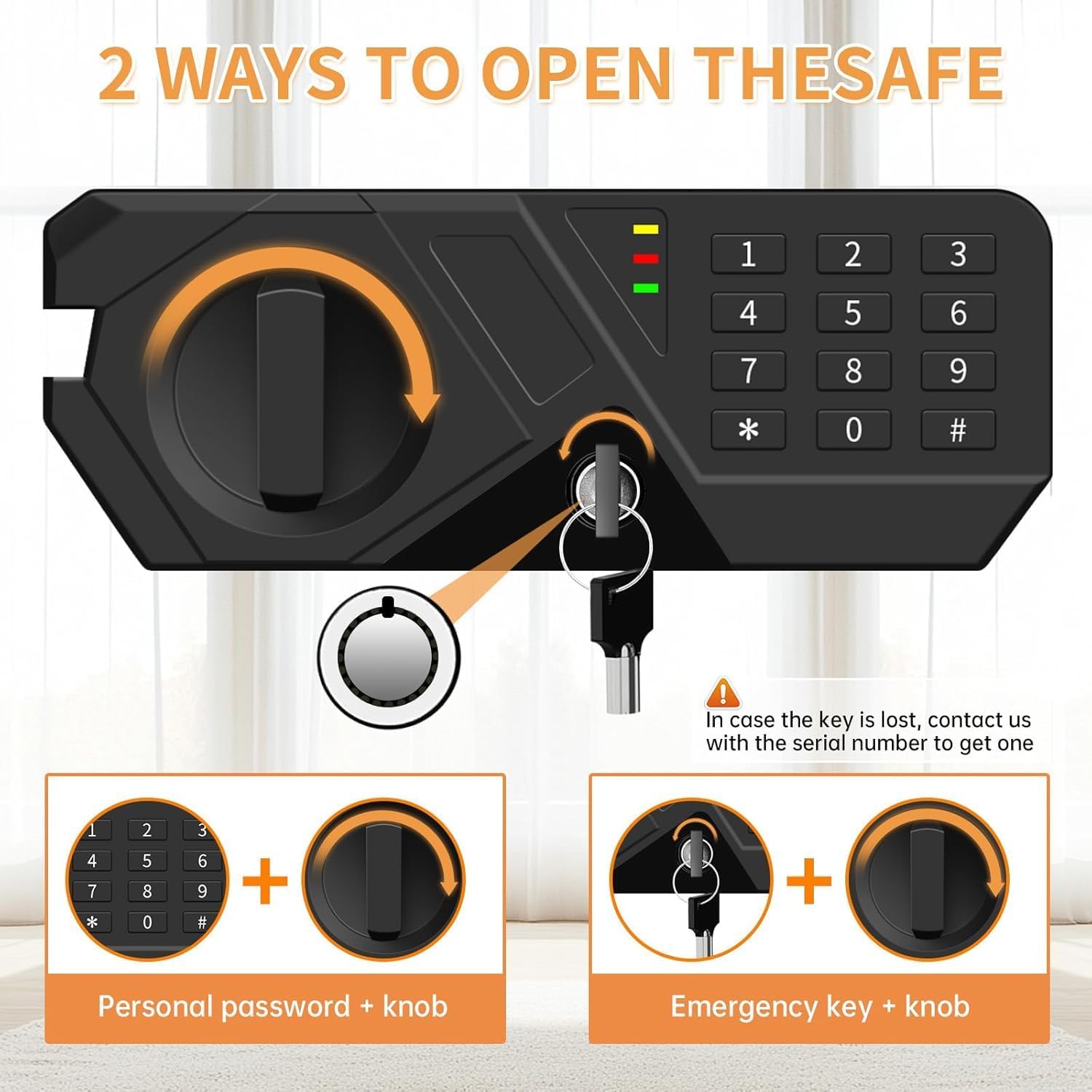
Figure 4: Two methods for opening the safe.
4. Closing and Locking the Safe
- Close the safe door firmly.
- Rotate the knob clockwise until it stops. The safe is now locked.
5. Alarm System
The safe is equipped with an audible alarm. If an incorrect code is entered multiple times consecutively, the alarm will activate. To silence the alarm, enter the correct code or use the emergency key.
Maintenance
1. Battery Replacement
When the batteries are low, the red indicator light on the keypad may flash or the safe may not respond. Replace all batteries promptly.
- Open the safe using the personal code or emergency key.
- Locate the battery compartment on the inside of the door.
- Remove old batteries and insert new AA batteries, observing polarity.
- Test the keypad functionality.
2. Cleaning
Clean the exterior of the safe with a soft, damp cloth. Avoid abrasive cleaners or solvents that could damage the finish.
Troubleshooting
| Problem | Possible Cause | Solution |
|---|---|---|
| Safe does not open with personal code. | Incorrect code entered, low batteries, code not set correctly. |
|
| Keypad is unresponsive. | Dead or improperly installed batteries. |
|
| Emergency key does not turn. | Key not fully inserted, obstruction. |
|
| Alarm sounds unexpectedly. | Multiple incorrect code entries. |
|
Specifications
| Feature | Detail |
|---|---|
| Brand | Homirxan |
| Model | safe box |
| Capacity | 3.3 Cubic Feet |
| Exterior Dimensions (D x W x H) | 14.96" x 12.16" x 17.71" |
| Lock Type | Digital Keypad, Emergency Key |
| Material | Steel Construction |
| Special Features | Alarm System, Anti-Theft, Combination Lock, Fire Resistant, Water Resistant |
| Mounting Type | Floor Mount, Wall Mount |
| Item Weight | 28.6 pounds (approx. 13 kg) |
| Batteries Required | AA (not included) |
Warranty and Support
For warranty information or technical support, please contact Homirxan customer service. Refer to the product packaging or the manufacturer's official website for the most current contact details.
Please have your model number (safe box) and purchase date available when contacting support.
Ask a question about this manual
Ask about setup, troubleshooting, compatibility, parts, safety, or missing instructions. Manuals+ will review the question and use this page’s manual context to help answer it.