
VIPARSPECTRA XS3000 Pro
VIPARSPECTRA XS3000 Pro LED Grow Light User Manual
Model: XS3000 Pro
1. Introduction
The VIPARSPECTRA XS3000 Pro LED Grow Light is engineered to provide optimal light conditions for indoor plant cultivation. Featuring a new-generation optical lens design, full spectrum output, and dimmable daisy chain functionality, this grow light is designed to support plant growth from seed starting through flowering, ensuring high PAR uniformity and energy efficiency.

Image 1.1: The VIPARSPECTRA XS3000 Pro LED Grow Light, showcasing its dual light panels and hanging system.
2. Safety Information
- Always disconnect power before installation, maintenance, or moving the light.
- Do not look directly at the LED lights when they are operating.
- Ensure proper ventilation around the light to prevent overheating.
- Keep the light away from water and moisture. This product is for indoor use only.
- Do not attempt to disassemble or modify the light. This will void the warranty.
- Use only the provided power cord and accessories.
3. Package Contents
Verify that all components are present in your package:
- VIPARSPECTRA XS3000 Pro LED Grow Light Unit
- 1 x Dimming Cable
- 1 x Power Cord
- 1 x Hanging Kit (includes 2x Stainless Steel Hooks, 2x Rope Hangers)
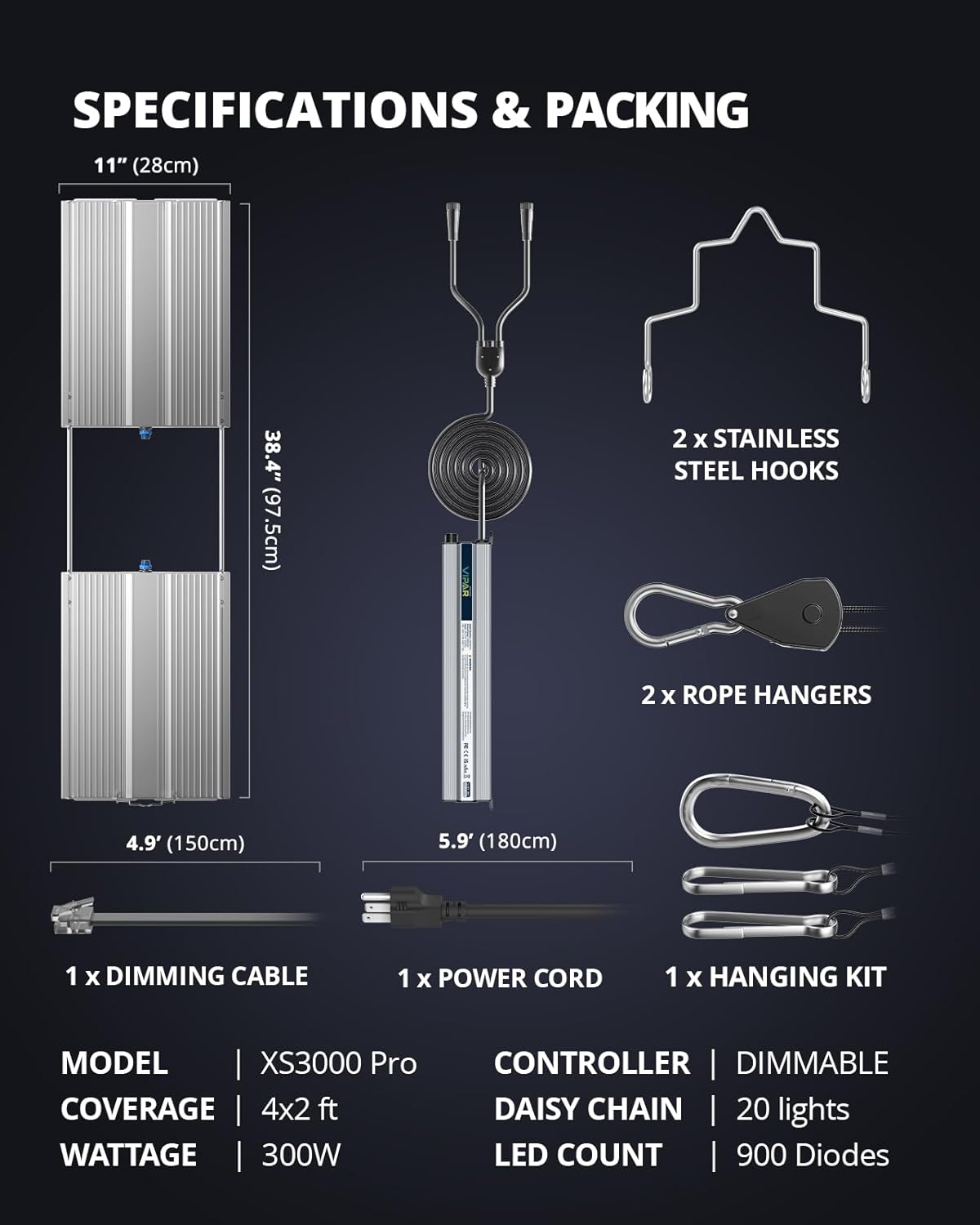
Image 3.1: Diagram illustrating the components included in the VIPARSPECTRA XS3000 Pro package, such as the light unit, dimming cable, power cord, and hanging kit.
4. Setup
4.1 Mounting the Grow Light
- Attach the stainless steel hooks to the top of the grow light unit.
- Connect the rope hangers to the stainless steel hooks.
- Hang the light securely from a sturdy support structure (e.g., grow tent frame, ceiling hooks) using the rope hangers. Adjust the height as needed for your plants.

Image 4.1: An illustration of the grow light system installed within a grow tent, showing proper hanging and ventilation setup.
4.2 Connecting Power
Plug the provided power cord into the light unit and then into a standard electrical outlet. Ensure the outlet matches the voltage requirements of the light.
4.3 Daisy Chain Setup (Optional)
The XS3000 Pro supports daisy chaining up to 20 lights for unified dimming control. Connect the dimming cable from the 'OUT' port of one light to the 'IN' port of the next light. This allows a single dimmer to control the brightness of all connected lights.

Image 4.2: A visual representation of multiple XS3000 Pro grow lights connected in a daisy chain configuration, illustrating the dimming cable connection for synchronized control.
5. Operating Instructions
5.1 Dimming Control
The XS3000 Pro features a dimmer knob with 6 levels of brightness control (0-100%). Rotate the knob to adjust the light intensity according to your plants' specific growth stage and needs. For models with the updated dimmer, turning the knob to 0% will turn the light off.
5.2 Full Spectrum Output
The light utilizes a blend of white (3000K, 5000K), red (660nm), and IR (730nm) LEDs to provide a comprehensive spectrum for all growth stages:
- 5000K White: Promotes plant germination and early vegetative growth.
- 3000K White: Boosts flowering and fruiting.
- 660nm Red: Essential for photosynthesis, flowering, and fruit development.
- 730nm IR: Promotes flowering and boosts yields (appears dim to the human eye).

Image 5.1: A graph illustrating the optimized full spectrum output of the XS3000 Pro, highlighting the contributions of 5000K, 3000K, 660nm, and 730nm LEDs across different wavelengths.
5.3 Recommended Coverage and Hanging Height
The XS3000 Pro is designed for optimal photosynthesis and uniform PAR distribution, especially with its New-Gen Lens technology. Recommended coverage areas are approximately 4x3 ft for vegetative growth and 4x2 ft for flowering. Adjust hanging height based on plant stage and desired light intensity (PPFD).

Image 5.2: A comparison showing the PAR value distribution with and without the New-Gen Lens, demonstrating the improved uniformity and higher output achieved with the lens.
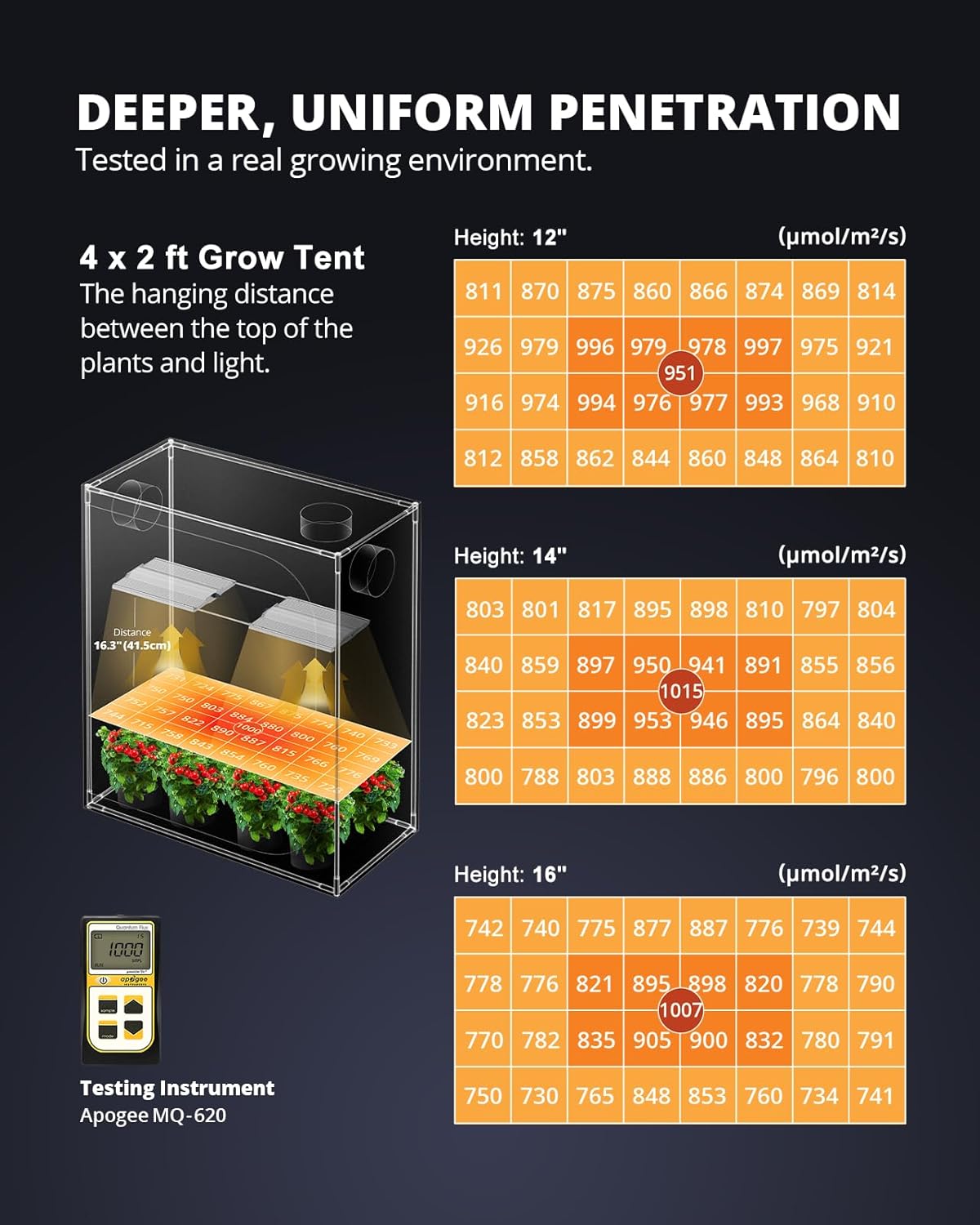
Image 5.3: A PAR map illustrating the deeper and more uniform light penetration within a 4x2 ft grow tent at various hanging heights (12", 14", 16"), measured with an Apogee MQ-620 testing instrument.
6. Maintenance
- Cleaning: Periodically wipe the light surface and LEDs with a soft, dry cloth to remove dust and debris. Ensure the light is unplugged before cleaning.
- Heat Dissipation: The light features a quality aluminum heatsink for efficient heat dissipation. Ensure adequate airflow around the light to maintain optimal operating temperature and extend lifespan.
- Storage: If storing the light for an extended period, disconnect it from power, clean it, and store it in a cool, dry place.
7. Troubleshooting
- Light Not Turning On: Check if the power cord is securely plugged into both the light and the electrical outlet. Ensure the dimmer knob is not set to 0% (off). Test the outlet with another device.
- Dimming Issues: If the light does not dim properly, ensure the dimming cable (if used in a daisy chain) is correctly connected. If using a single light, verify the dimmer knob is functioning.
- Reduced Brightness: Ensure the light surface and LEDs are clean. Dust accumulation can reduce light output.
- Excessive Heat: While the light is designed for efficient heat dissipation, ensure it is not in an enclosed space without proper ventilation. Maintain adequate distance from other objects.
8. Specifications
| Feature | Specification |
|---|---|
| Model | XS3000 Pro |
| Wattage | 300W |
| Coverage (Veg) | 4x3 ft |
| Coverage (Flower) | 4x2 ft |
| LED Count | 900 Diodes |
| Light Source Type | LED |
| Material | Aluminum |
| Product Dimensions | 38.4"L x 11"W x 1.4"H |
| Item Weight | 11.6 Pounds |
9. Warranty and Support
VIPARSPECTRA is committed to providing professional guidance and support to help you achieve better plant growth. Ensure you purchase authentic VIPARSPECTRA grow lights for indoor plants to receive full warranty coverage and customer service. For any inquiries or assistance, please contact VIPARSPECTRA customer support.
Ask a question about this manual
Ask about setup, troubleshooting, compatibility, parts, safety, or missing instructions. Manuals+ will review the question and use this page’s manual context to help answer it.