

Product Overview
The POWXS AA AAA Battery Charger Pro is designed for efficient and safe charging of various rechargeable battery types. It features 8 independent charging slots, allowing for simultaneous charging of AA and AAA batteries. The charger supports Ni-MH, Ni-Cd, and Li-ion battery chemistries and utilizes a convenient Type-C input for power.
This manual provides detailed instructions for setting up, operating, and maintaining your battery charger, along with troubleshooting tips and product specifications.
Key Features
- Universal Compatibility: Supports simultaneous charging of AA and AAA rechargeable batteries, including Ni-MH, Ni-Cd, and Li-ion types.
- Convenient Type-C Input: Offers flexible charging options via power bank, laptop, car charger, or mobile phone charger.
- Independent and Fast Charging: Each of the 8 slots operates independently, allowing for charging 1-8 batteries at once. Provides a maximum 1.5V output for faster charging.
- Smart LED Indicators: LEDs display the charging status (flashing for charging, solid for full charge) and indicate battery type with different colors.
- Multiple Safety Protections: Features auto safety shut-off, overcharge protection, excellent heat-dissipation, short circuit protection, overdischarge protection, and overvoltage protection.
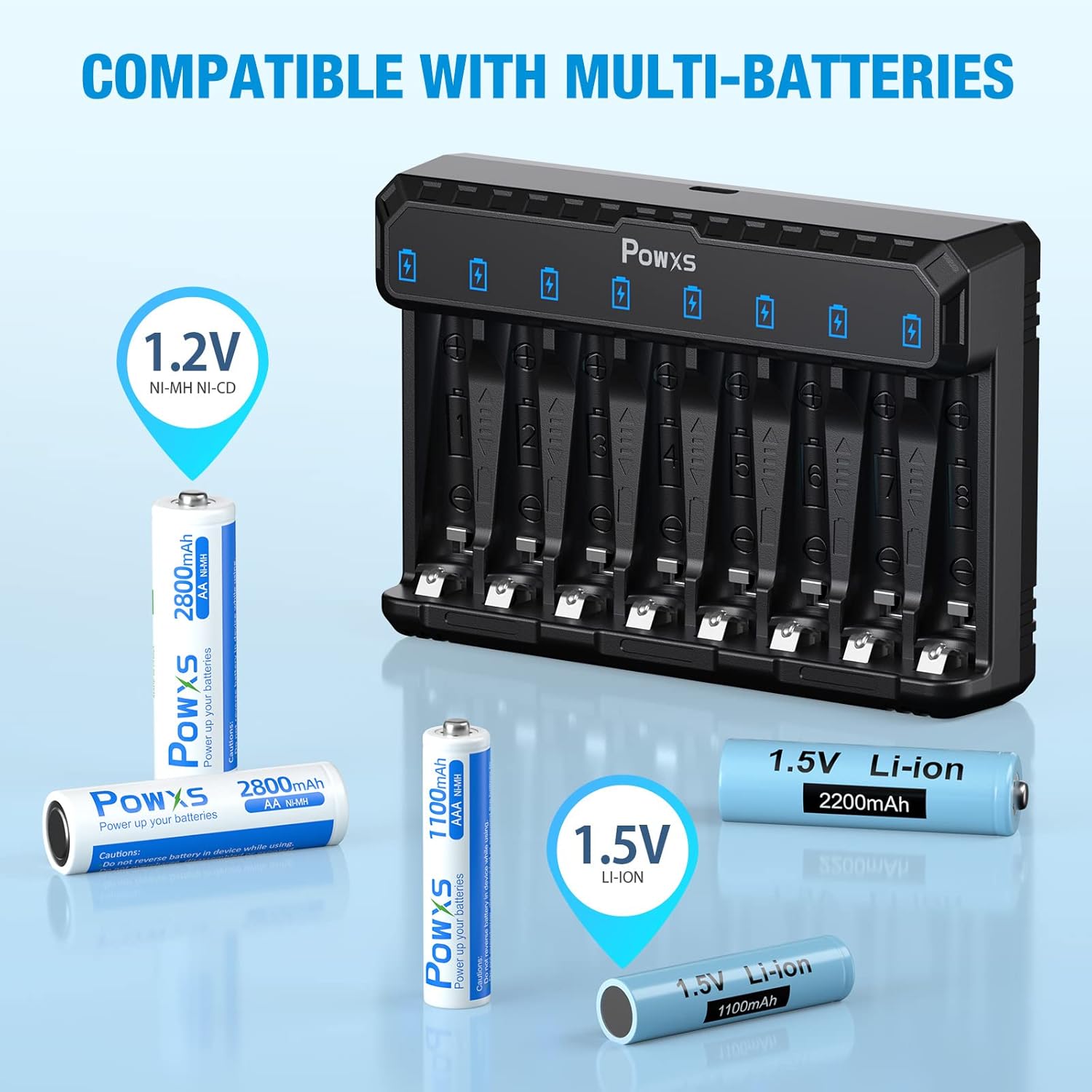
Image: The POWXS charger demonstrating compatibility with various battery types, including 1.2V Ni-MH/Ni-CD and 1.5V Li-ion AA and AAA batteries.
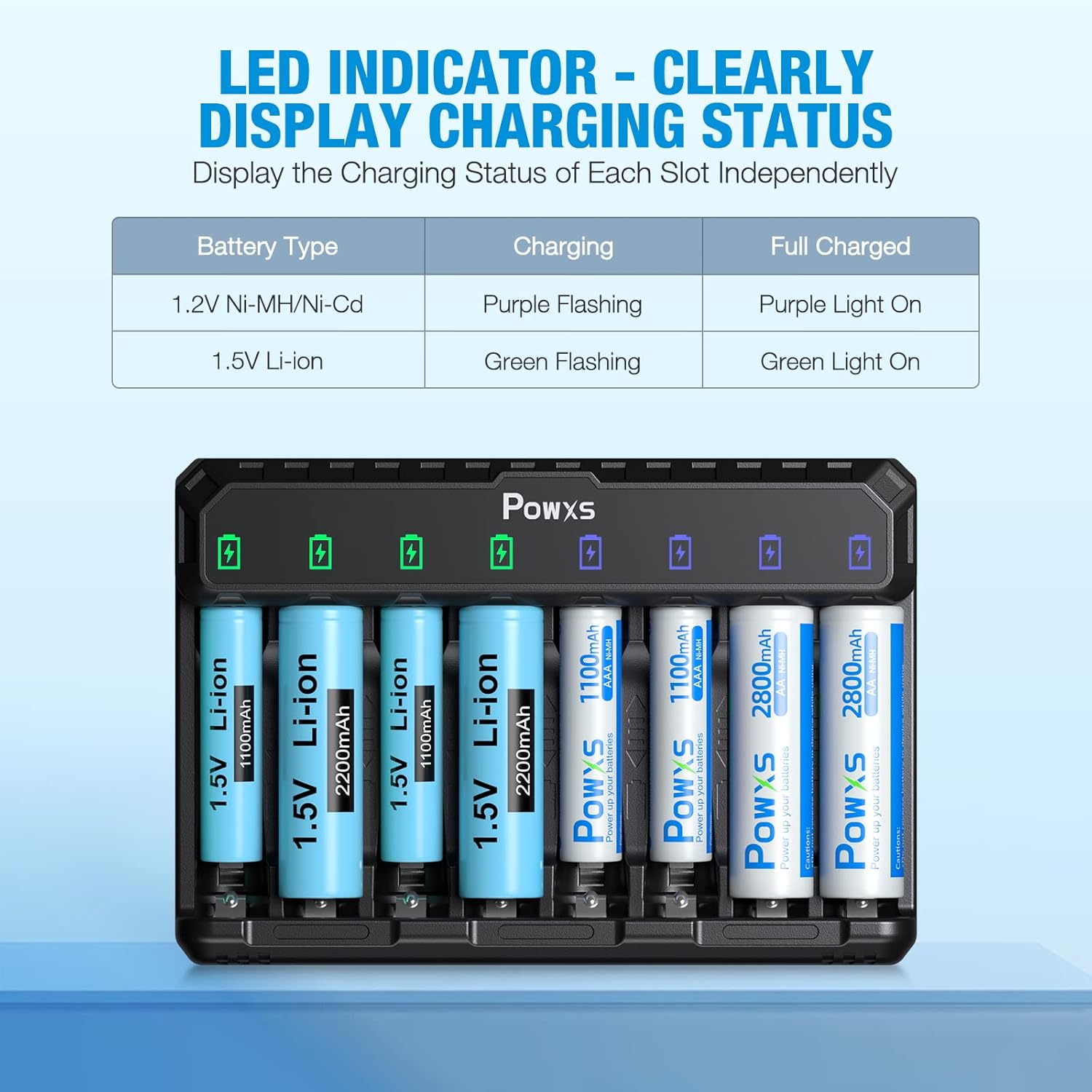
Image: A close-up of the POWXS charger showing the LED indicators and a table explaining their meaning for different battery types and charging states.

Image: The POWXS charger highlighting its Type-C input port, indicating convenient and fast charging with a 5V/2A adapter.

Image: Diagram illustrating the multiple defense functions of the POWXS charger, including overheat, short circuit, overdischarge, overcharge, and overvoltage protection.
Setup
Before first use, please ensure all packaging materials are removed and inspect the charger for any visible damage.
- Unpack: Carefully remove the POWXS battery charger and its accessories from the packaging.
- Connect Power: Connect the provided USB Type-C cable to the charger's Type-C input port. Plug the other end of the USB cable into a compatible 5V/2A USB power adapter (not included), power bank, laptop, or car charger.
- Power On: Once connected, the charger's LEDs may briefly illuminate as a self-test.

Image: The POWXS battery charger, its packaging, USB-C cable, and user manual, illustrating the contents upon unboxing.
Operating Instructions
Follow these steps to charge your batteries safely and effectively:
- Insert Batteries: Insert one or more AA or AAA rechargeable batteries into any of the 8 independent charging slots. Ensure the positive (+) and negative (-) terminals of the battery align correctly with the markings on the charger.
- Automatic Detection: The charger will automatically detect the battery type (Ni-MH/Ni-Cd or Li-ion) and begin charging.
- Monitor Charging Status: Observe the LED indicator above each slot:
- For 1.2V Ni-MH/Ni-Cd batteries: The LED will flash purple during charging and turn solid purple when fully charged.
- For 1.5V Li-ion batteries: The LED will flash green during charging and turn solid green when fully charged.
- Remove Batteries: Once the LED indicator for a battery turns solid (purple or green), the battery is fully charged. Carefully remove the charged battery from the slot.
Typical charging times are approximately 4 hours for AA batteries and 2.5 hours for AAA batteries, though actual times may vary based on battery capacity and discharge level.

Image: The POWXS charger with batteries inserted, illustrating its automatic recognition of battery types (1.5V Li-ion indicated by green, 1.2V Ni-MH/Ni-Cd indicated by purple).
Maintenance
Proper maintenance ensures the longevity and optimal performance of your POWXS battery charger.
- Cleaning: Disconnect the charger from power before cleaning. Use a soft, dry cloth to wipe the exterior. Do not use abrasive cleaners or solvents. Ensure no liquid enters the charging slots.
- Storage: Store the charger in a cool, dry place away from direct sunlight and extreme temperatures. When not in use for extended periods, disconnect it from the power source.
- Handling: Avoid dropping the charger or subjecting it to strong impacts, as this can damage internal components.
Troubleshooting
If you encounter issues with your POWXS battery charger, refer to the following common problems and solutions:
| Problem | Possible Cause | Solution |
|---|---|---|
| Charger not powering on / LEDs not lighting up. | No power supply; faulty USB cable; faulty power adapter. | Ensure the USB cable is securely connected to both the charger and a working 5V/2A power source. Try a different USB cable or power adapter. |
| Battery not charging (LED not flashing). | Battery inserted incorrectly; battery is non-rechargeable or damaged; charger slot malfunction. | Re-insert the battery, ensuring correct polarity (+/-). Verify the battery is rechargeable and not damaged. Try the battery in a different slot. If the issue persists with multiple batteries in one slot, that slot may be faulty. |
| Batteries get warm during charging. | Normal operation; overcharging; poor ventilation. | A slight warmth is normal. If batteries become excessively hot, remove them immediately. Ensure the charger is placed in a well-ventilated area. The charger has built-in overheat protection. |
| Charging takes longer than expected. | Low capacity power adapter; high capacity batteries; deeply discharged batteries. | Ensure you are using a 5V/2A power adapter. Higher capacity batteries will naturally take longer to charge. Deeply discharged batteries may require more time for initial activation and charging. |
Specifications
| Attribute | Detail |
|---|---|
| Brand | POWXS |
| Model | NL8 |
| Compatible Battery Types | AA, AAA (Ni-MH, Ni-Cd, Li-ion) |
| Number of Slots | 8 Independent Slots |
| Input Voltage | 5 Volts (DC) |
| Input Current | 2 Amps (Recommended) |
| Output Voltage | 1.2 Volts (DC) for Ni-MH/Ni-Cd, 1.5 Volts (DC) for Li-ion |
| Typical Charging Time | AA: ~4 Hours, AAA: ~2.5 Hours (varies by capacity) |
| Product Dimensions | 13.9 x 9.4 x 3.8 cm |
| Item Weight | 150 g |
| Safety Features | Overheat, Short Circuit, Overdischarge, Overcharge, Overvoltage Protection |
Warranty and Support
POWXS is committed to providing high-quality products and excellent customer service.
- Warranty: This product is covered by a one-year limited warranty from the date of purchase. This warranty covers manufacturing defects and issues arising from normal use.
- Returns: A 30-day worry-free return policy is offered for this product. Please refer to your point of purchase for specific return procedures.
- Customer Support: For any questions, concerns, or technical assistance, please contact POWXS customer support through the retailer's platform or the official POWXS website. Please have your product model number (NL8) and purchase details ready when contacting support.
For more information about POWXS products and support, visit the POWXS Store on Amazon.

