Introduction
Thank you for choosing the mollie Smart 8000BTU Window Air Conditioner. This unit is designed to provide efficient and comfortable cooling for rooms up to 350 square feet, featuring Wi-Fi connectivity for smart control via app and remote. This manual provides detailed instructions for installation, operation, maintenance, and troubleshooting to ensure optimal performance and longevity of your air conditioner.
Safety Information
Please read all safety instructions carefully before installing and operating the unit. Failure to follow these instructions may result in electric shock, fire, or personal injury.
- Always ensure the unit is properly grounded.
- Do not operate the unit with a damaged power cord or plug.
- Do not insert fingers or objects into the air inlet/outlet.
- Keep flammable materials away from the unit.
- Unplug the unit before cleaning or performing any maintenance.
- This appliance is not intended for use by persons (including children) with reduced physical, sensory or mental capabilities, or lack of experience and knowledge, unless they have been given supervision or instruction concerning use of the appliance by a person responsible for their safety.
Product Overview
Familiarize yourself with the main components of your mollie Smart Window Air Conditioner.

Figure 1: mollie 8000BTU Window AC unit, showing the main display panel, air vents, remote control, and a smartphone displaying the control app.
Control Panel and Display
The unit features an intuitive control panel with a digital display for easy operation. Key indicators include temperature, mode, fan speed, and Wi-Fi status.

Figure 2: Detailed view of the AC unit's control panel and the included remote control, highlighting various buttons and display elements.
- Digital Display: Shows current temperature, timer settings, and operational status.
- Mode Button: Cycles through Cool, Dry, Fan, Auto, Eco, and Sleep modes.
- Fan Speed Button: Adjusts fan speed (High, Medium, Low, Auto).
- Power Button: Turns the unit On/Off.
- Filter Indicator: Lights up when the filter needs cleaning.
- Timer Button: Sets the 24-hour timer for scheduled operation.
- Eco Button: Activates energy-saving mode.
- Sleep Button: Activates sleep mode for quiet, comfortable night operation.
Setup and Installation
This section guides you through the proper installation of your window air conditioner. Ensure your window meets the required dimensions before beginning.

Figure 3: Unit dimensions (18.5" L x 13.5" H x 15.5" D) and recommended window dimensions (23"-36" W, 14.5" Min. H).
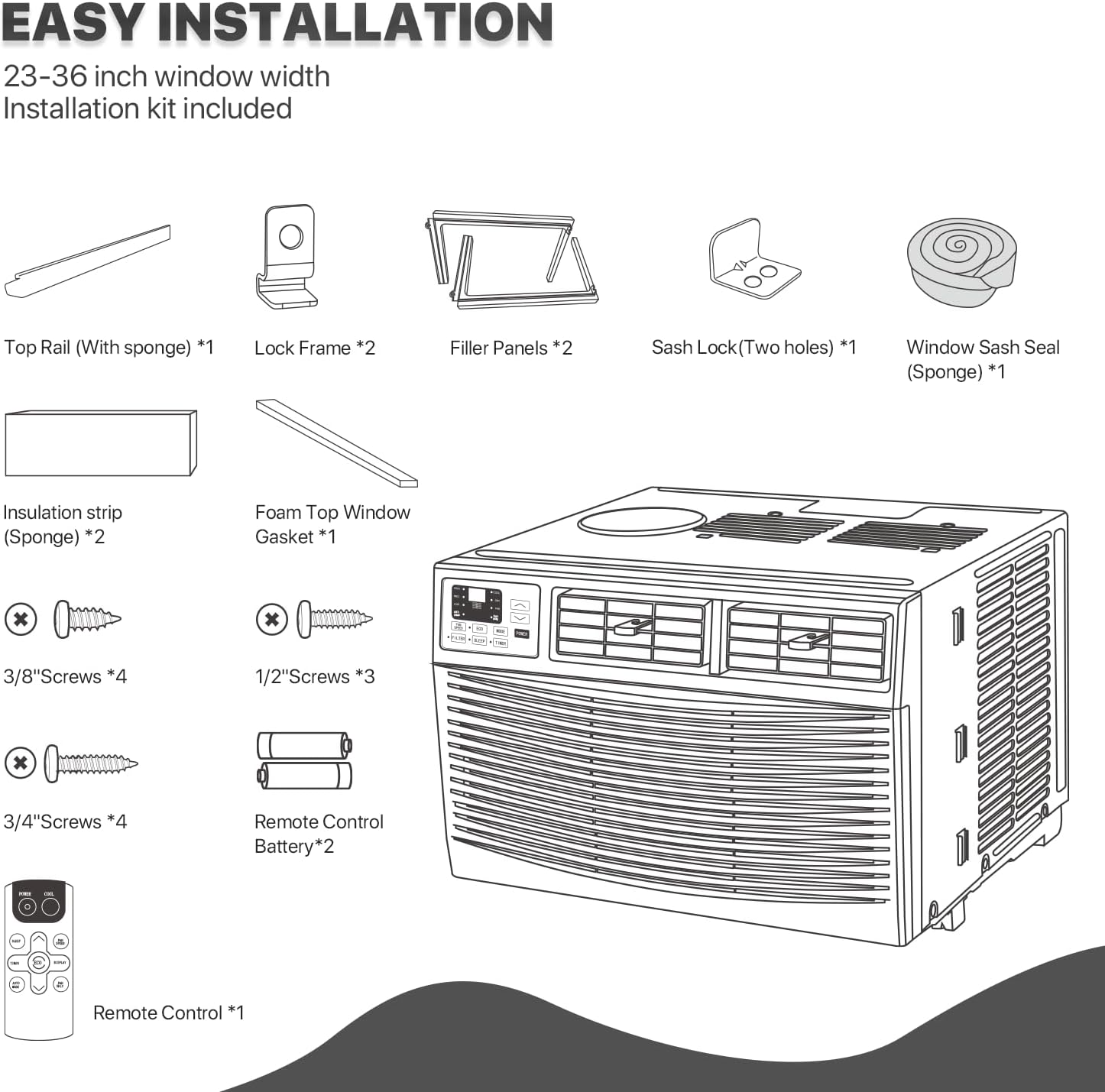
Figure 4: Included installation kit components, such as top rail, lock frame, filler panels, sash lock, window sash seal, insulation strip, foam top window gasket, various screws, and remote control with batteries.
Installation Steps:
- Prepare the Window: Ensure the window opening is clean and clear of obstructions. The window must be between 23 and 36 inches wide, with a minimum height of 14.5 inches.
- Attach Top Rail: Secure the top rail (with sponge) to the top of the air conditioner unit using the provided screws.
- Install Filler Panels: Slide the filler panels into the side channels of the unit.
- Place Unit in Window: Carefully lift the unit and place it into the window opening, ensuring the bottom rail rests securely on the windowsill.
- Extend Filler Panels: Extend the filler panels to fill the window opening completely and secure them with screws.
- Secure Unit: Install the lock frame and sash lock to firmly secure the unit in the window, preventing it from falling out or being pushed in.
- Seal Gaps: Apply the window sash seal and insulation strips to seal any gaps around the unit, preventing air leakage and improving efficiency.
- Power Connection: Ensure the unit is plugged into a grounded 110V/120V electrical outlet.
Operating Instructions
Your mollie Smart AC unit offers multiple ways to control your comfort.
Using the Control Panel and Remote Control
The unit can be operated directly from its control panel or using the included remote control.
- Power On/Off: Press the POWER button.
- Select Mode: Press the MODE button to cycle through COOL, DRY, FAN, AUTO, ECO, and SLEEP.
- COOL: Provides cooling. Adjust temperature using UP/DOWN arrows (61°F-88°F).
- DRY: Dehumidifies the room.
- FAN: Circulates air without cooling.
- AUTO: Automatically selects mode based on room temperature.
- ECO: Energy-saving mode. The fan will turn off when the compressor cycles off.
- SLEEP: Gradually increases temperature for comfortable sleep and quiet operation.
- Adjust Fan Speed: Press the FAN SPEED button to select High, Medium, Low, or Auto.
- Set Timer: Press the TIMER button to set a delay for turning the unit on or off (0.5-24 hours).

Figure 5: The unit's sleep mode automatically adjusts temperature and operates quietly for enhanced comfort during rest.
Smart App Control (Wi-Fi Connected)
Control your AC unit from anywhere using the dedicated smartphone app. This feature allows for convenient monitoring, scheduling, and control.
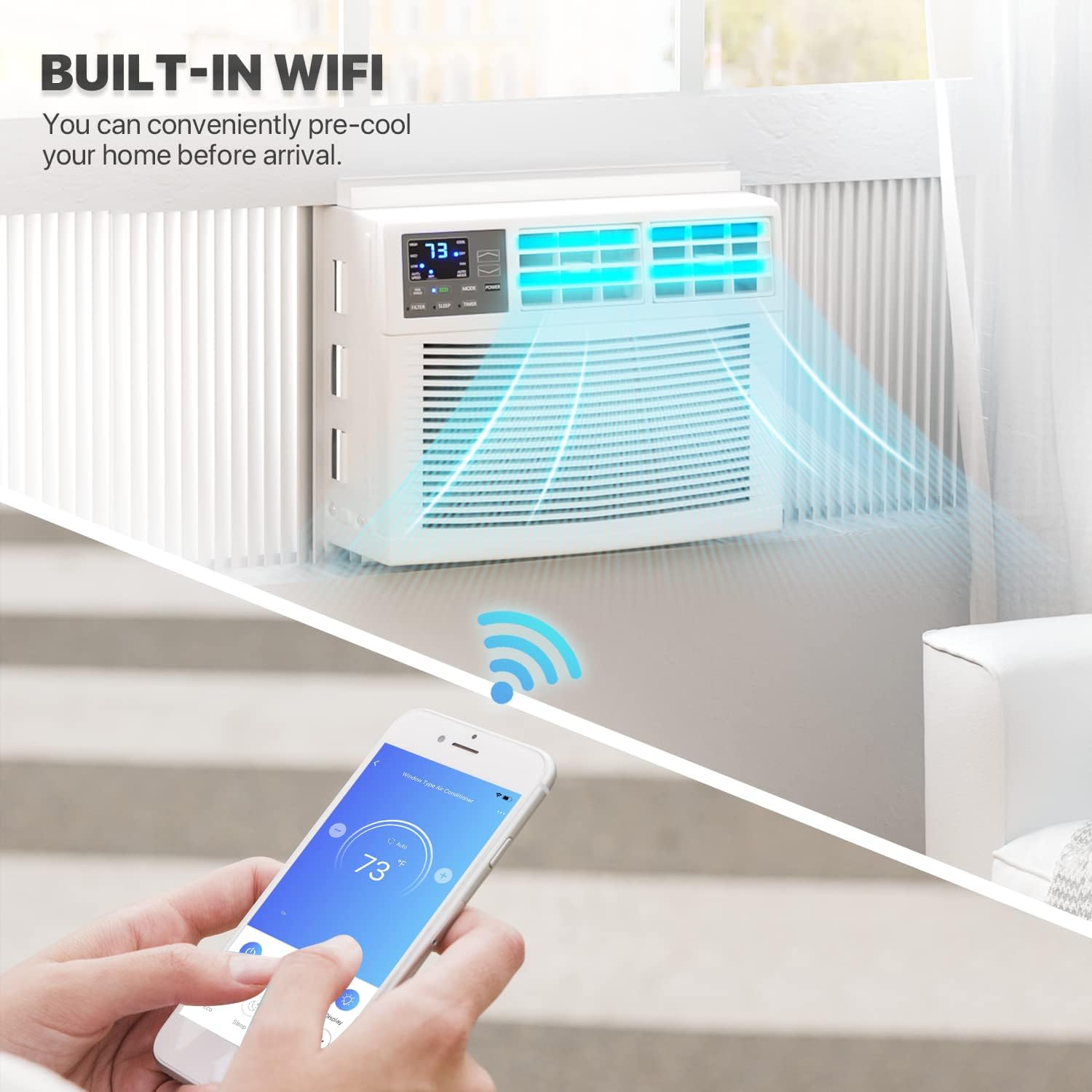
Figure 6: Control your AC unit remotely via the built-in Wi-Fi and smartphone app, allowing you to pre-cool your home before arrival.

Figure 7: The smart app provides comprehensive control over modes (Cool, Dry, Fan, Auto), fan speeds (High, Mid, Low, Auto), and additional features like buzzer control, reservation, electricity monitoring, and self-diagnosis.
- Download App: Search for the "mollie Smart" app on your smartphone's app store.
- Pairing: Follow the in-app instructions to pair your AC unit with your mobile phone. This typically involves pressing the SMART button on the unit.
- Remote Control: Once paired, you can adjust temperature, change modes, set fan speeds, and schedule operations from anywhere.
- Energy Monitoring: The app provides detailed daily, monthly, and yearly electricity usage reports, helping you manage energy consumption effectively.

Figure 8: The app's energy monitoring feature allows you to track electricity consumption over time, aiding in effective energy management.
The mollie Smart AC unit is also compatible with Amazon Alexa and Google Assistant for voice control, offering even greater convenience.
Maintenance
Regular maintenance ensures your air conditioner operates efficiently and extends its lifespan.
Cleaning the Washable Filter
The unit includes a reusable washable filter that should be cleaned regularly (every two weeks or when the filter indicator light illuminates) to maintain optimum cooling power and air quality.

Figure 9: The washable and reusable filter is easily accessible for cleaning, ensuring optimal performance.
- Turn Off and Unplug: Always turn off the unit and unplug it from the power outlet before cleaning.
- Remove Filter: Locate the filter access panel (usually on the front or side) and carefully slide out the filter.
- Clean Filter: Wash the filter with warm water and mild dish soap. Alternatively, you can vacuum clean it with a dust buster.
- Dry Thoroughly: If hand washing, allow the filter to dry completely before re-installing it. Do not expose to direct sunlight.
- Re-install Filter: Slide the dry filter back into its slot until it clicks into place.
General Cleaning
- Wipe the exterior of the unit with a soft, damp cloth. Do not use harsh chemicals or abrasive cleaners.
- Ensure the air inlet and outlet grilles are free from dust and debris.
Troubleshooting
Before contacting customer support, please refer to the following common issues and their solutions.
| Problem | Possible Cause | Solution |
|---|---|---|
| Unit does not turn on. | No power, tripped circuit breaker, power cord not fully plugged in. | Check power outlet, reset circuit breaker, ensure power cord is securely plugged in. |
| Unit not cooling effectively. | Dirty air filter, blocked air intake/outlet, room too large, windows/doors open. | Clean air filter, clear obstructions, ensure unit is sized correctly for the room, close windows/doors. |
| Unit is noisy. | Loose parts, unit not level, fan obstruction. | Check for loose screws, ensure unit is level, remove any fan obstructions. Note: Some operational noise (53-58 dB) is normal. |
| Wi-Fi connection issues. | Incorrect Wi-Fi password, unit too far from router, app not updated. | Verify Wi-Fi password, move unit closer to router or use a Wi-Fi extender, update the mollie Smart app. |
| Water dripping from unit. | Drainage issue, high humidity. | Ensure proper drainage, this can be normal in high humidity conditions. If excessive, contact support. |
Specifications
Detailed technical specifications for the mollie Smart 8000BTU Window Air Conditioner.
| Feature | Detail |
|---|---|
| Model Number | A54-WAC-003-8K-WIFI |
| Cooling Capacity | 8000 BTU |
| Coverage Area | Up to 350 Square Feet |
| Product Dimensions (D x W x H) | 15.5 x 18.5 x 13.5 inches |
| Item Weight | 52.7 pounds |
| Voltage | 115 Volts |
| Noise Level | 53 to 58 dB (average 55 dB) |
| Refrigerant Type | R32 (Zero ozone layer impact, improved energy efficiency) |
| Special Features | Dehumidifier, Washable Filter, WiFi Enabled, Smart App Control, Remote Control, 24-hour Timer, Eco Mode, Sleep Mode, Energy Monitoring |
| Minimum Window Height | 14.5 inches |
| Window Width Range | 23 - 36 inches |
| Included Components | Installation Kit, Window Air Conditioner, Remote Control |
| Operating Temperature Range | 61°F - 88°F |

Figure 10: Recommended BTU cooling capacity based on room size.
Warranty and Support
For warranty information regarding this product, please contact the seller directly. For additional support or inquiries, refer to the contact information provided with your purchase or visit the official mollie website.
You can also visit the mollie Store on Amazon for more product information and support resources.


