
Introduction
Thank you for choosing the LEDLightsWorld RF Mini Wireless Remote Controller. This device is designed to provide convenient control over single color 3528 and 5050 LED strip lights powered via USB. It allows for brightness adjustment, dynamic modes, and speed control, enhancing your lighting experience. Please read this manual carefully to ensure proper installation and operation.
Product Overview
The RF Mini Wireless Remote Controller system consists of two main components: the inline USB controller module and the 11-key RF wireless remote control.
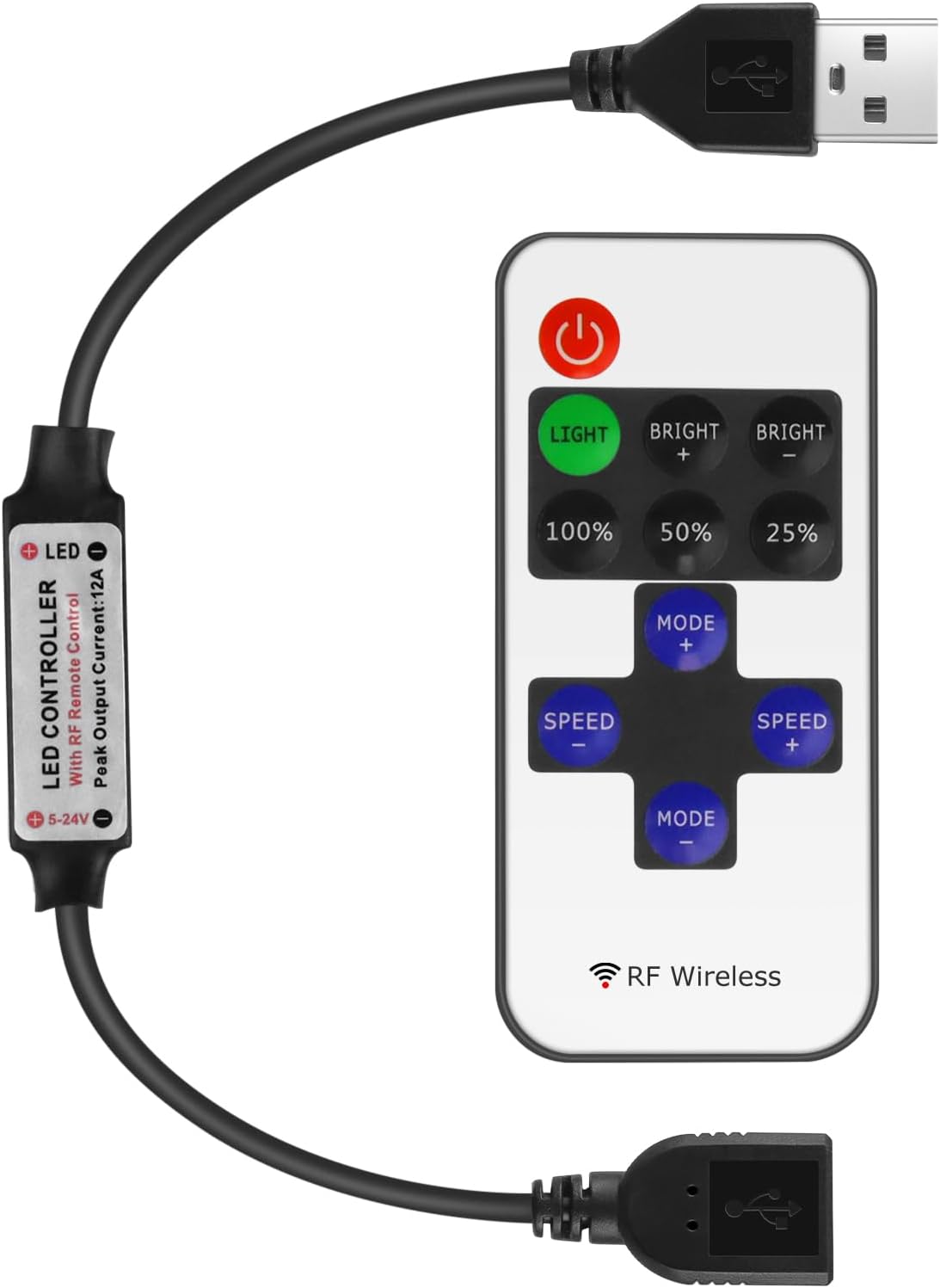
An overview of the RF Mini Wireless Remote Controller, showing the compact remote and the inline USB controller module.
The controller module connects inline between your USB power source and the single color LED strip. The remote control uses Radio Frequency (RF) technology, allowing operation without direct line-of-sight to the controller module.
Specifications
| Feature | Detail |
|---|---|
| Working Voltage | DC 5-24V |
| Output Current | Peak 6A |
| Remote Control Mode | RF Wireless |
| Remote Frequency | 433.92MHz |
| Remote Distance | >15m (open area) |
| Dynamic Modes | 8 modes |
| Dynamic Speed Levels | 10 levels |
| Lighting Brightness Levels | 10 levels |
| PWM Grade | 256 grades |
| Smooth Dimmer Effect | Yes |
| Item Weight | 1.13 ounces |
| Batteries | 1 CR2 battery required (included) |
| Model Number | DC-RF-USB-US |
Setup Instructions
Follow these steps to connect your RF Mini Wireless Remote Controller:
- Ensure Power Off: Before making any connections, ensure your USB power source is disconnected from power.
- Connect LED Strip: Plug the USB output connector of the controller module into the USB input of your single color LED strip light.
- Connect Power Source: Plug the USB input connector of the controller module into a compatible USB power source (e.g., USB wall adapter, power bank, computer USB port). Ensure the power source provides DC 5-24V.
- Power On: Connect your USB power source to an electrical outlet or activate it. The LED strip should light up or be ready for control.

A detailed view of the USB controller module, showing the input and output USB connectors for connecting to a power source and LED strip.
Operating Instructions
The 11-key RF remote control provides various functions:
The RF remote control with its 11 function keys.
- Power Button: Turns the LED strip lights On or Off.
- LIGHT Button: Toggles between static light and dynamic modes. When in static mode, it can also be used for pairing (see Pairing Instructions).
- BRIGHT + / BRIGHT -: Adjusts the brightness level of the LED strip. There are 10 brightness levels.
- 100% / 50% / 25%: Quick selection buttons for 100%, 50%, or 25% brightness.
- MODE + / MODE -: Cycles through the 8 available dynamic lighting modes (e.g., flash, fade, strobe).
- SPEED + / SPEED -: Adjusts the speed of the selected dynamic lighting mode. There are 10 speed levels. These buttons are also used for 1-to-1 pairing (see Pairing Instructions).
Pairing Instructions
The controller supports both 1-to-1 pairing (one remote controls one controller) and 1-to-many pairing (one remote controls multiple controllers). By default, controllers are often paired 1-to-many from the factory.

This diagram details the steps for pairing the remote controller, offering both one-to-one and one-to-many pairing options for LED strip lights.
1. 1-to-Many Pairing (One Remote Controls Multiple Controllers)
This is useful if you want a single remote to control several LED strips simultaneously.
- Ensure the LED strip connected to the controller is powered off.
- Power on the LED strip (connect the USB power).
- Within 5 seconds of powering on, press the green "LIGHT" button on the remote control.
- The LED strip lights will flicker, indicating successful 1-to-many pairing. The controller will now respond to this remote and any other remotes previously paired in 1-to-many mode.
2. 1-to-1 Pairing (One Remote Controls Only One Controller)
This is useful if you have multiple LED strips in close proximity and want to control each independently with its own remote.
- Ensure the LED strip connected to the controller is powered off.
- Power on the LED strip (connect the USB power).
- Within 5 seconds of powering on, press and hold both the "SPEED+" and "SPEED-" buttons simultaneously on the remote control.
- The LED strip lights will flicker, indicating successful 1-to-1 pairing. The controller will now only respond to this specific remote.
Note: If you experience issues with multiple remotes controlling the same strip unintentionally, re-perform the 1-to-1 pairing for each controller with its designated remote.
Battery Installation and Replacement
The remote control uses one CR2025 or CR2032 coin cell battery.

The reverse side of the remote control, illustrating how to open the battery compartment and insert or replace the CR2025 or CR2032 coin cell battery.
- Locate the battery compartment on the back of the remote control.
- Push the small tab or slide the tray out as indicated by the arrows on the remote.
- Insert a new CR2025 or CR2032 battery with the positive (+) side facing up.
- Slide the battery tray back into the remote until it clicks securely into place.
Maintenance
- Keep the controller and remote dry. Moisture can damage electronic components.
- Clean the remote control and controller module with a soft, dry cloth. Do not use harsh chemicals or abrasive cleaners.
- Avoid exposing the devices to extreme temperatures.
- Replace the remote control battery when its range decreases or it becomes unresponsive.
Troubleshooting
- LED Strip Does Not Light Up:
- Check all connections to ensure they are secure.
- Verify that the USB power source is functioning correctly and providing adequate power (DC 5-24V).
- Ensure the LED strip itself is functional by testing it directly with a compatible power source if possible.
- Remote Control Is Unresponsive:
- Replace the remote control battery (CR2025/CR2032).
- Re-pair the remote control with the controller module using the 1-to-1 pairing instructions.
- Ensure there are no significant obstructions between the remote and the controller, although RF typically has good penetration.
- Controller Module Becomes Warm:
- A slight warmth during operation is normal. However, if the controller becomes excessively hot to the touch, immediately disconnect power.
- Ensure the connected LED strip's power requirements do not exceed the controller's maximum output current of 6A. Overloading can cause overheating.
- Ensure adequate ventilation around the controller module.
- Multiple Remotes Control One Strip (Unintended):
- Perform the 1-to-1 pairing procedure for each controller with its intended remote to isolate control.
Warranty and Support
For warranty information or technical support, please refer to the product packaging or contact LEDLightsWorld customer service through your purchase platform. Please have your model number (DC-RF-USB-US) and purchase details ready when contacting support.