
1. Safety Information
Please read and understand all instructions before assembly and use. Keep this manual for future reference.
- Do not exceed the maximum weight capacity of 140 pounds (63.5 kg).
- Ensure all screws and fasteners are securely tightened before use. Periodically check for loose connections.
- Keep small parts away from children during assembly to prevent choking hazards.
- Use the product on a level surface to prevent tipping.
- Do not stand or sit on the cabinet.
- When using the charging station, ensure electrical connections are secure and avoid overloading the outlets.
- Do not expose the product to excessive moisture or direct sunlight.
2. Parts List
Before beginning assembly, verify all parts are present and undamaged. Refer to the assembly diagram for identification.
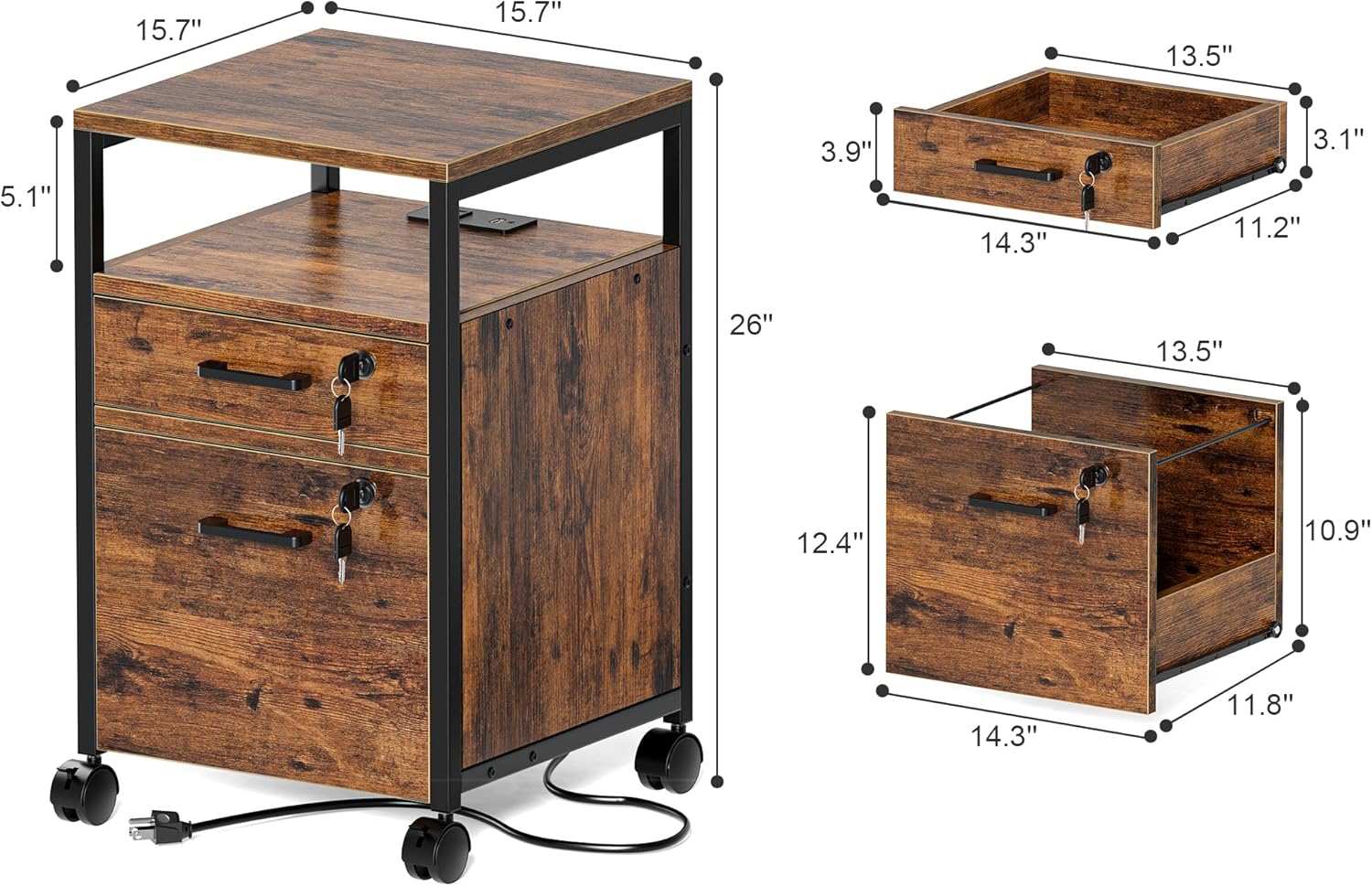
Image: Exploded view of the file cabinet showing individual components and their dimensions. This includes the top shelf, middle shelf, two drawers, side panels, back panel, metal frame, wheels, and charging station unit. Dimensions for the overall unit and individual drawers are also indicated.
Included Components:
- Engineered Wood Panels (Top, Middle, Side, Back, Drawer Fronts, Drawer Sides, Drawer Bottoms)
- Metal Frame Components
- 2 Lockable Drawers with 4 Keys
- 4 Swivel Wheels (2 with brakes)
- Charging Station (AC Outlets 125V/12A, USB Ports 5V-2A, 4.9-foot Power Cord)
- Drawer Slides
- Assembly Hardware (screws, dowels, cam locks, etc.)
- Anti-tip kit (if included)
3. Setup & Assembly
Assembly typically requires two adults. Follow the numbered steps provided in the included assembly guide. Ensure all connections are firm but do not overtighten screws.
Tools Required (Not Included):
- Phillips Head Screwdriver
- Hammer (optional, for dowels)
Assembly Steps Overview:
- Unpack all components and lay them out on a clean, soft surface to prevent scratches.
- Attach the metal frame components to the side panels using the provided hardware.
- Install the drawer slides onto the cabinet frame and drawer sides. Ensure they are correctly oriented.
- Assemble the drawers. Attach drawer fronts, sides, and bottoms. Install drawer handles and locks.
- Insert the assembled drawers into the cabinet frame, aligning them with the drawer slides.
- Attach the top and middle shelves to the frame.
- Install the charging station unit into its designated slot.
- Attach the four swivel wheels to the base of the cabinet. Ensure the two wheels with brakes are positioned at the front for easy access.
- Perform a final check to ensure all connections are secure and the cabinet is stable.

Image: The fully assembled SUPERJARE file cabinet positioned next to a desk. A printer is placed on the top surface, and a phone and other small items are on the open middle shelf, demonstrating its functional use in an office setting.
4. Operation
4.1 Using the Drawers
- Top Drawer: Suitable for smaller office supplies, notepads, and personal items.
- Bottom Drawer: Designed for hanging A4 or letter-sized files. Ensure file folders are properly seated on the rails.

Image: A detailed view of the file cabinet's drawers. The top drawer is partially open, revealing small office items. The bottom drawer is fully open, displaying hanging file folders, illustrating its capacity for document storage.
4.2 Locking Mechanism
- The cabinet features two locks and four keys. Each lock secures its respective drawer.
- To lock a drawer, push the drawer fully closed, insert the key, and turn it clockwise until the drawer is secured.
- To unlock, insert the key and turn it counter-clockwise.
- Keep spare keys in a safe, accessible location.

Image: A close-up of the SUPERJARE file cabinet highlighting the two key locks on the drawer fronts. An infographic indicates "2 LOCKS" and "4 KEYS," emphasizing the security features.
4.3 Charging Station
- Plug the cabinet's power cord into a standard wall outlet.
- The charging station provides two AC outlets (125V/12A) and two USB ports (5V-2A).
- Use the AC outlets for devices like laptops, printers, or lamps.
- Use the USB ports for charging smartphones, tablets, and other USB-powered devices.
- Do not exceed the maximum electrical load capacity of the charging station.

Image: A detailed shot of the integrated charging station on the file cabinet. A smartphone is shown connected to a USB port, and a power adapter is plugged into one of the AC outlets, demonstrating the charging capabilities.
4.4 Mobility
- The cabinet is equipped with 360-degree swivel wheels for easy movement.
- Two of the wheels have locking brakes. To secure the cabinet in place, press down on the brake levers.
- To move the cabinet, release the brake levers.
5. Maintenance
- Cleaning: Wipe the surfaces with a soft, damp cloth. Avoid harsh chemicals or abrasive cleaners that may damage the finish.
- Hardware Check: Periodically inspect all screws and fasteners to ensure they remain tight. Retighten as necessary to maintain stability.
- Drawer Slides: If drawers become stiff, apply a small amount of silicone lubricant to the drawer slides.
- Electrical Components: Ensure the power cord and charging station are free from damage. Do not use if any part is frayed or broken.
6. Troubleshooting
| Problem | Possible Cause | Solution |
|---|---|---|
| Cabinet is wobbly. | Loose fasteners; uneven surface. | Tighten all assembly screws. Move cabinet to a level surface. |
| Drawers do not slide smoothly. | Drawer slides misaligned; screws on slides not flush; debris in tracks. | Check drawer slide alignment. Ensure all screws on slides are fully tightened and flush. Clean tracks of any debris. Apply silicone lubricant. |
| Charging station not working. | Power cord not plugged in; wall outlet not active; device not properly connected; overloaded circuit. | Ensure power cord is securely plugged into a live wall outlet. Test the wall outlet with another device. Reduce the number of devices connected to the charging station. |
| Drawers cannot be locked. | Drawer not fully closed; key not inserted correctly. | Push the drawer completely shut. Ensure the key is fully inserted and turned clockwise. |
| Wheels do not roll freely. | Brakes engaged; debris in wheels. | Release the wheel brakes. Clean any debris from the wheel casters. |
7. Specifications
- Model: 7301ZC
- Brand: SUPERJARE
- Color: Rustic Brown
- Material: Engineered Wood, Metal Frame
- Product Dimensions (D x W x H): 39.9 cm x 39.9 cm x 66 cm (15.7" D x 15.7 "W x 26" H)
- Item Weight: 16.24 kg (35.8 lbs)
- Weight Capacity (Maximum): 140 lbs (63.5 kg)
- Special Features: Lockable drawers, Wheeled, Integrated Charging Station
- Charging Station:
- AC Outlets: 125V/12A
- USB Ports: 5V-2A
- Power Cord Length: 4.9 feet
- File Compatibility: A4, Letter Size
8. Warranty & Support
For warranty information or technical support, please contact SUPERJARE customer service. Details are typically provided with your purchase documentation or on the official SUPERJARE website.
Please have your model number (7301ZC) and purchase date available when contacting support.
Contact Information: Refer to the packaging or the official SUPERJARE website for the most current contact details.