
LG 75UR8750PSA
LG 75UR8750PSA 75-inch 4K UHD AI ThinQ Smart TV Instruction Manual
Model: 75UR8750PSA
Introduction
This manual provides essential information for the safe and efficient operation of your LG 75UR8750PSA 75-inch 4K UHD AI ThinQ Smart TV. Please read it thoroughly before using the product and retain it for future reference.

Figure 1: Front view of the LG 75UR8750PSA 75-inch 4K UHD Smart TV with its remote control, displaying a vibrant floral image.
Setup
1. Unpacking
- Carefully remove the TV and all accessories from the packaging.
- Retain the packaging materials for future transport or service.
2. Stand Installation
Attach the stand to the TV following the instructions provided in the separate assembly guide. Ensure all screws are securely fastened.

Figure 2: Close-up view of the stand for the LG 75UR8750PSA 75-inch 4K UHD Smart TV, illustrating its design and attachment points.
3. Wall Mounting (Optional)
If wall-mounting, use a VESA-compliant wall mount kit (sold separately) and follow the instructions provided with the mount. Consult a professional for installation to ensure safety.
4. Connecting External Devices
Connect your external devices (e.g., cable box, Blu-ray player, gaming console) to the TV's input ports.
- HDMI Ports: Connect high-definition devices. This TV features multiple HDMI inputs.
- USB Ports: Connect USB storage devices for media playback. This TV includes 2 USB ports.
- Optical Digital Audio Out: Connect to a soundbar or audio receiver for enhanced sound.
- LAN Port: Connect an Ethernet cable for a wired internet connection.
- Antenna/Cable Input: Connect an antenna or cable for broadcast TV.
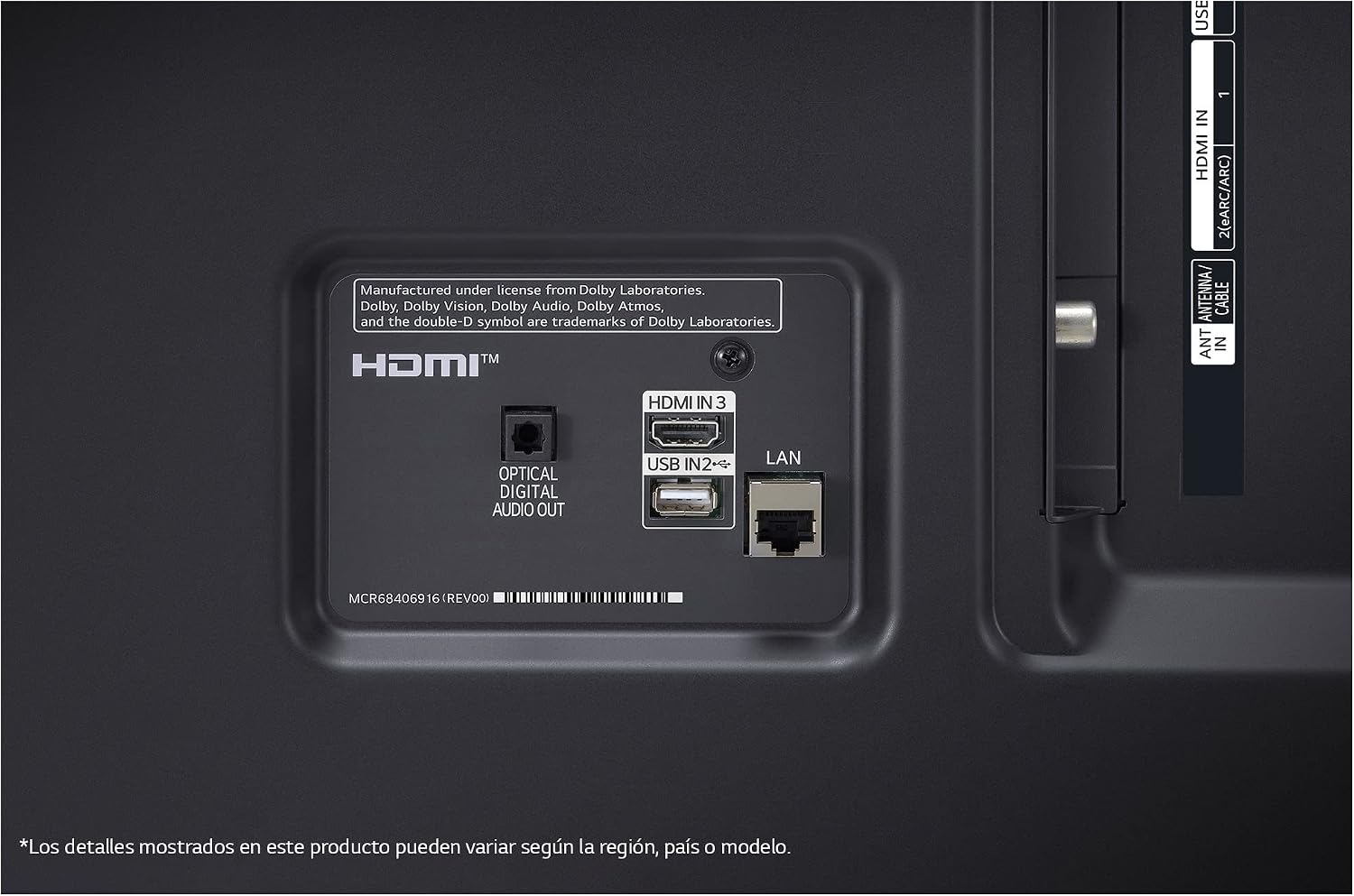
Figure 3: Detailed view of the input ports on the back of the LG 75UR8750PSA 75-inch 4K UHD Smart TV, including HDMI, USB, Optical Digital Audio Out, and LAN.
Operating the TV
1. Power On/Off
Connect the power cord to an electrical outlet. Press the Power button on the remote control or the TV to turn it on or off.
2. Remote Control
The included remote control allows you to navigate menus, adjust settings, and access smart features. This TV includes a universal remote control with Bluetooth technology.

Figure 4: A person using the LG Magic Remote to control the TV while watching a dynamic motorcycle racing scene.
3. webOS 23 Smart Features
Your LG Smart TV runs on webOS 23, offering an intuitive interface for accessing content and applications.
- My Profile: Get personalized movie recommendations and special notifications.
- AI Concierge: Provides tailored content suggestions.
- Quick Cards: Organize your favorite apps and services for quick access.

Figure 5: Screenshot of the LG webOS interface with ThinQ AI, showing personalized profiles, AI Concierge, and quick access cards.
Picture and Sound Features
1. 4K REAL and HDR10 Pro
Experience realistic image quality and vivid colors with 4K REAL. HDR10 Pro delivers optimized brightness levels for vibrant colors and remarkable detail.

Figure 6: LG UHD TV displaying a vast snowy landscape, illustrating the immersive viewing experience of 4K REAL.
2. α5 AI Processor 4K Gen6
The α5 AI Processor 4K Gen6 automatically analyzes and optimizes both picture and sound. It enhances conventional images to 4K resolution with greater clarity and precision using its 4K Upscaler.
- AI Brightness Control: Ensures the perfect brightness level for any environment by adapting to ambient lighting.
- AI Sound Pro: Improves audio by converting 2.0 channel sound to virtual 5.1 surround sound.

Figure 7: Graphic illustrating the LG α5 AI Processor 4K Gen6, highlighting AI Brightness Control and AI Sound Pro features.
3. FILMMAKER MODE
With FILMMAKER MODE, movies are displayed preserving the original color and settings as intended by the creators.

Figure 8: Image depicting a cinematic viewing experience on the LG 75UR8750PSA TV, showcasing various streaming service logos.
Gaming Features
Enjoy high-speed HDR gaming with the latest gaming specifications, including ALLM (Auto Low Latency Mode), eARC (enhanced Audio Return Channel), and HGiG (HDR Gaming Interest Group).
Game Optimizer and Dashboard
Optimize your gaming experience with Game Optimizer and Dashboard. Access a variety of settings in a single menu for quick and intuitive operation.

Figure 9: Screenshot of the LG Game Optimizer dashboard, displaying settings for FPS, VRR, Black Stabilizer, and Low Latency for an optimized gaming experience.
Connectivity
Your LG Smart TV offers diverse connectivity options:
- Wi-Fi: Built-in Wi-Fi for wireless internet access.
- Bluetooth: Connect compatible Bluetooth devices, such as headphones or soundbars.
- HDMI: Multiple HDMI ports for high-definition audio and video input.
- USB: Two USB ports for connecting storage devices.
- Smart Home Integration: Works with Apple AirPlay, Apple Home, and Matter for seamless integration into your smart home ecosystem.
- Voice Assistants: Features multiple voice assistant support, including Alexa built-in.

Figure 10: Screenshot of the LG TV's 'Wow Interface' showing diversified sound output configurations, including Bluetooth, Optical Out, and HDMI (ARC) options.

Figure 11: Logos for smart assistants and connectivity features of the LG 75UR8750PSA TV, including Matter, Alexa built-in, Apple AirPlay, and Apple Home.
Maintenance
Cleaning the TV
- Always unplug the TV before cleaning.
- Use a soft, dry cloth to wipe the screen and cabinet.
- For stubborn marks, lightly dampen the cloth with water or a mild screen cleaner. Do not spray cleaner directly onto the screen.
- Avoid using abrasive cleaners, waxes, or solvents.
Troubleshooting
If you encounter issues with your TV, refer to the following common solutions:
- No Power: Ensure the power cord is securely plugged into both the TV and a working electrical outlet.
- No Picture/Sound: Check that the correct input source is selected. Verify all cables are securely connected.
- Remote Control Not Working: Replace the batteries. Ensure there are no obstructions between the remote and the TV.
- Network Connection Issues: Restart your router and modem. For Wi-Fi, ensure the TV is within range. For wired connections, check the Ethernet cable.
- Smart Features Not Responding: Try restarting the TV by unplugging it for a few minutes and then plugging it back in.
For more detailed troubleshooting, consult the full electronic manual available on the LG support website.
Specifications

Figure 12: Diagram illustrating the dimensions of the LG 75UR8750PSA 75-inch 4K UHD Smart TV.
| Feature | Detail |
|---|---|
| Brand | LG |
| Model | 75UR8750PSA |
| Model Year | 2023 |
| Screen Size | 75 Inches |
| Display Technology | LED |
| Display Type | UHD |
| Resolution | 3840 x 2160 Pixels (4K) |
| Refresh Rate | 60 Hz |
| Operating System | WebOS |
| Special Features | Multiple Voice Assistance, Browser, Flat Screen |
| Connectivity Technology | Bluetooth, HDMI, USB, Wi-Fi |
| Total USB Ports | 2 |
| Audio Output Mode | Surround |
| Speaker Surround Sound Channel Configuration | 5.1 |
| Output Wattage | 20 Watts |
| Power Source | Corded Electric |
| Mounting Type | Table Mount |
| Product Dimensions (WxDxH) | 167.8 x 36.1 x 102.7 cm |
| Product Weight | 31.8 kg |
| Included Components | Remote control, User manual, Warranty card |
Warranty and Support
Your LG 75UR8750PSA TV comes with a warranty. Please refer to the included warranty card for details on coverage and terms. For technical support, service, or additional information, please visit the official LG support website or contact LG customer service.
You can find more information and support at the LG Electronics Store on Amazon.
Ask a question about this manual
Ask about setup, troubleshooting, compatibility, parts, safety, or missing instructions. Manuals+ will review the question and use this page’s manual context to help answer it.