
ARCADE1UP IGB-I-301200
Arcade1Up Infinity Game Board User Manual
Model: IGB-I-301200
Introduction
Welcome to the user manual for your new Arcade1Up Infinity Game Board. This manual provides essential information for setting up, operating, maintaining, and troubleshooting your device. Please read it thoroughly to ensure optimal performance and longevity of your Infinity Game Board.
The Arcade1Up Infinity Game Board is a compact, digital gaming device designed to provide access to hundreds of games, including classic board games and more. It features an 18.5-inch HD touchscreen, Wi-Fi connectivity, and supports gameplay for up to 6 players.
Package Contents
Before you begin, please ensure all items are present in the package:
- Arcade1Up Infinity Game Board unit
- Power cable
- 4 protection cards (for games like Battleship)
- User Manual (this document)

Image: The Arcade1Up Infinity Game Board, illustrating various game components like cards, dice, and pawns being digitally integrated into the device's screen, symbolizing the vast library of games available.
Setup
The Infinity Game Board is designed for easy and immediate setup.
- Unpacking: Carefully remove the Infinity Game Board from its packaging.
- Placement: Place the unit on a stable, flat surface. Ensure there is adequate ventilation around the device.
- Power Connection: Connect the provided power cable to the power input port on the back of the Infinity Game Board. Plug the other end into a standard electrical outlet.
- Initial Power On: Press the power button, usually located on the side or back of the unit, to turn on the device. The screen will illuminate, and the system will begin to boot up.
- Network Connection: Upon first boot, you will be prompted to connect to a Wi-Fi network. Select your network from the list and enter the password if required. A stable internet connection is necessary for accessing the game store and online play features.
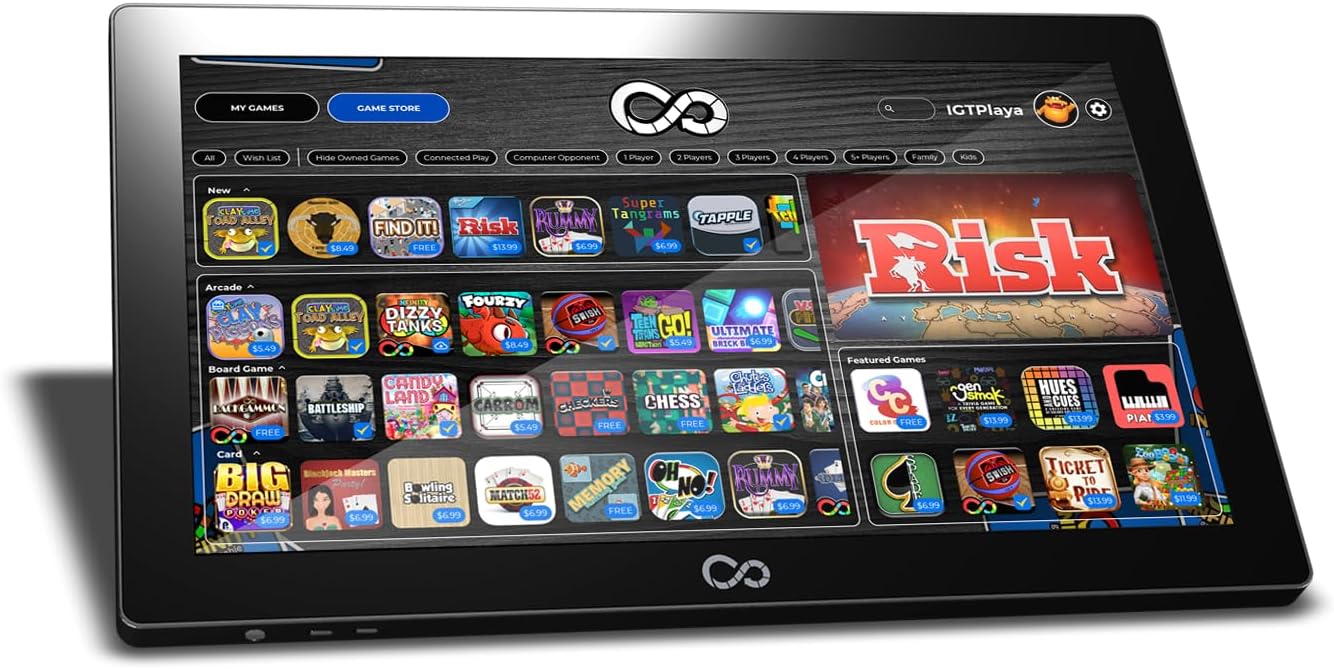
Image: A clear front view of the Arcade1Up Infinity Game Board, showcasing its sleek design and the 18.5-inch HD touchscreen, ready for use on a flat surface.
Operating Instructions
Navigating the Interface
The Infinity Game Board features an intuitive touchscreen interface. Use your fingers to tap, swipe, and interact with on-screen elements.
- Home Screen: Displays your installed games and provides access to the game store.
- Game Store: Browse and download additional games. The device comes with 50 pre-installed games, including classic Hasbro titles.
- Settings: Access system settings, Wi-Fi configuration, and account management.

Image: The Infinity Game Board's screen showing the "Game Store" interface, with various game icons and categories like "New" and "Featured" visible, allowing users to browse and select games.
Playing Games
- Selecting a Game: Tap on a game icon from the home screen or game store to launch it.
- Gameplay: Follow the on-screen instructions for each game. The 18.5-inch HD touchscreen provides responsive tactile feedback.
- Multiplayer: The board supports gameplay for up to 6 players. Some games feature dynamic zoom viewing and online play.
- Saving Progress: For selected games, you can save your game progress and resume later.
- Card Blockers: Use the included 4 protection cards for specific games like Battleship to obscure your game pieces from opponents.

Image: Two individuals, an adult and a child, are shown from an overhead perspective, engaged in playing a game on the Arcade1Up Infinity Game Board, demonstrating its interactive and multi-player capabilities.

Image: The Arcade1Up Infinity Game Board displaying a digital version of the Monopoly game, with the board, player pieces, and virtual money visible on the touchscreen.
Maintenance
Proper maintenance will extend the life of your Infinity Game Board.
- Cleaning the Screen: Use a soft, lint-free cloth specifically designed for electronic screens. Do not use abrasive cleaners or sprays directly on the screen. Lightly dampen the cloth with water if necessary.
- Cleaning the Casing: Wipe the exterior casing with a soft, dry cloth.
- Storage: When not in use, store the device in a cool, dry place away from direct sunlight and extreme temperatures.
- Software Updates: Periodically check for system software updates through the settings menu to ensure optimal performance and access to new features.
Troubleshooting
| Problem | Possible Cause | Solution |
|---|---|---|
| Device does not power on. | Power cable not connected properly; Power outlet issue. | Ensure the power cable is securely connected to both the device and the power outlet. Try a different outlet. |
| Screen is unresponsive. | Temporary software glitch; Screen calibration issue. | Restart the device. If the issue persists, check for software updates. |
| Cannot connect to Wi-Fi. | Incorrect password; Router issue; Out of range. | Double-check the Wi-Fi password. Restart your router. Ensure the device is within range of your Wi-Fi signal. |
| Games are slow or lagging. | Too many applications running; Low internal memory; Software issue. | Close any background applications. Ensure sufficient internal memory (16 GB total). Check for software updates. |
If you encounter issues not listed here, please refer to the support section for further assistance.
Specifications
- Model Number: IGB-I-301200
- Display: 18.5-inch HD Touchscreen
- Resolution: 1920 x 1080 pixels
- Connectivity: Wi-Fi
- Internal Memory: 16 GB
- Dimensions (L x W x H): 47 x 29 x 8.3 cm (18.5 x 11.4 x 3.3 inches)
- Weight: 3.5 kg (7.7 lbs)
- Included Games: 50+ pre-installed games (e.g., Monopoly, Yahtzee, Trivial Pursuit, Ticket to Ride, Battleship, Operation, Candyland, Chess, Solitaire, Sudoku)
- Max Players: Up to 6 players
- Power: Power cable included (external battery sold separately for portability)
- Language: English
- Country of Origin: China

Image: A diagram illustrating the physical dimensions of the Arcade1Up Infinity Game Board, showing its length (47 cm / 18.4 inches) and width (28.6 cm / 11.25 inches).
Warranty and Support
Warranty Information
Specific warranty details for the Arcade1Up Infinity Game Board are typically provided with your purchase documentation or on the manufacturer's official website. Please retain your proof of purchase for warranty claims.
The product is designed for durability, but any defects arising from manufacturing errors are usually covered under warranty for a specified period.
Customer Support
For technical assistance, troubleshooting beyond this manual, or warranty inquiries, please contact Arcade1Up customer support. Visit the official Arcade1Up website for the most up-to-date contact information, including phone numbers, email addresses, and online support portals.
When contacting support, please have your product model number (IGB-I-301200) and proof of purchase readily available.
Related documentsIGB-I-301200


Ask a question about this manual
Ask about setup, troubleshooting, compatibility, parts, safety, or missing instructions. Manuals+ will review the question and use this page’s manual context to help answer it.